Pwodwi souview
The CHUWI GemiBook Plus is a 15.6-inch business laptop designed for efficient daily computing. It features an Intel N100 CPU, 8GB of LPDDR5 RAM, and a 256GB SSD, running on Windows 11. This laptop is built for portability and performance, suitable for both work and entertainment.

Imaj: Devan view of the CHUWI GemiBook Plus laptop displaying the Windows 11 logo on its screen, highlighting its operating system.
Ki sa ki nan bwat la
- CHUWI GemiBook Plus Laptop
- 38Wh Li-ion Battery (integrated)
- Adaptè pouvwa
- Dokimantasyon (Manyèl Itilizatè, Kat Garanti)
Gid Enstalasyon
1. Premye Chajman
Before first use, connect the power adapter to the laptop's charging port and a power outlet. Charge the laptop until the battery indicator shows a full charge. This ensures optimal battery performance.
2. Limen
Press the power button located on the keyboard to turn on the laptop. The power button is typically found in the top right corner of the keyboard area.

Imaj: Anwo-anba view of the CHUWI GemiBook Plus laptop, showing the full keyboard layout and touchpad, indicating the power button location.
3. Enstalasyon Windows 11
Follow the on-screen prompts to complete the Windows 11 initial setup. This includes selecting your region, language, connecting to a Wi-Fi network, and creating a user account. Ensure you have an active internet connection for this process.
Enstriksyon Operasyon
Klavye ak Touchpad
The laptop features a full-sized keyboard and a responsive touchpad for navigation. The touchpad supports multi-touch gestures for enhanced control.

Image: A hand demonstrating the use of the touchpad on the CHUWI GemiBook Plus laptop, highlighting its multi-touch capabilities.
Konekte periferik
The laptop is equipped with various ports for connecting external devices:
- Pò USB: Connect USB devices such as mice, keyboards, or external storage drives. The laptop has 1 USB 2.0 port.
- HDMI Port: Connect to an external monitor or TV for a larger display.
- Audio Jack: Konekte kas ekoutè oswa oratè ekstèn.
Koneksyon san fil
The CHUWI GemiBook Plus supports Wi-Fi 6 (802.11ax) for high-speed internet access and Bluetooth 5.2 for connecting wireless accessories like headphones or speakers.
Webcam Privacy Switch
For enhanced privacy, the laptop includes a physical switch to block the webcam lens. Slide the switch to cover or uncover the camera as needed.
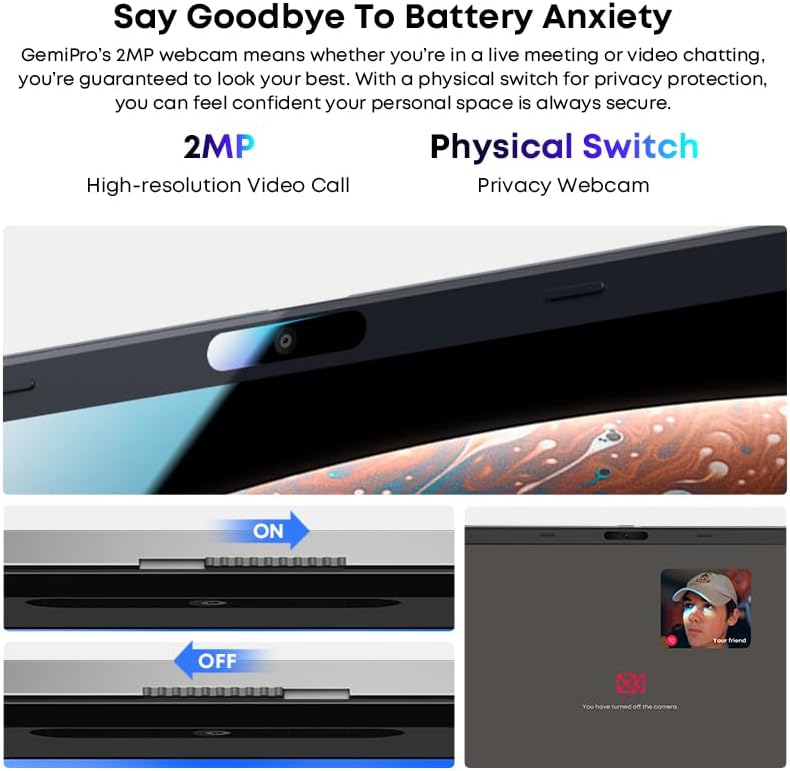
Imaj: Gwo plan view of the laptop's webcam, illustrating the physical privacy switch in both open and closed positions.
Antretyen
Netwayaj òdinatè pòtab la
Use a soft, lint-free cloth to clean the screen and exterior surfaces. For stubborn marks, slightly dampRense twal la avèk dlo oswa yon solisyon pou netwaye ekran. Evite pwodui chimik ki agresif oswa materyèl abrazif.
Swen batri
The laptop is equipped with a 38Wh Li-ion battery. To prolong battery life, avoid extreme temperatures and fully discharging the battery frequently. It takes approximately 3 hours for a full recharge.
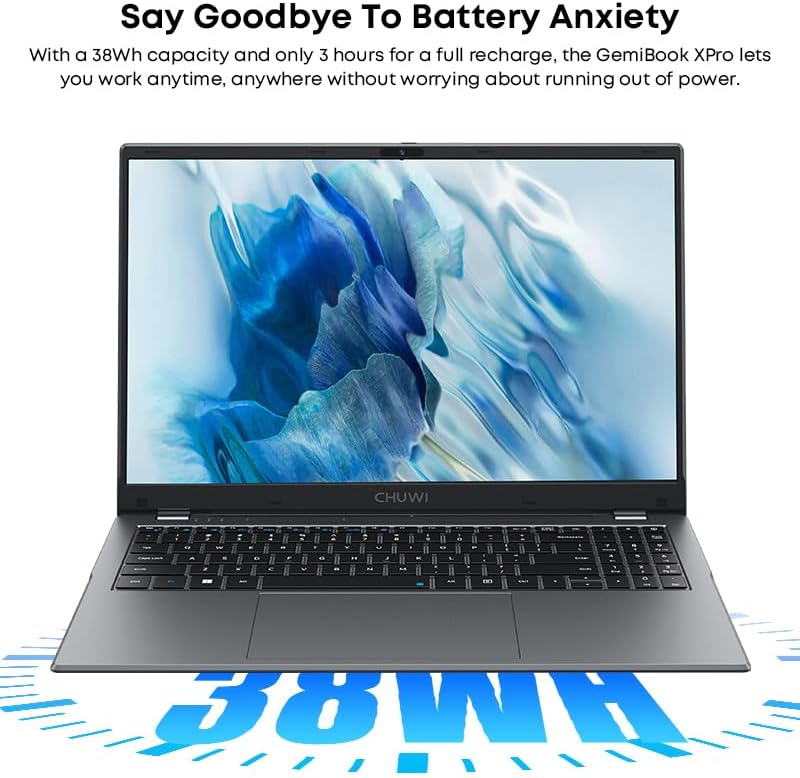
Image: The CHUWI GemiBook Plus laptop with an overlay indicating its 38Wh battery capacity, emphasizing its power endurance.
Mizajou lojisyèl
Tcheke epi enstale mizajou Windows ak mizajou chofè regilyèman pou asire pèfòmans ak sekirite optimal.
Depanaj
Laptop la pa limen
- Asire w adaptè kouran an byen konekte ak laptop la ak yon priz kouran ki fonksyone.
- Tcheke si priz kouran an ap fonksyone lè w branche yon lòt aparèy ladan l.
- Si batri a fin dechaje nèt, li ka pran kèk minit pou l chaje anvan laptop la ka limen.
Pa gen koneksyon Wi-Fi
- Verifye ke Wi-Fi a aktive nan paramèt Windows yo.
- Rekòmanse routeur Wi-Fi ou a ak laptop la.
- Ensure you are within range of a Wi-Fi network and have entered the correct password.
Pèfòmans Ralanti
- Fèmen aplikasyon ki pa nesesè k ap fonksyone nan background nan.
- Tcheke epi enstale nenpòt mizajou Windows ki annatant.
- Run a disk cleanup and defragmentation (for HDD) or optimize drives (for SSD).
- Asire w ke gen ase espas lib sou SSD a.
Espesifikasyon
| Karakteristik | Detay |
|---|---|
| Mak | CHUWI |
| Non modèl | GemiBook Plus |
| Gwosè ekran | 15.6 pous |
| Rezolisyon ekran | 1920 x 1080 piksèl (FHD) |
| Processeur | Intel N100 CPU (up to 3.4GHz) |
| RAM | 8 GB LPDDR5 |
| Disk Drive | 256 GB SSD (M.2 2280 SSD expansion up to 1TB supported) |
| Sistèm operasyon | Windows 11 |
| Kat grafik | Integrated Intel UHD Graphics for 12th Gen Intel Processors |
| Kalite san fil | Wi-Fi 6 (802.11ax) |
| Bluetooth | Bluetooth 5.2 |
| Pò | 1x USB 2.0, HDMI, Audio Jack |
| Pwa atik | 3.85 liv (1.74 kg) |
| Dimansyon pwodwi | 14.1 x 9.5 x 0.78 pous (35.8 x 24.1 x 1.98 cm) |
| Batri | Batri Li-ion 38Wh |
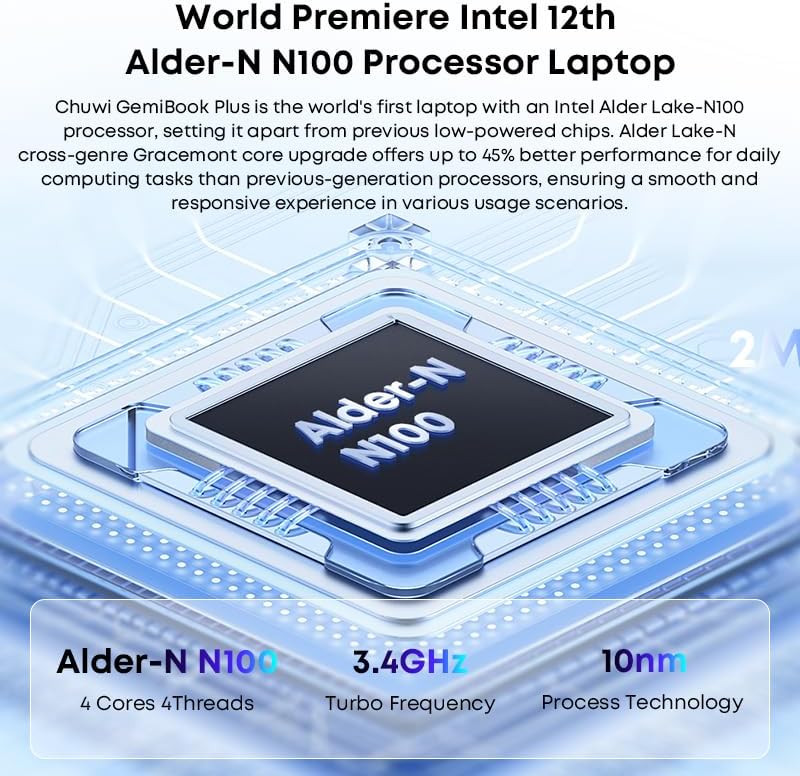
Image: Diagram illustrating the Intel Alder-N N100 processor with details on its 4 Cores 4 Threads, 3.4GHz Turbo Frequency, and 10nm Process Technology.
Garanti ak sipò
Enfòmasyon sou Garanti
The CHUWI GemiBook Plus laptop comes with a 1-ane garanti valid immediately after purchase. This warranty covers manufacturing defects and ensures product reliability.
Sipò pou Kliyan
CHUWI offers lifetime factory professional support and 24 hours of online support to assist with any issues or questions you may have. For support, please refer to the contact information provided in your product documentation or visit the official CHUWI websit.
Ou ka vizite tou CHUWI Store on Amazon pou plis enfòmasyon ak resous.


