

 HT64
HT64
Manyèl itilizatè


PREKOSYON AK MEZI SEKIRITE
Enstriman an te fèt an konfòmite ak direktiv IEC/EN61010-1 ki gen rapò ak enstriman mezi elektwonik. Pou sekirite w ak pou evite domaje enstriman an, tanpri swiv ak anpil atansyon pwosedi ki dekri nan manyèl sa a epi li tout nòt ki presye pa senbòl.  ak pi gwo atansyon.
Anvan ak apre ou fin fè mezi, ak anpil atansyon obsève enstriksyon sa yo:
- Pa fè okenn mezi nan anviwònman imid.
- Pa fè okenn mezi si gen gaz, materyèl eksplozif oswa ki ka pran dife, oswa nan anviwònman ki gen pousyè.
- Evite nenpòt ki kontak ak kous la ap mezire si pa gen okenn mezi yo te pote.
- Evite nenpòt kontak ak pati metal ekspoze, ak sond mezi ki pa itilize, sikwi, elatriye.
- Pa fè okenn mezi nan ka ou jwenn anomali nan enstriman an tankou deformation, kraze, koule sibstans, absans ekspozisyon sou ekran an, elatriye.
- Peye atansyon espesyal lè w mezire voltagse pi wo pase 20V, paske gen yon risk pou chòk elektrik.
Nan manyèl sa a, ak sou enstriman an, yo itilize senbòl sa yo:
Avètisman: Obsève enstriksyon yo bay nan manyèl sa a; move itilizasyon ka domaje enstriman an oswa konpozan li yo.
 Double-izole mèt
 AC voltage oswa aktyèl
 DC voltage oswa aktyèl
 Koneksyon sou latè
1.1. ENSTRIKSYON PRELIMINÈ
- Enstriman sa a te fèt pou itilize nan anviwònman polisyon degre 2.
- Li ka itilize pou VOLTAGE ak mezi aktyèl sou enstalasyon ak CAT IV 600V ak CAT III 1000V.
- Nou rekòmande swiv règleman sekirite nòmal yo envante pa pwosedi yo pou fè operasyon sou sistèm vivan epi sèvi ak PPE preskri a pou pwoteje itilizatè a kont kouran danjere ak enstriman an kont itilizasyon kòrèk.
- Nan ka mank de endikasyon nan prezans nan voltage ka reprezante yon danje pou operatè a, toujou fè yon mezi kontinwite anvan ou fè mezi a sou sistèm ap viv la, yo nan lòd yo konfime koneksyon ki kòrèk la ak kondisyon nan kondwi yo.
- Se sèlman plon yo apwovizyone ak enstriman an garanti konfòmite ak estanda sekirite yo. Yo dwe nan bon kondisyon epi yo dwe ranplase ak modèl ki idantik, lè sa nesesè.
- Pa teste sikui ki depase volim espesifye atage limit.
- Pa fè okenn tès nan kondisyon anviwònman ki depase limit ki endike nan § 6.2.1.
- Tcheke ke batri a byen antre.
- Asire w ke ekspozisyon LCD a ak switch rotary a endike menm fonksyon an.
1.2. PANDAN ITILIZE
Tanpri li ak anpil atansyon rekòmandasyon ak enstriksyon sa yo:
ATANSYON
Si w pa respekte nòt prekosyon yo ak/oswa enstriksyon yo ka domaje enstriman an ak/oswa konpozan li yo oswa li kapab yon sous danje pou operatè a.
- Anvan aktive switch rotary a, dekonekte fil tès yo nan kous la ap mezire.
- Lè enstriman an konekte ak kous la mezire, pa manyen okenn tèminal ki pa itilize.
- Pa mezire rezistans nan ka ekstèn voltagyo prezan; menm si enstriman an pwoteje, yon vol twòptage ka lakòz fonksyone byen.
- Pandan w ap mezire, si valè oswa siy kantite yo ap mezire a pa chanje, tcheke si fonksyon HOLD la aktive.
1.3. APRE ITILIZE
- When measurement is complete, set the rotary switch to OFF to switch off the instrument.
- Si enstriman an pa dwe itilize pou yon tan long, retire pil yo.
1.4. DEFINISYON MEZI (OVERVOLTAGE) KATEGORI
Estanda "IEC/EN61010-1: Kondisyon sekirite pou ekipman elektrik pou mezi, kontwòl ak itilizasyon laboratwa, Pati 1: Kondisyon jeneral", defini ki kategori mezi, yo rele souvan overvol.tage category, is. § 6.7.4: Measured circuits, reads: (OMISSIS)
Sikui yo divize an kategori mezi sa yo:
- Mezi kategori IV se pou mezi ki fèt nan sous lowvol latage enstalasyon. Egzamples yo se mèt elektrisite ak mezi sou aparèy prensipal pwoteksyon surkouran ak inite kontwòl rid.
- Mezi kategori III se pou mezi ki fèt sou enstalasyon andedan bilding yo. Egzamples yo se mezi sou tablo distribisyon, disjoncteurs, fil elektrik, ki gen ladan kab, ba otobis, bwat junction, switch, priz-priz nan enstalasyon an fiks, ak ekipman pou itilizasyon endistriyèl ak kèk lòt ekipman, pou egzanp.ample, motè estasyonè ak koneksyon pèmanan nan enstalasyon fiks.
- Kategori mezi II se pou mezi ki fèt sou sikui ki konekte dirèkteman ak ba-vol latage enstalasyon. Egzamples yo se mezi sou aparèy nan kay la, zouti pòtab ak ekipman menm jan an.
- Kategori mezi I se pou mezi ki fèt sou sikui ki pa konekte dirèkteman ak MAINS. Egzamples yo se mezi sou sikui ki pa sòti nan MAINS, ak espesyalman pwoteje (entèn) sikui ki sòti MAINS. Nan dènye ka a, estrès pasajè yo varyab; pou rezon sa a, estanda a mande pou itilizatè a fè konnen kapasite ekipman an kenbe tèt ak tanporè.
DESKRIPSYON JENERAL
Enstriman an fè mezi sa yo:
- DC/AC/AC+DC TRMS Voltage
- DC/AC voltage ak enpedans ba (LoZ)
- DC/AC/AC+DC TRMS Current
- DC/AC/AC+DC TRMS Current with transducer clamps
- AC, AC+DC TRMS current
- 4-20mA% ekspozisyon
- Tès rezistans ak kontinwite
- Dyòd tès
- Kapasite
- Frekans
- Sik devwa
- Tanperati ak pwofonde K-kalite
- Data Logger function and display of graphs of measured data
Chak nan fonksyon sa yo ka chwazi pa mwayen switch ki apwopriye a. Enstriman an tou ekipe ak kle fonksyon (gade § 4.2), bargraph analòg ak LCD TFT gwo kontras koulè ekspozisyon. Enstriman an tou ekipe ak yon fonksyon Auto Power OFF ki otomatikman etenn enstriman an apre yon sèten tan (ki pwograme) idling.
2.1. MEZI VALÈ MWAYÈN AK VALÈ TRMS
Enstriman mezire nan kantite altène yo divize an de gwo fanmi:
- Mwayèn-VALÈ mèt: enstriman ki mezire valè vag sèl la nan frekans fondamantal (50 oswa 60 Hz).
- TRMS (True Root Mean Square) Mèt VALÈ: enstriman ki mezire valè TRMS kantite yo te teste a.
Avèk yon vag parfe sinusoidal, de fanmi enstriman yo bay rezilta ki idantik.
Ak vag defòme, olye de sa, lekti yo dwe diferan. Mèt valè mwayèn bay valè RMS sèl vag fondamantal la; Mèt TRSM, olye de sa, bay valè RMS tout vag la, ki gen ladan Harmony (nan Pleasant enstriman yo). Se poutèt sa, lè yo mezire menm kantite ak enstriman ki soti nan tou de fanmi yo, valè yo jwenn yo idantik sèlman si vag la se parfe sinusoidal. Nan ka li defòme, TRMS mèt yo dwe bay valè ki pi wo pase valè yo li pa mèt valè mwayèn.
2.2. DEFINISYON VRÈ RASIN VRE VALÈ KARE AK FAKTÈ CREST
Valè kare mwayèn aktyèl la defini jan sa a: “Nan yon tan ki egal a yon peryòd, yon kouran altènatif ak yon valè kare mwayèn rasin ki gen 1A entansite, k ap sikile sou yon rezistans, gaye menm enèji ki pandan menm tan an, ta gaye pa yon kouran dirèk ak yon entansite 1A". Definisyon sa a rezilta nan ekspresyon nimerik la:
 Valè kare mwayen rasin yo endike ak akwonim RMS la.
Faktè Crest la defini kòm relasyon ki genyen ant valè pik yon siyal ak li
Valè RMS: CF Valè sa a chanje ak fòm ond siyal la, pou yon vag piman sinusoidal li ye
  Nan ka deformation, Faktè Crest la pran pi wo valè kòm distòsyon vag ogmante.
PREPARASYON POU ITILIZE
3.1. INISYAL TCHEK
Anvan anbake, enstriman an te tcheke nan yon pwen elektrik osi byen ke mekanik view. Tout prekosyon posib yo te pran pou enstriman an delivre san domaj. Sepandan, nou rekòmande jeneralman tcheke enstriman an nan lòd yo detekte domaj posib soufri pandan transpò. Nan ka yo jwenn anomali, imedyatman kontakte ajan transfè a. Nou rekòmande tou tcheke si anbalaj la gen tout eleman ki endike nan § 6.3.1. Nan ka dezakò, tanpri kontakte konsesyonè a. Nan ka yo ta dwe retounen enstriman an, tanpri swiv enstriksyon yo bay nan § 7.
3.2. ENERGIS POU ENSTRIMMAN
The instrument is powered by 1×7.4V rechargeable Li-ION battery included in the package. When the battery is flat, the symbol “ ” appears on the display. For battery recharge, please refer to § 6.1.
3.3. DEPO
Yo nan lòd yo garanti mezi egzak, apre yon tan depo long, tann pou enstriman an tounen nan kondisyon nòmal (gade § 7.1.3).
NOMENKLATI
4.1. DESKRIPSYON ENSTRIMAN AN

CAPTION:
- LCD ekspozisyon
- Kle fonksyon F2
- Kle fonksyon F3
- Kle fonksyon F1
- Kle fonksyon F4
- Kle RANGE
- HOLD/REL key
- Rotary seleksyon switch
- Antre tèminal 10A
- Antre tèminal

- Input terminal mAuA
- Antre tèminal COM
4.2. DESKRIPSYON KLE FONKSYON
4.2.1. HOLD/REL key
Pressing the HOLD/REL key freezes the value of the measured quantity on the display. After pressing this key, the message “Hold” appears on the display. Press the HOLD/REL key again to exit the function. To save the vale on the display, see § 4.3.3. Press and hold the HOLD/REL key for a long time in order to activate/deactivate relative measurement. The instrument zeroes the display and saves the displayed value as a reference value which subsequent measurements will be referred to (see § 4.3.4). The symbol “A” appears on the display. This function is not active in position . Press and hold the HOLD/REL key again to exit the function.
4.2.2. KLE RANGE
Press the RANGE key to activate the manual mode and to disable the Autorange function. The message “Manual” appears on the upper left part of the display instead of “AUTO”. In manual mode, press the RANGE key to change measuring range: the relevant decimal point will change its position. The RANGE key is not active in positions Hz%,
Hz%,  . In Autorange mode, the instrument selects the most appropriate ratio for carrying out measurement. If a reading is higher than the maximum measurable value, the indication “O.L” appears on the display. Press and hold the RANGE key for more than 1 second to exit the manual mode and restore the Autorange mode.
4.2.3. Function keys F1, F2, F3, F4
Use keys F1, F2, F3 and F4 to manage the instrument’s internal functions (see § 4.3).
4.2.4. LoZ karakteristik
Mòd sa a pèmèt yo fè AC/DC voltage mezi ak yon enpedans D' ba nan fason pou evite move lekti akòz pèdi voltage nan kapasitif makonnen.
ATANSYON
Mete enstriman an ant kondiktè faz ak tè a, aparèy pwoteksyon RCD yo ka degaje pandan tès la. Pou faz-PE voltage measurement after a RCD device preliminarily connect the test leads between phase and neutral cables at least for 5s, then perform the phase-PE measurement to avoid unexpected trips-out
4.2.5. LEAD message at display
From instrument switch off (OFF), in the  positions a short sound is emitted and a “LEAD” message is shown for a while to indicate an advise of using test leads for the current measurements.
4.3. DESCRIPTION OF INTERNAL FUNCTIONS
4.3.1. Description of the display
 CAPTION:
- Endikasyon de mòd otomatik/manyèl
- Endikasyon tan sistèm lan
- Indication of battery charge level and activation/deactivation of key tone (not associated with continuity test)
- Endikasyon de inite mezire
- Endikasyon de rezilta mezire
- Bargraph analogique
- Indications associated with function keys F1, F2, F3, F4
4.3.2. AC+DC Voltage ak aktyèl mezi
Enstriman an kapab mezire yon prezans posib nan sipèpoze konpozan altène sou yon vol jeneriktage oswa aktyèl fòm ond dirèk. Sa a ka itil lè w mezire siyal enpilsyon tipik nan chaj ki pa lineyè (egzanp machin soude, fou elektrik, elatriye).
- Chwazi pozisyon
 .
. - Press the F2 key selecting the “
 " " oswa " ” modes (see Fig. 3)
 - Follow the instructions shown in § 5.1 or § 5.9
 4.3.3. HOLD function and saving

- Press the HOLD/REL key again to freeze the result. The message “Hold” appears onthe display.
- Press the F3 key to save the data in the instrument’s memory.
- Enter the General menu to display the saved result (see § 4.3.7)
4.3.4. Mezi relatif

- Press and hold the HOLD/REL key to enter relative measurement (see Fig. 5 – right side). The message “REL” and symbol “
 ” parèt sou ekspozisyon an.
 - Press the F4 key to enter the General menu, save the measured result and display it (see § 4.3.7).
4.3.5. Saving MIN/MAX/AVERAGE and PEAK values 
- Press the F4 key to enter the measuring mode of MAX, MIN and Average values of the quantity to be measured (see Fig. 6 – central part). The message “MAX MIN” appears on the display.
- The values are automatically updated by the instrument, which emits a short beep whenever the actually displayed values are exceeded (higher for MAX value, lower for MIN value).
- Press the F2 key to stop detecting the values and the F1 key to start measuring again.
- Press the F3 key to save the measured result (see Fig. 6 – right side) and display it (see § 4.3.7).

- Press the F4 key to enter the measuring mode of Peak values of the quantity to be measured (see Fig. 7 – right side). The message “PEAK” appears on the display and the values are updated in the same way as for the MAX/MIN function.
- Press the F2 key to stop detecting the values and the F1 key to start measuring again.
- Press the F3 key to save the result and display it (see § 4.3.7).
4.3.6. Creating and saving graphs of measurements

- Press the F1 key to enter the section for creating a graph of the quantity to be measured (see Fig. 8 – left side).
- Press the F2 (Fast) or F3 (Slow) key to set the sampling interval the instrument will use as a reference when creating the graph. You can choose among the following values: 0.2s, 0.5s, 1.0s, 2.0s, 5.0s, 10s
- Press the F1 key to start creating the graph. The measuring range (automatically inserted by the instrument) and the real-time value are displayed by the instrument (see Fig. 8 – central part).
- Press the F4 key to end the graph.
- Press the F1 key to save the graph in the instrument’s memory or the F4 key to start a new graph (see Fig. 8 – right side).
4.3.7. Instrument general menu
- With a measurement on the display (see Fig. 9 – left side), press function key F3 to enter the instrument’s general menu. The screen (see Fig. 9 – right side) is shown on the display.
 Ekonomize mezi
 - Press the F1 (ENTER) key to save the measurement.
Recording data (Logger) - Use the F2 or F3 key to select symbol “Record” and press the F1 key (see Fig. 10 – left side).

- Use the F2 or F3 key to select:
➢ Setting of recording duration, from 1min to 23h:59min
➢ Setting of sampling interval from 1s to 59min:59s - Press the F1 key to enable the editing functions and the F2 (+) and F3 (>>) keys to carry out the desired settings.
- Press the F1 (OK) key to confirm the settings or the F4 (CANCEL) key to go back to editing (see Fig. 10 – right side).
- Press the key F4 (CLOSE) to go back to the main screen
- Select the option “Start Recording” and press the F1 key. The following screen appears on the display

- The instrument shows the remaining time and the number of samples taken in real time, and the message “Stopped” at the end of recording (see Fig. 11 – left side). Press the F4 (STOP) key to stop recording at any time.
- Press the F2 key to save recorded data in the internal memory and view it again on the display
- Press the F3 (TREND) key to display the trend of recording (see Fig. 11 – central part).
- Press the F4 (>>) key to move the cursor on the graph and the F2 (+) key to activate the Zoom function of the graph, increasing resolution (symbol “Xy” where y=max zoom dimension appears at the top of the display on the right side) (see Fig. 11 – right side). You can zoom X1 for at least 15 measuring points, X2 for at least 30 measuring points, X3 for at least 60 measuring points and so on for maximum 6 zooming operations.
- Press the F4 (BACK) key to go back to the previous screen. Deleting the instrument’s memory
- Use the F2 or F3 key to select symbol “Delete” and press the F1 key (see Fig. 12 – left side).
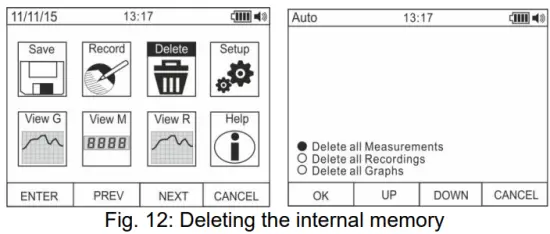
- Use the F2 or F3 key to select the options:
➢ Delete all Measurements → all snapshots (measurements) are deleted
➢ Delete all Recordings → all recordings are deleted
➢ Delete all Graphs → all graphs are deleted. - Press the F1 (OK) key to carry out the selected operation (a confirmation message is shown by the instrument). General settings of the instrument
- Use the F2 or F3 key to select symbol “Setup” and press the F1 key (see Fig. 13 – left side).

- Use the F2 or F3 key to select the options:
➢ Reset → restores the instrument’s default conditions.
➢ Format → allows activating the key tone, setting the format of date/time and of the displayed numbers (decimal comma or point).
➢ General → allows setting the system’s date/time, defining the Auto Power OFF interval, the background colour and the display’s font colour and type, and choosing the system’s language.
➢ Meter Info → provides information on the internal Firmware version and on the memory’s available space. - Press the F1 (ENTER) key to carry out the selected operation or the F4 (CANCEL) key to go back to the measuring screen. General settings of the instrument – Reset

- Press the F1 (OK) key to activate the Reset.
- The Reset operation do not deletes the instrument’s internal memory
General settings of the instrument – Format
- Use the F2 or F3 key to select the options:➢ Key tone → allows activating/deactivating the tone of the function keys.
➢ Numeric Format → allows defining the format of the numbers shown on the display among the options: 0.000 (decimal point) and 0,000 (comma)
➢ Date Format → allows defining the format of the system date between the options: MM/DD/YY and DD/MM/YY
➢ Time Format → allows defining the format of the system time between the options: - OURS and 24 HOURS
- Use the F1 (EDIT) key and the F2 and F3 keys for settings or the F4 key to go back to the previous screen. General settings of the instrument – Display

- Use the F2 or F3 key to select the options:
➢ Set Date → allows setting the system’s date as defined in the Format menu.
➢ Set Time → allows setting the system’s time as defined in the Format menu.
➢ Auto Power OFF → allows defining the instrument’s auto power off interval when idling in the range: 5min 60min with resolution 1min. Set value 00 to disable the function. Press the F3 key to switch on the instrument again after it has automatically switched off.
➢ Foreground → allows defining the display’s background colour and the colour of the font.
➢ Select Font → allows defining the type of font or the display among the available options (0, 1, 2).
➢ Language → allows selecting the system’s language among the options: Italian, English, Spanish, German and French
General settings of the instrument – Instrument Info
- The instrument shows the following information:
➢ Firmware version → internal Firmware version
➢ Free memory → percentage values of the remaining free space in the memory for saving snapshots (SAVE), recordings (REC) and graphs (GRAPH). - Press the F4 key to go back to the previous screen Recalling graphs to the display

- Use the F2 or F3 key to select symbol “View G” and press the F1 key (see Fig. 18 – left side).
- Use the F2 (PREV) or F3 (NEXT) keys to select the desired graph among the ones saved in the instrument’s memory and press key F1 (ENTER) to open the graph (see Fig. 18 – central part).
- Use the F2 (<<) or F3 (>>) keys to move the cursor within the graph in the two directions, observing the corresponding value at the bottom of the display (see Fig. 18 – right side).
- Press the F1 (DELETE) key to delete the selected graph or the F4 (BACK) key to go back to the previous screen. Recalling measured data (snapshots) on the display

- Use the F2 or F3 key to select symbol “View M” and press the F1 key (see Fig. 19 – left side).
- Use the F2 (PREV) or F3 (NEXT) key to select and view the desired measure among the ones saved in the instrument’s memory (see Fig. 19 – right side). The measure reference appears at the bottom of the display on the right side.
- Press the F1 (DELETE) key to delete the selected measure or the F4 (CLOSE) key to go back to main screen Recalling recordings to the display

- Use the F2 or F3 key to select symbol “View R” and press the F1 key (see Fig. 20 – left side).
- Use the F2 (PREV) or F3 (NEXT) key to select the desired recording among the ones saved in the instrument’s memory (see Fig. 20 – central part). The recording reference appears at the bottom of the display.
- Press the F1 (TREND) key to display the trend of recording.
- Press the F3 (>>) key to move the cursor on the graph and observe the corresponding value at the bottom of the display.
- Press the F2 (+) key to activate (if available) the zooming function of the graph.
- Press the F1 (DELETE) key to delete the selected recording or the F4 (BACK) key to go back to the previous screen.
Help on line on the display
- Use the F2 or F3 key to select symbol “Help” and press the F1 key (see Fig. 21).
- Use the F2 (UP) or F3 (DOWN) to browse the pages of the context on-line help.
- Press the F4 (CLOSE) key to go back to the main screen
ENSTRIKSYON OPERATION
5.1. Vòl DC, AC+DCTAGE MEZI
ATANSYON
D' maksimòm DC voltage se 1000V. pa mezire voltagli depase limit yo bay nan manyèl sa a. Depase voltagLimit yo ka lakòz chòk elektrik itilizatè a ak domaj nan enstriman an.

- Chwazi pozisyon V Hz% or mV
- Mete kab wouj la nan tèminal opinyon ak kab nwa a nan D 'tèminal COM.
- Pozisyon plon wouj la ak plon nwa a respektivman nan tach ki genyen potansyèl pozitif ak negatif nan kous la yo dwe mezire (gade Fig. 22). Ekspozisyon an montre valè voltage.
- Si ekspozisyon an montre mesaj "OL", chwazi yon seri pi wo.
- Lè senbòl “-” parèt sou ekspozisyon enstriman an, sa vle di voltage gen direksyon opoze a parapò ak koneksyon ki nan Fig. 22.
- To use the HOLD, RANGE and REL function, see § 4.2.
- For AC+DC measurement, see § 4.3.2 and to use the internal functions, see § 4.3.
5.2. AC VOLTAGE MEZI
ATANSYON
D' maksimòm AC voltage se 1000V. pa mezire voltagli depase limit yo bay nan manyèl sa a. Depase voltagLimit yo ka lakòz chòk elektrik itilizatè a ak domaj nan enstriman an.

- Chwazi pozisyon V Hz% or mV
- In position mV, press the F2 (MODE) key to view symbol “~” on the display.
- Mete kab wouj la nan tèminal opinyon
 ak kab nwa a nan D 'tèminal COM.
 - Pozisyon plon wouj la ak plon nwa a respektivman nan tach sikwi yo dwe mezire (gade Fig. 23). Ekspozisyon an montre valè voltage.
- Si ekspozisyon an montre mesaj "OL", chwazi yon seri pi wo.
- Press the F2 (MODE) key to select measurements “Hz” or “%” in order to display the values of frequency and duty cycle of input voltage. Press the F1(TRIG) key to select the positive or negative half-wave of the function “%”The bargraph is not active in these functions.
- To use the HOLD, RANGE and REL function, see § 4.2.
- To use the internal functions, see § 4.3
5.3. AC/DC VOLTAGE MEZI AK ENPEDANS BA (LOZ)
ATANSYON
D' maksimòm AC/DC voltage se 600V. pa mezire voltagli depase limit yo bay nan manyèl sa a. Depase voltagLimit yo ka lakòz chòk elektrik itilizatè a ak domaj nan enstriman an.

- Chwazi pozisyon LoZV
 . The “LoZ” and “DC” symbols are shown
 - Press the MODE (F2) key to select possibly the “AC” measurement
- Mete kab wouj la nan tèminal opinyon ak kab nwa a nan D 'tèminal COM
- Pozisyon plon wouj la ak plon nwa a respektivman nan tach yo vle nan sikwi a yo dwe mezire (gade Fig. 24) oswa nan tach yo ki gen potansyèl pozitif ak negatif nan sikwi a yo dwe mezire (gade Fig. 22). Ekspozisyon an montre valè voltage.
- Mesaj "OL" endike ke valè DC voltage depase valè maksimòm mezirab la.
- Lè senbòl “-” parèt sou ekspozisyon enstriman an, sa vle di voltage gen direksyon opoze a parapò ak koneksyon ki nan Fig. 22
- To use the HOLD, RANGE and REL function, see § 4.2
- To use the internal functions, see § 4.3
5.4. MEZI FRANS AK SIK DEVWA
ATANSYON
D' maksimòm AC voltage se 1000V. pa mezire voltagli depase limit yo bay nan manyèl sa a. Depase voltagLimit yo ka lakòz chòk elektrik itilizatè a ak domaj nan enstriman an.

1. Chwazi pozisyon Hz%.
2. Press the F2 (MODE) key to select measurements “Hz” or “%” in order to display the values of frequency and duty cycle of input voltage.
3. Insert the red cable into input terminal ak kab nwa a nan D 'tèminal COM.
4. Position the red lead and the black lead respectively in the spots of the circuit to be measured (see Fig. 25). The value of frequency (Hz) or of duty cycle (%) is shown on the display. The bargraph is not active in these functions.
5. To use the HOLD and REL function, see § 4.2.
6. Pou itilize fonksyon entèn yo, gade § 4.3
5.5. Mezi rezistans ak tès kontinwite
ATANSYON
Anvan ou eseye nenpòt mezi rezistans, koupe ekipman pou pouvwa nan kous la yo dwe mezire epi asire w ke tout kondansateur yo egzeyate, si yo prezan.

- Chwazi pozisyon
- Mete kab wouj la nan tèminal opinyon ak kab nwa a nan D 'tèminal COM.
- Pozisyon fil tès yo nan plas yo vle nan kous la yo dwe mezire (gade Fig. 26). Ekspozisyon an montre valè rezistans.
- Si ekspozisyon an montre mesaj "OL", chwazi yon seri pi wo.
- Press the F2 (MODO) key to select measurement )))” relevant to the continuity test, and position the test leads in the desired spots of the circuit to be measured.
- The value of resistance (which is only indicative) is displayed in 2 and the instrument sounds if the value of resistance is <50Ω
- To use the HOLD, RANGE and REL function, see § 4.2.
- To use the internal functions, see § 4.3.
5.6. TÈS DIOD
ATANSYON
Anvan ou eseye nenpòt mezi rezistans, koupe ekipman pou pouvwa nan kous la yo dwe mezire epi asire w ke tout kondansateur yo egzeyate, si yo prezan.

- Chwazi pozisyon
- Press the F2 (MODE) key to select “+” measurement.
- Mete kab wouj la nan tèminal opinyon ak kab nwa a nan D 'tèminal COM.
- Pozisyon fil yo nan pwent dyòd yo dwe teste a (gade Fig. 27), respekte polarite ki endike a. Valè papòt dirèkteman polarize voltage yo montre sou ekspozisyon an.
- If threshold value is equal to OmV, the P-N junction of the diode is short-circuited.
- Si ekspozisyon an montre mesaj "OL", tèminal yo nan dyod la ranvèse ak respè endikasyon ki bay nan Fig. 27 oswa junction PN nan dyod la domaje.
- To use the HOLD and REL function, see § 4.2.
- To use the internal functions, see § 4.3.
5.7. MEZI KAPASANS
ATANSYON
Anvan ou fè mezi kapasite sou sikui oswa kondansateur, koupe ekipman pou pouvwa nan kous la ke yo teste epi kite tout kapasite nan li dwe egzeyate. Lè w konekte miltimèt la ak kapasite yo dwe mezire, respekte polarite ki kòrèk la (lè sa nesesè).

- Chwazi pozisyon
- Press the F2 (MODE) key until the symbol “nF” is displayed.
- Mete kab wouj la nan tèminal opinyon ak kab nwa a nan D 'tèminal COM.
- Press the REL/A key before carrying out measurements.
- Position the leads at the ends of the capacitor to be tested, respecting, if necessary, the positive (red cable) and negative (black cable) polarity (see Fig. 28). The display shows the value. Depending on the capacitance, the instrument can take about 20s before displaying the correct final value. The bargraph is not active in this function.
- Mesaj "OL" endike ke valè kapasite depase valè maksimòm mezirab la.
- To use the HOLD and REL function, see § 4.2.
- To use the internal functions, see § 4.3.
5.8. MEZI TANPERATI AK SOND K-TYPE
ATANSYON
Anvan ou eseye nenpòt mezi tanperati, koupe ekipman pou pouvwa nan kous la yo dwe mezire epi asire w ke tout kondansateur yo egzeyate, si yo prezan.

- Chwazi pozisyon

- Press the F2 (MODE) key until the symbol “°C” or “F” is displayed.
- Mete adaptè yo bay la nan tèminal opinyon yo (polarite +) ak COM (polarite -) (gade Fig. 29)
- Connect the provided K-type wire probe or the optional K-type thermocouple (see § 7.2.2) to the instrument by means of the adapter, respecting the positive and negative polarity on it. The display shows the value of temperature. The bargraph is not active in this function.
- Mesaj "OL" la endike ke valè tanperati a depase valè maksimòm mezirab la.
- To use the HOLD and REL function, see § 4.2.
- To use the internal functions, see § 4.3.
5.9. DC, AC+DC CURRENT MEASUREMENT AND E 4-20MA% READING
ATANSYON
Maximum input DC current is 10A (input 10A) or 600mA (input mAuA). Do not measure currents exceeding the limits given in this manual. Exceeding voltagLimit yo ka lakòz chòk elektrik itilizatè a ak domaj nan enstriman an.

- Koupe ekipman pou pouvwa nan kous la yo dwe mezire.
- Select position µA, mA or 10A 20mA for 4-20mA reading. to measure DC current or the same position 4-
- Insert the red cable into input terminal 10A or into input terminal mAµA and the black cable into input terminal COM.
- Konekte plon wouj la ak plon nwa a nan seri sikwi a ki gen kouran ou vle mezire, respekte polarite ak direksyon aktyèl la (gade Fig. 30).
- Bay kous la pou mezire.
- Valè DC aktyèl la (gade Fig. 30 - bò gòch) parèt sou ekspozisyon an.
- The value of reading 4-20mA% (0mA = -25%, 4mA = 0%, 20mA = 100% and 24mA = 125%) (see Fig. 30 right side) appears on the display. The bargraph is not active in this function.
- Si ekspozisyon an montre mesaj "OL", valè maksimòm mezirab la rive.
- Lè senbòl “-” parèt sou ekspozisyon enstriman an, sa vle di ke kouran an gen direksyon opoze a parapò ak koneksyon ki nan Fig. 30.
- To use the HOLD, RANGE and REL functions, see § 4.2.
- For AC+DC measurement, see § 4.3.2 and to use the internal functions, see § 4.3
5.10. MEZI KOURAN AC
ATANSYON
Maximum input AC current is 10A (input 10A) or 600mA (input mAuA). Do not measure currents exceeding the limits given in this manual. Exceeding voltagLimit yo ka lakòz chòk elektrik itilizatè a ak domaj nan enstriman an.

- Koupe ekipman pou pouvwa nan kous la yo dwe mezire.
- Select positions μΑ, mA or 10A
- Press the F2 (MODE) key to select “AC” measurement.
- Insert the red cable into input terminal 10A or into input terminal mAµA and the black cable into input terminal COM.
- Connect the red lead and the black lead in series to the circuit whose current you want to measure (see Fig. 31).
- Bay kous la pou mezire. Ekspozisyon an montre valè aktyèl la.
- Si ekspozisyon an montre mesaj "OL", valè maksimòm mezirab la rive.
- To use the HOLD, RANGE and REL functions, see § 4.2.
- To use the internal functions, see § 4.3
5.11. DC, AC, AC+DC CURRENT MEASUREMENT WITH TRANSDUCER CLAMPS
ATANSYON
- Maksimòm mezi aktyèl nan fonksyon sa a se 3000A AC oswa 1000A DC. Pa mezire kouran ki depase limit yo bay nan manyèl sa a
- Enstriman an fè mezi a lè l sèvi avèk tou de transducer fleksib clamp (si ou vle akseswar F3000U) ak lòt estanda clamp transducteurs nan fanmi HT. Pou transducer clamps with HT output connector is necessary the NOCANBA optional adapter in order to perform the connection

- Chwazi pozisyon

- Press F2(MODE) key to select “AC”, “DC” or “AC+DC” measurement
- Peze kle RANGE pou chwazi sou enstriman an menm ranje ki mete sou transducer cl laamp among the options: 1000mA, 10A, 30A, 40A (only for HT4006) 100A, 300A, 400A (only for HT4006), 1000A, 3000A. The selected range appear in the top left part of the display
- Mete kab wouj la nan tèminal opinyon and the black cable into input terminal COM. For other standard transducers (see §) with HT connector use the NOCANBA optional accessory. For information about the use of transducer clampal gade nan manyèl itilizatè relatif
- Mete kab la andedan machwè a (gade Fig. 32). Valè aktyèl la parèt sou ekspozisyon an
- Si ekspozisyon an montre mesaj "OL", valè maksimòm mezirab la rive
- Pou itilize fonksyon HOLD, RANGE ak REL, gade § 4.2
- To use the internal functions, see § 4.3
Antretyen
ATANSYON
- Se sèlman teknisyen ekspè ak ki resevwa fòmasyon ki ta dwe fè operasyon antretyen. Anvan ou fè operasyon antretyen, dekonekte tout câbles ki soti nan tèminal antre yo.
- Pa sèvi ak enstriman an nan anviwònman ki gen gwo imidite oswa tanperati ki wo. Pa ekspoze a limyè solèy la dirèk.
- Toujou fèmen enstriman an apre w fin itilize li. Nan ka enstriman an pa dwe itilize pou yon tan long, retire batri a pou evite koule likid ki ta ka domaje sikui entèn enstriman an.
6.1. RECHARGING THE INTERNAL BATTERY
Lè LCD a montre senbòl " ”, it is necessary to recharge the internal battery.

- Pozisyon switch rotary a nan OFF epi retire câbles yo nan tèminal yo antre.
- Insert the adaptor of the battery charger power supply into the instrument, into the four input terminals (see Fig. 33).
- Insert the connector of the power supply into the adapter and connect the power supply to the electric mains.
- A blinking symbol of a green battery appears on the display. The recharging process is complete when the symbol is steady.
- Disconnect the battery charger from the instrument when the operation is complete.
ATANSYON
If the charging process does not run, check the integrity of the F800mA/1000V protection fuse (see § 7.1.2) and replace it if necessary (see § 6.2)
6.2. RANPLASMAN FIZIB ENTÈN YO

- Pozisyon switch rotary a nan OFF epi retire câbles yo nan tèminal yo antre.
- Turn the fastening screw of the battery compartment cover from position
 and remove it (see Fig. 34)
 nan pozisyon
 - Retire fuzibl ki domaje a epi mete yon nouvo fuse ki gen menm kalite (gade § 7.1.2).
- Restore the battery compartment cover into place and turn the fastening screw from position nan pozisyon .
6.3. Netwaye enstriman an
Sèvi ak yon twal mou epi sèk pou netwaye enstriman an. Pa janm sèvi ak twal mouye, solvang, dlo, elatriye.
6.4. FEN LAVI
 AVÈTISMAN: senbòl la sou enstriman an endike ke aparèy la ak Pwodwi pou Telefòn li yo dwe kolekte separeman epi yo kòrèkteman jete.
ESPESIFIKASYON TEKNIK
7.1. Karakteristik TEKNIK
Accuracy calculated as [%reading + (num. digits*resolution)] at 18°C 28°C <75%HR
DC Voltage
| Range | Rezolisyon | Presizyon | Enpedans Antre | Pwoteksyon kont chaj twòp |
| 600.0mV | 0.1mV | ± (0.1% lekti + 5 chif) | > 10MW | 1000VDC/ACrms |
| 6.000V | 0.001V | |||
| 60.00V | 0.01V | |||
| 600.0V | 0.1V | ± (0.2% lekti + 5 chif) | ||
| 1000V | 1V |
AC TRMS Voltage
| Range | Rezolisyon | Presizyon (*) | Pwoteksyon kont chaj twòp | |
| (50Hz¸60Hz) | (61Hz¸1kHz) | |||
| 600.0mV | 0.1mV | ± (0.9% lekti + 5 chif) | ±(3.0% lekti + 5dgt) | 1000VDC/ACrms |
| 6.000V | 0.001V | |||
| 60.00V | 0.01V | |||
| 600.0V | 0.1V | |||
| 1000V | 1V | |||
(*) Accuracy specified from 10% to 100% of the measuring range, Input impedance: > 9M ;
Accuracy PEAK function: ±(10%rdg + 30dgt), PEAK response time: 1ms
For not sinusoidal waveforms the accuracy is: (10.0%reading + 10dgt)
AC+ DC TRMS Voltage
| Range | Rezolisyon | Accuracy (*) (50Hz¸1kHz) | Enpedans Antre | Pwoteksyon kont chaj twòp |
| 6.000V | 0.001V | ±(3.0% lekti + 20dgt) | > 10MW | 1000VDC/ACrms |
| 60.00V | 0.01V | |||
| 600.0V | 0.1V | |||
| 1000V | 1V |
(*) Presizyon espesifye soti nan 10% a 100% nan seri a mezire
For not sinusoidal waveforms the accuracy is: (10.0%reading + 10dgt)
DC/AC TRMS Voltage ak enpedans ba (LoZ)
| Range | Rezolisyon | Accuracy (*) (50Hz¸1kHz) | Enpedans Antre | Pwoteksyon kont chaj twòp |
| 6.000V | 0.001V | ± (3.0% lekti + 40dgt) | apeprè 3 kW | 600VDC/ACrms |
| 60.00V | 0.01V | |||
| 600.0V | 0.1V | |||
| 600V | 1V |
(*) Presizyon espesifye soti nan 10% a 100% nan seri a mezire
For not sinusoidal waveforms the accuracy is: (10.0%reading + 10dgt)
DC aktyèl
| Range | Rezolisyon | Presizyon | Pwoteksyon kont twòp chaj |
| 600.0mA | 0.1mA | ± (0.9% lekti + 5 chif) | Rapid fusible 800mA/1000V |
| 6000mA | 1mA | ||
| 60.00mA | 0.01mA | ||
| 600.0mA | 0.1mA | ± (0.9% lekti + 8 chif) | |
| 10.00A | 0.01A | ± (1.5% lekti + 8 chif) | Rapid fusible 10A/1000V |
AC TRMS aktyèl
| Range | Rezolisyon | Presizyon (*) (50Hz¸1kHz) | Pwoteksyon kont twòp chaj |
| 600.0mA | 0.1mA | ± (1.2% lekti + 5 chif) | Rapid fusible 800mA/1000V |
| 6000mA | 1mA | ||
| 60.00mA | 0.01mA | ||
| 600.0mA | 0.1mA | ||
| 10.00A | 0.01A | ± (1.5% lekti + 5 chif) | Rapid fusible 10A/1000V |
(*) Accuracy specified from 5% to 100% of the measuring range; For not sinusoidal waveforms accuracy is: +(10.0%reading + 10dgt)
Accuracy PEAK function: ±(10%rdg+30dgt) , AC+DC TRMS Current: accuracy (50Hz+1kHz): +(3.0%reading + 20dgt)
DC Kouran ak transducer clamp
| Range | Pwopòsyon pwodiksyon an | Rezolisyon | Presizyon (*) | Pwoteksyon kont twòp chaj |
| 1000mA | 1V/1A | 1mA | ±(1.5%rdg + 6dgt) | 1000VDC/ACrms |
| 10A | 100mV/1A | 0.01A | ||
| 30A | ||||
| 40A (**) | 10mV/1A | ±(1.5%rdg.+26dgt) (***) | ||
| 100A |
0.1A |
±(1.5%rdg + 6dgt) | ||
| 300A | ||||
| 400A (**) | 1mV/1A | ±(1.5%rdg.+26dgt) (***) | ||
| 1000A | 1mV/1A | 1A | ±(1.5%rdg+6dgt) | |
| 3000A |
(*) Accuracy referred to only instrument without transducer ; (**) With HT4006 transducer clamp ; (***) Accuracy instrument + clamp
AC TRMS Kouran ak transducer clamp
| Range | Pwopòsyon pwodiksyon an | Rezolisyon | Accuracy (*) (50Hz¸1kHz) | Pwoteksyon kont chaj twòp |
| 1000mA | 1V/1A | 1mA | ±(2.5%rdg + 10dgt) | 1000VDC/ACrms |
| 10A | 100mV/1A | 0.01A | ||
| 30A | ||||
| 40A (**) | 10mV/1A | ±(3.5%rdg.+30dgt) (***) | ||
| 100A | 0.1A | ±(2.5%rdg + 10dgt) | ||
| 300A | ||||
| 400A (**) | 1mV/1A | ±(3.5%rdg+30dgt) (***) | ||
| 1000A | 1A | ±(2.5%rdg + 10dgt) | ||
| 3000A |
(*) Accuracy referred to only instrument without transducer ; Accuracy specified from 5% to 100% of the measuring range;
(**) With HT4006 transducer clamp ; (***) Accuracy instrument + clamp
For not sinusoidal waveforms accuracy is:  (10.0%reading + 10dgt)
Accuracy PEAK function: ±(10%rdg+30dgt) , AC+DC TRMS Current: accuracy (50Hz1kHz): (3.0%reading + 20dgt)
4-20mA% reading
| Range | Rezolisyon | Presizyon | Korespondans |
| -25%¸125% | 0.1% | ± 50dgt | 0mA=-25%, 4mA=0%, 20mA=100%, 24mA=125% |
Dyòd tès
| Fonksyon | Tès aktyèl | Max voltage ak kous louvri |
|
|
<1.5mA | 3.2VDC |

Frekans (sikwi elektwonik)
| Range | Rezolisyon | Presizyon | Pwoteksyon kont twòp chaj |
| 40.00Hz ¸ 10kHz | 0.01Hz ¸ 0.001kHz | ± (0.5% lekti) | 1000VDC/ACrms |
Sansiblite: 2Vrms
Frekans (sikwi elektwonik)
| Range | Rezolisyon | Presizyon | Pwoteksyon kont chaj twòp |
| 6.000Hz | 0.001Hz | ± (0.09% rdg + 5 chif) | 1000VDC/ACrms |
| 60.00Hz | 0.01Hz | ||
| 600.0Hz | 0.1Hz | ||
| 6.000kHz | 0.001kHz | ||
| 60.00kHz | 0.01kHz | ||
| 600.0kHz | 0.1kHz | ||
| 1.000MHz | 0.001MHz | ||
| 10.00MHz | 0.01MHz |
Sensitivity: >2Vrms (@ 20% +80% duty cycle) and f<100kHz; >5Vrms (@ 20% + 80% duty cycle) and f>100kHz
Tès rezistans ak kontinwite
| Range | Rezolisyon | Presizyon | Buzzer | Pwoteksyon kont chaj twòp |
| 600.0W | 0.1W | ±(0.8% lekti + 10dgt) | <50W | 1000VDC/ACrms |
| 6.000kW | 0.001kW | ± (0.8% lekti + 5 chif) | ||
| 60.00kW | 0.01kW | |||
| 600.0kW | 0.1kW | |||
| 6.000MW | 0.001MW | |||
| 60.00MW | 0.01MW | ±(2.5% lekti + 10dgt) |
Sik devwa
| Range | Rezolisyon | Presizyon |
| 0.1% ¸ 99.9% | 0.1% | ± (1.2% lekti + 2 chif) |
Pulse frequency range: 40Hz + 10kHz, Pulse amplitude: ±5V (100+s + 100ms)
Kapasite
| Range | Rezolisyon | Presizyon | Pwoteksyon kont twòp chaj |
| 60.00nF | 0.01nF | ±(1.5% lekti + 20dgt) | 1000VDC/ACrms |
| 600.0nF | 0.1nF | ± (1.2% lekti + 8 chif) | |
| 6.000mF | 0.001mF | ± (1.5% lekti + 8 chif) | |
| 60.00mF | 0.01mF | ± (1.2% lekti + 8 chif) | |
| 600.0mF | 0.1mF | ± (1.5% lekti + 8 chif) | |
| 6000mF | 1mF | ±(2.5% lekti + 20dgt) |
Tanperati ak pwofonde K-kalite
| Range | Rezolisyon | Presizyon (*) | Pwoteksyon kont chaj twòp |
| -40.0°C ÷ 600.0°C | 0.1°C | ±(1.5% lekti + 3°C) | 1000VDC/ACrms |
| 600°C ÷ 1350°C | 1°C | ||
| -40.0°F ÷ 600.0°F | 0.1°F | ±(1.5%rdg + 5.4°F) | |
| 600°F ÷ 2462°F | 1°F |
(*) Presizyon enstriman san sond; Presizyon espesifye ak tanperati anviwònman ki estab nan ±1°C
Pou mezi ki dire lontan, lekti a ogmante pa 2°C
7.1.1. Estanda referans
Sekirite: IEC/EN61010-1
EMC: IEC/EN 61326-1
Izolasyon: doub izolasyon
Nivo polisyon: 2
Overvoltage kategori: CAT IV 600V, CAT III 1000V
7.1.2. Karakteristik jeneral
Karakteristik mekanik
Gwosè (L x W x H): 175 x 85 x 55mm (7 x 3 x 2in)
Pwa (pil enkli): 400g (14 ons)
Pwoteksyon mekanik: IP40
Ekipman pou pouvwa
Kalite batri: 1 × 7.4V rechargeable Li-ION batri, 1300mAh
Battery charger power supply: 100/240VAC, 50/60Hz, 10VDC, 1A
Endikasyon batri ki ba: senbòl " ”Nan ekspozisyon an
Lavi batri: approx. 15 èdtan
Auto Power OFF: after 5 60min minutes’ idling (may be disabled)
Fuses: F10A/1000V, 10 x 38mm (input 10A)
F800mA/1000V, 6 x 32mm (input mAuA)
Ekspozisyon
Konvèsyon: TRMS
Characteristics: colour TFT, 6000 dots with bargraph
Sampling frequency: 3 times/s
memwa MEASURES → max 2000, GRAPHS → max 50 RECORDINGS → 128 of max 20000 points
7.1.3. Kondisyon anviwònman pou itilize
Tanperati referans: 18°C 28 ° C (64 ° F 82 ° F)
Operating temperature: 5°C ÷ 40°C (41°F 104 ° F)
Imidite relatif admisib: <80%RH
Storage temperature: -20°C ÷ 60°C (-4°F 140 ° F)
Depo imidite: <80% RH
Max altitid opere: 2000m (6562ft)
Enstriman sa a satisfè egzijans Low Voltage Directive 2014/35/EU (LVD) ak nan EMC Directive 2014/30/EU
Enstriman sa a satisfè egzijans Ewopeyen Directive 2011/65/EU (RoHS) ak 2012/19/EU (WEEE)
7.2. AKSESWA
7.2.1. Pwodwi pou Telefòn yo bay
- Pè fil tès ak pwent 2/4mm
- Adaptè + K-kalite sond fil
- Li-ION rechargeable battery Code BAT64
- Battery charger power supply multiplug + interface Code A64
- Carrying bag and user manual
7.2.2. Pwodwi pou Telefòn si ou vle
- K-tip pwofonde pou tanperati lè ak gaz Kòd TK107
- K-tip pwofonde pou tanperati sibstans semisolid Kòd TK108
- K-tip pwofonde pou tanperati likid sibstans Kòd TK109
- K-tip pwofonde pou tanperati sifas Kòd TK110
- K-tip pwofonde pou tanperati sifas ak 90 ° pwent Kòd TK111
- Fleksib transducer clamp AC 30/300/3000A Cod. F3000U
- Standard transducer clamp DC/AC 40-400A/1V Cod. HT4006
- Standard transducer clamp AC 1-100-1000A/1V Cod. HT96U
- Standard transducer clamp AC 10-100-1000A/1V Cod. HT97U
- Standard transducer clamp DC 1000A/1V Cod. HT98U
- Adapter for standard transducer clamp with HT connector Cod. NOCANBA
ASISTANS
8.1. KONDISYON GARANTI
This instrument is warranted against any material or manufacturing defect, in compliance with the general sales conditions. During the warranty period, defective parts may be replaced. However, the manufacturer reserves the right to repair or replace the product. Should the instrument be returned to the After-sales Service or to a Dealer, transport will be at the Customer’s charge. However, shipment will be agreed in advance. A report will always be enclosed to a shipment, stating the reasons for the product’s return. Only use original packaging for shipment. Any damage due to the use of non-original packaging material will be charged to the Customer. The manufacturer declines any esponsibility for injury to people or damage to property.
Garanti a pa dwe aplike nan ka sa yo:
- Reparasyon ak/oswa ranplasman akseswa ak batri (pa garanti nan garanti).
- Reparasyon ki ka vin nesesè kòm yon konsekans yon move itilizasyon enstriman an oswa akòz itilizasyon li ansanm ak aparèy ki pa konpatib.
- Reparasyon ki ka vin nesesè kòm yon konsekans anbalaj move.
- Reparasyon ki ka vin nesesè kòm yon konsekans entèvansyon ki fèt pa pèsonèl ki pa otorize.
- Modifikasyon nan enstriman an fèt san otorizasyon eksplisit manifakti a.
- Sèvi ak yo pa bay nan espesifikasyon enstriman an oswa nan manyèl enstriksyon an.
Kontni manyèl sa a pa ka repwodui nan okenn fòm san otorizasyon manifakti a.
Pwodwi nou yo patante ak mak komèsyal nou yo anrejistre. Manifakti a rezève dwa pou fè chanjman nan espesifikasyon yo ak pri si sa a se akòz amelyorasyon nan teknoloji.
8.2. ASISTANS
Si enstriman an pa fonksyone byen, anvan ou kontakte Sèvis apre-lavant, tanpri tcheke kondisyon batri ak câbles epi ranplase yo, si sa nesesè. Si enstriman an toujou fonksyone mal, tcheke si pwodwi a ap opere dapre enstriksyon yo bay nan manyèl sa a. Si yo ta retounen enstriman an bay Sèvis Apre-lavant oswa bay yon Konsesyonè, transpò a pral sou chaj Kliyan an. Sepandan, chajman yo pral dakò davans. Yon rapò ap toujou fèmen nan yon chajman, ki endike rezon ki fè yo retounen pwodwi a. Sèlman sèvi ak anbalaj orijinal pou chajman; nenpòt domaj akòz itilizasyon materyèl anbalaj ki pa orijinal yo pral chaje kliyan an.
HT ITALIA SRL
Via della Boaria, 40
48018 – Faenza (RA) – Itali
T +39 0546 621002
F +39 0546 621144
M info@ht-instrumnents.com
www.ht-instruments.it
HT INSTRUMENTS SL
C/ Legalitat, 89
08024 Barcelona – Espay
T +34 93 408 17 77
F +34 93 408 36 30
M info@htinstruments.es
www.ht-instruments.com/es-es/
HT INSTRUMENTS GmbH
Mwen Waldfriedhof 1b
D-41352 Korschenbroich – Almay
T +49 (0) 2161 564 581
F +49 (0) 2161 564 583
M info@htinstruments.de
www.ht-instruments.de
KOTE NOU YE
 https://l.ead.me/bcsxjF
© Copyright HT ITALIA 2024
Lage 3.01 - 04/12/2024
Dokiman / Resous
 |
HT Instruments HT64 TRMS/AC+DC Digital Multimeter With Colour LCD Display [pdfManyèl Itilizatè HT64, HT64 TRMS AC DC Digital Multimeter With Colour LCD Display, HT64, TRMS AC DC Digital Multimeter With Colour LCD Display, Digital Multimeter With Colour LCD Display, Multimeter With Colour LCD Display, Colour LCD Display, LCD Display, Display |