

Zoom Telephonics 5341J DOCSIS 3.0 kab modem
Enfòmasyon sou ModemDOCSIS 3.0 kab modèm 8 × 4 lyezon chanèl ak vitès ki rive jiska 150 Mbps sou yon koneksyon filaire Cox rekòmande yon modèm DOCSIS 3.0 16×4 oswa pi wo |
Pi wo nivo sèvisPrefere 150 |
Devan View
|
|
|
Retounen View
|
Zoom 5341J gen pò sa yo ki disponib sou do modèm lan.
|
|
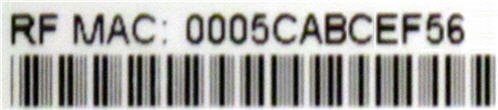
Adrès MAC
|
Adrès MAC yo ekri kòm 12 chif ki genyen tou de lèt ak nimewo (0-9, AF). Yon adrès MAC inik. Premye sis karaktè adrès MAC yo inik pou manifakti aparèy la. |



Depanaj

Limyè yo endike estati aktyèl modèm ou a. Pou rezoud nenpòt pwoblèm koneksyon, sèvi ak tablo ki anba a.
| Limyè modem | Estati | Pwoblèm |
|---|---|---|
| Pouvwa | Off | Pa gen pouvwa - Verifye tout koneksyon kab epi eseye reset modèm la. |
| On | Okenn | |
| DS
(En) |
Klike vèt | Etabli yon koneksyon soti nan entènèt la nan òdinatè a - Verifye tout koneksyon kab epi eseye re modem la. |
| Solid vèt | Okenn - koneksyon | |
| Klè ble | Negosye yon estokaj DS (en) chanèl - Verifye tout koneksyon kab epi eseye re modem la. | |
| Solid Blue | Youn oswa plis DS (en) chanèl yo estokaj | |
| US
(En) |
Off | Etabli yon koneksyon soti nan òdinatè a sou entènèt la - Verifye tout koneksyon kab epi eseye re modem la. |
| Solid | Okenn | |
| Klè ble | Negosye yon estokaj US (en) chanèl - Verifye tout koneksyon kab epi eseye re modem la. | |
| Solid Blue | Youn oswa plis DS (en) chanèl yo estokaj | |
| Sou entènèt | Klike vèt | Etabli yon koneksyon ak founisè kab la - Verifye tout koneksyon kab yo epi eseye re modem la. |
| Solid vèt | Okenn - koneksyon etabli | |
| Off | Offline - Verifye tout koneksyon kab epi eseye re modem la. | |
| Link | Klike vèt | Okenn - done ap koule tankou dlo |
| Solid vèt | Okenn - ki konekte nan aparèy LAN, tankou òdinatè oswa routeur | |
| Off | Pa jwenn Ethernet |
Resous manifakti
Sèvi ak resous sa a soti nan Zoom pou plis enfòmasyon detaye sou 5341J la.
Zoom_5341J_Quick_Start_Guide [PDF]
Referans
- Manyèl itilizatèmanual.tools
Published: August 10, 2021
Mizajou: 11 fevriye 2023
I absolutely cannot find how to disable SIP ALG on my zoom cable modem and I cannot find a telephone number that works to contact zoom.
How do I disable SIP ALG on the Zoom 5341J cable modem and how can I contact Zoom support?
The Zoom 5341J is a bridge-only cable modem, not a gateway or router. Because it does not have built-in routing or firewall capabilities, it does not have a SIP ALG (Session Initiation Protocol Application Layer Gateway) setting to disable. If you are experiencing VoIP issues related to SIP ALG, the setting is likely located in the standalone router connected to the modem's LAN port.
To resolve this, you should log into your router's web interface (common addresses include 192.168.1.1 or 192.168.0.1) and look for SIP ALG under settings typically labeled as "Firewall," "NAT," or "Advanced Settings."
Regarding manufacturer support, Zoom Telephonics (now operating largely under the Motorola Brand for retail cable products) can be reached via the following methods:
Read the full Q&A page
My telephone company says to disable SIP ALG but I do not know how and I have not found any support site or telephone number for customer service for this product. I guess there is no customer service for the Zoom cable mode 534ij. Once you buy it …good luck.
How do I disable SIP ALG on the Zoom 5341J cable modem?
La Zoom 5341J is a standalone cable modem, not a gateway or router. Because it does not have built-in routing or firewall functions, it does not have a SIP ALG setting to disable.
If your telephone company is requesting this change, the setting will be located in your standalone wireless router (the device connected to the modem's LAN port) rather than the modem itself. You should log into your router's web interface (commonly found at 192.168.0.1 or 192.168.1.1) and look for SIP ALG under the "Firewall," "NAT," or "Advanced Settings" menus.
Regarding customer service, Zoom Telephonics transitioned its branding to Motorola Network products several years ago. For legacy support, you may try contacting their technical support team at 1-800-753-0797 or visiting their official support site at motorolanetwork.com/support.
Read the full Q&A page