

Cisco DPC3008 DOCSIS 3.0 kab modem
Enfòmasyon sou ModemDOCSIS 3.0 modèm 8 × 4 lyezon chanèl ak vitès ki rive jiska 150 Mbps sou yon koneksyon filaire Cox rekòmande yon modèm DOCSIS 3.1 oswa yon pòtay |
Pi wo nivo sèvisPrefere 150 |
Devan View
|
Cisco DPC3008 a se yon aparèy DOCSIS 3.0 ki ofri 8 × 4 lyezon chanèl. Apre modèm kab la anrejistre avèk siksè sou rezo a, endikatè POWER, DS, US, ak ONLINE eklere kontinyèlman pou endike ke modèm kab la sou entènèt epi li fonksyone nèt. | |
Retounen View
|
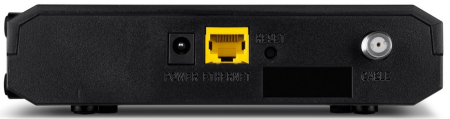
Cisco DPC3008 gen pò sa yo ki disponib sou do modèm la.
|
|
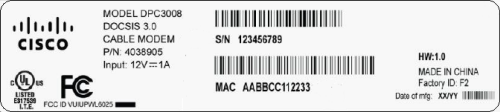
Adrès MAC
|
Adrès MAC yo ekri kòm 12 chif ki genyen tou de lèt ak nimewo (0-9, AF). Yon adrès MAC inik. Premye sis karaktè adrès MAC yo inik pou manifakti aparèy la. |


Depanaj
Limyè yo endike estati aktyèl la nan pòtay ou a. Pou rezoud nenpòt pwoblèm koneksyon, sèvi ak tablo ki anba a.
| Limyè Gateway | Estati | Pwoblèm |
|---|---|---|
| POUVWA | Off | Pa gen pouvwa - Verifye tout koneksyon kab epi eseye reset modèm la. |
| On | Okenn | |
| DS | Kliyote | Modèm etabli koneksyon sou Entènèt la ak òdinatè a - Verifye tout koneksyon kab epi eseye reset modèm la. |
| On | Okenn | |
| US | Off | Chanèl en aktif - Verifye tout koneksyon kab epi eseye reset modèm la |
| Kliyote | Fè rechèch pou chanèl en - Verifye tout koneksyon kab epi eseye retabli modèm la | |
| On | Okenn | |
| ONLINE | Off | Pa gen koneksyon - Verifye tout koneksyon kab epi eseye reset modèm la. |
| Kliyote | Okenn - optik pou paramèt konfigirasyon | |
| On | Okenn - operasyonèl | |
| LYEN | Kliyote | Okenn - yon sèl aparèy ki konekte atravè Ethernet ak done yo te transfere ant òdinatè a ak modèm kab la. |
| On | Yon sèl aparèy ki konekte nan pò Ethernet la epi yo pa voye okenn done nan oswa soti nan modèm kab la - Verifye tout koneksyon kab epi eseye retabli modèm la. | |
| Off | Pa gen aparèy ki konekte - Verifye tout koneksyon kab epi eseye re modem la. |
Resous manifakti
Pou plis enfòmasyon teknik detaye sou DPC3008, sèvi ak resous ki anba yo.
- Cisco_DPC3008_Data_Fèy [PDF]
- Cisco_DPC3008_Gid_Enstalasyon [PDF]
Referans
- Manyèl itilizatèmanual.tools
Published: August 10, 2021
Mizajou: 26 avril 2023
Thanks, I was looking for the manual.
Gracias, estaba buscando el manual.
Gracias, estaba buscando el manual.
Where can I find the user manual and setup information for the Cisco DPC3008 DOCSIS 3.0 Cable Modem?
The Cisco DPC3008 is a DOCSIS 3.0 cable modem capable of speeds up to 150 Mbps. Below is a summary of the setup and troubleshooting information found in the manual:
Koneksyon panèl dèyè:
Estati endikatè ki ap dirije:
Ki jan yo Reyajiste:
If you are experiencing connection issues, you can use a paperclip to press the RESET button on the back of the device. For a full factory reset (30-30-30 method), hold the button for 30 seconds while powered on, another 30 seconds while unplugged, and a final 30 seconds after plugging it back in.
For more detailed technical specifications, you can refer to the Gid Enstalasyon Cisco DPC3008.
Read the full Q&A page