1. Entwodiksyon
This manual provides detailed instructions for the setup, operation, and maintenance of your LEFFOT H618 Plus Android 14.0 TV Box. This device transforms your television into a smart entertainment hub, offering access to streaming services, apps, and media content. Please read this manual thoroughly before using the device to ensure proper functionality and safety.
2. Pake kontni
Verifye ke tout atik ki nan lis anba a yo enkli nan pakè ou a:
- LEFFOT H618 Plus Android 14.0 TV Box
- Adaptè pouvwa
- Kab HD (Kab HDMI)
- Kontwòl Remote
- Manyèl Itilizatè (dokiman sa a)
3. Pwodwi souview
The LEFFOT H618 Plus is a 4K UHD streaming device powered by Android 14.0. It features an Allwinner H618 Quad-core ARM Cortex-A53 CPU and Mali G31 GPU, providing smooth performance for streaming and applications. This model includes 2GB RAM and 16GB ROM for system operations and app storage.
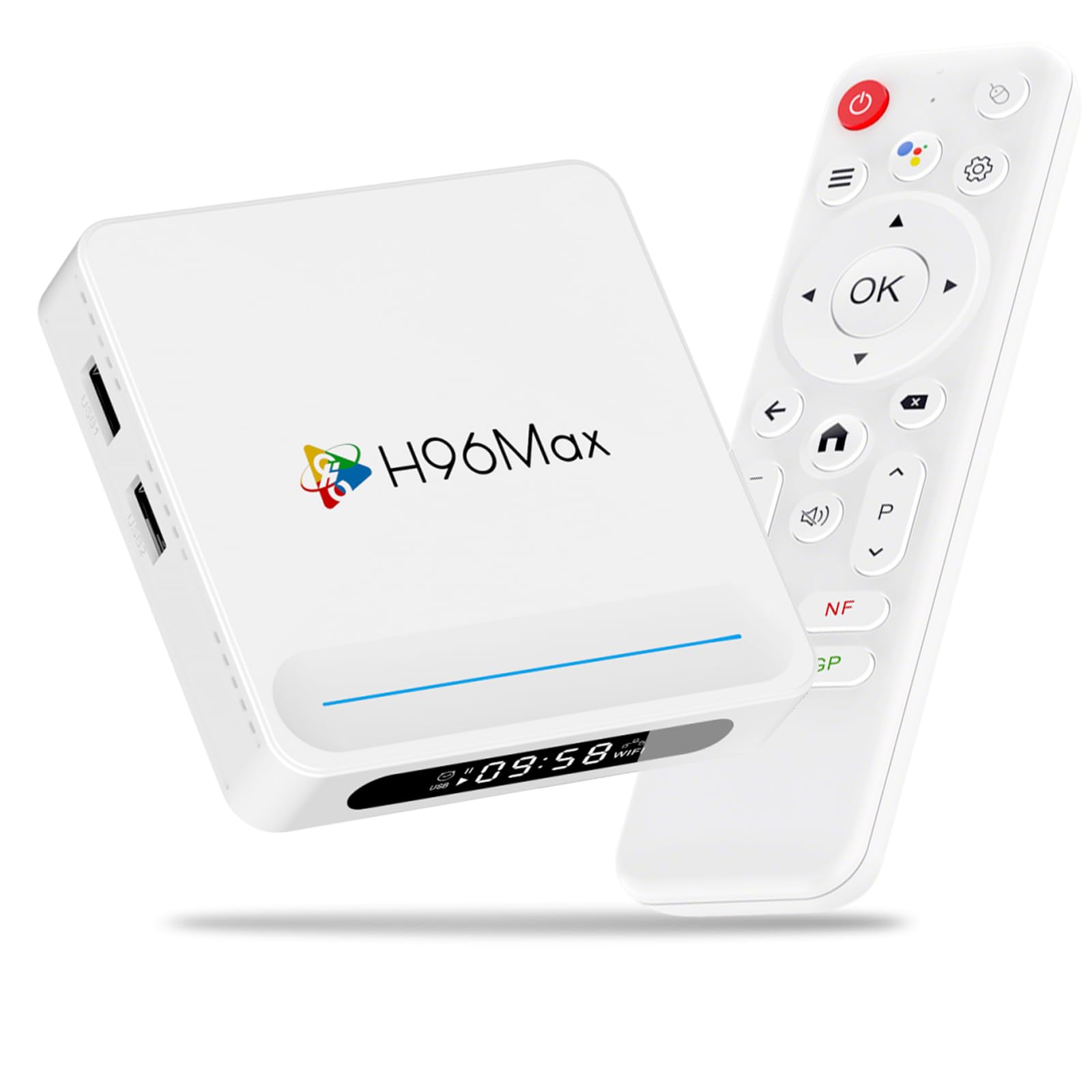
Figi 3.1: Devan view of the LEFFOT H618 Plus Android TV Box, showcasing its compact design and various ports for connectivity. The included remote control is also visible.
Pò ak Koneksyon
- HDMI 2.0a Output: Connects to your TV or display for 4K video output.
- Pò USB 2.0 (x2): For connecting external storage devices, keyboards, mice, or other USB peripherals.
- AV Sòti: For connecting to older televisions using an analog cable.
- Antre pouvwa DC: Connects the power adapter to the device.
- Pò Ethernet (100M): Pou yon koneksyon rezo filaire ki estab.
4. Gid Enstalasyon
Follow these steps to set up your LEFFOT H618 Plus TV Box:
- Konekte ak televizyon an: Connect one end of the provided HD cable (HDMI) to the HDMI port on the TV Box and the other end to an available HDMI input on your television.
- Konekte pouvwa: Plug the power adapter into the DC power input port on the TV Box, then plug the adapter into a wall outlet.
- Pouvwa sou: Aparèy la ta dwe limen otomatikman. Si se pa sa, peze bouton pouvwa a sou kontwòl remote la.
- Chwazi Antre: On your television, select the correct HDMI input source using your TV's remote control.
- Premye konfigirasyon: Follow the on-screen instructions to complete the initial setup, which typically includes selecting your language, connecting to a Wi-Fi network (or using Ethernet), and signing in with your Google account.
5. Operasyon Enstriksyon
Navigasyon Kontwòl Remote
Use the included remote control to navigate the Android interface:
- Direksyon pad: Use the up, down, left, and right arrows to move between menu items and options.
- OK bouton: Press to select an item or confirm an action.
- Bouton tounen: Retounen nan ekran oswa meni anvan an.
- Bouton Kay: Retounen nan ekran prensipal la.
- Bouton Volim: Ajiste volim pwodiksyon odyo a.
- Bouton pouvwa: Turns the device on or off (standby mode).
Aksè Aplikasyon yo
From the home screen, you can access pre-installed applications or download new ones from the Google Play Store. Navigate to the 'Apps' section or the Google Play Store icon and select it to browse and install applications.
6. Koneksyon
Wi-Fi Koneksyon
The device supports 2.4G/5G Dual-Band Wi-Fi 6 for fast and stable wireless internet access. To connect:
- Ale nan Anviwònman > Rezo & Entènèt.
- Chwazi Wi-Fi epi limen li.
- Chwazi rezo Wi-Fi ou vle a nan lis la.
- Antre modpas Wi-Fi a si yo mande w epi chwazi Konekte.
Koneksyon Ethernet
For a more stable connection, connect an Ethernet cable from your router to the Ethernet port on the TV Box. The device will automatically detect and use the wired connection.
Bluetooth 5.0
The TV Box features Bluetooth 5.0, allowing you to connect compatible wireless accessories such as headphones, game controllers, or keyboards.
- Ale nan Anviwònman > Aparèy ki konekte > Pè nouvo aparèy.
- Mete akseswa Bluetooth ou a nan mòd koneksyon.
- Select the accessory from the list on your TV screen to pair.
7. Kontwòl vwa
The LEFFOT H618 Plus integrates with Google Assistant for convenient voice control. If your remote control has a dedicated microphone button, press it to activate voice commands.
- Search Content: Say "Find action movies" or "Play [Movie Title]".
- Lanse Aplikasyon yo: Say "Open YouTube" or "Launch Netflix".
- Kontwòl Lektur: Say "Pause", "Play", "Fast forward", or "Rewind".
- Ajiste Volim: Say "Volume up" or "Volume down".
8. Ekran Mirroring
The device supports AirPlay and Miracast, allowing you to wirelessly cast content from your iOS or Android devices to your television.
Using AirPlay (for iOS devices)
- Ensure your iOS device and the TV Box are connected to the same Wi-Fi network.
- On your iOS device, open the Control Center (swipe down from the top-right corner on newer iPhones/iPads, or swipe up from the bottom on older models).
- Tape Ekran Mirroring or AirPlay.
- Select the LEFFOT H618 Plus from the list of available devices.
Using Miracast (for Android devices)
- Ensure your Android device and the TV Box are connected to the same Wi-Fi network.
- On your Android device, look for a feature like Jete, Ekran Mirroring, Entelijan View, oswa Wireless Display in your quick settings or display settings.
- Activate the feature and select the LEFFOT H618 Plus from the list of available devices.
9. Espesifikasyon
Detailed technical specifications for the LEFFOT H618 Plus Android 14.0 TV Box (2GB-16GB model):
| Mak | LEFFOT |
| Nimewo Modèl | 2GB-16GB |
| Sistèm operasyon | Android 14.0 |
| CPU | Allwinner H618 Kat-nwayo ARM Cortex-A53 |
| GPU | Mali G31 |
| RAM | 2GB |
| ROM | 16GB |
| Rezolisyon | 4K UHD |
| Wi-Fi | 2.4G/5G Dual-Band Wi-Fi 6 |
| Bluetooth | Bluetooth 5.0 |
| Ethernet | 100M |
| Pò | HDMI 2.0a, 2x USB 2.0, AV Out, DC In, Ethernet |
| Karakteristik espesyal | HDR10, AirPlay, Miracast, Voice Control (Google Assistant) |
| Dimansyon | 3.93 x 3.93 x 0.76 pous |
| Pwa | 4.1 ons (115 gram) |
NAN. Depanaj
If you encounter issues with your LEFFOT H618 Plus TV Box, refer to the following common problems and solutions:
- Pa gen pouvwa:
- Asire w adaptè kouran an byen konekte ak aparèy la epi li nan yon priz kouran ki fonksyone.
- Eseye yon priz kouran diferan.
- Pa gen siyal sou televizyon:
- Verify the HDMI cable is firmly connected to both the TV Box and the TV.
- Asire w ke televizyon ou an configuré sou bon sous antre HDMI a.
- Eseye yon lòt kab HDMI oswa yon lòt pò HDMI sou televizyon ou an.
- Wi-Fi Connection Issues / Spotty Wi-Fi:
- Tcheke si routeur Wi-Fi ou a ap fonksyone byen.
- Ensure the TV Box is within range of your Wi-Fi router.
- Try restarting both the TV Box and your Wi-Fi router.
- Consider using a wired Ethernet connection for better stability.
- Slow Performance / Buffering:
- Fèmen aplikasyon background ki pa nesesè yo.
- Clear the cache of frequently used apps (Settings > Apps > [App Name] > Clear Cache).
- Ensure you have a stable and fast internet connection.
- Rekòmanse aparèy la.
- Kontwòl Remote pa reponn:
- Tcheke epi ranplase pil yo nan kontwòl remote la.
- Asire w pa gen okenn obstak ant telekòmand lan ak bwat televizyon an.
- Pwoblèm konpatibilite aplikasyon:
- Some applications may not be fully optimized for Android TV Box environments. Check the app's requirements or look for alternative versions.
11. Antretyen
To ensure the longevity and optimal performance of your TV Box:
- Netwayaj: Sèvi ak yon twal mou epi sèk pou netwaye aparèy la. Pa sèvi ak pwodui netwayaj likid oswa ayewosòl.
- Plasman: Place the device on a stable, flat surface with adequate ventilation. Avoid placing it near heat sources or in direct sunlight.
- Pouvwa Off: If not in use for an extended period, disconnect the power adapter.
- Mizajou lojisyèl: Periodically check for system updates in the device settings to ensure you have the latest features and security patches.
12. Enfòmasyon sou Sekirite
Tanpri obsève prekosyon sekirite sa yo:
- Pa ekspoze aparèy la nan dlo, imidite, oswa tanperati ekstrèm.
- Pa eseye ouvri oswa repare aparèy la tèt ou. Konfye tout antretyen bay pèsonèl kalifye.
- Sèvi ak adaptè kouran ki vini ak li a sèlman. Itilizasyon adaptè ki pa otorize ka domaje aparèy la epi anile garanti a.
- Kenbe aparèy la lwen timoun ak bèt kay.
13. Garanti ak sipò
For warranty information or technical support, please refer to the documentation provided with your purchase or contact LEFFOT customer service through their official website or the retailer where the product was purchased. Please have your model number (2GB-16GB) and purchase details ready when contacting support.


