Entwodiksyon
The PNI HAM27 is a portable multiband radio scanner designed for amateur radio enthusiasts and general frequency monitoring. This manual provides detailed instructions for its proper use, setup, operation, and maintenance. Please read this manual thoroughly before operating the device.
Enfòmasyon sou Sekirite
- Pa ekspoze aparèy la nan tanperati ekstrèm, limyè solèy dirèk, oswa imidite ki wo.
- Kenbe aparèy la lwen dlo oswa lòt likid.
- Sèvi sèlman akseswa chaje yo bay oswa rekòmande yo.
- Do not disassemble, modify, or attempt to repair the device yourself. Refer to qualified service personnel.
- Sekirite batri: Do not dispose of the battery in fire, expose it to high temperatures, or short-circuit it. Do not disassemble the battery.
Kontni pake
Verifye ke tout atik yo prezan nan pakè a:
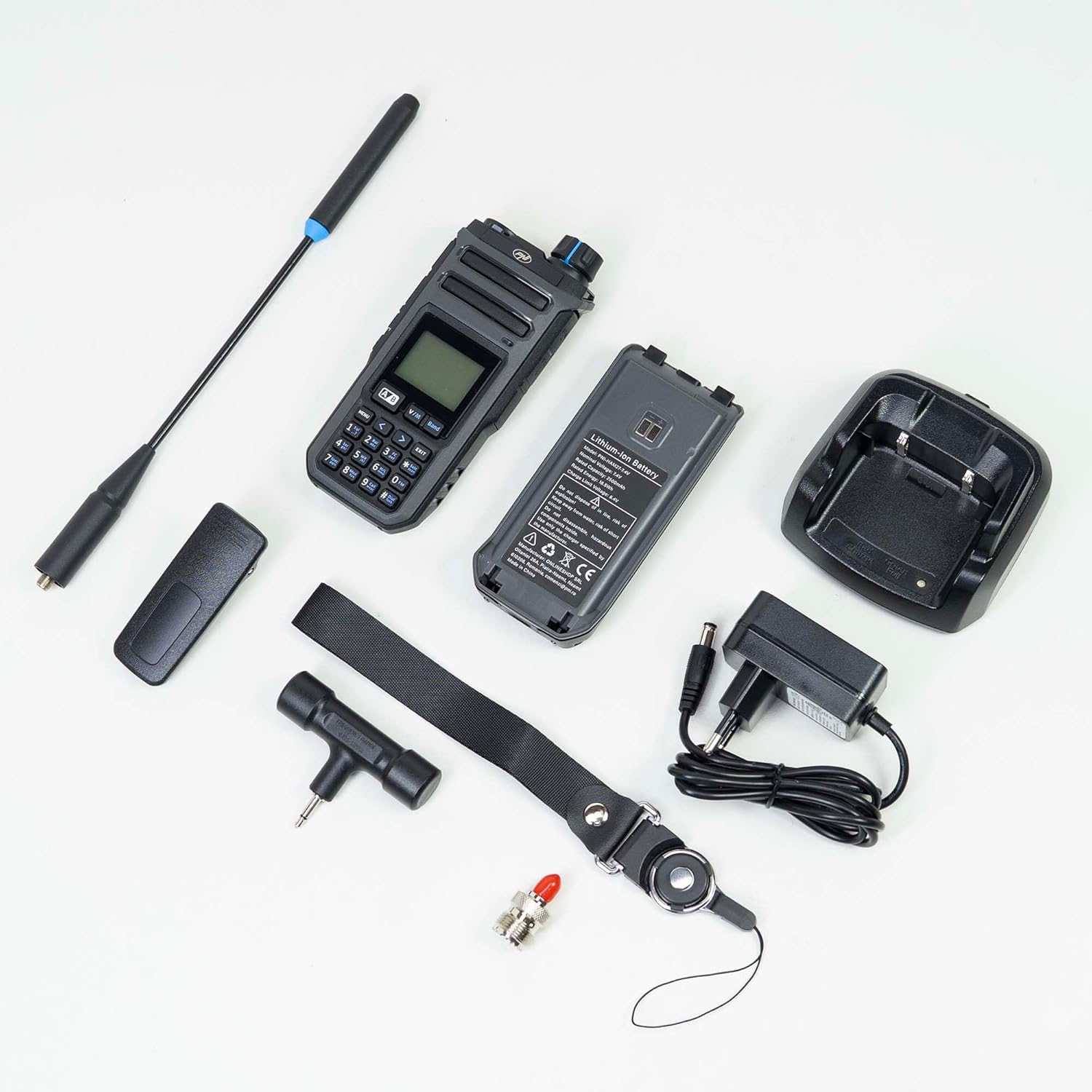
- PNI HAM27 Portable Multiband Radio Scanner
- 7.4V 2500mAh Li-ion batri
- SMA antèn
- 3.5mm Jack Antenna
- Desktop Charger
- Adaptè pouvwa
- senti ponyèt
- Clip senti

Image: PNI HAM27 radio scanner and all included accessories, including the main unit, two antennas, battery, desktop charger, power adapter, wrist strap, and belt clip.
Enstalasyon
1. Enstalasyon batri
Insert the 7.4V 2500mAh Li-ion battery into the designated compartment on the back of the scanner. Ensure it clicks securely into place. To remove, slide the battery release latch and pull the battery out.

Image: The PNI HAM27 radio scanner shown next to its removable lithium-ion battery, illustrating the battery compartment.
2. Antèn Koneksyon
Screw the SMA antenna clockwise onto the antenna connector at the top of the scanner until it is finger-tight. Do not overtighten.

Image: The PNI HAM27 radio scanner with its long SMA antenna attached, positioned next to its retail packaging.
3. Chaje batri a
Connect the power adapter to the desktop charger, then plug the adapter into a wall outlet. Place the scanner into the desktop charger. The charging indicator will illuminate to show the charging status. Ensure you use a power adapter with an output of 4.5-5W.

Image: The desktop charging cradle and the separate power adapter for the PNI HAM27 scanner.

Image: The PNI HAM27 radio scanner securely seated in its desktop charging cradle, ready for charging.

Image: A visual guide indicating the correct power adapter wattage (4.5-5W) for charging the device, with an incorrect adapter crossed out.
Enstriksyon Operasyon
Imaj: Yon fasad detaye view of the PNI HAM27 radio scanner, highlighting its display screen and keypad for operation.
1. Power On/Off
To turn the scanner on or off, press and hold the power button (typically located on the top or side of the device) for a few seconds until the display illuminates or shuts down.
2. Frequency and Channel Mode
The PNI HAM27 supports both frequency (VFO) and channel (Memory) modes. Use the V/M bouton pou chanje ant mòd sa yo.
- Mòd frekans: Allows manual input of frequencies using the keypad.
- Mòd chanèl: Enables navigation through the 999 programmable channels.
3. Scanning Frequencies
To initiate a scan, press the dedicated Eskane button or navigate through the menu to the scanning function. The scanner will sweep through the frequency range of 0.153 to 1160 MHz, stopping on active signals.
4. Kontwòl Volim
Adjust the audio output level using the rotary knob located on the top of the device, next to the antenna connector.
5. Jack kas
Connect 2-pin PNI-K compatible headphones to the dedicated jack for private listening. This provides 1W audio output with high sensitivity and low distortion.
6. Dirije flach
Activate the built-in LED flashlight for illumination in low-light conditions. Refer to the device's menu or a specific button for this function.
7. Belt Clip and Wrist Strap
Attach the belt clip to the back of the scanner for convenient carrying. Use the wrist strap to secure the device during portable use.

Imaj: Yon bò view of the PNI HAM27 radio scanner, showing the attached belt clip for easy portability.
Antretyen
1. Netwayaj
Wipe the scanner with a soft, dry, lint-free cloth. Do not use abrasive cleaners, solvents, or harsh chemicals, as these can damage the device's surface and internal components.
2. Swen batri
To maximize battery life, avoid fully discharging the battery frequently. Recharge the battery when the low battery indicator appears. If storing the device for an extended period, charge the battery to approximately 50% and store it in a cool, dry place.
3. Depo
Store the PNI HAM27 scanner and its accessories in a clean, dry environment, away from direct sunlight, extreme temperatures, and corrosive materials. Ensure the antenna is removed or protected during storage to prevent damage.
Depanaj
- Aparèy pa limen:
- Check if the battery is correctly installed and fully charged. Ensure the power button is pressed and held sufficiently. - Pa gen odyo:
- Verify the volume level. Check if headphones are properly connected and functioning. Ensure the squelch setting is not too high, which might block weak signals. - Resepsyon ki pa bon:
- Ensure the antenna is securely attached. Try repositioning the scanner for better signal reception. Check for local interference sources such as other electronic devices. - Pwoblèm chaj:
- Confirm the power adapter is correctly connected to both the charger and a functional power outlet. Ensure the scanner is properly seated in the desktop charger. Verify that the correct 4.5-5W power adapter is being used. - Ekspozisyon pa travay:
- If the display is blank or flickering, try restarting the device. If the issue persists, ensure the battery is charged.
Espesifikasyon
| Karakteristik | Spesifikasyon |
|---|---|
| Nimewo Modèl | PNI-HAM27 |
| Gamme frekans | 0.153 - 1160 MHz |
| Kantite Chanèl | 999 |
| Kalite batri | 7.4V 2500mAh Li-ion |
| Ekspozisyon | 1.44 pous ekran |
| Sòti odyo | 1W |
| Sansiblite | -21 dBm FM / -100 dBm AM |
| Distòsyon odyo | <10% |
| Dimansyon (L x W x H) | 6 x 4 x 12.5 cm |
| Pwa | 575 g |
| Port chaje | USB-C (via desktop charger) |
| Karakteristik espesyal | FM radio, Channel monitoring, LED flashlight, Wireless scanner, SMA antenna, 3.5mm jack, Belt clip, Wrist strap |
Garanti ak sipò
For warranty information, technical assistance, or service inquiries, please contact your authorized PNI dealer or visit the official PNI websit la. Kenbe resi acha ou kòm prèv acha pou reklamasyon garanti.
Ou ka jwenn plis enfòmasyon ak sipò nan PNI Official Store.


