
1. Entwodiksyon
This manual provides essential information for setting up, operating, maintaining, and troubleshooting your CHUWI Hi10 X2 2-in-1 Laptop Tablet. Please read it thoroughly before using your device.
Ki sa ki nan bwat la
- Hi10 X2 Tablet
- Klavye mayetik
- Ka ak kanpe
- Set plato
- Manyèl Itilizatè (dokiman sa a)

Image 1.1: CHUWI Hi10 X2 Tablet with Magnetic Keyboard and Case.
2. Enstalasyon
2.1 Premye chaj
Before first use, fully charge your CHUWI Hi10 X2 tablet using the provided charger set. Connect the charger to the Type-C port on the tablet and plug it into a power outlet. The charging indicator light will illuminate.
2.2 Attaching the Magnetic Keyboard and Case
Align the tablet with the magnetic connectors on the keyboard. The magnets will secure the tablet in place. The case with stand can be adjusted to your preferred viewang ang.
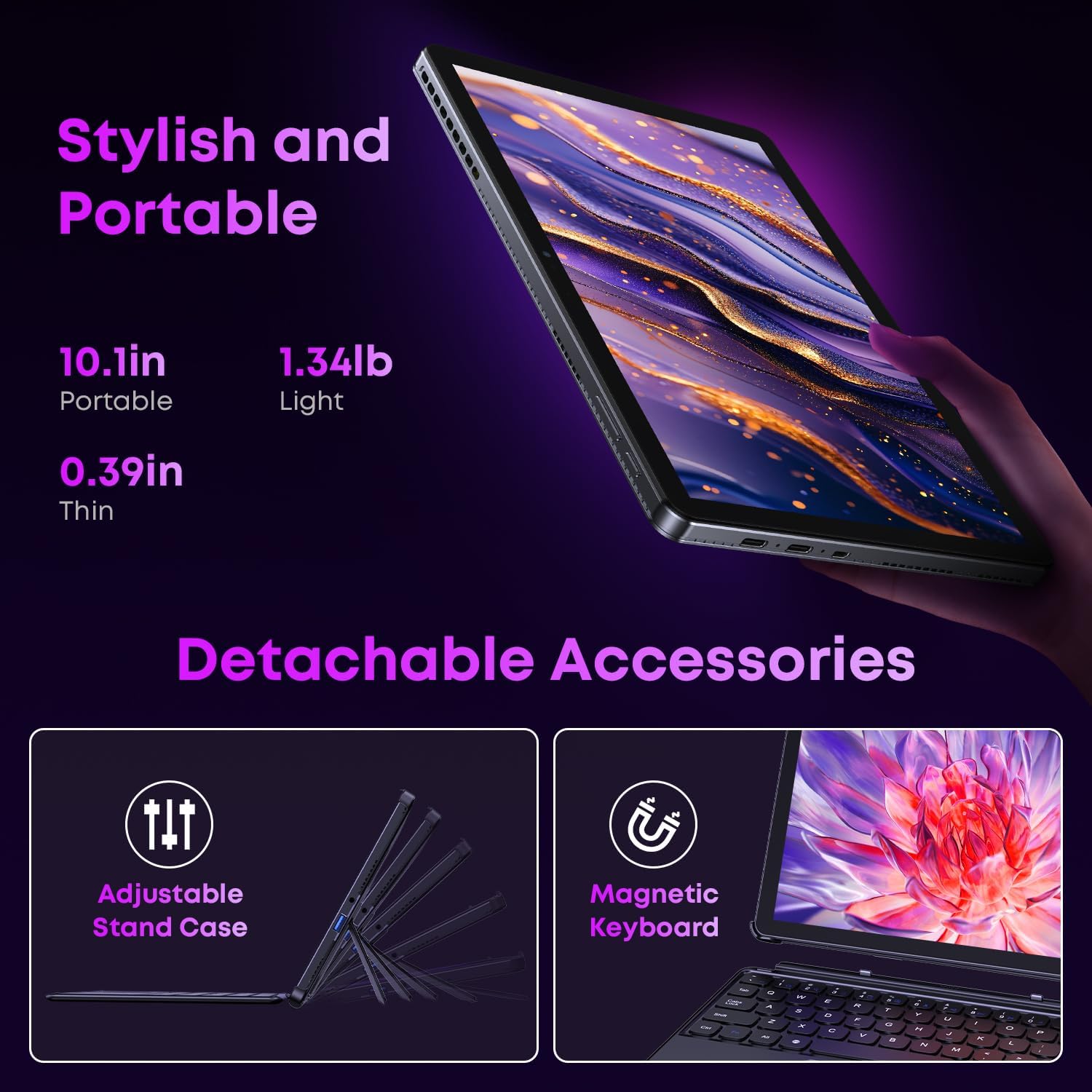
Image 2.1: Detachable accessories including the magnetic keyboard and adjustable stand case.
2.3 First Boot-Up and Windows Activation
Press and hold the power button until the screen turns on. Follow the on-screen instructions to complete the initial Windows 11 setup. If your Windows system arrives unactivated, please send the serial number (located on the back of the device) to CHUWI support via Amazon for your activation key.
2.4 Konekte ak Wi-Fi
During setup, you will be prompted to connect to a Wi-Fi network. Select your network and enter the password. The device supports Wi-Fi 6 for fast and stable connections.
3. Operasyon Enstriksyon
3.1 Mòd pou limen/etenn ak dòmi
- Pouvwa sou: Peze epi kenbe bouton pouvwa a jiskaske ekran an limen.
- Pouvwa Off: From the Windows Start menu, select Power > Shut down.
- Mòd dòmi: Briefly press the power button to enter or exit sleep mode.
3.2 Sèvi ak Touchscreen la
The 10.1-inch HD touchscreen supports 10-point multi-touch gestures. Use taps, swipes, and pinches for navigation and interaction with applications.

Image 3.1: The 10.1-inch HD touchscreen display.
3.3 Laptop and Tablet Modes
The magnetic keyboard allows for seamless switching between laptop and tablet modes. Attach the keyboard for typing and productivity, or detach it for a pure tablet experience.
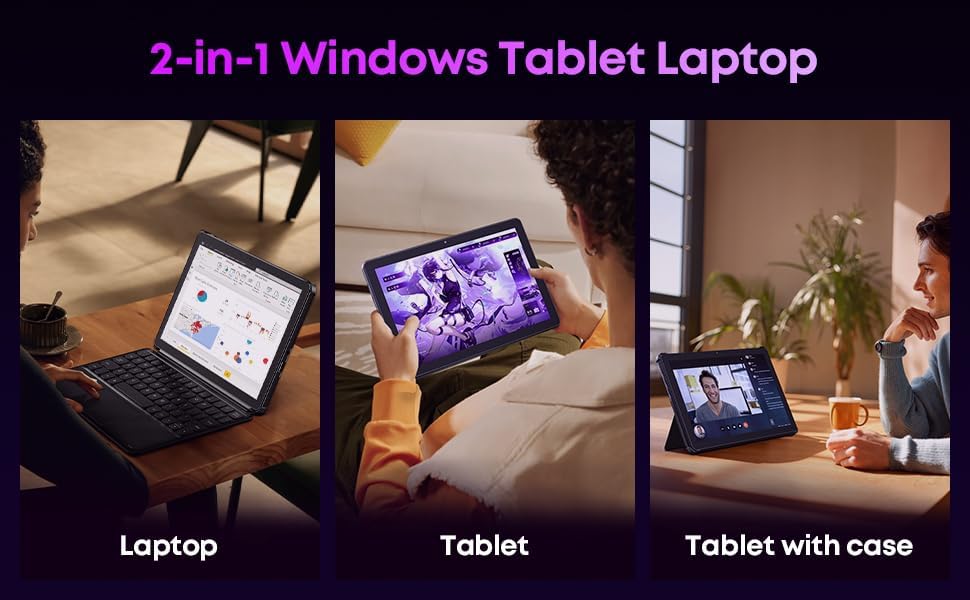
Image 3.2: Usage scenarios demonstrating laptop, tablet, and tablet with case modes.
3.4 Koneksyon
- Pò USB: The tablet features a full-featured Type-C port and a USB 3.2 Gen1 port for data transfer and connecting peripherals.
- Mikwo HDMI: Connect to external monitors or TVs using the Micro HDMI port for extended display options, supporting up to 4K video output.
- Bluetooth 5.3: Pair with wireless headphones, mice, and other Bluetooth accessories.
- Wi-Fi 6: Enjoy high-speed internet connectivity for streaming and browsing.
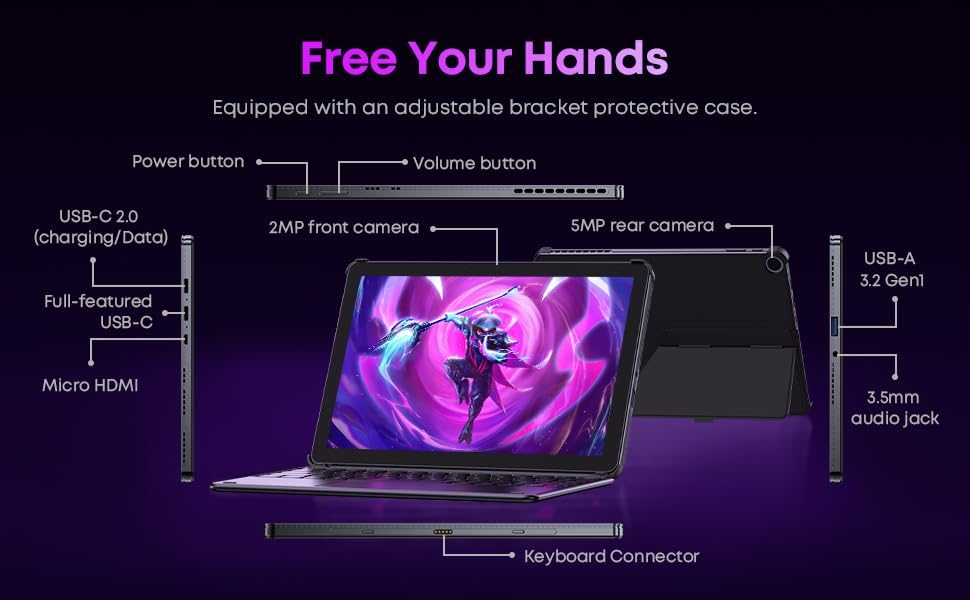
Imaj 3.3: Detaye view of the tablet's ports and connectors.
3.5 Itilizasyon Kamera
The tablet is equipped with a 5MP autofocus rear camera for capturing photos and videos, and a 2MP front camera for video calls and selfies.

Image 3.4: Camera and wireless connectivity features.
3.6 Processor and Storage
Powered by a 10th Gen Intel Core i3 processor (up to 3.9GHz) and 8GB RAM, the tablet handles multitasking efficiently. The 256GB SSD provides ample storage and fast access to your files.

Image 3.5: Intel 10th Gen Core i3 Processor details.
3.7 Pwodwi souview Videyo
Videyo 3.6: Yon overview of the CHUWI Hi10 X2 2-in-1 Laptop Tablet, highlighting its features and functionality.
4. Antretyen
4.1 Netwaye Aparèy la
Sèvi ak yon twal mou ki pa gen pousyè pou netwaye ekran an ak kò tablèt la. Pou tach ki difisil pou retire, siye yon ti kras.ampRense twal la avèk dlo oswa yon solisyon pou netwaye ekran. Evite pwodui chimik ki agresif oswa materyèl abrazif.
4.2 Swen Batri
To prolong battery life, avoid exposing the tablet to extreme temperatures. It is recommended to keep the battery charge between 20% and 80% for optimal longevity. Avoid fully discharging the battery frequently.
4.3 Mizajou lojisyèl
Tcheke epi enstale mizajou Windows regilyèman pou asire sistèm ou an gen dènye patch sekirite ak amelyorasyon pèfòmans yo. Ale nan Anviwònman > Mizajou Windows.
4.4 Jesyon Depo
Tanzantan review epi efase sa ki pa nesesè files and applications to free up storage space on the 256GB SSD. This helps maintain optimal device performance.
NAN. Depanaj
5.1 Aparèy la pa limen
- Ensure the device is fully charged. Connect the charger and wait a few minutes before attempting to power on.
- Peze epi kenbe bouton pouvwa a pandan 10-15 segonn pou fè yon reset konplè.
5.2 Pwoblèm koneksyon Wi-Fi
- Rekòmanse routeur Wi-Fi ou a ak tablèt la.
- Tcheke si lòt aparèy yo ka konekte sou menm rezo Wi-Fi a.
- Bliye rezo a nan paramèt Windows yo epi rekonekte li.
5.3 Ekran an pa reponn lè w touche l
- Rekòmanse tablèt la.
- Asire w ekran an pwòp epi li pa gen okenn debri.
5.4 Keyboard Not Working
- Ensure the tablet is correctly aligned and securely connected to the magnetic keyboard.
- Rekòmanse tablèt la.
For further assistance, please refer to the Support section.
6. Espesifikasyon
| Karakteristik | Spesifikasyon |
|---|---|
| Mak | CHUWI |
| Non modèl | Hi10 X2 |
| Processeur | Intel Core i3 (10th Gen, up to 3.9 GHz) |
| Sistèm operasyon | Windows 11 Kay |
| RAM | 8 GB |
| Depo | 256 GB SSD |
| Gwosè ekran | 10.1 pous |
| Rezolisyon ekspozisyon | 1280x800 piksèl |
| Koneksyon | Wi-Fi 6, Bluetooth 5.3 |
| Pò | Full-featured Type-C, USB 3.2 Gen 1, Micro HDMI, 3.5mm Audio Jack |
| Kamera | 5MP Autofocus Rear, 2MP Front |
| Pwa | 1.3 liv (apeprè 0.59 kg) |
| Dimansyon (L x W x P) | 9.6" x 6.49" x 0.39" |
| Kapasite batri | 3400 mAh |
7. Enfòmasyon sou Garanti
The CHUWI Hi10 X2 2-in-1 Laptop Tablet comes with a 1-ane garanti limite. This warranty covers manufacturing defects and malfunctions under normal use. Please retain your proof of purchase for warranty claims.
For detailed warranty terms and conditions, please refer to the official CHUWI websit oswa kontakte sipò kliyan.
8. Sipò
If you encounter any issues not covered in the Troubleshooting section, or require assistance with Windows activation, please contact CHUWI customer support. You can typically find support contact information on the official CHUWI website or through your purchase platform (e.g., Amazon seller messaging).
Lè w ap kontakte sipò a, tanpri kenbe nimewo seri aparèy ou an ak prèv acha a fasil pou jwenn.