Entwodiksyon
Mèsi pou acha aasing the ROCAM CR1030DAB Solar DAB+/FM Emergency Radio. This portable radio is designed for reliable communication and power in various situations, from daily use to outdoor adventures and emergencies. It features DAB+/FM radio reception, Bluetooth connectivity, multiple charging options including solar and hand crank, a powerful 12000 mAh battery, and integrated lighting functions. Please read this manual thoroughly before use to ensure proper operation and to maximize the product's lifespan.
Enstriksyon Sekirite
- Pa ekspoze aparèy la nan tanperati ekstrèm, limyè solèy dirèk pou peryòd pwolonje (apre chaje), oswa nan imidite ki wo.
- Evite lage radyo a oswa soumèt li a gwo enpak.
- Pa demonte oswa eseye repare aparèy la tèt ou. Konfye tout antretyen bay pèsonèl kalifye.
- Keep the device away from water and other liquids, except for its IPX6 water resistance which protects against strong jets of water. Do not submerge.
- Ensure the USB-C port cover is securely closed when not in use, especially in wet conditions.
- Lè w ap itilize manivèl la, vire l nan yon vitès fiks e modere. Twòp fòs oswa vitès ka domaje mekanis lan.
- The SOS alarm is very loud. Avoid activating it unnecessarily or near sensitive ears.
- Jete pil yo selon règleman lokal yo.
Kontni pake
Verifye ke tout atik yo prezan nan pakè a:
- 1 × ROCAM CR1030DAB Radio
- 1 × USB-C chaje kab
- 1 × Portable Strap
- 1 × Manyèl itilizatè
Pwodwi souview
Familyarize w avèk konpozan ak kontwòl radyo a.

Imaj: Devan view of the ROCAM CR1030DAB radio, highlighting its display, control buttons, and extended antenna. The radio is shown in an outdoor setting, emphasizing its portable and robust design.
Konpozan kle:
- Ekspozisyon koulè 2.4-pous: Shows station information, battery level, time, and menu options.
- Bouton kontwòl: Power, Mode, Menu, Scan, Volume, Navigation (Up/Down/Left/Right/OK), SOS.
- Antèn teleskopik: For optimal DAB+/FM signal reception.
- Panèl solè: Sitiye anlè pou chaje ak enèji solè.
- Manivèl men: On the side for manual power generation.
- Flach: Integrated LED light on one end.
- Lekti Lamp: Foldable panel with 12 LEDs.
- Pò Antre/Sòti USB-C: For charging the radio and charging external devices.
- Jack kas ekoutè (3.5mm): Pou koute prive.
- Lòj batri: For AAA backup batteries.

Imaj: Yon detaye view of the radio's 2.4-inch color display, illustrating its clarity and the information presented, such as station name and signal strength.
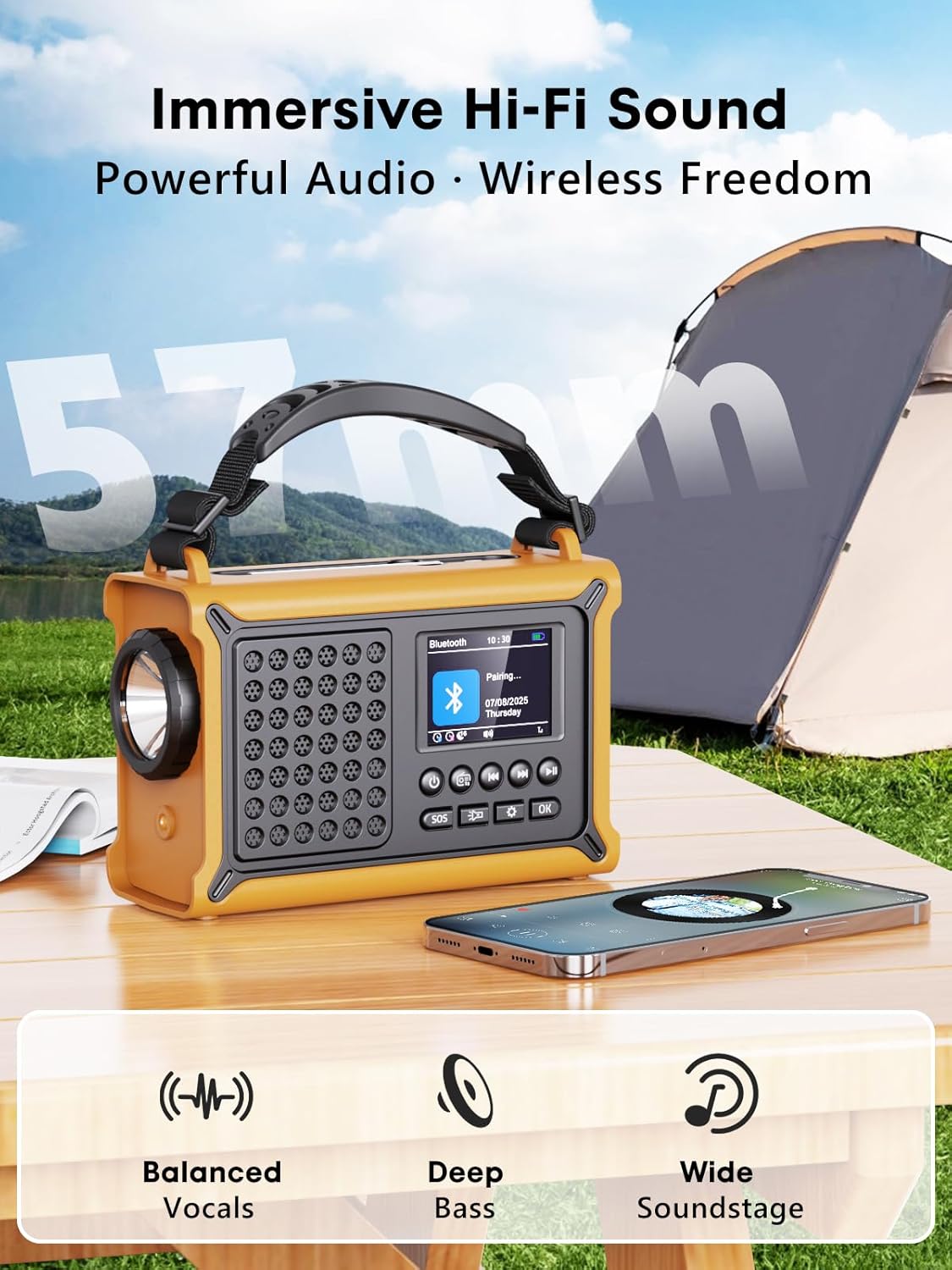
Imaj: The radio highlighting its audio capabilities, featuring 57mm speakers designed for clear, powerful sound with balanced vocals and deep bass.

Imaj: The radio held in hand, illustrating its ultra-portable design and compact dimensions (17.3 cm length, 12.1 cm height, 7.4 cm width), along with its IPX6 water resistance.
Enstalasyon
1. Premye Chajman
Before first use, it is recommended to fully charge the radio's internal 12000 mAh battery using the supplied USB-C cable. Connect the USB-C cable to the radio's USB-C input port and the other end to a standard USB power adapter (not included) or a computer USB port. The charging indicator on the display will show the charging status. A full charge ensures maximum battery life and optimal performance.
2. Inserting AAA Batteries (Optional Backup)
For an additional power backup, you can insert 3 AAA batteries (not included) into the battery compartment. This provides an alternative power source if the internal rechargeable battery is depleted and other charging methods are unavailable.
3. Power On and Language Selection
Peze epi kenbe la Pouvwa button to turn on the radio. Upon first power-on, you may be prompted to select your preferred language from the 12 available options. Use the navigation buttons to select and the OK bouton pou konfime.
Enstriksyon Operasyon
Limen / Off
- Pou limen: Peze epi kenbe bouton an Pouvwa bouton.
- Pou etenn: Peze epi kenbe bouton an Pouvwa bouton ankò.
DAB+/FM Radio Operation
- Chwazi mòd: Peze a Mode bouton an pou chanje ant mòd radyo DAB+ ak FM.
- Pwolonje antèn: Lonje antèn teleskopik la nèt pou pi bon resepsyon.
- Oto Scan: In DAB+ or FM mode, press the Eskane button to automatically search for available stations. The radio will store up to 40 DAB+ and 40 FM stations.
- Manual Tuning/Station Selection: Sèvi ak la Leve/Desann navigation buttons to browse through scanned stations or manually tune frequencies.
- Kontwòl Volim: Sèvi ak la Volim +/- bouton pou ajiste nivo son an.
- Prereglaj: Pou sove yon estasyon, branche sou estasyon ou vle a, answit peze epi kenbe bouton an OK button. Use navigation buttons to select a preset number and press OK to save. To recall a preset, briefly press the OK button, then use navigation to select the preset.
Koneksyon Bluetooth
- Antre nan mòd Bluetooth: Peze a Mode button until "Bluetooth" appears on the display. The radio will enter pairing mode, indicated by a blinking Bluetooth icon.
- Peyaj: On your smartphone or other Bluetooth device, enable Bluetooth and search for available devices. Select "ROCAM CR1030DAB" from the list.
- Konekte: Once paired, the radio will emit a confirmation sound, and the Bluetooth icon will stop blinking. You can now play audio from your device through the radio.
Chaje radyo a
The radio offers multiple charging methods for its internal 12000 mAh battery:

Imaj: The radio demonstrating its versatile charging capabilities, including the solar panel, USB-C input, hand crank, and the option for AAA batteries.
- USB-C chaje: Connect the supplied USB-C cable to a 5V/2A (or higher) USB power source. This is the fastest charging method.
- Solè chaje: Place the radio with the solar panel facing direct sunlight. The solar charging indicator will illuminate. This method is ideal for maintaining charge or slow charging in emergencies. The 8500 mm² panel provides 350 mA.
- Manvèl chaje: Rotate the hand crank clockwise or counter-clockwise at a steady pace (approx. 120-150 RPM). Cranking for 1 minute can provide several minutes of radio playback. The hand crank generates 650 mA.
- Batri AAA: If the internal battery is depleted, the radio can operate using 3 AAA batteries (not included) inserted into the battery compartment.
Chaje Aparèy Ekstèn (Fonksyon Bank Pouvwa)
The radio can act as a power bank to charge external devices like smartphones. Connect your device's charging cable to the radio's USB-C output port. The radio's 12000 mAh battery provides a 5V/1A output.
Fonksyon ekleraj

Imaj: A composite image illustrating the radio's versatile lighting options: a powerful 5W flashlight, the SOS red flashing light, and a soft 12-LED reading lamp.
- Flach: Peze a Flach button once to turn on the 5W LED flashlight. Press again to cycle through brightness levels (if available) or turn off.
- Lekti Lamp: Lift the reading lamp panel. Press the Lekti Lamp button (often combined with flashlight button or a separate one) to activate the 12-LED reading lamp. Press again to cycle through brightness levels or turn off.
Fonksyon Alam SOS
Nan yon ijans, peze epi kenbe bouton an SOS button. The radio will emit a loud 120 dB siren and flash a red light to attract attention. Press the SOS button again to deactivate the alarm.
Antretyen
- Netwayaj: Siye radyo a ak yon mou, damp twal. Pa sèvi ak pwodui netwayaj abrazif oswa solvang.
- Depo: When not in use for extended periods, store the radio in a cool, dry place. It is recommended to fully charge the internal battery every 3-6 months to maintain its health.
- Swen batri: Avoid completely draining the internal battery frequently. Recharge it as soon as possible when the low battery indicator appears.
Depanaj
| Pwoblèm | Kòz posib | Solisyon |
|---|---|---|
| Radyo a pa limen. | Batri ap vide. | Charge the radio via USB-C, solar, or hand crank. Ensure AAA batteries are inserted correctly if using them. |
| Resepsyon radyo pòv. | Antèn pa pwolonje, zòn siyal fèb, entèferans. | Fully extend the telescopic antenna. Reposition the radio to a location with better signal. Perform an auto scan again. |
| Aparèy Bluetooth la pa ka konekte. | Radio not in pairing mode, device too far, already connected to another device. | Ensure the radio is in Bluetooth pairing mode. Move the device closer to the radio. Disconnect from other Bluetooth devices. |
| Aparèy ekstèn lan pa ap chaje. | Radio battery too low, incorrect cable, device not compatible. | Ensure the radio has sufficient charge. Use a compatible USB-C cable. Some devices may draw too much power. |
| Manivèl la rèd oswa li pa chaje. | Mechanism obstruction, incorrect cranking speed. | Check for any obstructions. Rotate the crank at a steady, moderate pace. Do not force it. |
Espesifikasyon
| Modèl | CR1030DAB |
| Bann Radyo | DAB +, FM |
| Bluetooth vèsyon | 5.0 |
| Kapasite batri | 12000 mAh (Lithium) |
| Chaje Metòd | USB-C, Solar, Hand Crank, 3x AAA Batteries (backup) |
| Gwosè Panèl Solè | 8500 mm² (350 mA output) |
| Hand Crank Output | 650 mA |
| USB Sòti | 5V/1A |
| Ekspozisyon | Ekran LCD koulè 2.4 pous |
| Prereglaj | 80 (40 DAB +, 40 FM) |
| Rezistans dlo | IPX6 |
| SOS Alam | 120 dB |
| Flach | 5W ki ap dirije |
| Lekti Lamp | 12-ki ap dirije |
| Dimansyon | 12L x 17.2W x 7.3H cm (apeprè) |
| Pwa | 820 gram (apeprè) |

Imaj: A comparison chart detailing the specifications of the ROCAM CR1030DAB against generic alternatives, emphasizing its advanced features like a larger color display, higher battery capacity, and more efficient charging.
Garanti ak sipò
ROCAM products are designed for reliability and performance. This product comes with a standard manufacturer's warranty. For specific warranty details, please refer to the documentation provided with your purchase or contact ROCAM customer support.
If you encounter any issues or have questions regarding the operation or maintenance of your ROCAM CR1030DAB radio, please contact our customer support team.
- Sipò Kliyan: Refer to your product packaging or the ROCAM official websit pou enfòmasyon kontak.
- Resous sou entènèt: Visit the ROCAM websit pou kesyon yo poze souvan (FAQ), anrejistreman pwodwi, ak lòt materyèl sipò.


