1. Entwodiksyon
The Audizio Desio is a versatile digital radio that combines classic aesthetics with modern audio technology. It features DAB, DAB+, and FM tuning for clear radio reception, along with Bluetooth 5.0 for wireless streaming, a USB port for media playback, and a 3.5mm AUX input for wired connections. The radio is equipped with a 2.4-inch color LCD display and integrated stereo speakers, making it suitable for various environments such as living rooms, kitchens, or bedrooms.
This manual provides detailed instructions for setting up, operating, and maintaining your Audizio Desio radio. Please read it thoroughly before use to ensure proper functionality and to maximize your listening experience.
2. Enfòmasyon sou Sekirite
- Asire w ke vòl adaptè kouran antage koresponn ak ekipman pou kouran lokal ou a anvan ou konekte.
- Pa ekspoze aparèy la anba lapli, imidite, oswa tanperati ekstrèm.
- Evite mete aparèy la toupre sous chalè oswa anba limyè solèy dirèk.
- Pa ouvri c laasing; konfye tout antretyen bay pèsonèl kalifye.
- Kenbe inite a lwen gwo chan mayetik.
- Netwaye inite a sèlman ak yon twal mou, sèk.
3. Pake kontni
Tanpri verifye ke tout atik yo prezan lè w ap debale l:
- Audizio Desio DAB/DAB+/FM Radio
- Adaptè pouvwa (DC 5V)
- Kontwòl Remote
- Manyèl itilizatè
4. Kontwòl ak Koneksyon
Kontwòl panèl devan
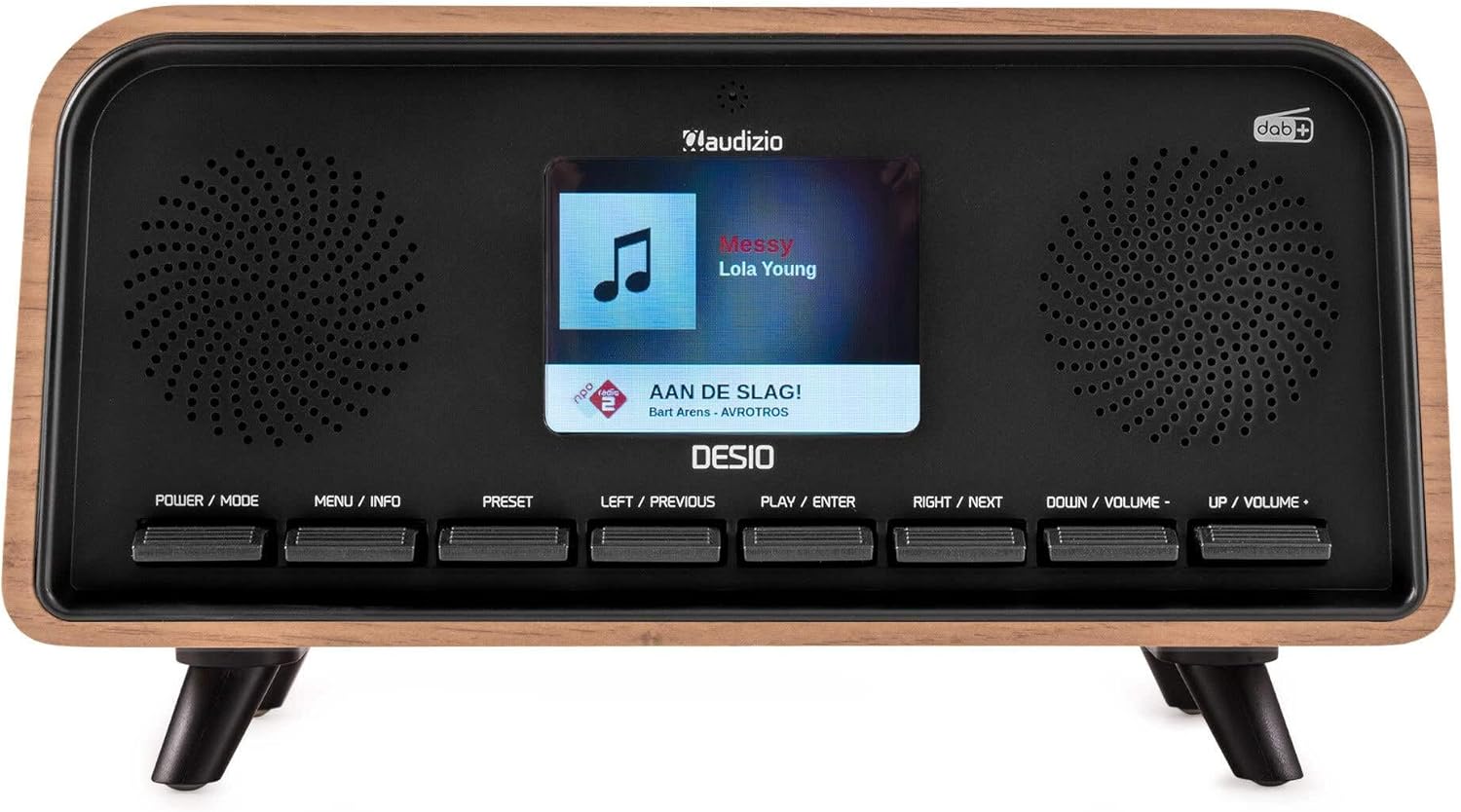
Devan view of the Audizio Desio radio, showing the display playing music with artist and track information. The control buttons are visible below the screen.
- POWER / MODE: Press to turn on/off. Press and hold to switch between DAB, FM, Bluetooth, USB, and AUX modes.
- MENU / INFO: Press to access menu options. In playback mode, press to cycle through information display.
- PRESET: Press to recall saved stations. Press and hold to save current station.
- LEFT / PREVIOUS: Navigate left in menus, or skip to previous track/station.
- PLAY / ENTER: Confirm selection in menus, or play/pause media.
- RIGHT / NEXT: Navigate right in menus, or skip to next track/station.
- DOWN / VOLUME -: Decrease volume, or navigate down in menus.
- UP / VOLUME +: Increase volume, or navigate up in menus.
Koneksyon Panèl Dèyè
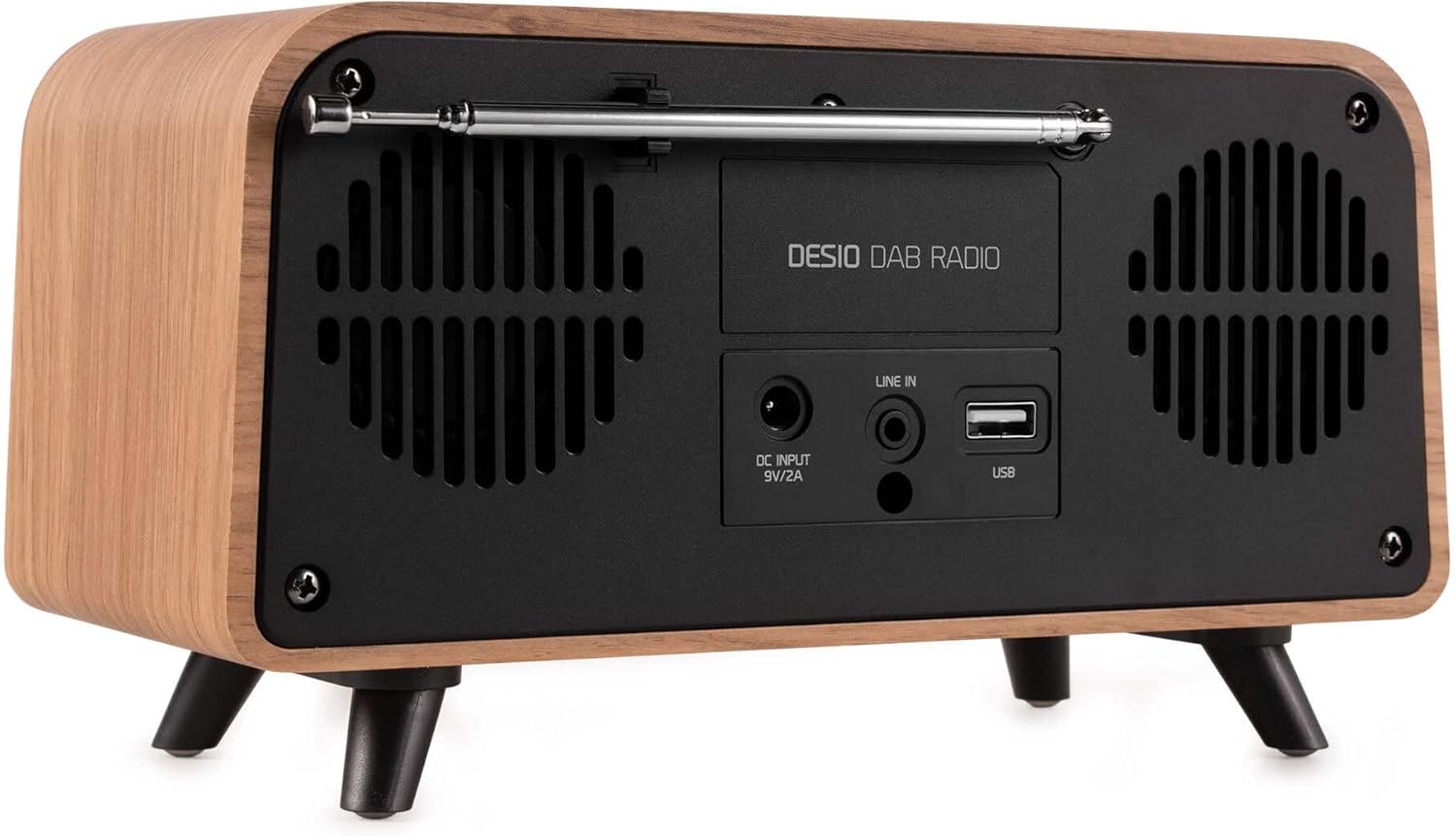
Dèyè view of the Audizio Desio radio, highlighting the DC INPUT 9V/2A, LINE IN (3.5mm AUX), and USB ports. The telescopic antenna is extended.
- DC INPUT 9V/2A: Konekte adaptè kouran ki founi an isit la.
- LINE IN (3.5mm AUX): Konekte aparèy odyo ekstèn yo lè l sèvi avèk yon kab odyo 3.5mm.
- USB: Insert a USB flash drive for MP3 playback.
- Antèn teleskopik: Extend fully for optimal DAB/DAB+ and FM reception.
5. Inisyal Enstalasyon
- Konekte pouvwa: Plug the provided DC 5V power adapter into the DC INPUT port on the rear of the radio, then plug the adapter into a wall outlet.
- Pwolonje antèn: Fully extend the telescopic antenna located on the rear of the unit for best reception.
- Pouvwa sou: Peze a POUVWA / MÒD bouton pou limen radyo a.
- First-time DAB Scan: Upon first power-on, the radio will automatically perform a full scan for DAB/DAB+ stations. This may take a few minutes. The display will show the scanning progress.
- Mete lè/dat: The time and date will usually be set automatically via DAB signal. If not, you can manually set them via the menu.
6. Operasyon Enstriksyon
6.1 Operasyon Radyo DAB/DAB+

Devan view of the Audizio Desio radio, displaying a DAB radio station ('NPO Klassiek') and current time.
- Select DAB Mode: Peze a POUVWA / MÒD button repeatedly until 'DAB' is displayed.
- Eskane pou Estasyon yo: If no stations are found or you wish to rescan, press MENI / ENFO, Lè sa a, sèvi ak LEFT / PREVIOUS or DWA / PWOCHÈ to select 'Full Scan' and press PLAY / ENTER.
- Chwazi Estasyon: Sèvi ak la LEFT / PREVIOUS or DWA / PWOCHÈ buttons to browse available stations. Press PLAY / ENTER yo chwazi yon estasyon.
- Sove Prereglaj: Pou sove yon estasyon, peze epi kenbe bouton an PRESET bouton. Sèvi ak LEFT / PREVIOUS or DWA / PWOCHÈ to choose a preset number (1-50), then press PLAY / ENTER pou konfime.
- Rapèl Prereglaj: Pou raple yon estasyon ki anrejistre, peze bouton an PRESET button (do not hold). Use LEFT / PREVIOUS or DWA / PWOCHÈ pou chwazi predefinisyon ou vle a, apresa peze PLAY / ENTER.

Devan view of the Audizio Desio radio, showing the 'Preset Recall' menu on the display, indicating empty preset slots.
6.2 Operasyon Radyo FM
- Chwazi Mòd FM: Peze a POUVWA / MÒD button repeatedly until 'FM' is displayed.
- Oto Scan: Peze epi kenbe PLAY / ENTER to automatically scan for and save available FM stations.
- Manyèl akor: Sèvi ak LEFT / PREVIOUS or DWA / PWOCHÈ to fine-tune the frequency.
- Save/Recall Presets: Follow the same procedure as for DAB radio (Section 6.1).
6.3 Bluetooth (BT) Operation

Devan view of the Audizio Desio radio, with the display showing 'BT' (Bluetooth) mode and 'Connected' status.
- Select BT Mode: Peze a POUVWA / MÒD button repeatedly until 'BT' is displayed. The radio will enter pairing mode, indicated by a flashing Bluetooth icon.
- Pè aparèy: On your smartphone, tablet, or laptop, enable Bluetooth and search for available devices. Select 'Audizio Desio' from the list.
- Konekte: Once paired, the display will show 'Connected'. You can now stream audio from your device to the radio.
- Kontwòl lèktur: Use your connected device or the radio's PLAY / ENTER, LEFT / PREVIOUS, ak DWA / PWOCHÈ bouton pou kontwole lèktur.
6.4 Lekti USB

Devan view of the Audizio Desio radio, with the display showing 'USB' mode, current time, and details of an MP3 file ke yo te jwe.
- Mete yon kle USB: Insert a USB flash drive (formatted to FAT32) containing MP3 files into the USB port on the rear of the radio.
- Chwazi Mòd USB: Peze a POUVWA / MÒD button repeatedly until 'USB' is displayed. The radio will automatically start playing the first compatible audio file.
- Navige Files: Sèvi ak LEFT / PREVIOUS or DWA / PWOCHÈ to skip tracks. Press PLAY / ENTER pou fè yon poz/reprann lekti.
6.5 Antre AUX
- Konekte aparèy: Connect an external audio device (e.g., MP3 player, smartphone) to the 'LINE IN' (3.5mm AUX) port on the rear of the radio using a 3.5mm audio cable (not included).
- Chwazi Mòd AUX: Peze a POUVWA / MÒD button repeatedly until 'AUX' is displayed.
- Kontwòl Lektur: Playback is controlled directly from your connected external device. Adjust volume using the radio's volume controls.
6.6 Fonksyon Alam ak Revèy
- Mete Alam: Jwenn aksè nan paramèt alam yo atravè MENI / ENFO button. You can set multiple alarms with customizable sources (DAB, FM, Buzzer), volume, and recurrence (daily, weekdays, weekends).
- Revèy dòmi: Minitè dòmi an pèmèt radyo a etenn otomatikman apre yon sèten tan. Jwenn aksè nan fonksyon sa a atravè MENI / ENFO button and select the desired duration.
- Fonksyon Snooze: When an alarm sounds, press any button (except Power) to activate the snooze function for a short period.
7. Antretyen
- Netwayaj: Sèvi ak yon twal mou, sèk, ki pa gen pousyè pou netwaye sifas radyo a. Pa sèvi ak pwodui netwayaj abrazif, sir, oswa solvan.
- Swen antèn: Manyen antèn teleskopik la ak anpil atansyon pou evite li pliye oswa kraze.
- Depo: If storing the radio for an extended period, disconnect it from the power supply and store it in a cool, dry place.
NAN. Depanaj
| Pwoblèm | Kòz posib | Solisyon |
|---|---|---|
| Pa gen pouvwa | Adaptè kouran an pa konekte oswa priz la gen pwoblèm. | Tcheke koneksyon adaptè kouran an epi eseye yon lòt priz kouran. |
| Resepsyon DAB/FM ki pòv | Antenna not fully extended or poor signal area. | Fully extend the antenna. Try repositioning the radio. Perform a full scan. |
| Bluetooth pa konekte | Radio not in BT mode, device not in pairing mode, or too far away. | Ensure radio is in BT mode. Put your device in pairing mode. Move device closer to the radio (within 10m). |
| Lektur USB pa travay | USB drive not inserted correctly, unsupported file format, or drive not FAT32. | Reinsert USB drive. Ensure files are MP3. Check USB drive format (FAT32). |
| Pa gen son ki soti nan AUX la | Radio not in AUX mode, cable faulty, or external device volume low. | Select AUX mode. Check 3.5mm cable. Increase volume on both radio and external device. |
9. Espesifikasyon teknik
- Mak: Odisyon
- Modèl: Desio
- Teknoloji sentonizè: FM, DAB +
- Bluetooth: Version 5.0 (Range: 10m)
- Opsyon pou lekti: Bluetooth, USB, 3.5mm AUX input
- Estasyon Prereglaj: 50
- Ekspozisyon: 2.4 pous Koulè LCD
- Fonksyon: Alarm, Sleep Timer, Snooze, Dimming, Week/Weekend Alarm
- Max Speaker Power: 30 Watt
- Pwovizyon pou pouvwa: DC 5V (Power Adapter)
- Dimansyon pwodwi (H x W x P): 32 x 16 x 18 cm
- Pwa: 1.66 kg
10. Garanti ak sipò
This product comes with a standard manufacturer's warranty. For detailed warranty terms and conditions, please refer to the documentation provided at the time of purchase or contact your retailer.
For technical support, troubleshooting assistance, or service inquiries, please contact the Audizio customer support team or your local dealer. Please have your product model number (Desio) and purchase information ready when contacting support.


