Entwodiksyon
Thank you for choosing the Nakamichi OW1500ANC Bluetooth 5.4 ANC Noise Cancelling Headphones. This manual provides detailed instructions for setting up, operating, and maintaining your headphones to ensure optimal performance and longevity. Please read this manual thoroughly before use.
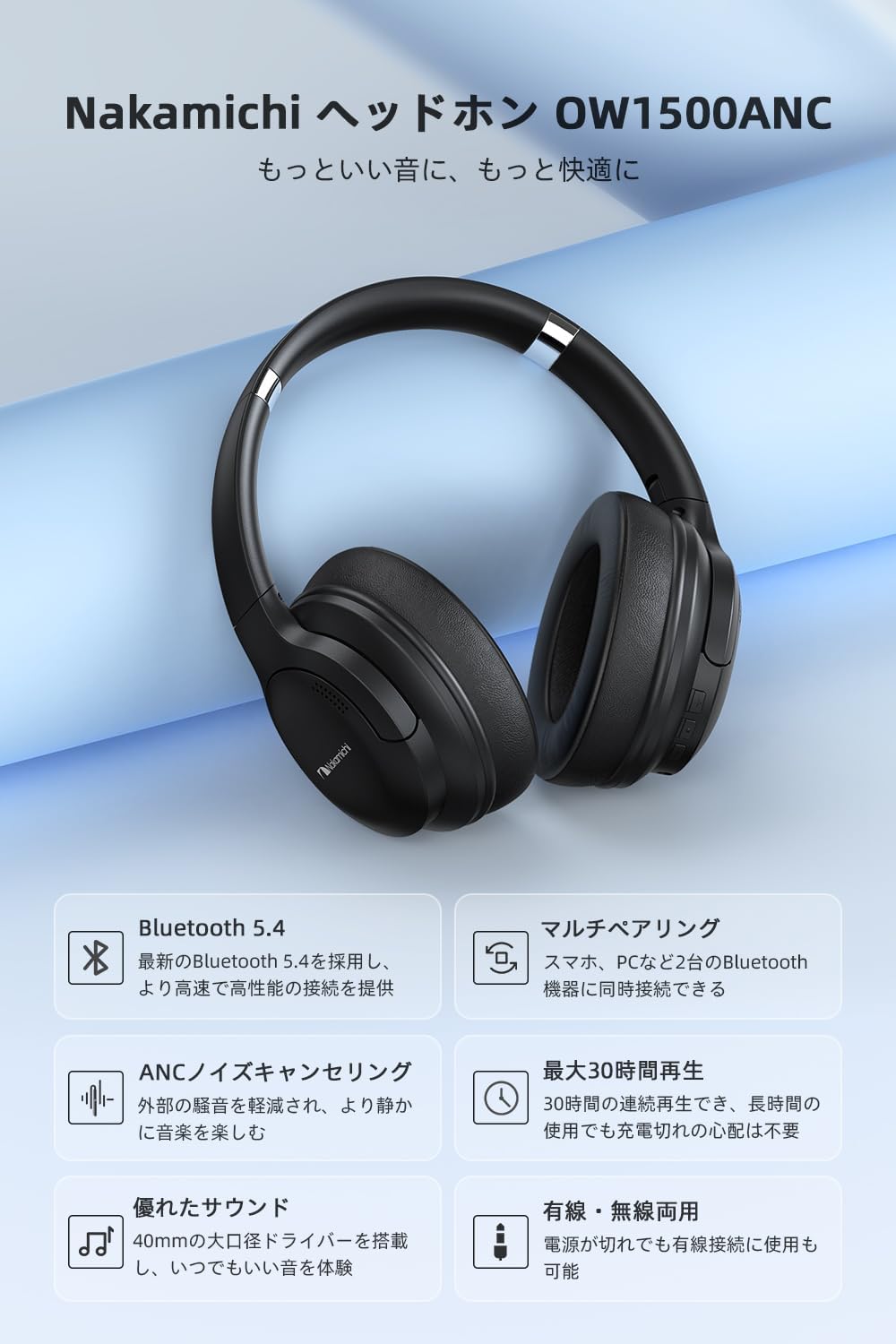
Image: The Nakamichi OW1500ANC headphones, showcasing konsepsyon nwa elegant yo ak fòm ki kouvri zòrèy la.
Kontni pake
Verifye ke tout atik yo prezan nan pakè a:
- Nakamichi OW1500ANC Headphones
- USB-C Chaje Kab
- 3.5mm Audio Kab
- Manyèl Itilizatè (dokiman sa a)
Pwodwi souview
Familiarize yourself with the various parts of your Nakamichi OW1500ANC headphones.

Image: A diagram highlighting key features of the Nakamichi OW1500ANC headphones, including Bluetooth 5.4, ANC, multi-pairing, 30-hour playback, wired/wireless use, and 40mm drivers.
Kontwòl ak pò
- Bouton pouvwa: Used to power on/off the headphones and initiate Bluetooth pairing.
- Bouton Volim Monte/Pwochen Mizik: Press to increase volume, hold to skip to the next track.
- Bouton Diminye Volim/Mizik Presedan: Press to decrease volume, hold to go to the previous track.
- Bouton milti-fonksyon (MFB): Jwe/mete mizik sou poz, reponn/fini apèl.
- ANC Button/Switch: Aktive oswa dezaktive Anilasyon Bri Aktif la.
- USB-C pò: Pou chaje kas ekoutè yo.
- 3.5mm Audio Jack: Pou koneksyon filaire lè l sèvi avèk kab odyo ki enkli a.
- Mikwofòn: Entegre pou apèl.
Enstalasyon
Chaje kas ekoutè yo
Anvan premye itilizasyon an, chaje kas ekoutè yo nèt. Yon chaj konplè pran apeprè 2.5 èdtan.
- Connect the USB-C charging cable to the USB-C port on the headphones.
- Konekte lòt bout kab la nan yon adaptè kouran USB (pa enkli) oubyen nan yon pò USB òdinatè.
- Endikatè LED la ap montre eta chaj la (pa egzanp, wouj pou chaj, ble pou chaj konplè).

Image: The Nakamichi OW1500ANC headphones with visual indicators for battery life, showing approximately 24 hours with ANC on, 30 hours with ANC off, and 2.5 hours charging time.
Enstriksyon Operasyon
Power On/Off
- Pouvwa sou: Peze epi kenbe bouton Power la pou apeprè 3 segonn jiskaske endikatè LED la limen.
- Pouvwa Off: Peze epi kenbe bouton Power la pou apeprè 3 segonn jiskaske endikatè LED la etenn.
Pè Bluetooth
The headphones utilize Bluetooth 5.4 for stable and fast connections.
- Asire w ke kas ekoutè yo etenn.
- Peze epi kenbe bouton Pouvwa a pou apeprè 5-7 segonn jiskaske endikatè LED la flache wouj ak ble altènativman, sa ki endike mòd koneksyon.
- Sou aparèy ou an (telefòn entelijan, tablèt, òdinatè pòtab), aktive Bluetooth epi chèche aparèy ki disponib yo.
- Select "Nakamichi OW1500ANC" from the list of devices.
- Yon fwa konekte, endikatè ki ap dirije a ap klere ble tou dousman.

Image: An illustration demonstrating the advanced Bluetooth 5.4 chip within the Nakamichi OW1500ANC headphones, emphasizing improved connection speed and stability.
Multi-pwen Koneksyon
The headphones support connecting to two Bluetooth devices simultaneously.
- Pair the headphones with the first device (e.g., smartphone) as described above.
- Dezaktive Bluetooth sou premye aparèy la.
- Put the headphones back into pairing mode and pair them with the second device (e.g., laptop).
- Enable Bluetooth on the first device again. The headphones should automatically connect to both devices.
- To switch between devices, pause audio on the currently playing device and start playback on the other.
Nòt: Multi-point connection is only available in wireless mode. Simultaneous wired and wireless connection is not supported.

Image: The Nakamichi OW1500ANC headphones connected to both a laptop and a smartphone, illustrating the multi-point connection feature.
Anilasyon bri aktif (ANC)
The ANC feature reduces ambient noise by up to -22dB, providing a quieter listening experience.
- Aktive ANC: Press the dedicated ANC button/switch. The LED indicator will light up (e.g., green) to confirm ANC is active.
- Dezaktive ANC: Press the ANC button/switch again. The LED indicator will turn off.

Image: A person wearing the Nakamichi OW1500ANC headphones, demonstrating the effective noise reduction provided by the ANC feature in a busy environment.
Koneksyon branche
Use the 3.5mm audio cable for a wired connection, especially when the battery is depleted or for devices without Bluetooth.
- Branche yon bout kab odyo 3.5mm lan nan priz odyo 3.5mm kas ekoutè a.
- Branche lòt bout la nan priz pwodiksyon odyo aparèy ou an.
- Kas ekoutè yo ap chanje otomatikman nan mòd filaire.

Image: A split image showing the Nakamichi OW1500ANC headphones connected wirelessly via Bluetooth to a laptop (top) and wired via a 3.5mm audio cable to a laptop (bottom), highlighting dual connectivity options.
Lèktur Mizik ak Apèl
| Fonksyon | Aksyon |
|---|---|
| Jwe/Poz | Peze MFB a yon fwa. |
| Volim leve | Peze bouton an Volim moute yon fwa. |
| Volim desann | Peze bouton Volim desann yon fwa. |
| Next Track | Hold the Volume Up button for 2 seconds. |
| Previous Track | Hold the Volume Down button for 2 seconds. |
| Reponn/Fen Apèl | Peze MFB a yon fwa. |
| Rejte apèl | Hold the MFB for 2 seconds. |
Konfò ak Portabilite
The Nakamichi OW1500ANC headphones are designed for extended comfortable use and easy transport.
- Kousen zòrèy mou: Made with low-rebound material for a soft feel and reduced pressure on the ears during long listening sessions.
- Bando reglabl: The headband features sliders on both sides, allowing you to adjust the length to fit various head sizes and shapes.
- Konsepsyon pliable: The headphones can be folded compactly for easy storage and portability, making them convenient for travel or commuting.

Image: A composite image detailing the comfortable earcups, adjustable headband, and foldable design of the Nakamichi OW1500ANC headphones.
Antretyen
Bon antretyen asire lonjevite ak pèfòmans kas ekoutè ou yo.
- Netwayaj: Sèvi ak yon twal mou epi sèk pou netwaye kas ekoutè yo. Pa sèvi ak pwodui netwayaj abrazif oswa solvan.
- Depo: Lè w pa ap itilize kas ekoutè yo, sere yo nan yon kote ki fre epi sèk, lwen limyè solèy dirèk ak tanperati ekstrèm. Sèvi ak konsepsyon pliyan an pou yon depo konpak.
- Evite imidite: Pa ekspoze kas ekoutè yo nan dlo oswa imidite twòp.
- Swen kab: Handle the charging and audio cables gently. Avoid sharp bends or excessive pulling.
Depanaj
Si ou rankontre pwoblèm ak kas ekoutè ou yo, gade solisyon komen sa yo:
| Pwoblèm | Solisyon |
|---|---|
| Kas ekoutè yo pa limen. | Asire w ke kas ekoutè yo byen chaje. Konekte yo nan yon sous kouran epi eseye ankò. |
| Pa ka konekte ak yon aparèy. |
|
| Pa gen son oswa volim nan ba. |
|
| ANC pa efikas. | Ensure the ANC feature is activated (LED indicator on). ANC is most effective against low-frequency, constant noise. |
| Sound cuts out or is unstable. |
|
Espesifikasyon
| Karakteristik | Detay |
|---|---|
| Nimewo Modèl | OW1500ANC |
| Koneksyon Teknoloji | San fil (Bluetooth 5.4), Filaire (3.5mm Jack) |
| Kalite kas ekoutè | Sou-zòrèy |
| Kontwòl bri | Anilasyon bri aktif (ANC) |
| Repons Frekans | 20 Hz - 20 KHz |
| Sansiblite | 116 dB |
| Enpedans | 32 Ohms |
| Dire Batri (ANC Off) | Jiska 30 èdtan |
| Dire Batri (ANC Aktive) | Jiska 24 èdtan |
| Tan pou chaje | Apeprè 2.5 èdtan |
| Pwa atik | 0.22 kg (220 g) |
| Dimansyon pwodwi | 18.3 x 16.5 x 8.2 cm |
| Konpozan ki enkli | USB-C Cable, User Manual |
| Aparèy konpatib | Gaming Consoles, Tablets, Desktop PCs, Laptops, Mobile Phones |
Garanti ak sipò
Nakamichi provides a manufacturer's warranty for this product.
- Peryòd garanti: 1 ane apati dat acha a.
- Kontakte sipò: If you encounter any issues with your Nakamichi OW1500ANC headphones, please contact Nakamichi customer support. Refer to the contact information provided on the product packaging or the official Nakamichi websit.
Tanpri kenbe prèv ou achte pou reklamasyon garanti.


