1. Entwodiksyon
This manual provides essential information for the safe and efficient operation of your Thomson 43FT2S15 FHD LED Smart TV. Please read this manual thoroughly before using the television and retain it for future reference.
2. Enfòmasyon sou Sekirite
Toujou swiv prekosyon sekirite debaz yo lè w ap itilize pwodui sa a pou diminye risk dife, chòk elektrik, ak blesi.
- Pa ekspoze televizyon an ak lapli oswa imidite.
- Pa bloke ouvèti vantilasyon.
- Asire w ke kòd elektrik la byen konekte atè.
- Pa mete televizyon an sou yon kabwa, yon sipò, yon trépied, yon sipò oswa yon tab ki pa estab.
- Dekonekte televizyon an pandan tanpèt zèklè oswa lè ou pa itilize li pou yon bon bout tan.
- Refere tout sèvis yo bay pèsonèl sèvis kalifye.
3. Pake kontni
Verifye ke tout atik ki nan lis anba a yo enkli nan pakè ou a:
- Thomson 43FT2S15 FHD LED Smart TV
- Adaptè pouvwa
- Kontwòl Remote
- Manyèl Itilizatè (dokiman sa a)
- Kat Garanti

Imaj: Devan view of the Thomson 43FT2S15 Smart TV.
4. Enstalasyon
4.1 Enstalasyon Fizik
The Thomson 43FT2S15 TV is designed for table mounting. Ensure the TV is placed on a stable, flat surface.

Image: Diagram showing the dimensions of the Thomson 43FT2S15 Smart TV. The screen size is 109 cm (43 inches) diagonally, with a width of 95 cm and height of 60 cm (including stand). The depth is 6 cm.
Dimansyon (W x H x P): 95 cm x 60 cm x 6 cm (without stand, depth is 6 cm). The screen diagonal is 109 cm (43 inches).
4.2 Konekte Aparèy
Konekte aparèy ekstèn ou yo nan pò ki apwopriye yo sou televizyon an. Gade dyagram ki anba a pou wè kote pò yo ye.
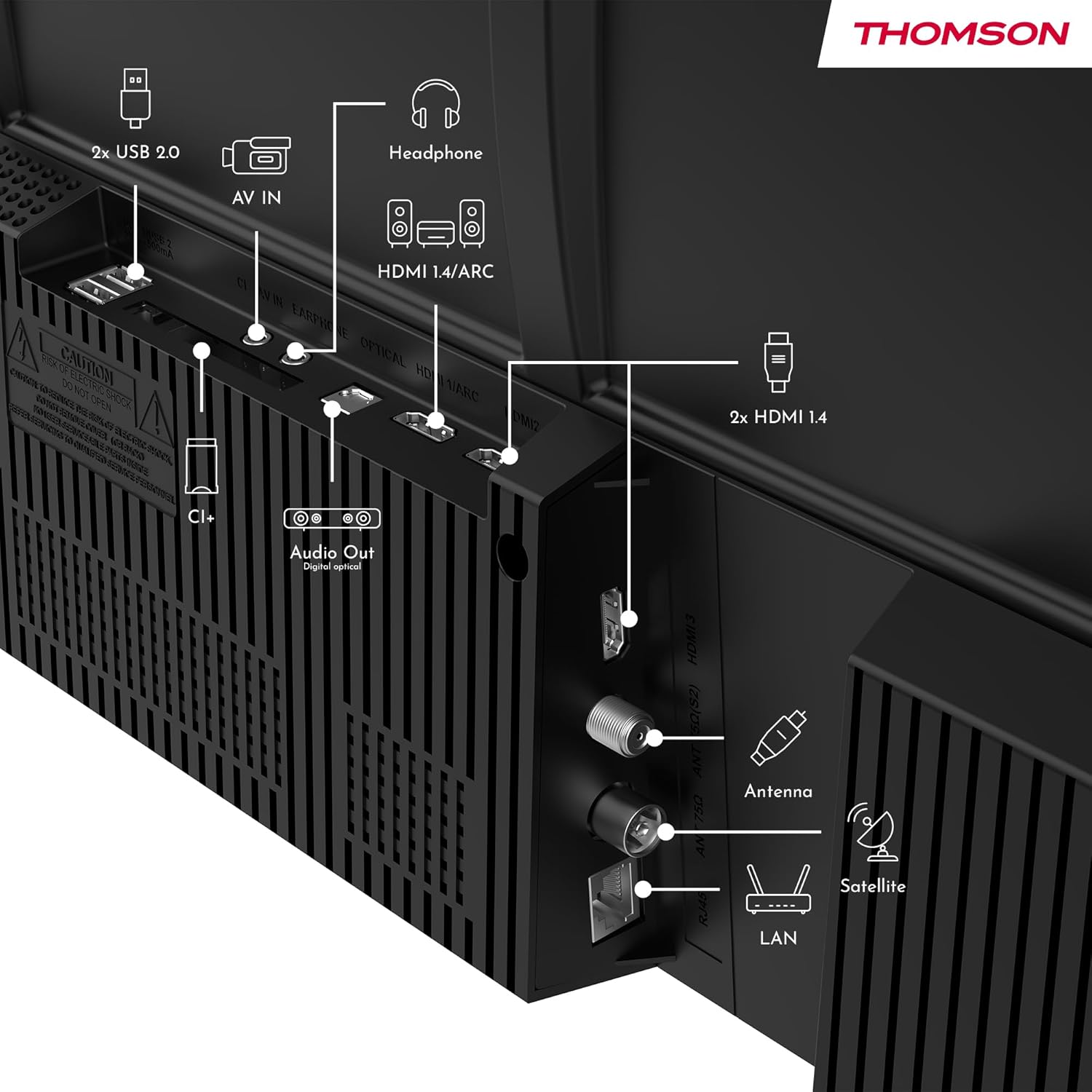
Imaj: Dèyè view of the Thomson 43FT2S15 Smart TV showing various connection ports. These include 2x USB 2.0, AV IN, Headphone out, HDMI 1.4/ARC, Optical Audio Out, CI+, Antenna (DVB-T2/C), Satellite (DVB-S2), and LAN (Ethernet).
- HDMI: Connect external devices like Blu-ray players, game consoles, or set-top boxes. The TV has 2 HDMI 1.4 ports, one with ARC support.
- USB: For connecting USB storage devices. The TV has 2 USB 2.0 ports.
- Antèn/Satelit: Connect your terrestrial or satellite antenna for live TV.
- LAN (Etènèt): Pou yon koneksyon entènèt filaire.
- Wi-Fi: Pou koneksyon entènèt san fil.
- Bluetooth: Pou konekte akseswa san fil konpatib.
- Sòti Odyo (Optik): For connecting to an external sound system.
- Ekoutè: Pou konekte kas ekoutè.
- Plas CI+: For inserting a Conditional Access Module (CAM) for encrypted channels.
5. Operasyon Enstriksyon
5.1 Power On/Off
Connect the power adapter to the TV and a power outlet. Press the power button on the remote control to turn the TV on or off.
5.2 Sistèm operasyon TiVo ak karakteristik entelijan
Your Thomson Smart TV is powered by TiVo OS, which integrates live TV, streaming applications, and on-demand services into a single, intuitive interface. Personalized recommendations help you discover new content.

Image: The Thomson Smart TV displaying the TiVo OS interface with various streaming apps like Netflix, Canal+, Prime Video, YouTube, and Disney+.
5.3 Kontwòl vwa
Use the TiVo Voice Control feature to navigate channels, open applications, or search for content across different platforms using voice commands. The remote control includes a microphone for this function.

Image: The Thomson Smart TV remote control highlighting the voice control microphone, backlit buttons, and direct access buttons for streaming services.
5.4 Wireless Display
Mirror content from your smartphone, tablet, or laptop to the TV screen using the Wireless Display function. This allows for easy sharing of videos, photos, and applications.
5.5 Amelyorasyon Odyo ak Videyo
- Dolby Audio: Experience enhanced sound quality with Dolby Audio, providing clear dialogue and immersive, multi-dimensional effects.

Image: A Thomson Smart TV displaying content with visual representations of sound waves, indicating the Dolby Audio feature.
- HDR10: Enjoy sharper contrast and lifelike colors with HDR10 technology, revealing details in both bright highlights and deep shadows.

Image: A split-screen comparison showing the difference between SDR (Standard Dynamic Range) and HDR10 (High Dynamic Range) image quality on a Thomson Smart TV, demonstrating improved contrast and color.
5.6 Kontwòl Remote
The ergonomic remote control features backlit buttons for easy navigation in low light conditions. It also includes direct access buttons for popular streaming services such as Netflix, YouTube, Prime Video, Disney+, and Canal+.
6. Antretyen
Pou asire lonjevite ak pèfòmans optimal televizyon ou an, swiv gid antretyen sa yo:
- Netwaye ekran an: Siye ekran an dousman avèk yon twal mou ki pa gen pousyè. Pou mak ki difisil pou retire, sèvi ak yon pwodui netwayaj ekran ki fèt espesyalman pou televizyon, aplike sou twal la, pa dirèkteman sou ekran an.
- Netwaye kabinè a: Sèvi ak yon twal mou epi sèk pou siye kabinè televizyon an. Pa sèvi ak pwodui netwayaj abrazif oswa solvan.
- Vantilasyon: Asire w ouvèti vantilasyon yo sou dèyè televizyon an pa bloke pou anpeche li chofe twòp.
- Kòd pouvwa: Regularly check the power cord for any damage. If damaged, contact qualified service personnel for replacement.
NAN. Depanaj
Si w rankontre pwoblèm ak televizyon w lan, gade etap depanaj komen sa yo:
- Pa gen pouvwa:
- Check if the power cord is securely connected to the TV and the power outlet.
- Ensure the power outlet is functioning by plugging in another device.
- Eseye peze bouton pouvwa a sou televizyon an menm, pa sèlman sou telekòmand lan.
- Pa gen imaj/son:
- Verifye ke sous opinyon ki kòrèk la chwazi (pa egzanp, HDMI 1, Antèn).
- Tcheke tout koneksyon kab ant televizyon an ak aparèy ekstèn yo.
- Ajiste volim nan epi asire w ke televizyon an pa sou silans.
- Kontwòl Remote pa travay:
- Ranplase pil yo nan kontwòl remote la.
- Asire w pa gen okenn obstak ant telekòmand lan ak detèktè IR televizyon an.
- Smart TV Features Not Working (Wi-Fi/Apps):
- Check your internet connection. Restart your router if necessary.
- Go to the TV's network settings to ensure it's connected to Wi-Fi or Ethernet.
- Eseye rekòmanse televizyon an.
For more complex issues, please contact customer support or refer to the manufacturer's websit.
8. Espesifikasyon
Key technical specifications for the Thomson 43FT2S15 FHD LED Smart TV:
| Karakteristik | Spesifikasyon |
|---|---|
| Mak | Thomson |
| Modèl | 43FT2S15 |
| Gwosè ekran | 43 pous (109 cm) |
| Teknoloji ekspozisyon | dirije |
| Rezolisyon | 1920 x 1080 (FHD) |
| Rafrechisman pousantaj | 60 Hz |
| Aspè rapò | 16:9 |
| Sistèm operasyon | TiVo OS |
| Teknoloji Audio | Dolby Audio (Dolby Atmos encoding) |
| Sipò HDR | HDR10 |
| Koneksyon | Wi-Fi, Ethernet, Bluetooth, 2x HDMI 1.4 (1x ARC), 2x USB 2.0, Optical Audio Out, AV In, Headphone, CI+ |
| Tuner | DVB-T2/C/S2 (Triple Tuner) |
| Sèvis Entènèt Sipòte | Netflix, YouTube, Prime Video, Disney+, Canal+, Browser |
| Dimansyon (pwodwi) | 6 x 95 x 60 cm; 6.5 kg |
| Klas efikasite enèji | E |

Image: Energy efficiency label for the Thomson 43FT2S15 Smart TV, showing an energy class of E and energy consumption of 42 kWh/1000h (SDR) and 46 kWh/1000h (HDR).
Pou jwenn enfòmasyon detaye sou pwodwi a, gade baz done EPREL la: https://eprel.ec.europa.eu/qr/1969521
9. Garanti ak sipò
Your Thomson 43FT2S15 TV comes with a warranty. Please refer to the included Warranty Card for specific terms and conditions.
Pou sipò teknik oswa kesyon sou sèvis, tanpri kontakte manifakti a:
- Manifakti: Kouranview GmbH
- Websit: www.streamview.com
- Imèl: kontak@difizyonview.com
- Telefòn: +4318900066
Please have your model number (43FT2S15) and purchase information ready when contacting support.


