1. Pwodwi souview
The KLIM Cassette Player Boombox is a versatile audio device combining classic cassette playback with modern features like AM/FM radio, Bluetooth connectivity, and USB playback/recording. Its portable design allows for use at home or on the go.
Karakteristik kle:
- Jwè kasèt ak Anrejistrè
- Sintonizatè Radyo AM/FM
- Bluetooth Connectivity for wireless streaming
- USB Port for MP3 playback and recording
- Integrated Microphone for direct recording
- Headphone Jack for private listening
- Dual Power: AC power cord or 4 x C-type batteries (not included)
- Portable design with a carrying handle
Ki sa ki nan bwat la:
- KLIM Cassette Player Boombox
- AC pouvwa kòd
- Manyèl itilizatè

Figi 1: Devan view of the KLIM Cassette Player Boombox, showcasing its controls and cassette compartment.
2. Enstalasyon
Alimente aparèy la:
The KLIM Cassette Player Boombox can be powered in two ways:
- AC pouvwa: Connect the included AC power cord to the device's power input and then to a standard wall outlet.
- Pouvwa batri: For portable use, insert 4 x C-type batteries (not included) into the battery compartment located on the underside of the device. Ensure correct polarity.

Figi 2: Anba view showing the battery compartment for portable power.
3. Operasyon Enstriksyon
3.1. Cassette Player/Recorder
- Slide the function selector to 'TAPE'.
- Press the 'OPEN' button to open the cassette compartment.
- Insert a cassette tape with the open side facing up.
- Fèmen lòj kasèt la.
- Use the 'PLAY', 'STOP/EJECT', 'FFWD' (Fast Forward), and 'REW' (Rewind) buttons to control playback.
- To record, ensure a blank tape is inserted. Press the 'REC' button to start recording from the built-in microphone, radio, or USB.

Figi 3: Top view of the boombox with a cassette tape inserted into the compartment.
3.2. AM/FM Radio
- Slide the function selector to 'RADIO'.
- Lonje antèn teleskopik la pou yon resepsyon optimal.
- Use the 'BAND' switch to select between AM and FM frequencies.
- Rotate the 'TUNING' knob to find your desired radio station.
3.3. Bluetooth Koneksyon
- Slide the function selector to 'BT' (Bluetooth).
- The device will enter pairing mode, indicated by a flashing light or audible prompt.
- Sou smartphone ou oswa tablèt, aktive Bluetooth epi chèche aparèy ki disponib.
- Select 'KLIM Cassette Player' (or similar name) from the list to pair.
- Yon fwa li konekte, ou ka difize odyo san fil soti nan aparèy ou an.
3.4. Lekti ak Anrejistreman USB
- Slide the function selector to 'USB'.
- Mete yon kle USB ki gen odyo MP3 ladan l files nan pò USB a.
- The device will automatically begin playing the audio files. Use the playback controls (play/pause, skip) to navigate.
- To record to USB, ensure a USB drive is inserted. Press the 'REC' button while in radio or cassette mode to record the audio source directly to the USB drive.
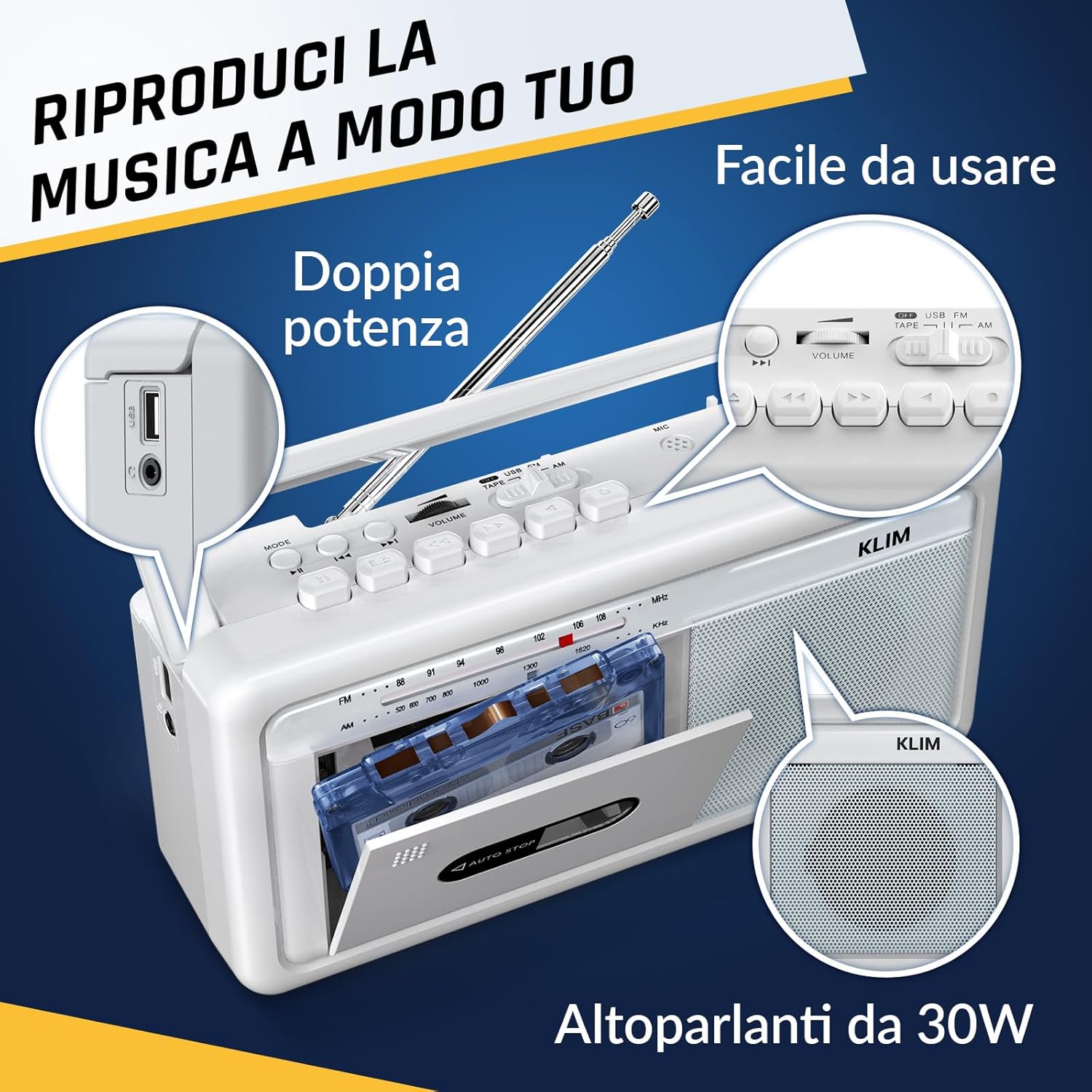
Figi 4: Side view highlighting the USB port for media playback and recording.
3.5. Itilizasyon kas ekoutè
Connect standard 3.5mm headphones to the headphone jack for private listening. The internal speakers will automatically mute when headphones are connected.
Video 1: Instructions on how to record a tape to USB using the WTB-795 model. This video demonstrates the USB recording functionality.
Videyo 2: Finiview of a retro cassette player with USB, Bluetooth, and AM/FM radio features, similar to the KLIM Cassette Player Boombox.
4. Antretyen
- Kenbe aparèy la pwòp lè w siye l avèk yon twal mou epi sèk. Evite itilize pwodui netwayaj likid oswa solvan.
- Regularly clean the cassette head and pinch rollers with a cotton swab lightly dampenfuze ak alkòl izopropilik pou asire yon bon jan kalite son optimal epi pou anpeche domaj nan kasèt la.
- Keep the device away from direct sunlight, heat sources, and excessive dust or moisture.
- When not in use for extended periods, remove batteries to prevent leakage.
NAN. Depanaj
| Pwoblèm | Solisyon posib |
|---|---|
| Pa gen pouvwa | Check if the AC power cord is securely connected. If using batteries, ensure they are inserted correctly and are not depleted. |
| Pa gen son ki soti nan moun kap pale | Increase the volume. Ensure headphones are not connected. Check the function selector is in the correct mode (TAPE, RADIO, BT, USB). |
| Resepsyon radyo pòv | Extend the telescopic antenna fully. Adjust the antenna direction. Try moving the unit to a different location. |
| Kasèt la pa ap jwe/anrejistre | Ensure the tape is inserted correctly. Check if the tape is damaged. Clean the cassette head and pinch rollers. |
| Bluetooth pa konekte | Ensure the unit is in Bluetooth mode. Make sure your device's Bluetooth is enabled and within range. Try unpairing and re-pairing the device. |
| Pwoblèm lekti USB | Ensure the USB drive is formatted correctly (FAT32) and contains compatible audio files (MP3, WAV, WMA, AAC, FLAC). Try a different USB drive. |
6. Espesifikasyon
- Mak: KLIM
- Modèl: Jwè kasèt
- Dimansyon pwodwi: 25 x 13.1 x 7.6 cm
- Pwa atik: 1 kg
- Aparèy konpatib: MP3 Player, Smartphone, Tablet
- Audio Sòti Mode: Stereo
- Fòma odyo sipòte: Cassette, Analog Radio, MP3, WAV, WMA, AAC, FLAC, Bluetooth
- Sous pouvwa: Corded Electric (AC) / 4 x C-type Batteries (not included)
- Koneksyon Teknoloji: USB, Bluetooth
- Koulè: Frost Blan
- Nimewo Atik: KLSIN4825
7. Garanti & Sipò
The KLIM Cassette Player Boombox comes with a 5-ane garanti. For any questions, technical assistance, or warranty claims, please contact KLIM customer support. Our team is available 24/7 to assist you.
Please refer to the contact information provided in your product packaging or visit the official KLIM websit pou plis detay.


