1. Entwodiksyon
This manual provides essential instructions for the safe and efficient operation of your OOYCYOO 100A MPPT Solar Charge Controller. Please read this manual thoroughly before installation and use, and retain it for future reference. This controller is designed to optimize power harvesting from your solar panels and manage battery charging for various 12V, 24V, 36V, and 48V battery systems.
2. Enstriksyon Sekirite
- Ensure all wiring is correctly polarized (+ to + and - to -) to prevent damage to the controller and connected devices.
- Always connect the battery first, then the solar panels, and finally the load. Disconnect in reverse order.
- Install appropriate circuit breakers for each line (solar, battery, load) to protect against overcurrent.
- Mount the controller in a well-ventilated area, away from direct sunlight, high temperatures, and moisture.
- Pa eseye demonte oswa repare kontwolè a tèt ou. Kontakte pèsonèl kalifye pou sèvis.
- Wear appropriate personal protective equipment (PPE) during installation, including gloves and eye protection.
3. Pwodwi souview
The OOYCYOO 100A MPPT Solar Charge Controller utilizes advanced Maximum Power Point Tracking (MPPT) technology to achieve up to 99% tracking efficiency and 98% peak conversion efficiency. It supports a wide range of battery types and system voltages, ensuring optimal charging and system protection.
Karakteristik kle:
- Batri konpatibilite: Supports 12V/24V/36V/48V Lead-acid (Sealed, Gel, AGM, Flooded) and Lithium batteries.
- Segondè efikasite: Up to 99% tracking efficiency and 98% peak conversion efficiency.
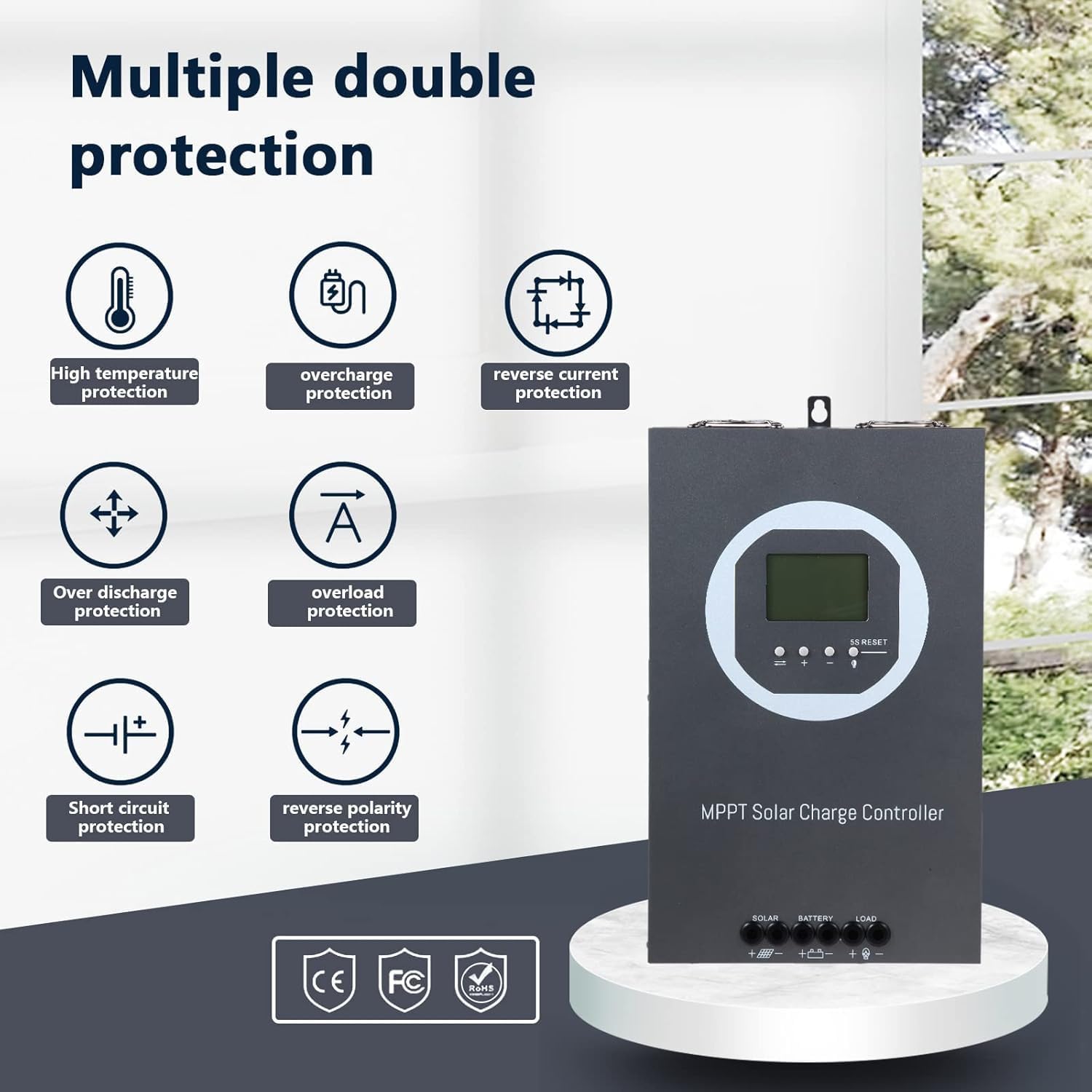
- Pwoteksyon konplè: Includes PV array short-circuit, PV input over-current, load short-circuit, PV/battery polarity reversal, and over-temperature protection.
- Wide Voltage/Power Support: Max PV D' voltage up to 150V. Max input power up to 5000W (for 48V system).
- Refwadisman efikas: Die-cast aluminum construction with a turbofan for active cooling (activates >45°C, turns off <40°C).
- Ekspozisyon LCD: Provides real-time system information.
Idantifikasyon konpozan:


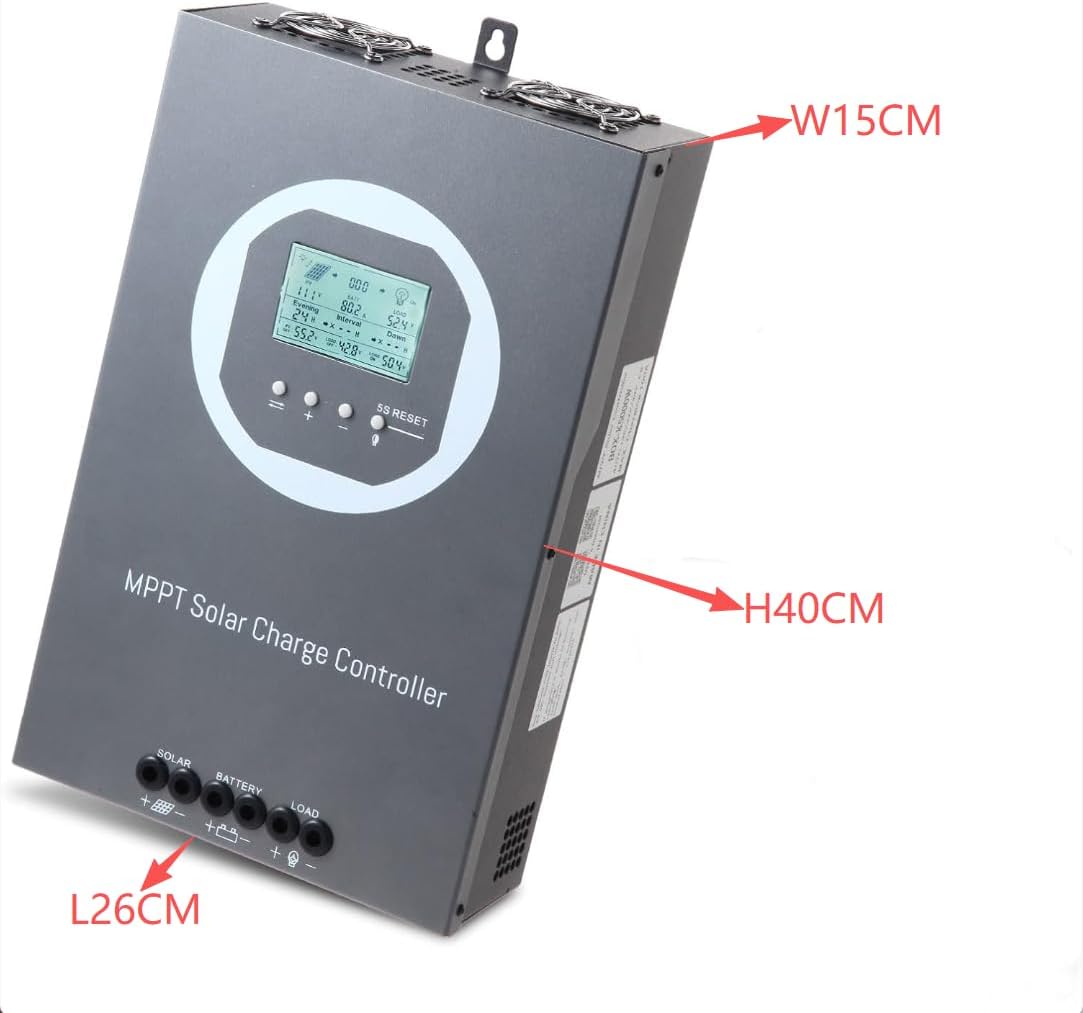
4. Enstalasyon ak Enstalasyon
4.1 Monte kontwolè a
Mount the controller vertically on a wall or suitable surface using screws. Ensure there is ample space around the controller for proper heat dissipation. Avoid mounting in direct sunlight or areas with high humidity.
4.2 Koneksyon fil elektrik
Follow the connection order carefully to prevent damage. Always connect the battery first, then the solar panels, and finally the load.
- Koneksyon batri: Connect the battery positive and negative terminals to the controller's BATTERY terminals. Ensure correct polarity.
- Koneksyon Panèl Solè: Connect the solar array positive and negative terminals to the controller's SOLAR terminals. Ensure correct polarity.
- Koneksyon chaj: Connect the DC load positive and negative terminals to the controller's LOAD terminals. Ensure correct polarity.

4.3 Seleksyon Kalite Batri
After initial power-up, configure the battery type on the controller's LCD display. The controller supports Lead-acid (Sealed, Gel, AGM, Flooded) and Lithium batteries. Refer to the detailed operating instructions for navigating the menu and selecting the appropriate battery type.
4.4 Parallel Communication Setup (Optional)
For systems requiring multiple charge controllers, parallel communication can be established. This allows controllers to synchronize their operations. The following video demonstrates the process:
5. Operasyon Enstriksyon
5.1 Enfòmasyon sou ekran LCD a
The LCD display provides real-time monitoring of your solar system's status. Information typically includes:
- PV Antre Voltage ak pouvwa
- Batri Voltage ak Kouran Chaje
- Load Output Current and Power
- Tanperati batri
- Estati Sistèm ak Kòd Erè
5.2 Fonksyon bouton
The controller features several buttons for navigation and settings adjustment:
- PV/SET: Abitye view PV parameters and enter/save settings.
- BAT/▲: Abitye view battery parameters and increase values in settings.
- BAT/▼: Abitye view battery parameters and decrease values in settings.
- LOAD/5S RESET: Used to control load output and perform a 5-second reset.
For detailed operation and setting adjustments, refer to the specific instructions in the full product manual.
5.3 General Operation Demonstration
The following videos provide visual demonstrations of the controller's basic operation and connection procedures:
6. Antretyen
6.1 Sistèm refwadisman
The controller is equipped with a die-cast aluminum casing and a turbofan for efficient heat dissipation. The fan activates automatically when the internal temperature exceeds 45°C and turns off when it drops below 40°C. Ensure the ventilation openings are clear of obstructions to maintain optimal cooling performance.

6.2 Swen Jeneral
- Regularly inspect all wiring connections for tightness and corrosion.
- Kenbe kontwolè a pwòp epi san pousyè ak debri. Sèvi ak yon twal sèk pou netwaye.
- Periodically check the battery terminals for any signs of wear or damage.
NAN. Depanaj
This section provides guidance for common issues. For complex problems, consult the full product manual or contact customer support.
Pwoblèm komen:
- Pa gen kouran/ekspozisyon: Check battery connections and ensure the battery circuit breaker is closed.
- Pa gen chaj: Verify solar panel connections, ensure sufficient sunlight, and check for any PV array short-circuits.
- Chaj la pa fonksyone: Check load connections, ensure the load output is enabled, and verify the load is not exceeding the controller's capacity.
- Kòd erè: Refer to the specific error code definitions in the comprehensive manual for diagnostic steps.

8. Espesifikasyon
| Karakteristik | Spesifikasyon |
|---|---|
| Mak | OOYCYOO |
| Nimewo Modèl | 100A 48V 36V 24V 12V |
| Sistèm Voltage | 12V/24V/36V/48V Auto |
| Max PV Antre Voltage | 150V |
| Maksimòm Pouvwa Antre (Sistèm 12V) | 1200W (PV input voltage range: DC20V~DC80V) |
| Maksimòm Pouvwa Antre (Sistèm 24V) | 2400W (PV input voltage range: DC37V~DC105V) |
| Maksimòm Pouvwa Antre (Sistèm 36V) | 3600W (PV input voltage range: DC50V~DC150V) |
| Maksimòm Pouvwa Antre (Sistèm 48V) | 4800W (PV input voltage range: DC72V~DC150V) |
| Kalite batri sipòte | Lead-acid (Sealed, Gel, AGM, Flooded), Lithium |
| Efikasite Suivi | Jiska 99% |
| Konvèsyon Efikasite | Jiska 98% |
| Refwadisman | Die-cast aluminum with turbofan |
| Kalite ekspozisyon | LCD |
| Pwa atik | 8.58 liv |
| Dimansyon pake | 15.75 x 10.24 x 5.91 pous |
| Materyèl | Aliminyòm |

9. Enfòmasyon sou Garanti
Please refer to the product packaging or the official OOYCYOO website for detailed warranty terms and conditions. Typically, products are covered against manufacturing defects for a specified period from the date of purchase.
10. Sipò pou Kliyan
For technical assistance, troubleshooting, or any inquiries regarding your OOYCYOO MPPT Solar Charge Controller, please contact OOYCYOO customer support through the vendor's contact information provided at the point of purchase or on their official websit.


