1. Entwodiksyon
The ANYFAR RM-LH3715F Decoder Adapter is designed to upgrade the infotainment system in compatible Land Rover and Jaguar vehicles. This adapter seamlessly integrates modern features such as wireless Apple CarPlay, wireless Android Auto, Mirror Link, and support for aftermarket backup cameras, all while retaining the original vehicle's controls and display. This manual provides detailed instructions for installation, operation, and troubleshooting to ensure optimal performance.
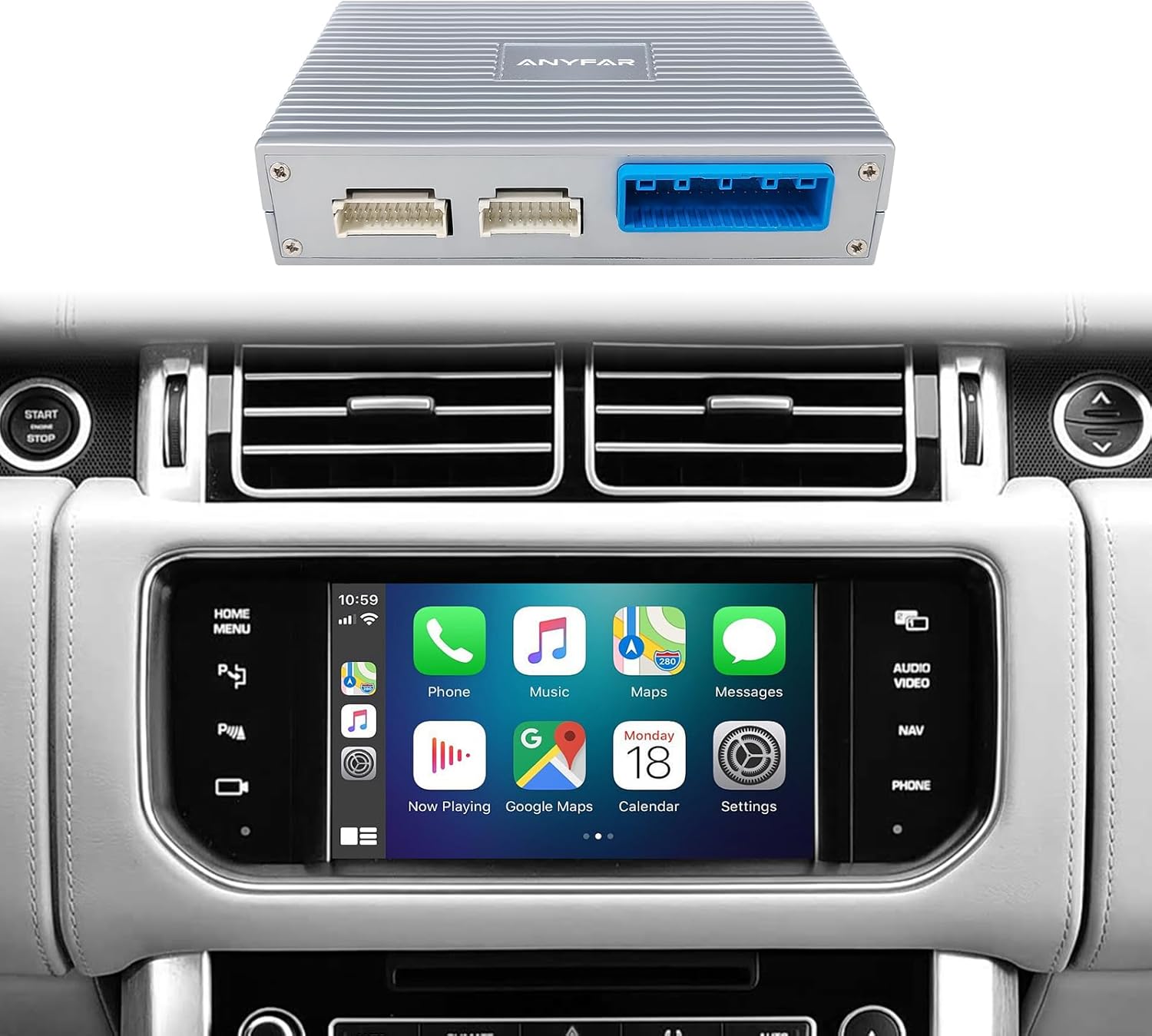
The ANYFAR Decoder Adapter module, designed to integrate with your vehicle's existing infotainment system, shown here with Apple CarPlay activated on the car's 8-inch screen.
2. Konpatibilite
This decoder adapter is specifically compatible with 2011–2018 Land Rover Range Rover and Jaguar vehicles that are equipped with a BOSCH head unit and an 8-inch screen. Please verify your vehicle's system before installation.
2.1. Compatible Vehicle Models:
- Landrover:
- 2011–2017 Land Rover Discovery
- 2015–2017 Range Rover
- 2015–2017 Range Rover Evoque
- 2012-2016 Discovery 4
- 2013-2016 Discovery Sport
- 2011-2014 Freelander 2
- Jagwa:
- 2015–2018 Jaguar XE
- 2016–2018 Jaguar XF
- 2012-2014 XE/XF
- 2012-2015 XJL
- 2013-2016 F-TYPE
Enpòtan: Your vehicle must have an 8-inch screen and a BOSCH head unit. Please refer to the verification guide below.
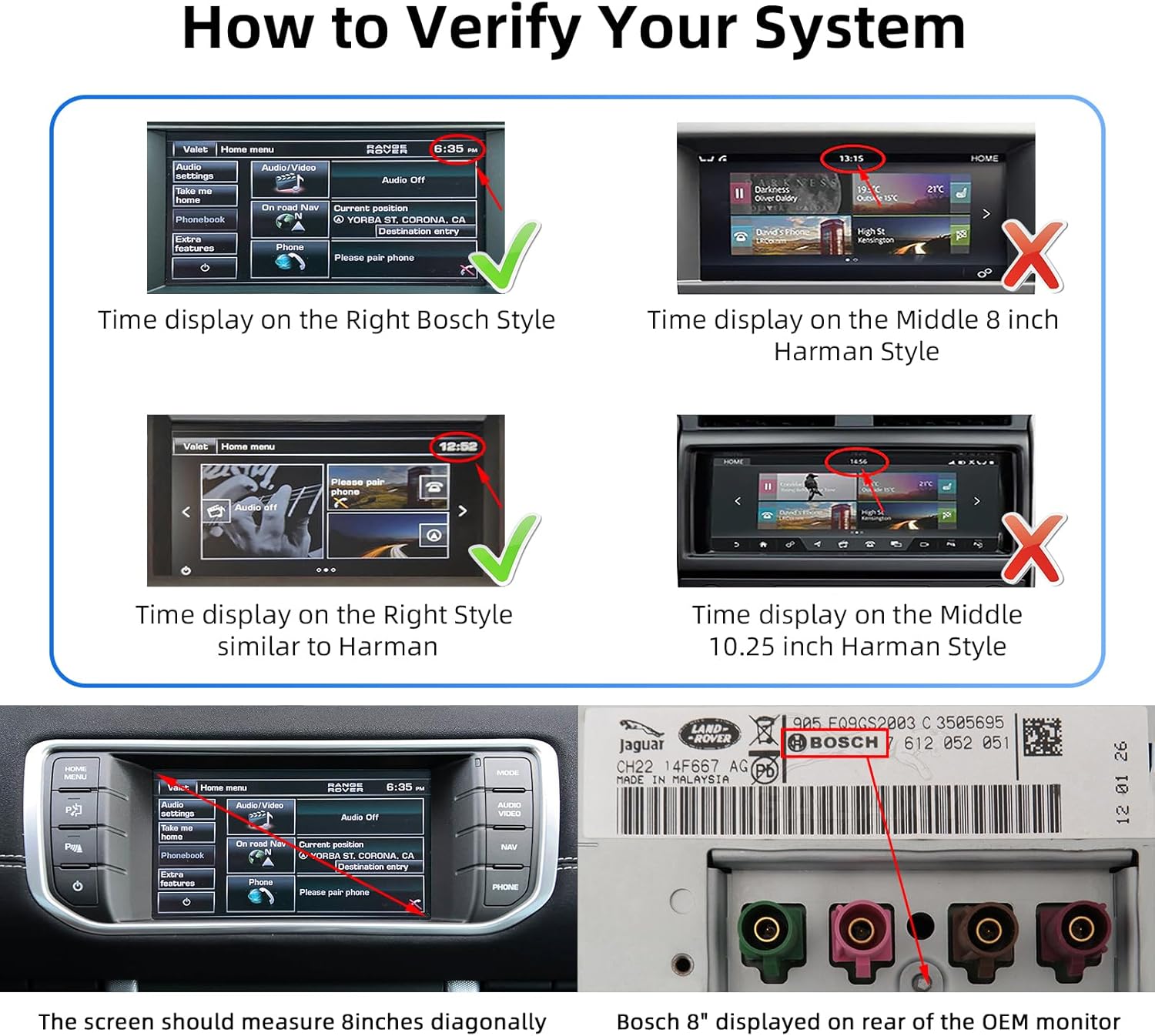
This guide helps verify system compatibility by showing examples of the correct time display style for Bosch head units and indicating where to find the "BOSCH" label on the rear of the OEM head unit. The screen must also measure 8 inches diagonally. The part number 3505695CH22-14F667-AG is an example of a compatible Bosch unit.

A comprehensive list of compatible Land Rover and Jaguar models, including Range Rover Evoque, Range Rover, Discovery 4, Discovery Sport, Freelander 2, XE/XF, XJL, and F-TYPE, along with their compatible model years and the required 8-inch screen size.
3. Pake kontni
Tanpri verifye sa ki nan pake a lè w resevwa li pou asire w tout konpozan yo la:
- ANYFAR Decoder Adapter Module (RM-LH3715F)
- Kab adaptè
- Pouvwa kab
- Screen Signal Cable
- RCA/USB kab
- Manyèl Itilizatè (dokiman sa a)

Contents of the package, including the main decoder unit (dimensions: 124mm x 80mm x 27mm), adapter cable, power cable, screen signal cable, and RCA/USB cable.
4. Enstalasyon ak Enstalasyon
Installation of the ANYFAR Decoder Adapter involves integrating it with your vehicle's existing head unit. Due to the complexity of vehicle electronics, professional installation is highly recommended to ensure proper functionality and to avoid damage to your vehicle.
4.1. General Installation Steps (Professional Installation Recommended):
- Preparasyon: Asire w ke machin nan etenn epi batri a dekonekte anvan ou kòmanse enstalasyon an.
- Inite Tèt Aksè: Carefully remove the necessary trim panels to access the rear of your vehicle's 8-inch Bosch head unit.
- Konekte kab: Connect the provided adapter cable, power cable, and screen signal cable to the corresponding ports on the decoder module and the vehicle's head unit wiring harness. Follow the wiring diagram provided with the product for specific connections.
- Route Câbles: Route all cables neatly and securely to prevent interference or damage.
- Mount Decoder Module: Securely mount the ANYFAR Decoder Adapter module in a suitable location behind the dashboard, ensuring it does not obstruct any moving parts or ventilation.
- Rekonekte batri: Yon fwa tout koneksyon yo byen fèm epi yo verifye, rekonekte batri machin nan.
- Fonksyonalite tès: Turn on the ignition and test all functions of the original system and the newly integrated CarPlay/Android Auto system.
The design allows for a lossless installation, meaning no permanent modifications to the original wiring are typically required. However, specific vehicle models may vary.

This image illustrates the seamless integration, allowing users to switch between the original vehicle's infotainment system and the new CarPlay/Android Auto interface by long-pressing the designated button on the car's knob.
5. Operasyon Enstriksyon
5.1. Switching Between Systems:
After installation, you can switch between your vehicle's original OEM system and the CarPlay/Android Auto interface by long-pressing the designated button on your car's control knob or central control panel. Refer to your vehicle's specific controls for the exact button.
5.2. Wireless CarPlay & Android Auto:
The adapter supports wireless Apple CarPlay and wireless Android Auto. Once connected, you can access navigation, music, calls, messaging, and voice assistant features directly on your car's screen without needing to physically connect your phone via a cable.
- Peyaj: Follow the on-screen instructions to pair your smartphone via Bluetooth for the initial setup of wireless CarPlay or Android Auto.
- Koneksyon otomatik: After the initial pairing, your phone should automatically connect to the system when you start the vehicle.

Plis paseview of the Wireless CarPlay Smart Module's capabilities, including Bluetooth connectivity, Apple CarPlay, Android Auto, voice control, live map integration, and online entertainment options.
5.3. Mirror Link & USB Drive Playback:
Utilize Mirror Link (for Android) or AirPlay (for iOS) to mirror your smartphone's display onto the car screen. This allows for viewing videos and other content from your phone. The integrated USB port also supports playing videos or music directly from a USB drive and can be used for phone charging.
5.4. Intelligent Voice Control:
Access your phone's voice assistant (Siri for CarPlay, Google Assistant for Android Auto) for hands-free control. This enables you to make calls, send messages, get directions, and control music using voice commands, enhancing driving safety.

Car screen displaying Siri and Google Assistant interfaces for intelligent voice control, allowing hands-free operation.
5.5. Retaining Original Car Controls:
The adapter is designed to maintain full functionality of your vehicle's original controls. This includes the touchscreen, steering wheel buttons, voice control, and physical knobs, ensuring a familiar user experience.
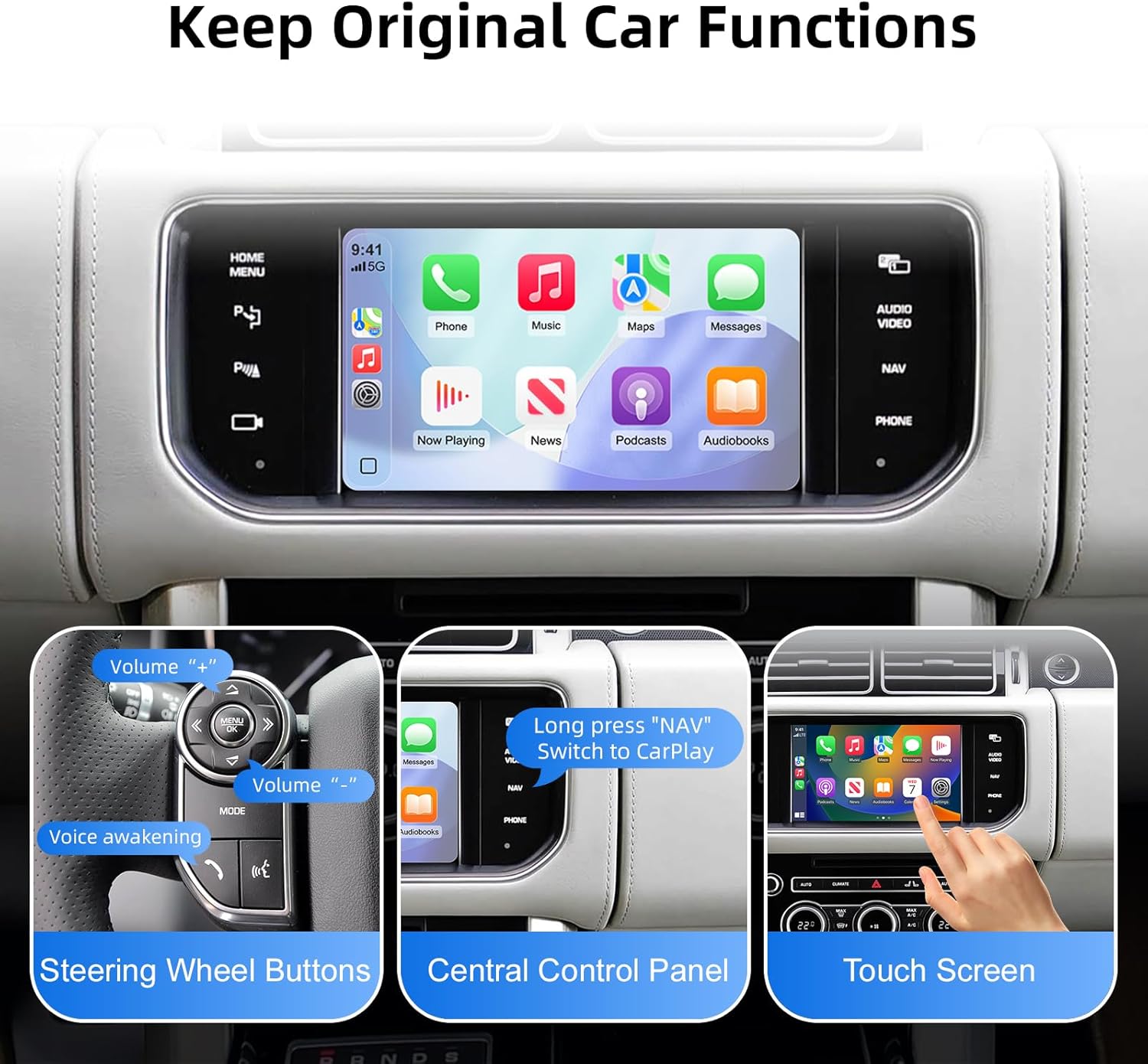
The system ensures that original car functions such as steering wheel controls, central control panel, and touchscreen remain fully operational.
5.6. Backup Camera Input Support:
The decoder supports connecting an aftermarket backup camera or front camera. When the vehicle is shifted into reverse, the camera feed will automatically display on the car screen, providing enhanced safety and convenience.

The system integrates with an optional aftermarket rear-view camera, displaying parking guidelines on the car screen.
6. Espesifikasyon
| Karakteristik | Detay |
|---|---|
| Nimewo Modèl | RM-LH3715F |
| Aparèy konpatib | Smartphone (for CarPlay/Android Auto/Mirror Link) |
| Kalite Connector | USB Kalite A |
| Dimansyon pake | 9.76 x 6.65 x 3.9 pous |
| Pwa atik | 1.63 liv (0.74 kilogram) |
| Manifakti | Huizhou Rhythm Technology Co, Ltd |
NAN. Depanaj
If you encounter issues with your ANYFAR Decoder Adapter, please refer to the following common troubleshooting steps:
- Pa gen ekspozisyon/ekran nwa:
- Ensure all cables are securely connected to the decoder module and the vehicle's head unit.
- Verify that the vehicle's ignition is on.
- Confirm compatibility with your specific vehicle model and head unit (Bosch 8-inch screen).
- CarPlay/Android Auto pa konekte:
- Ensure Bluetooth is enabled on your smartphone and it is paired with the decoder adapter.
- Check Wi-Fi settings on your phone; some wireless CarPlay/Android Auto systems use Wi-Fi for data transfer after initial Bluetooth pairing.
- Restart your smartphone and the vehicle's infotainment system.
- Pwoblèm odyo:
- Verify that the audio input source on your vehicle's head unit is correctly selected (e.g., AUX, Media).
- Check volume levels on both your phone and the car's audio system.
- Original Controls Not Responding:
- Ensure the system is correctly switched back to the OEM interface if you are trying to use original functions.
- If the issue persists, recheck all cable connections.
For further assistance, please contact ANYFAR customer support.
8. Garanti ak sipò
The ANYFAR Decoder Adapter comes with a manufacturer's warranty. Please refer to the warranty card included in your package or visit the official ANYFAR website for detailed warranty terms and conditions. For technical support, installation queries, or troubleshooting assistance, please contact ANYFAR customer service through their official channels.
Manifakti: Huizhou Rhythm Technology Co, Ltd


