1. Entwodiksyon
This manual provides essential information for the safe and efficient use of your VIVO T4 Pro 5G smartphone. Please read this guide thoroughly before using your device to ensure optimal performance and longevity. The VIVO T4 Pro 5G is a high-performance smartphone designed for advanced mobile communication and multimedia experiences.
2. Pake kontni
Verifye ke pake ou a gen atik sa yo:
- VIVO T4 Pro 5G Smartphone
- Adaptè pouvwa
- USB Kalite-C kab
- Zouti èkstrè SIM
- Gid Quick Start
- Enfòmasyon sou Sekirite
Note: Contents may vary by region.
3. Aparèy souview
Familiarize yourself with the physical components of your VIVO T4 Pro 5G.
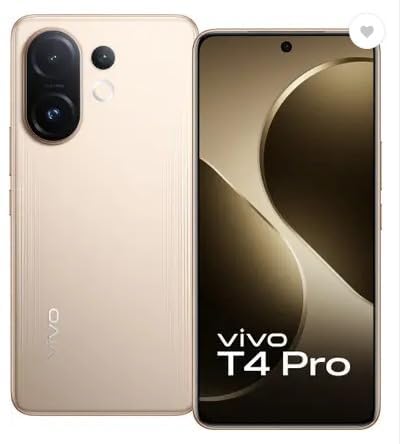
Figi 3.1: Devan ak dèyè View of the VIVO T4 Pro 5G. This image displays the overall design of the smartphone, highlighting its sleek profile and the placement of the rear camera module.
3.1. Bouton fizik ak pò yo
- Bouton pouvwa: Located on the right side, used to power on/off the device, or wake/sleep the screen.
- Bouton Volim: Located above the power button, used to adjust media volume, call volume, and notification volume.
- USB Kalite-C Port: Sitiye anba a, yo itilize li pou chaje ak transfere done.
- Plato SIM kat: Typically on the side, for inserting Nano-SIM cards and microSD cards.
- Oratè: Sitiye anba a pou pwodiksyon odyo.
- Mikwofòn: Entegre pou apèl ak anrejistreman vwa.
3.2. Sistèm Kamera
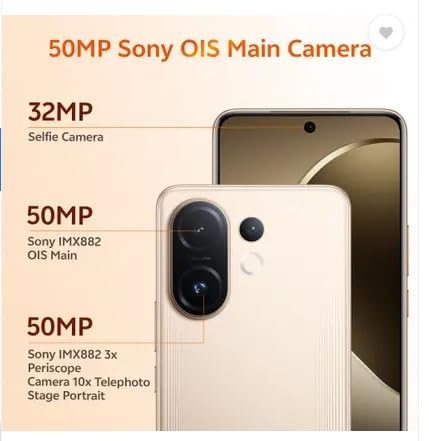
Figi 3.2: Detaye view of the VIVO T4 Pro 5G camera system. This image illustrates the arrangement of the 50MP Sony OIS Main Camera, 50MP Sony IMX882 3x Periscope Camera, and the 32MP Selfie Camera.
The VIVO T4 Pro 5G features an advanced camera system for high-quality photography and videography:
- Kamera dèyè: Includes a 50MP Sony OIS Main Camera and a 50MP Sony IMX882 3x Periscope Camera for versatile shooting, including telephoto and portrait modes.
- Kamera devan: A 32MP Selfie Camera for clear self-portraits and video calls.
3.3. Konpozan Entèn yo

Figi 3.3: Representation of the Snapdragon 7 Gen 4 processor. This image highlights the powerful chipset responsible for the device's performance.
The device is powered by a Snapdragon 7 Gen 4 processor, ensuring smooth performance for demanding applications and multitasking.
3.4. Karakteristik Durabilite

Figi 3.4: Illustration of the VIVO T4 Pro 5G's IP68 and IP69 water and dust protection. This image demonstrates the device's resistance to environmental elements.
The VIVO T4 Pro 5G features IP68 and IP69 ratings for industry-leading water and dust protection, enhancing its durability in various environments.
4. Enstalasyon
4.1. Mete kat SIM ak kat microSD
- Jwenn plato kat SIM lan sou bò aparèy ou an.
- Mete zouti pou retire kat SIM lan nan ti twou ki akote plato a epi peze byen fèm jiskaske plato a soti.
- Mete kat Nano-SIM ou yo ak/oswa kat microSD ou yo nan fant ki fèt pou sa sou plato a. Asire w ke kontak lò yo fè fas anba.
- Remete plato a nan aparèy la avèk prekosyon jiskaske li fè yon klik an plas.
4.2. Premye Limen ak Konfigirasyon Debaz
- Peze epi kenbe bouton Power la jiskaske logo VIVO a parèt.
- Swiv enstriksyon yo sou ekran an pou chwazi lang ou, rejyon ou, epi konekte ak yon rezo Wi-Fi.
- Konekte avèk kont Google ou a oswa kreye yon nouvo pou jwenn aksè nan sèvis Google yo ak Play Store la.
- Konfigure metòd blokaj ekran ou prefere a (Kòd PIN, modèl, modpas, anprent dwèt, oswa deblokaj figi).
- Complete the remaining setup steps as guided by the device.
5. Operasyon Enstriksyon
5.1. Navigasyon debaz
- Ekran Kay: Glise agoch oswa adwat pou navige ant ekran prensipal yo.
- Tiwa aplikasyon: Glise anlè soti anba ekran an pou jwenn aksè a tout aplikasyon ki enstale yo.
- Panèl Notifikasyon yo: Glise desann soti nan tèt ekran an pou view notifikasyon ak paramèt rapid.
- Aplikasyon ki sot pase yo: Swipe up and hold from the bottom (gesture navigation) or tap the square button (3-button navigation) to view aplikasyon ki fèk itilize yo.
5.2. Fè apèl epi voye mesaj
- Apèl: Open the Phone app, enter the number, and tap the call icon. To answer an incoming call, swipe up. To reject, swipe down.
- Mesaj: Open the Messages app, tap the "Start chat" or "+" icon, enter the recipient's number or select from contacts, type your message, and tap send.
5.3. Konekte ak rezo
- Wi-Fi: Ale nan Anviwònman > Rezo ak entènèt > Wi-Fi. Turn Wi-Fi on, select your desired network, and enter the password if required.
- Bluetooth: Ale nan Anviwònman > Aparèy konekte > Bluetooth. Turn Bluetooth on, scan for devices, and pair with your desired accessory.
- Done mobil: Ale nan Anviwònman > Rezo ak entènèt > Rezo mobil. Ensure Mobile data is enabled.
5.4. Sèvi ak Kamera a
The VIVO T4 Pro 5G camera offers various modes and features:
- Louvri aplikasyon Kamera a.
- Select your desired mode (e.g., Photo, Portrait, Video, Night, Pro).
- Tape bouton deklanchè a pou pran yon foto oubyen pou kòmanse/sispann anrejistreman videyo.
- Use pinch-to-zoom or the on-screen zoom controls to adjust magnification, including the 3x optical zoom.
- Access settings within the camera app to adjust resolution, filters, and other parameters.
6. Antretyen
6.1. Netwaye Aparèy Ou a
- Sèvi ak yon twal mou ki pa gen pousyè pou siye ekran an ak kò a.
- Evite itilize pwodui chimik ki agresif, materyèl abrazif, oswa lè konprese.
- Pou tach ki difisil pou retire, yon ti kras dampRense twal la avèk dlo oswa yon pwodui netwayaj ekran ki fèt pou aparèy elektwonik.
6.2. Swen batri
- Evite tanperati ekstrèm, paske yo ka diminye lavi batri a.
- Sèvi ak sèlman akseswa chaj orijinal yo oswa akseswa ki sètifye yo.
- Do not fully discharge the battery frequently. Optimal battery health is maintained between 20% and 80% charge.
6.3. Mizajou lojisyèl
Tcheke epi enstale mizajou lojisyèl regilyèman pou asire aparèy ou an gen dènye karakteristik yo, patch sekirite yo, ak amelyorasyon pèfòmans yo. Ale nan Anviwònman > Sistèm > Mizajou sistèm.
NAN. Depanaj
| Pwoblèm | Solisyon |
|---|---|
| Aparèy pa limen | Ensure the battery is charged. Connect to the power adapter and wait a few minutes before attempting to power on again. If unresponsive, perform a force restart by holding the Power button for 10-15 seconds. |
| Aplikasyon yo ap plante oswa yo bloke | Fèmen epi relouvri aplikasyon an. Vide kach aplikasyon an (Anviwònman > Aplikasyon > [Non aplikasyon an] > Depo ak kach > Efase kach). Update the app from the Play Store. If the issue persists, uninstall and reinstall the app. |
| Koneksyon rezo pòv | Check if Wi-Fi or mobile data is enabled. Restart your device. Reset network settings (Anviwònman > Sistèm > Opsyon Reyajiste > Reyajiste Wi-Fi, mobil ak Bluetooth). Ensure your SIM card is properly inserted. |
| Batri vide byen vit | Reduce screen brightness, disable unnecessary background apps, turn off Wi-Fi/Bluetooth/GPS when not in use. Check battery usage in Anviwònman> Batri pou idantifye aplikasyon ki konsome anpil enèji. |
| Capteur anprent dwèt la pa fonksyone | Asire w dwèt ou pwòp epi sèk. Anrejistre anprent dwèt ou yo ankò. Settings > Security & privacy > Device unlock > Fingerprint. |
7.1. Reset faktori
If you encounter persistent issues that cannot be resolved through basic troubleshooting, a factory reset may be necessary. Avètisman: Yon reset faktori ap efase tout done ki sou aparèy ou an. Fè yon kopi done enpòtan yo anvan ou kontinye. Ale nan Anviwònman> Sistèm> Opsyon Reyajiste> Efase tout done (reset faktori).
8. Espesifikasyon
| Non modèl | VIVO T4 Pro 5G |
| Sistèm operasyon | Android 14 |
| Processeur | Snapdragon 7 Jen 4 (2.8 GHz) |
| RAM | 8 GB |
| Depo Entèn | 128 GB |
| Rezolisyon ekspozisyon | 1080 x 2392 piksèl |
| Koneksyon | 5G, Wi-Fi, Bluetooth, GPS |
| Audio Port | USB Kalite C |
| Kapasite batri | 6500 Miliamp Orè |
| Dimansyon (LxWxH) | 16.4 x 7.7 x 0.8 santimèt |
| Pwa atik | 250 g |
| Koulè | Blaze Gold |
| Manifakti | Vivo Mobile India Pvt. Ltd. |
9. Garanti ak sipò
9.1. Garanti pwodwi
Your VIVO T4 Pro 5G smartphone comes with a standard manufacturer's warranty. Please refer to the warranty card included in your package for specific terms, conditions, and duration. Keep your purchase receipt as proof of purchase for warranty claims.
9.2. Sipò pou Kliyan
For technical assistance, service, or further inquiries, please contact VIVO customer support. You can find contact information on the official VIVO websit la oubyen nan seksyon sipò nan paramèt aparèy ou an.
- Sipò sou entènèt: Vizite ofisyèl la VIVO India Support Websit for FAQs, troubleshooting guides, and service center locations.
- Sant sèvis: Locate authorized VIVO service centers for in-person assistance.


