1. Entwodiksyon
The Trevi RDA 70 BR is a compact and versatile portable radio designed to provide a comprehensive listening experience. It combines traditional radio functionality with modern digital features, making it suitable for listening to music or news anywhere. This manual provides instructions for the proper setup, operation, and maintenance of your device.
2. Enfòmasyon sou Sekirite
- Li tout enstriksyon yo ak anpil atansyon anvan ou sèvi ak aparèy la.
- Pa ekspoze radyo a anba lapli, imidite, oswa tanperati ekstrèm.
- Evite mete aparèy la toupre sous chalè oswa nan limyè solèy la dirèk.
- Pa demonte oswa eseye repare aparèy la tèt ou. Konfye tout antretyen bay pèsonèl kalifye.
- Kenbe aparèy la lwen gwo chan mayetik.
- Use only the specified charging cable (USB Type-C) for recharging the battery.
3. Pake kontni
Asire w tout atik yo prezan nan pakè a:
- Trevi RDA 70 BR Portable Radio
- USB Kalite-C Chaje Kab
- Manyèl Itilizatè (dokiman sa a)
4. Pwodwi souview
Familiarize yourself with the various parts and controls of your Trevi RDA 70 BR radio.

Figi 1: Devan angilè view of the Trevi RDA 70 BR Portable Radio, showing the speaker grille, display, and main controls.
Kontwòl panèl devan
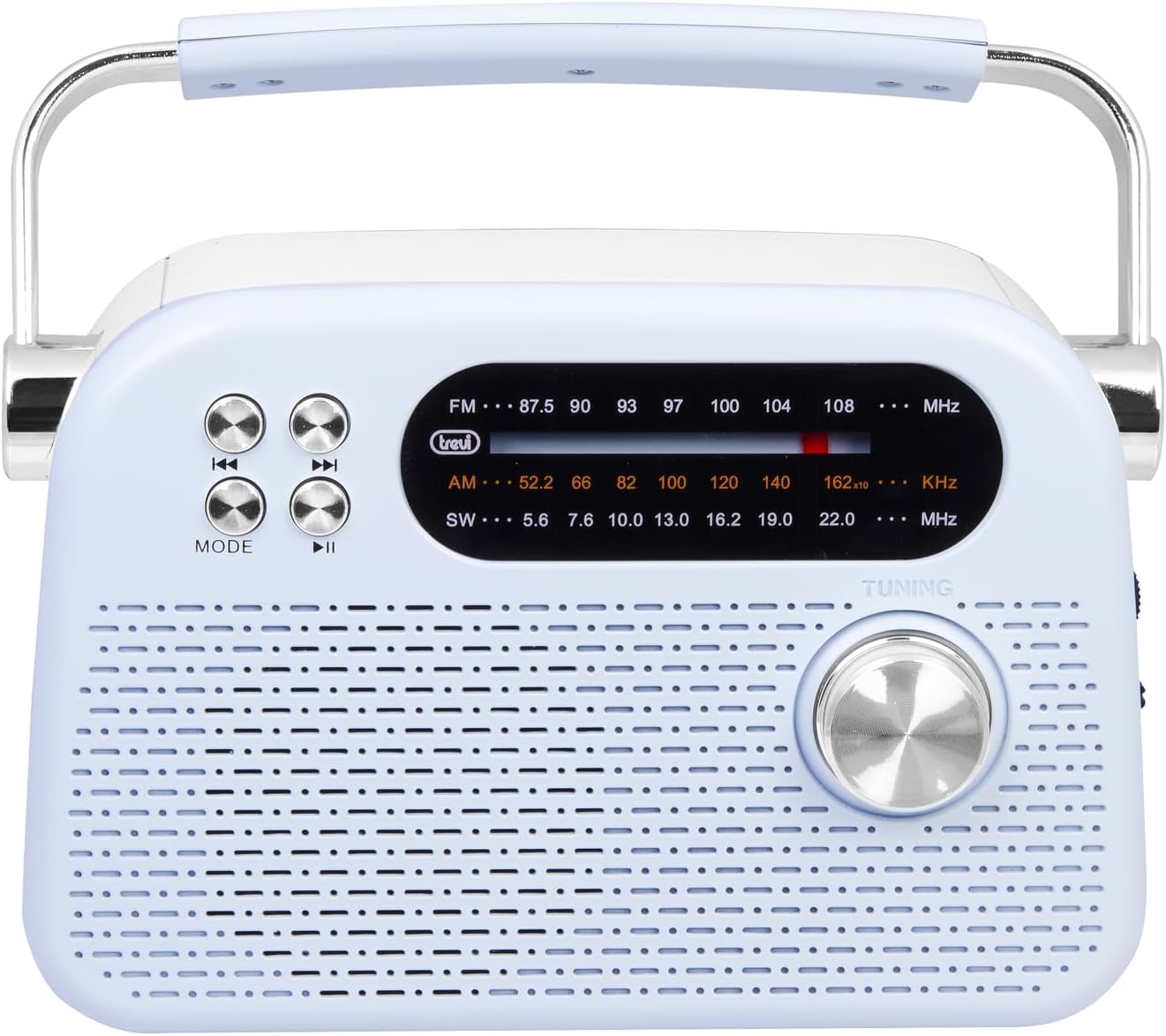
Figi 2: Devan detaye view highlighting the display, mode button, playback controls, and tuning knob.
- Ekspozisyon: Montre frekans, mòd, ak lòt enfòmasyon.
- Bouton MODE: Switches between radio bands (FM/AM/SW) and media playback modes (USB/Micro SD/Wireless).
- Playback Controls (◀◀ / ▶▶ / ▶▶): Used for skipping tracks in media mode or fine-tuning in radio mode.
- Bouton akor: For manual station tuning.
Side Panel Controls and Ports

Figi 3: Side view showing the power switch, volume control, USB port, Micro SD slot, and USB Type-C charging port.
- OFF/ON/Volume Knob: Turns the radio on/off and adjusts the volume level.
- DC 5V IN (USB Type-C): Pò chaje pou batri entèn lan.
- Pò USB: Pou konekte kle USB pou jwe MP3.
- Plas pou kat mikwo SD (TF): Pou mete kat Micro SD pou jwe MP3.
- Chanjman Seleksyon Gwoup Mizik: Selects between FM, AM, and SW radio bands, and MEDIA mode for USB/Micro SD/Wireless.
Panèl dèyè

Figi 4: Dèyè view showing the telescopic antenna and battery compartment.
- Antèn teleskopik: Extend for improved radio reception, especially for FM and SW bands.
- Lòj batri: Li gen pil ityòm rechargeable la.
5. Enstalasyon
5.1 Chaje batri a
- Locate the USB Type-C charging port on the side of the radio.
- Connect the provided USB Type-C cable to the radio's charging port.
- Konekte lòt bout kab USB a nan yon adaptè kouran USB estanda (pa enkli) oubyen nan yon pò USB òdinatè.
- The charging indicator light will illuminate (if present) to show charging status.
- Once fully charged, disconnect the cable. A full charge ensures maximum portability and uninterrupted use.
5.2 Ajisteman Antèn
For optimal radio reception, extend the telescopic antenna fully. Adjust its direction and angle to achieve the clearest signal, especially for FM and Shortwave (SW) broadcasts.
6. Operasyon Enstriksyon
6.1 Pouvwa pou limen/etenn ak kontwòl volim
- Pou vire radyo a ON, rotate the OFF/ON/Volume knob clockwise.
- Continue rotating the knob clockwise to ogmante volim la.
- Rotate the knob counter-clockwise to diminye volim la.
- Pou vire radyo a OFF, rotate the knob counter-clockwise until it clicks into the OFF position.
6.2 Seleksyon mòd
Sèvi ak la Chanjman Seleksyon Band on the side panel to choose your desired mode:
- FM: For Frequency Modulation radio stations.
- AM: Pou Amplitude Modulation radio stations.
- SW: For Shortwave radio stations.
- Mwayèn: For playing audio from USB, Micro SD, or Wireless (Bluetooth) sources.
6.3 Sintonizasyon Radyo
- Select the desired radio band (FM, AM, or SW) using the Band Selector Switch.
- Lonje antèn teleskopik la pou yon pi bon resepsyon.
- Dousman vire a Akor Knob on the front panel to scan for stations.
- The frequency will be displayed on the screen. Stop tuning when you find a clear station.
6.4 USB/Micro SD Playback (MP3)
- Insert a USB flash drive or a Micro SD card (with MP3 files) into the corresponding port/slot on the side panel.
- Switch the Band Selector Switch to MEDIA mode. The radio should automatically detect and begin playing MP3 files.
- Sèvi ak la Kontwòl Lektur (◀◀ / ▶▶) to skip to the previous or next track.
- Sèvi ak la Jwe/Pòz (▶▶) bouton pou fè yon poz oswa rezime lekti.
6.5 Wireless (Bluetooth) Connection
The radio supports wireless audio streaming from compatible devices.
- Switch the Band Selector Switch to MEDIA mode. The radio will enter Bluetooth pairing mode (indicated by an audible prompt or flashing indicator).
- Sou telefòn entelijan ou, tablèt ou, oswa lòt aparèy ki gen Bluetooth, aktive Bluetooth epi chèche aparèy ki disponib yo.
- Chwazi "Trevi RDA 70 BR" (or similar name) from the list of devices to pair.
- Yon fwa li konekte, ou ka difize odyo soti nan aparèy ou an nan radyo a.
- Use the playback controls on your connected device or the radio's playback controls to manage audio.
7. Antretyen
- Netwayaj: Sèvi ak yon twal mou epi sèk pou netwaye deyò radyo a. Pa sèvi ak pwodui netwayaj abrazif oswa solvan.
- Depo: Lè w pa itilize radyo a pou yon bon bout tan, sere l nan yon kote ki fre epi sèk, lwen limyè solèy dirèk ak tanperati ekstrèm.
- Swen batri: To prolong battery life, avoid fully discharging the battery frequently. Recharge it regularly, even if not in constant use.
NAN. Depanaj
| Pwoblèm | Kòz posib | Solisyon |
|---|---|---|
| Pa gen pouvwa | Battery is discharged; Power knob is OFF. | Charge the battery; Rotate the power knob to ON. |
| Resepsyon radyo pòv | Antèn pa lonje; Siyal fèb; Entèferans. | Extend and adjust the telescopic antenna; Move the radio to a different location; Tune carefully. |
| USB/Micro SD not playing | Incorrect mode; Unsupported file fòma; Pèvèti files. | Ensure Band Selector Switch is on MEDIA; Check if files are MP3 format; Try a different USB/Micro SD card. |
| Cannot connect via Wireless (Bluetooth) | Radio not in pairing mode; Bluetooth off on device; Device already connected to another unit. | Ensure radio is in MEDIA mode; Enable Bluetooth on your device; Disconnect from other devices and try again. |
9. Espesifikasyon
| Karakteristik | Detay |
|---|---|
| Mak | Trevi |
| Modèl | RDA 70 BR |
| Dimansyon (L x W x H) | 18.5 x 7 x 12.5 cm |
| Pwa | 600 gram |
| Sous pouvwa | Rechargeable batri ityòm |
| Port chaje | USB Type-C (DC 5V) |
| Gwoup Radyo Sipòte yo | FM, AM, SW |
| Lektur Media | USB, Micro SD (MP3 format) |
| Koneksyon san fil | Yes (Bluetooth compatible) |
| Karakteristik espesyal | Pòtab, Rechargeable |
10. Garanti ak sipò
For warranty information and customer support, please refer to the documentation provided at the time of purchase or visit the official Trevi website. Standard return policies apply for products purchased through retailers. For specific details regarding returns or defective products, consult your purchase platform's help pages.