Entwodiksyon
This manual provides essential instructions for the safe and efficient use of your TOPUTURE TP5 Folding Treadmill. Please read this manual thoroughly before operating the device and retain it for future reference.
Enstriksyon Sekirite Enpòtan
To reduce the risk of serious injury, read all important precautions and instructions in this manual before using the treadmill. The manufacturer assumes no responsibility for personal injury or property damage sustained by or through the use of this product.
- Always ensure the safety key is properly attached to your clothing before starting the treadmill.
- Kenbe timoun ak bèt kay lwen tapi a pandan operasyon an.
- Place the treadmill on a level surface with adequate clearance around it.
- Pa sèvi ak tapi kous la si fil la oswa ploge a domaje, oubyen si li pa ap fonksyone byen.
- Konsilte yon doktè anvan ou kòmanse nenpòt pwogram egzèsis.
Enstalasyon ak Asanble
The TOPUTURE TP5 treadmill comes largely pre-assembled. Follow these steps for quick setup:
- Debake: Carefully remove the treadmill from its packaging. Ensure all components are present.
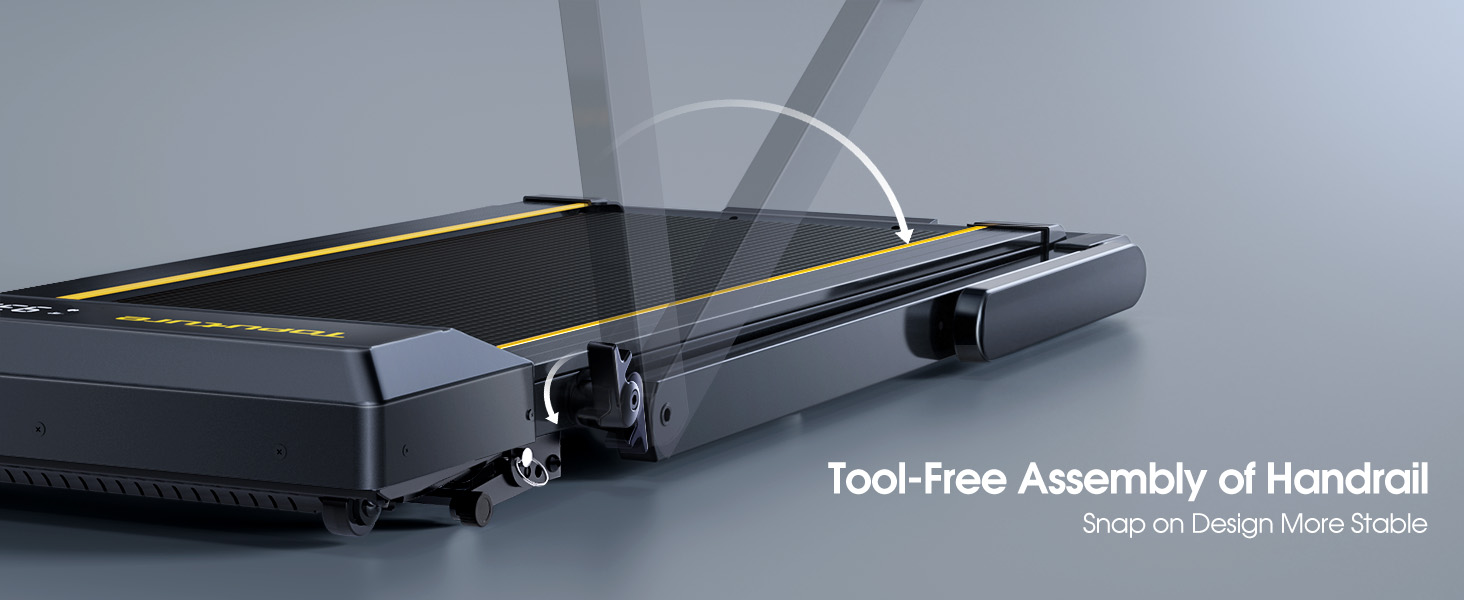
- Depliye gidon an: Gently lift the handlebar into its upright position until it locks securely. The quick-release snaps allow for easy transition between walking pad and running treadmill configurations.
- Konekte pouvwa: Ploge kòd elektrik la nan yon priz elektrik ki gen tè.
- Tcheke inisyal: Before first use, ensure the running belt is centered and properly tensioned. Refer to the maintenance section for belt adjustment if needed.

Enstriksyon Operasyon
Kontwòl Panel ak Display
The treadmill features a multifunctional LED display and touch controls. Information displayed includes time, speed, calories burned, distance, and heart rate.

Starting and Adjusting Speed
- Kòmanse/Stop: Press the Start/Pause button on the control panel or remote to begin/end your workout.
- Ajisteman vitès: Use the Speed +/- buttons on the control panel or remote to adjust the speed from 0.6 to 10 MPH.
- Kontwòl aplikasyon: Connect your smartphone or tablet via Bluetooth to control the treadmill and access guided workouts.

Fonksyon Incline
The treadmill offers three manual incline levels: 1%, 6%, and 12%. Adjust the incline by manually setting the support legs at the rear of the treadmill to the desired position.

Oratè Bluetooth
Connect your device to the treadmill's built-in Bluetooth speaker to enjoy music or audio during your workout.
Ki monitè kè bebe batman kè
Grip the hand sensors on both sides of the display to monitor your heart rate during exercise.
Antretyen
- Lubrifikasyon: Regularly apply treadmill lubricant under the running belt to ensure smooth operation and prolong belt life. Refer to the lubricant instructions for frequency.
- Netwayaj: Siye tapi roulan an ak piblisiteamp twal apre chak itilizasyon pou retire swe ak pousyè.
- Ajisteman senti: If the running belt feels loose or is off-center, use the provided tools to adjust the tension and alignment as per the detailed instructions in the full manual.

Depanaj
If you encounter any issues with your treadmill, please refer to the following common solutions:
- Tapis roulan an pa kòmanse: Ensure the power cord is securely plugged in and the safety key is correctly placed on the console. Check the power switch on the treadmill.
- Senti glise: The running belt may need tensioning. Refer to the maintenance section or the full manual for instructions on adjusting belt tension.
- Bwi etranj: Check for any loose parts or foreign objects under the belt. Lubricate the running belt if it has not been done recently.
- Ekspozisyon an pa fonksyone: Asire w ke tout koneksyon an sekirite. Si pwoblèm nan kontinye, kontakte sipò kliyan.
Espesifikasyon
| Karakteristik | Detay |
|---|---|
| Mak | TOPITURE |
| Non modèl | TP5 |
| Koulè | Nwa |
| Dimansyon pwodwi | 52.3"D x 28.2"W x 5.1"H |
| Pwa atik | 78 liv |
| Materyèl | Alloy Steel |
| Vitès maksimòm | 10 Mil pou chak èdtan |
| Pousan Incline Maksimòmtage | 12% |
| Maksimòm Puissance | 2.5 HP |
| Rekòmandasyon pwa maksimòm | 300 liv |
| Ekspozisyon | dirije |
| Koneksyon Teknoloji | Bluetooth |
| Karakteristik espesyal | Built-In Speaker, Foldable, Heart Rate Monitor, Portable, Shock Absorbent |
| Asanble obligatwa | Non (Pre-asanble) |
| Konpozan ki enkli | Kòd pouvwa |
Garanti ak sipò
Your TOPUTURE TP5 Treadmill comes with a yon ane garanti. For any assistance, questions, or warranty claims, please contact TOPUTURE customer support.
Ki jan yo kontakte sipò:
- Konekte nan kont Amazon ou.
- Ale nan "Kòmand ou yo".
- Find the order ID for your treadmill.
- Click "Contact Seller".
Please have your model name (TP5) and purchase details ready when contacting support.