Entwodiksyon
Mèsi pou acha aasing the ROCAM Digital Radio Alarm Clock. This manual provides detailed instructions for setting up, operating, and maintaining your device. Please read this manual thoroughly before use to ensure proper function and longevity of the product.
Enfòmasyon sou Sekirite
- Ensure the device is connected to a power source with the correct voltage.
- Pa ekspoze aparèy la nan dlo oswa imidite twòp.
- Evite mete aparèy la toupre sous chalè oswa nan limyè solèy la dirèk.
- Pa eseye demonte oswa repare aparèy la tèt ou. Kontakte pèsonèl sèvis kalifye.
- Kenbe soti nan atenn timoun yo.
Pwodwi souview
The ROCAM Digital Radio Alarm Clock features a clear display, intuitive controls, and multiple functions including FM radio, Bluetooth speaker, night light, and charging ports.

Devan view of the ROCAM Digital Radio Alarm Clock, showing the large digital display and speaker grille.
Karakteristik kle:
- FM Radio (87.5 MHz - 108.0 MHz) with 20 presets.
- Bluetooth 5.0 speaker with 10m wireless range.
- Adjustable night light.
- USB and Type-C charging ports.
- Large, dimmable LED display (5 brightness levels).
- Dual alarm modes with classic beep or radio sound.
- 12/24 hour format and DST function.
- Battery backup for time and settings during power outages.
Enstalasyon
1. Koneksyon pouvwa:
Connect the provided power adapter to the DC input port on the back of the alarm clock and plug it into a wall outlet. The clock requires plug power to operate. The internal battery serves as a backup for settings during power interruptions.
2. Premye limen:
Once connected, the display will light up. You may need to set the time manually if it's the first use or after a prolonged power disconnection without battery backup.
Enstriksyon Operasyon
Tan Anviwònman ak Dat:
- Peze epi kenbe la Tan Mete button (or similar button, usually indicated by a clock icon). The hour digits will start flashing.
- Vire a Time/Volume knob pou ajiste lè a.
- Peze a Tan Mete button again to confirm the hour and move to minutes.
- Vire a Time/Volume knob pou ajiste minit yo.
- Peze a Tan Mete button once more to save the time.
- Pou chanje ant fòma 12 èdtan ak 24 èdtan, peze bouton an 12/24H bouton.
Mete Alam:
Revèy la sipòte de alam endepandan.
- Peze epi kenbe la Alam 1 or Alam 2 bouton. Chif lè alam lan ap flache.
- Vire a Time/Volume knob pou fikse lè alam vle a.
- Peze korespondan an Alam button again to confirm the hour and move to minutes.
- Vire a Time/Volume knob to set the desired alarm minutes.
- Peze a Alam button again to select the alarm sound: classic beep or FM radio.
- Peze a Alam button one last time to save the alarm setting.
- To activate/deactivate an alarm, short press the corresponding Alam bouton an. Yon ikòn alam ap parèt/disparèt sou ekran an.
The alarm clock display showing the time and an active alarm icon, indicating the alarm function is set.
Fonksyon Snooze:
Lè yon alam sonnen, peze bouton an Snooze/Limyè button to temporarily silence the alarm for a few minutes (default snooze time). The alarm will sound again after the snooze period.
Operasyon Radyo FM:
- Peze a Mode bouton an pou chanje nan mòd Radyo FM.
- To perform an automatic scan for stations, press and hold the Eskane button. The radio will search for and save up to 20 available stations (87.5 MHz to 108.0 MHz).
- To manually tune, short press the Previous/Next bouton pou ajiste frekans lan.
- Vire a Time/Volume knob to adjust the radio volume (16 levels).

The alarm clock display showing an FM radio frequency, indicating it is in radio mode.
Bluetooth mak:
- Peze a Mode button to switch to Bluetooth mode. The display will show a Bluetooth icon, usually flashing to indicate pairing mode.
- On your mobile device or computer, enable Bluetooth and search for "ROCAM Alarm Clock" (or similar device name).
- Select the device to pair. Once connected, the Bluetooth icon on the clock's display will stop flashing.
- You can now stream audio from your device to the alarm clock.
- Vire a Time/Volume knob to adjust the playback volume.

Yon entèn view of the ROCAM alarm clock highlighting its Bluetooth 5.0 capabilities and speaker components, demonstrating its audio features.
Fonksyon limyè lannwit:
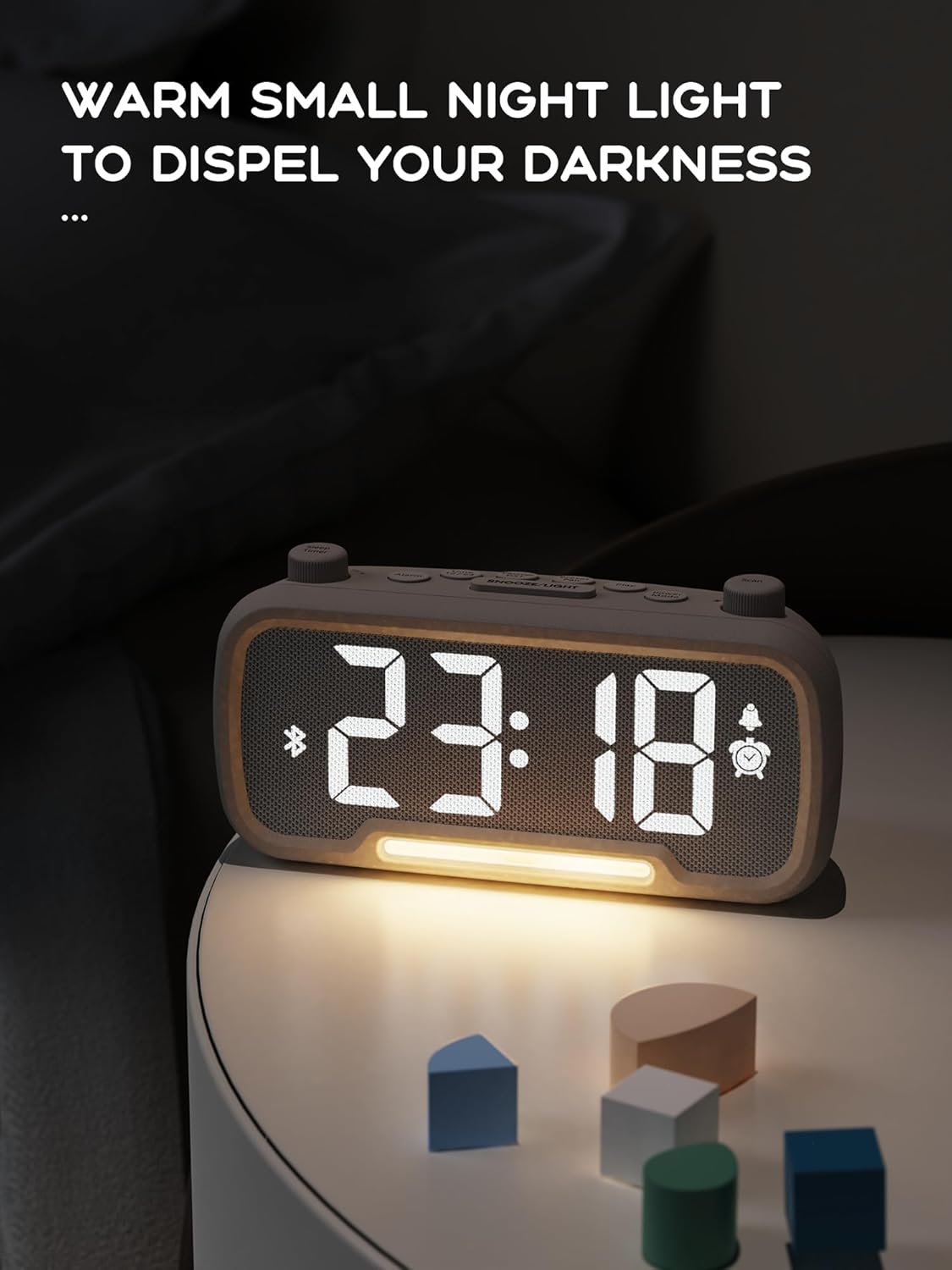
The alarm clock features an integrated night light.
- Kout peze la Snooze/Limyè button to turn the night light on or off.
- The night light has adjustable brightness levels. Press and hold the Snooze/Limyè button to cycle through the brightness options.

The ROCAM alarm clock on a bedside table, with its warm night light illuminated, providing ambient lighting.
Ajisteman klète ekspozisyon:
The main display has 5 adjustable brightness levels.
- Peze a Klète button (or similar, often combined with Snooze/Light) to cycle through the display brightness levels.
- Chwazi nivo ki pi konfòtab pou anviwònman ou an.
Daylight Saving Time (DST) Function:
Pou ajiste lè ete a:
- Kout peze la DST button (or similar, often indicated by a sun icon). The time will automatically adjust forward or backward by one hour.
- Press it again to revert the change.
USB and Type-C Charging Ports:
The alarm clock includes USB and Type-C ports for charging external devices.
- Connect your device's charging cable to the appropriate USB or Type-C port on the back of the alarm clock.
- Ensure the alarm clock is powered on for the charging ports to function.
Antretyen
- Netwaye aparèy la avèk yon twal mou epi sèk. Pa sèvi ak pwodui netwayaj likid oswa materyèl abrazif.
- Kenbe aparèy la pwòp de pousyè ak debri pou asire yon bon vantilasyon.
- Si ou pa pral itilize aparèy la pou yon bon bout tan, debranche li nan priz kouran an.
Depanaj
| Pwoblèm | Kòz posib | Solisyon |
|---|---|---|
| Afich revèy la etenn. | Pa gen kouran, kouran koupetage, or device is off. | Check power connection. Ensure the power adapter is securely plugged in. If there was a power outage, the battery backup should maintain settings, but the display requires main power. |
| Alam lan pa sonnen. | Alarm is not activated, volume is too low, or incorrect time set. | Ensure the alarm icon is visible on the display. Increase alarm volume. Verify alarm time is set correctly. |
| Resepsyon radyo FM lan pa bon. | Siyal fèb, antèn pa lonje, oubyen gen entèferans. | Adjust the position of the device. Extend the FM antenna fully. Try auto-scanning for stations again. Avoid placing near other electronic devices. |
| Aparèy Bluetooth la pa ka konekte. | Clock not in Bluetooth mode, device too far, or already paired with another device. | Ensure the clock is in Bluetooth mode (flashing icon). Move your device closer to the clock. Disconnect from other Bluetooth devices. |
| USB/Type-C charging not working. | Clock not powered, cable faulty, or device not compatible. | Ensure the alarm clock is plugged into a wall outlet. Try a different charging cable. Verify your device is compatible with standard USB charging. |
Espesifikasyon
| Karakteristik | Detay |
|---|---|
| Mak | ROCAM |
| Modèl | B0FNWB172Z |
| Koulè | Gri |
| Dimansyon | 16.8 x 3.81 x 8.4 cm (6.6 x 1.5 x 3.3 pous) |
| Pwa | 350 g (0.77 lbs) |
| Sous pouvwa | Fil elektrik |
| Batri | 1 Lithium-metal battery (included, for backup) |
| Gamme frekans FM | 87.5 MHz - 108.0 MHz |
| Bluetooth vèsyon | 5.0 |
| Ekspozisyon klète | 5 nivo reglabl |
| Nivo volim | 16 nivo reglabl |
Garanti ak sipò
For warranty information or technical support, please refer to the contact details provided with your purchase or visit the official ROCAM websit la. Kenbe prèv acha ou pou reklamasyon garanti.


