1. Entwodiksyon
Mèsi pou acha aasing the LENRUE MF01 Computer Speaker Soundbar. This device is designed to enhance your audio experience for gaming, movies, and music across various platforms. It features dual drivers with dual diaphragms for clear sound, dynamic colorful lighting, and versatile connectivity options including USB and Bluetooth 5.0. This manual provides detailed instructions for setup, operation, and maintenance to ensure optimal performance and longevity of your speaker.
2. Enfòmasyon sou Sekirite
- Pa ekspoze oratè a nan dlo oswa imidite twòp.
- Evite mete oratè a toupre sous chalè oswa anba limyè solèy dirèk.
- Pa eseye demonte oswa repare aparèy la tèt ou. Konsilte pèsonèl sèvis kalifye.
- Kenbe oratè a lwen chan mayetik fò.
- Sèvi ak sèlman câbles ak adaptè yo bay yo.
- Asire w ke gen bon vantilasyon toutotou oratè a pandan w ap itilize li.
3. Pake kontni
Tanpri tcheke kare a pou atik sa yo:
- MF01 Computer Speaker
- USB-A USB-C adaptè
- Manyèl Enstriksyon
4. Pwodwi souview
The LENRUE MF01 speaker features a sleek, fabric-covered design with integrated controls and ports for easy access.

Figure 1: LENRUE MF01 Computer Speaker with included USB-A to USB-C adapter.
Kontwòl ak pò:
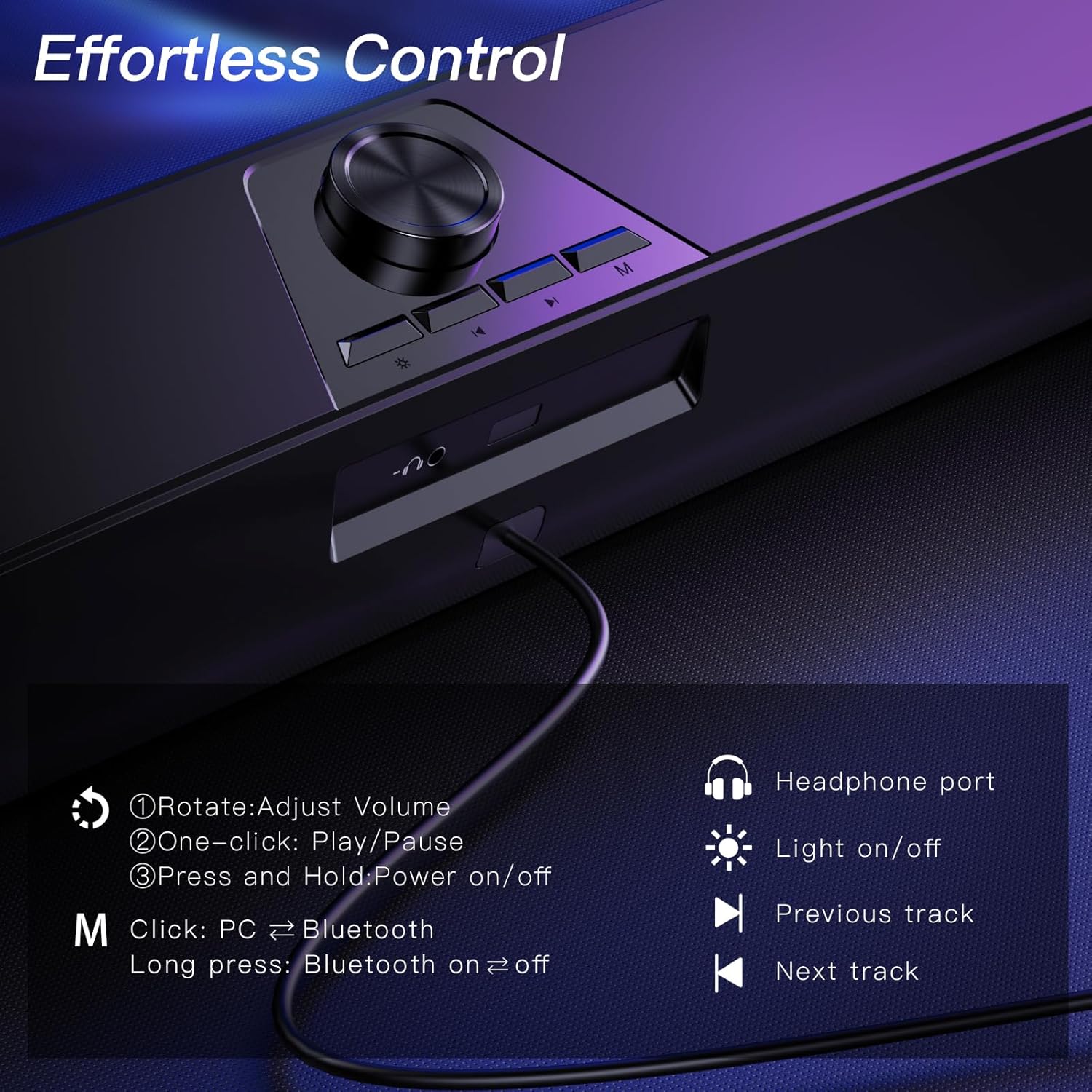
Figure 2: Top-mounted controls for volume, track navigation, light, and mode selection.
- Volim bouton: Rotate to adjust volume. Press and hold to power on/off. One-click to play/pause.
- Limyè bouton: Click to turn colorful lighting on/off.
- Previous Track bouton: Navigate to the previous audio track.
- Next Track bouton: Navigate to the next audio track.
- Bouton mòd (M): Click to switch between PC and Bluetooth modes. Long press to turn Bluetooth on/off.
- Pò ekoutè: Jack 3.5mm pou konekte kas ekoutè.
- Mikwofòn Jack: 3.5mm jack for connecting an external wired microphone (speaker does not have a built-in microphone).
5. Enstalasyon
The LENRUE MF01 offers two primary connection methods: USB for both power and audio, or Bluetooth for audio with USB for power.
5.1 Koneksyon USB (Plug-and-Play)
This mode provides both power and audio through a single USB cable, ideal for desktop PCs, laptops, and monitors.
- Connect the USB cable from the speaker directly to an available USB-A port on your computer or device.
- If your device only has USB-C ports, use the provided USB-A to USB-C adapter.
- The speaker will automatically power on and enter PC mode.
- Select "MF01" as the audio output device in your computer's sound settings.
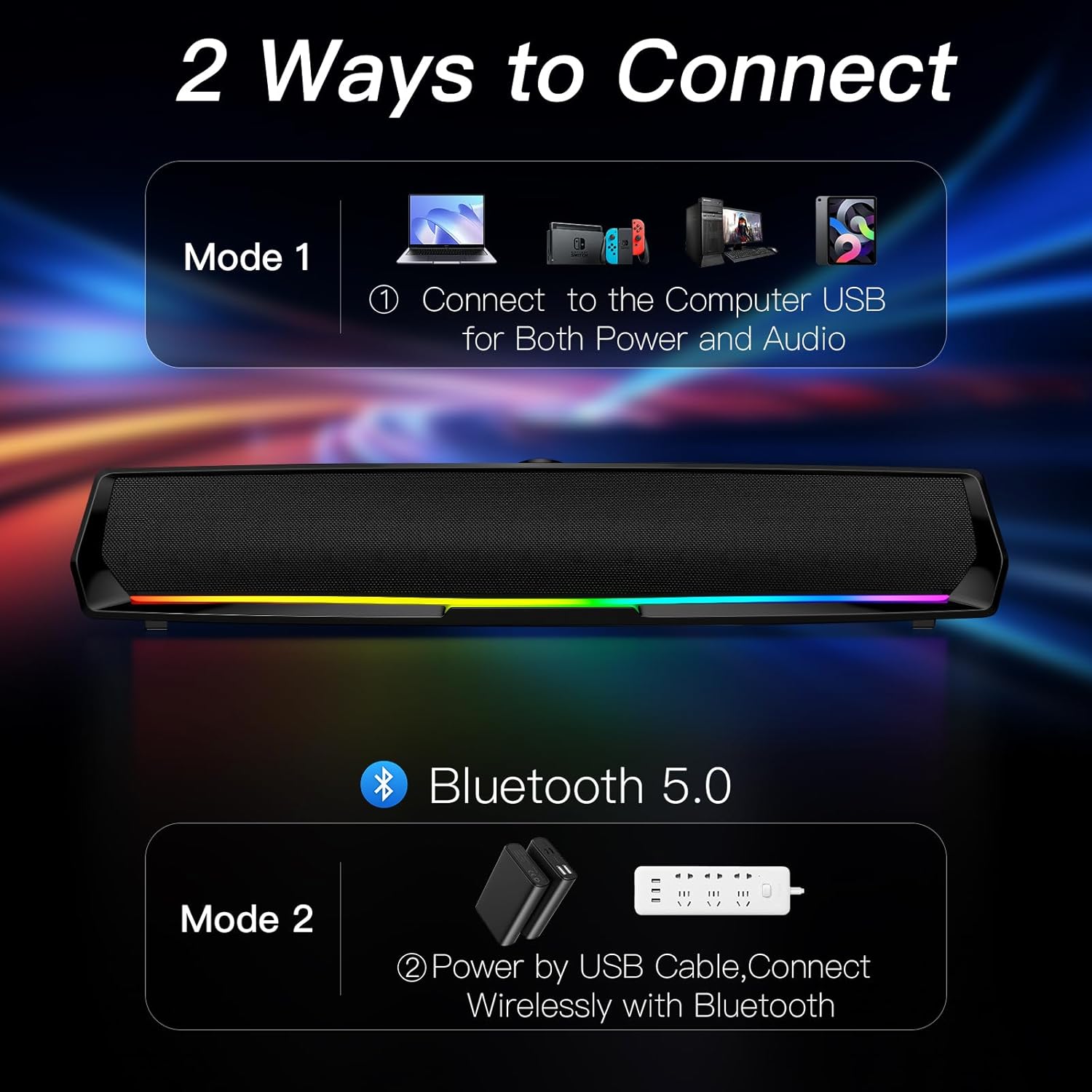
Figure 3: Connect the speaker to your computer's USB port for both power and audio.
5.2 Bluetooth Koneksyon
This mode allows wireless audio streaming from Bluetooth-enabled devices while drawing power from a USB source.
- Connect the USB cable from the speaker to a power source (e.g., a USB adapter, power bank, or a computer's USB port for power only).
- Press the 'M' (Mode) button on the speaker to switch to Bluetooth mode. The speaker will indicate "Bluetooth Mode" verbally.
- Sou telefòn entelijan ou, tablèt ou, oswa lòt aparèy Bluetooth ou, aktive Bluetooth epi chèche aparèy ki disponib yo.
- Select "MF01" from the list of devices to pair. The speaker will indicate successful pairing.
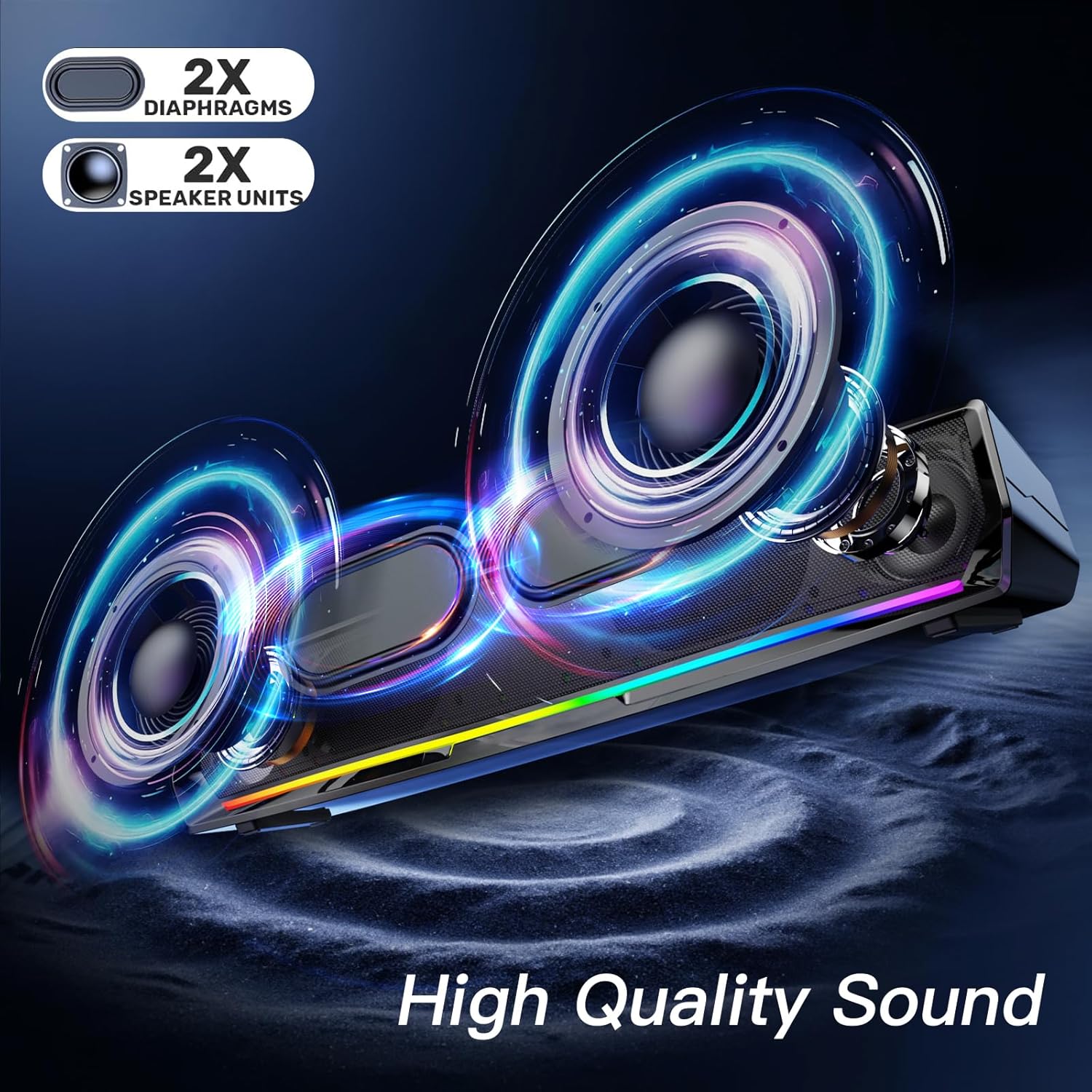
Figure 4: Power the speaker via USB and connect wirelessly via Bluetooth for audio.
5.3 Nòt sou konpatibilite
- The speaker is compatible with Windows/Mac PCs, monitors, PS5, Nintendo Switch, and smartphones.
- Tanpri sonje: The computer speaker interface is not compatible with Xbox devices.
6. Operasyon Enstriksyon
6.1 Pouvwa pou limen/etenn ak kontwòl volim
- Pouvwa sou: Press and hold the Volume Knob.
- Pouvwa Off: Press and hold the Volume Knob again.
- Ajiste Volim: Rotate the Volume Knob clockwise to increase volume, counter-clockwise to decrease.
- Jwe/Poz: One-click the Volume Knob to play or pause audio.
6.2 Kontwòl ekleraj
The speaker features dynamic colorful breathing LED lights.
- Limen/Etenyen limyè: Click the Light Button to toggle the LED lights.

Figure 5: The speaker features gentle color-changing breathing lights.
6.3 Navigasyon sou tras
- Track Previous: Click the Previous Track Button.
- Pwochen Track: Click the Next Track Button.
6.4 Headphone and Microphone Use
Connect your headphones or a wired microphone to the respective 3.5mm jacks on the back of the speaker for private listening or voice input.
Video 1: A user demonstrates the physical features and ports of the LENRUE MF01 speaker, including the headphone and microphone jacks.
7. Antretyen
- Clean the speaker with a soft, dry cloth. Do not use liquid cleaners.
- Keep the speaker free from dust and debris to ensure optimal sound quality.
- Sere oratè a nan yon kote ki fre, sèk lè li pa itilize.
NAN. Depanaj
| Pwoblèm | Kòz posib | Solisyon |
|---|---|---|
| Pa gen son ki soti nan oratè | Speaker not powered on; Incorrect audio output selected; Volume too low; Loose cable connection. | Press and hold Volume Knob to power on. Select "MF01" as audio output. Increase volume. Ensure USB cable is securely connected. |
| Bluetooth pa konekte | Speaker not in Bluetooth mode; Device Bluetooth off; Speaker already paired to another device. | Press 'M' button to enter Bluetooth mode. Enable Bluetooth on your device. Disconnect from other devices and try pairing again. |
| Limyè pa travay | Limyè yo etenn. | Click the Light Button to turn them on. |
| Distorsion son | Volim twò wo; Pwoblèm sous odyo a. | Lower the volume. Test with a different audio source. |
9. Espesifikasyon
| Karakteristik | Detay |
|---|---|
| Non modèl | MF01 |
| Kalite Oratè | Oratè stereo |
| Koneksyon Teknoloji | Bluetooth for Audio and USB for Power, USB for Both Power and Audio |
| Audio Sòti Mode | Stereo |
| Oratè maksimòm pwodiksyon pouvwa | 10 Watts |
| Repons Frekans | 150 Hz |
| Dimansyon pwodwi | 2.95"D x 16.7"W x 2.56"H |
| Pwa atik | 1.43 liv (648 gram) |
| Materyèl | Twal |
| Konpozan ki enkli | MF01 Computer Speaker, USB-A to USB-C Adapter |
10. Garanti ak sipò
For warranty information and customer support, please refer to the contact details provided on the product packaging or visit the official LENRUE websit. Kenbe resi acha ou pou reklamasyon garanti.


