1. Entwodiksyon
Thank you for choosing the DIERYA DK68-C 60% Gaming HE Keyboard. This compact, high-performance keyboard is designed for competitive gaming, featuring magnetic switches, rapid trigger functionality, adjustable actuation, and vibrant RGB backlighting. This manual provides essential information for setup, operation, maintenance, and troubleshooting to ensure optimal performance.

Image 1.1: The DIERYA DK68-C 60% Gaming HE Keyboard, showcasing its compact layout and RGB lighting.
2. Pake kontni
Tanpri verifye ke tout atik yo prezan nan pakè ou a:
- DIERYA DK68-C Keyboard x 1
- Trese USB-C kab x 1
- Keycap Puller x 1
- Manyèl itilizatè x 1
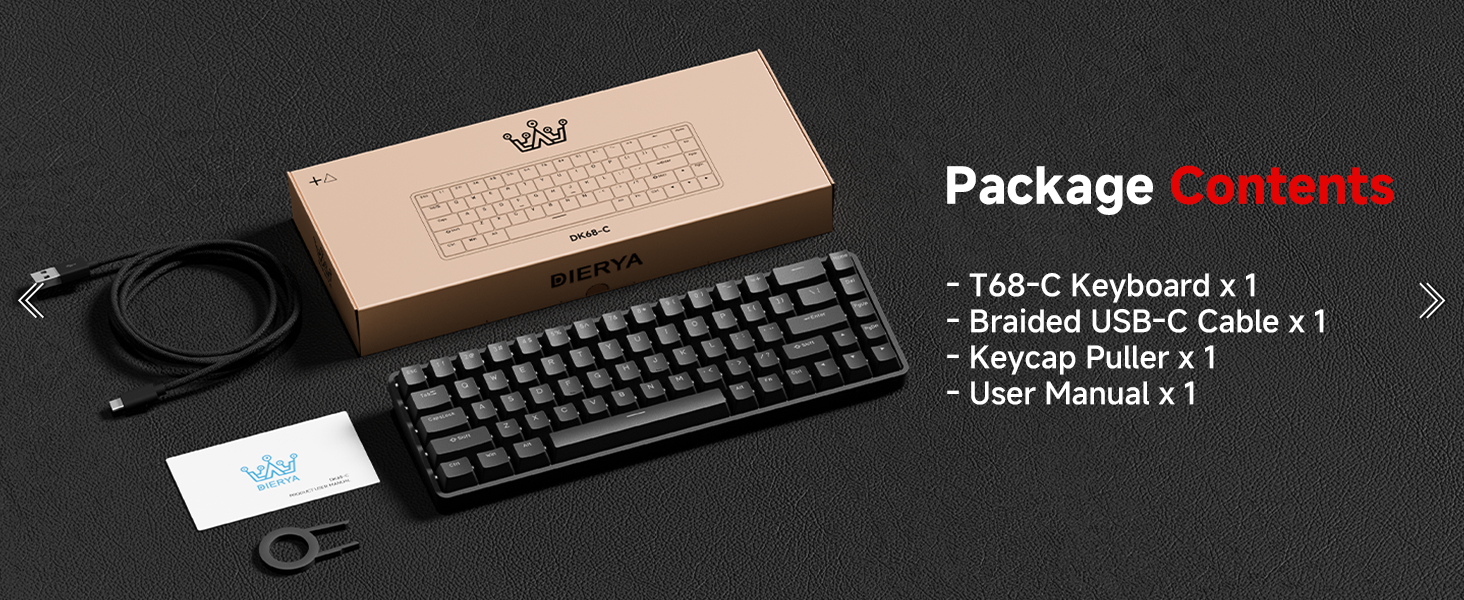
Image 2.1: Illustration of the DIERYA DK68-C keyboard and its included accessories: USB-C cable, keycap puller, and user manual.
3. Enstalasyon
The DIERYA DK68-C keyboard is designed for plug-and-play functionality with Windows operating systems.
- Konekte klavye a: Insert the USB-C end of the provided braided cable into the port on the back of the keyboard.
- Konekte ak òdinatè: Plug the USB-A end of the cable into an available USB port on your Windows PC.
- Enstalasyon chofè: The keyboard will be automatically recognized by your Windows system, and necessary drivers will install without user intervention.
- Tès Inisyal: Louvri yon editè tèks oswa yon navigatè epi teste sa w ap ekri pou asire w tout kle yo ap fonksyone byen.
Nòt: This keyboard is optimized for Windows systems. While it may function with other operating systems, full feature compatibility is not guaranteed. Console compatibility depends on specific game support for keyboard input.
4. Operasyon Enstriksyon
4.1 Karakteristik kle
- Switch mayetik: Equipped with magnetic switches for adjustable actuation and rapid trigger response.
- Deklanchman rapid: Allows keys to register input and reset based on movement distance, enabling faster repeated presses.
- Aksyon reglabl: Customize the actuation point from 0.1mm to 4.0mm for each key, tailoring sensitivity to your preference.
- To Sondaj 8000Hz: Provides ultra-low latency (under 0.3ms) for highly responsive input during intense gaming.
- Ekleraj RGB: Features 16.8 million color RGB lighting with various customizable effects.
- Konfigirasyon kontra enfòmèl ant 68 kle: A space-saving design that retains essential keys, including arrow keys, and provides additional functions via the Fn key.
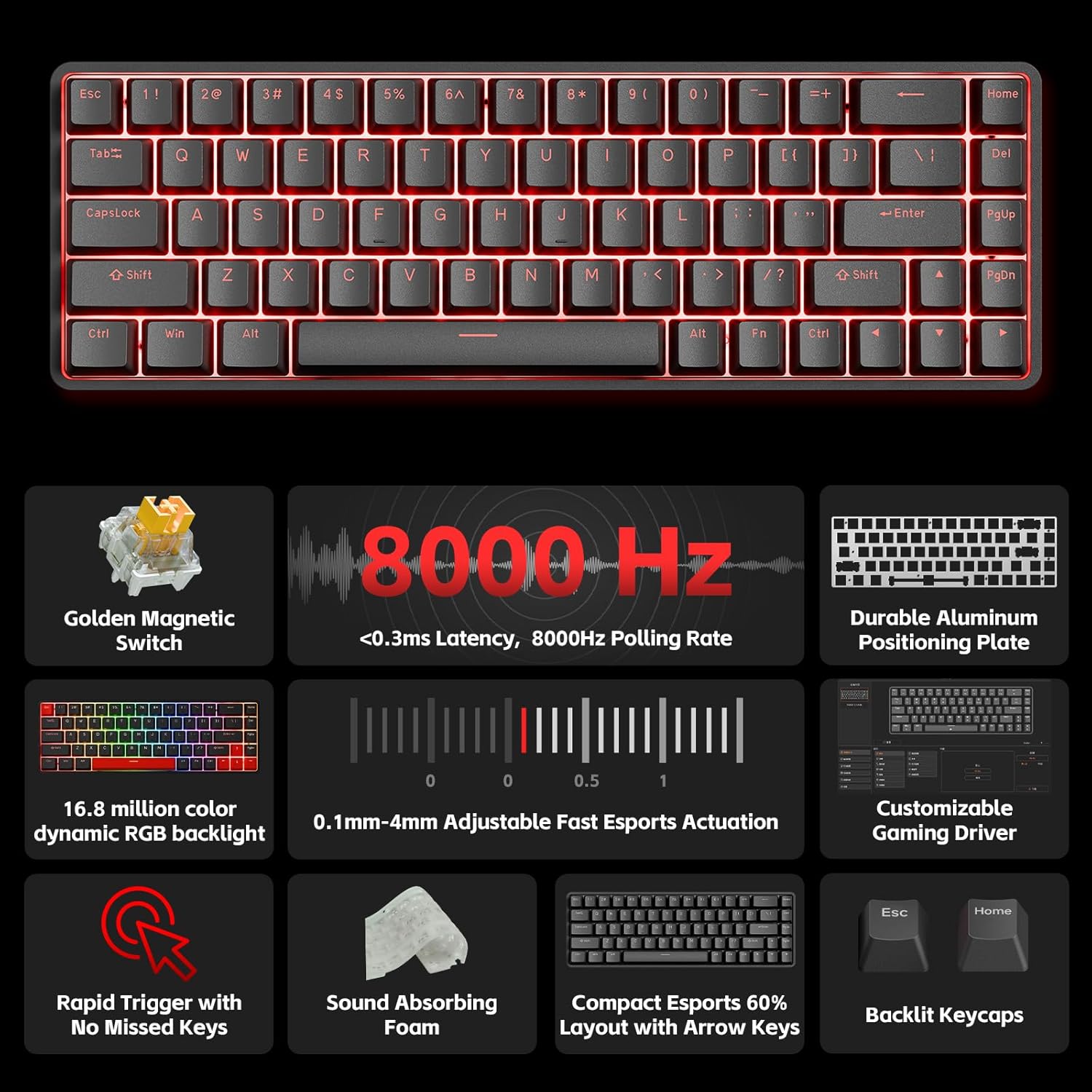
Imaj 4.1: Yon anlèview of the DIERYA DK68-C's key features, including magnetic switches, 8000Hz polling rate, RGB backlight, and customizable driver.
4.2 Adjustable Actuation and Rapid Trigger
The magnetic switches allow for precise control over key sensitivity.
- Actuation Range: The actuation point can be set between 0.1mm and 4.0mm. A lower value means a more sensitive key press.
- Deklanchman rapid: This feature dynamically adjusts the reset point of a key, allowing for quicker successive presses. For example, a key can reset as soon as it begins to move upwards, rather than requiring a full release.
These settings are typically configured using the dedicated software or web-based customization tool provided by DIERYA.

Image 4.2: Visual representation of the 0.1mm to 4.0mm adjustable actuation range for the magnetic switches.
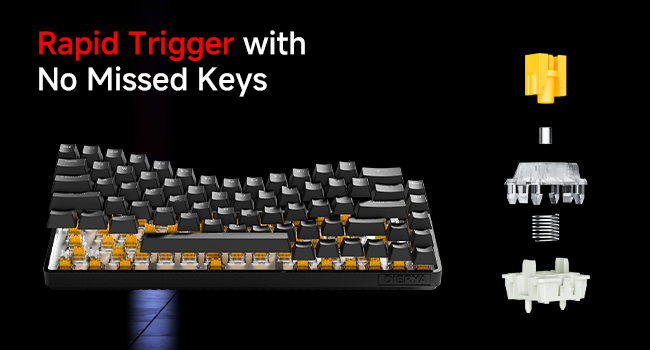
Image 4.3: Diagram illustrating the components of a magnetic switch and the concept of rapid trigger for precise input.
4.3 RGB ekleraj
The keyboard features dynamic RGB backlighting with 16.8 million colors. Lighting effects and colors can be customized through the web-based customization tool. This allows for personalized visual effects and macros without requiring software installation.
4.4 Function (Fn) Key Combinations
Due to its compact 68-key layout, some functions are accessed by holding the Fn key in combination with other keys. Refer to the keyboard's keycap legends or the web-based customization tool for specific combinations, which typically include:
- Kontwòl miltimedya: Play/Pause, Volume Up/Down, Mute.
- Kle Fonksyon (F1-F12): Accessed via Fn + number row keys.
- Lighting Adjustments: Changing RGB modes, brightness, speed.
- Kle flèch: Dedicated arrow keys are present, but additional navigation functions might be available via Fn.
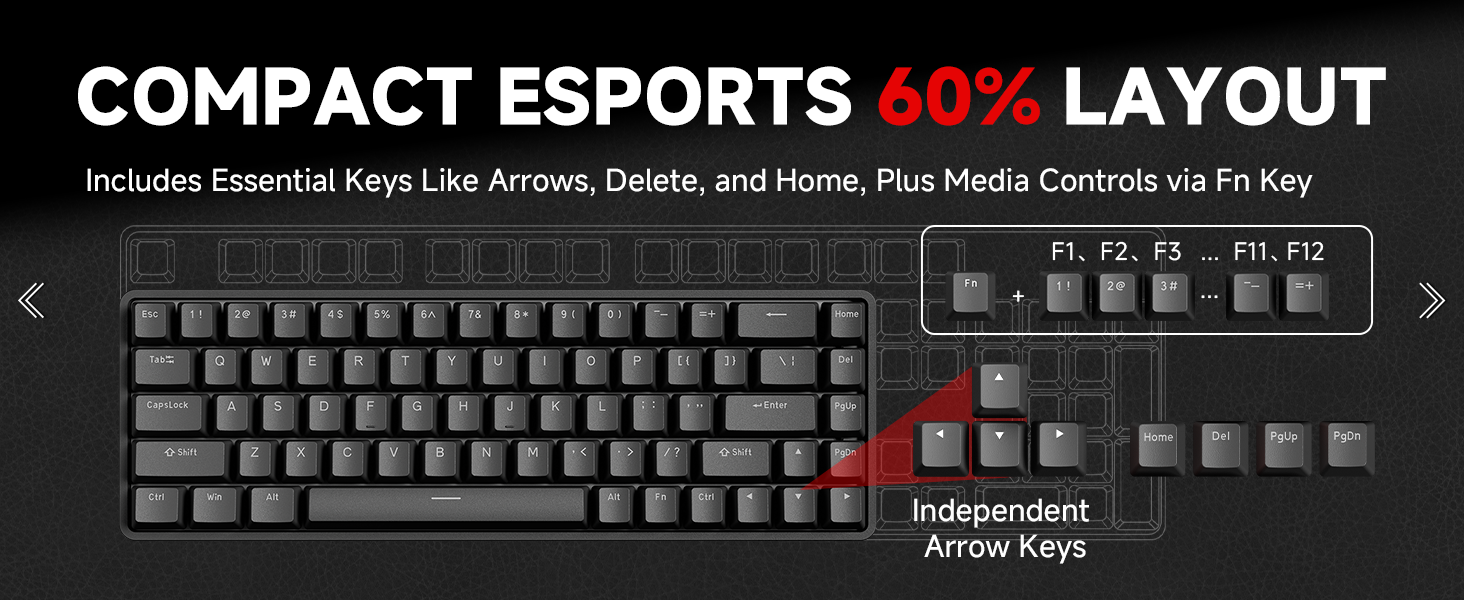
Image 4.4: Diagram illustrating the compact 60% layout and how F-keys and other functions are accessed using the Fn key.
4.5 Customization Software
The DIERYA DK68-C supports a web-based customization tool for advanced settings. This tool allows you to:
- Adjust actuation points for individual keys.
- Configure Rapid Trigger settings.
- Remap kle yo epi kreye makro.
- Personalize RGB lighting effects and colors.
Access the official DIERYA website for the link to the customization tool.
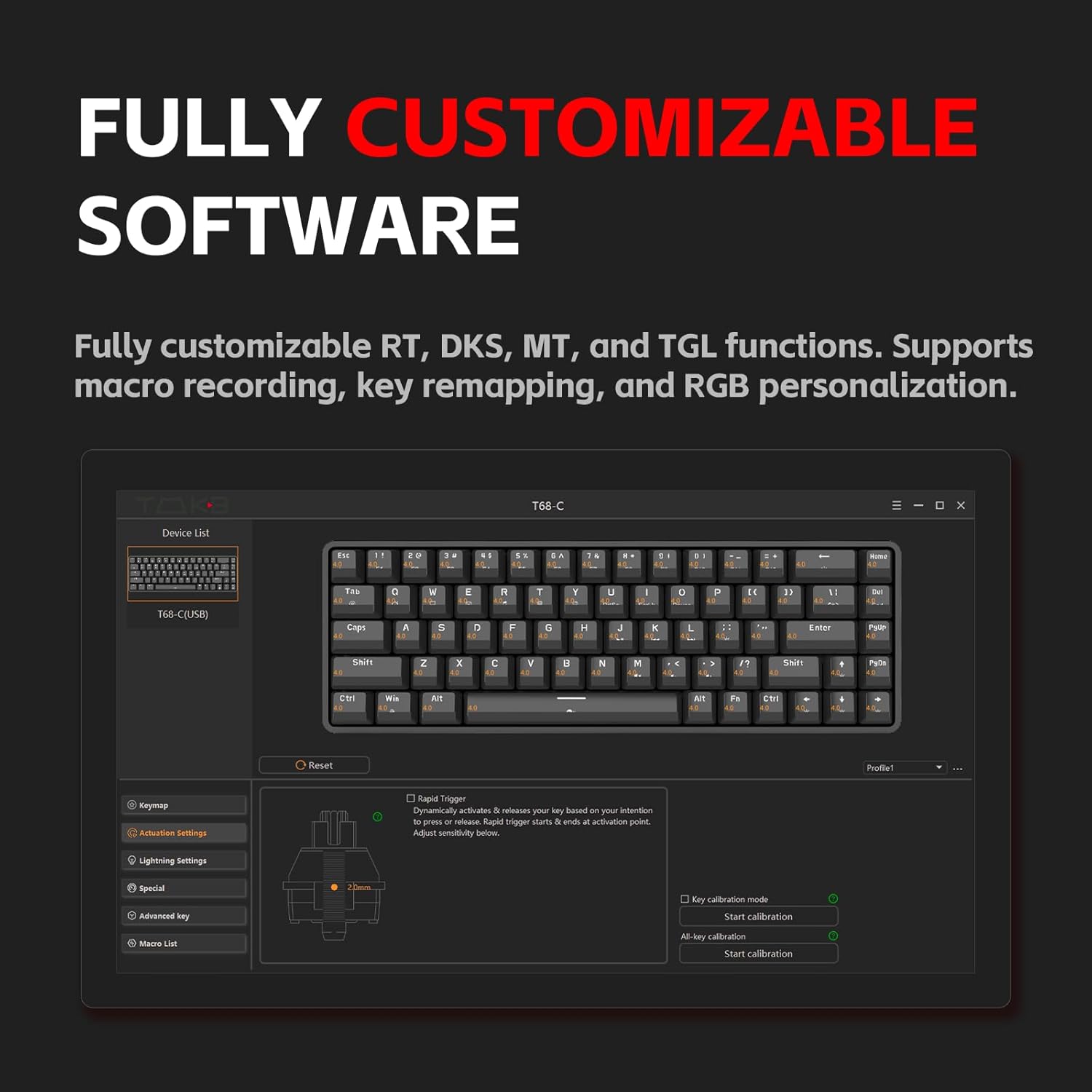
Image 4.5: Screenshot of the customization software interface, showing options for key remapping, lighting settings, and advanced key functions.
5. Antretyen
5.1 Netwaye klavye a
Netwayaj regilye ede kenbe pèfòmans ak aparans klavye a an bon eta.
- Dekonekte: Toujou dekonekte klavye a nan òdinatè w la anvan w netwaye li.
- Retire pousyè: Sèvi ak lè konprese pou retire pousyè ak debri ki ant bouchon kle yo.
- Netwayaj kle: Use the provided keycap puller to carefully remove keycaps. Clean them with a soft cloth lightly dampened with water or a mild cleaning solution. Ensure keycaps are completely dry before reattaching.
- Netwayaj sifas: Wipe the keyboard surface with a soft, lint-free cloth. Avoid harsh chemicals or abrasive materials.
5.2 Swen Chanjman
The magnetic switches are designed for durability. Avoid spilling liquids on the keyboard, as this can damage the switches and internal components. If a switch feels inconsistent, ensure no debris is lodged within it.
NAN. Depanaj
If you encounter issues with your DIERYA DK68-C keyboard, refer to the following common solutions:
| Pwoblèm | Solisyon posib |
|---|---|
| Klavye pa reponn |
|
| Kle yo pa anrejistre oswa yo pa tape de fwa. |
|
| Ekleraj RGB a pa fonksyone oswa li pa bon |
|
| Fn key combinations not working |
|
7. Espesifikasyon
| Karakteristik | Detay |
|---|---|
| Modèl | DK68-C |
| Kalite klavye | 60% Gaming HE Keyboard |
| Chanje Kalite | Chanjman mayetik |
| Actuation Range | 0.1mm - 4.0mm (Adjustable) |
| Pousantaj biwo vòt | 8000Hz |
| Latansi | <0.3ms |
| Ekleraj | RGB (16.8 milyon koulè) |
| Koneksyon | USB-C filaire |
| Aparèy konpatib | PC (Windows) |
| Dimansyon | 12.99 x 5.28 x 1.97 pous |
| Pwa atik | 1.59 liv |
8. Garanti ak sipò
DIERYA products are manufactured to high-quality standards. This product is covered by a manufacturer's warranty against defects in materials and workmanship. The specific warranty period and terms may vary by region and retailer. Please retain your proof of purchase for warranty claims.
For technical support, warranty inquiries, or further assistance, please visit the official DIERYA websit la oubyen kontakte depatman sèvis kliyan yo. Anjeneral, ou ka jwenn enfòmasyon pou kontakte yo sou anbalaj pwodwi a oubyen sou dokiman ofisyèl la. websit.
Resous sou entènèt:
- DIERYA Ofisyèl Websit: Visit the DIERYA Store
- Web-based Customization Tool: Refer to the official websit pou jwenn aksè.


