Entwodiksyon
This user manual provides detailed instructions for the J-Tech Digital 8K HDMI Switch 2 in 1 Out (Model: JTECH-8KSW21AE). This device allows you to connect two HDMI source devices to a single display, supporting high-resolution video up to 8K@60Hz and 4K@120Hz, along with advanced audio extraction capabilities. Please read this manual thoroughly before operation to ensure proper setup and optimal performance.
Kontni pake
Verifye ke tout atik ki nan lis anba a yo enkli nan pakè ou a:
- 1 × J-Tech Digital 8K HDMI Switch 2 in 1 Out (JTECH-8KSW21AE)
- 1 × 5V 1A DC Power Adapter
- 1 × Remote Control
- 1 × Manyèl itilizatè
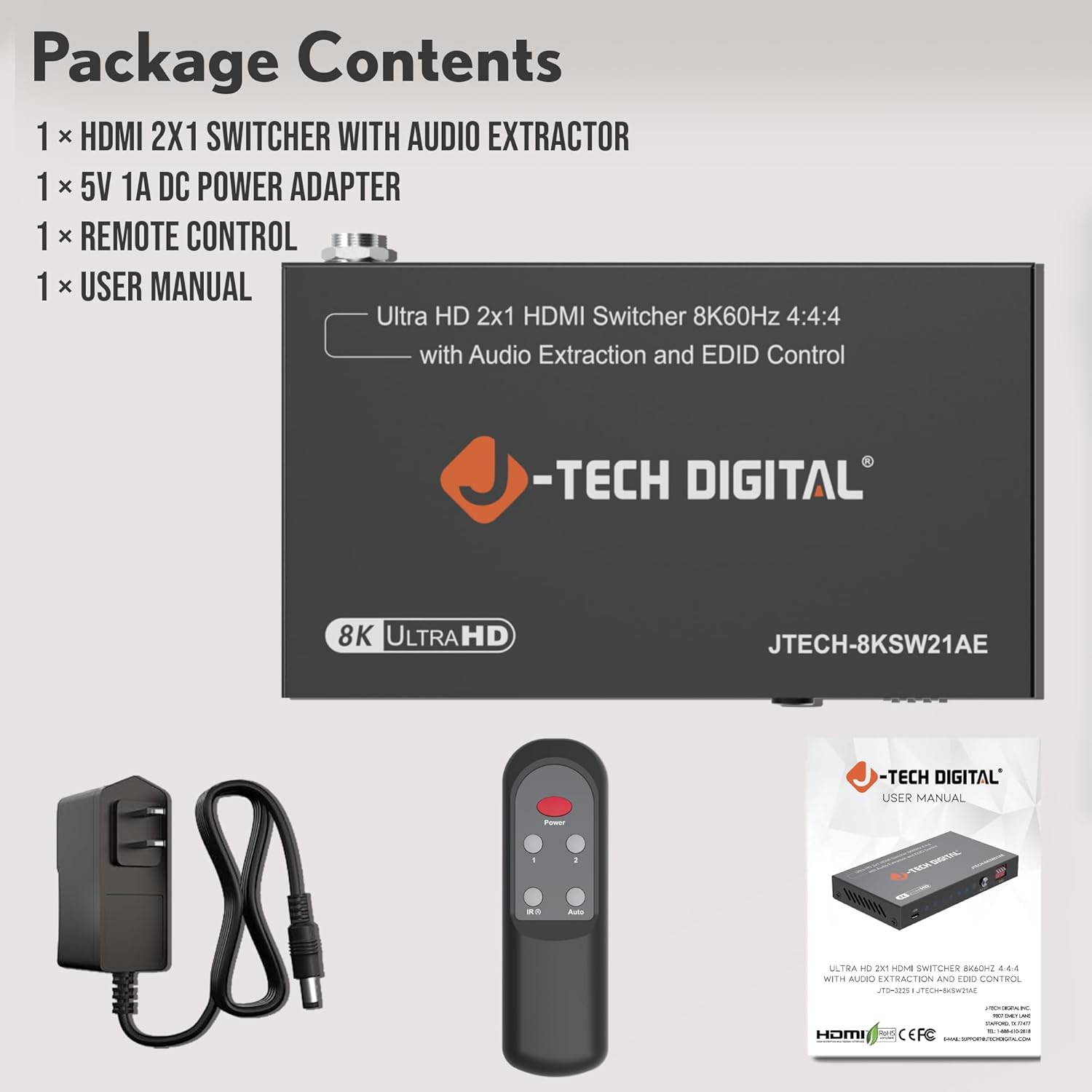
Image: Contents of the JTECH-8KSW21AE package, including the main unit, power supply, remote, and manual.
Pwodwi souview
The JTECH-8KSW21AE is designed for seamless integration into your home theater or gaming setup. It features two HDMI inputs and one HDMI output, along with audio extraction ports.

Imaj: Devan ak anwo view of the JTECH-8KSW21AE unit, highlighting its compact design and port layout.
Karakteristik panèl devan:
- Pò USB: For firmware updates (service use only).
- Pouvwa dirije: Endike estati pouvwa.
- Input 1/2 LEDs: Indicate which HDMI input is currently selected.
- Auto Switch LED: Indicates if auto-switching is enabled.
- Chwazi bouton: Manually switches between HDMI inputs.
- EDID Dip Switches: Configures EDID settings for optimal compatibility.
Karakteristik panèl dèyè:
- HDMI Input 1 & 2: Connect your HDMI source devices (e.g., PS5, Xbox, Blu-ray player).
- Sòti HDMI: Connect to your display (TV, projector, monitor).
- Sòti Odyo (3.5mm): Connect to stereo speakers or headphones.
- Sòti SPDIF (Optik): Connect to soundbars or AV receivers for digital audio.
- DC 5V: Pò D 'pouvwa.
Enstriksyon Enstalasyon
- Aparèy koupe pouvwa: Ensure all source devices (gaming consoles, Blu-ray players) and your display are powered off before making connections.
- Konekte sous HDMI: Connect your HDMI source devices to the "INPUT 1" and "INPUT 2" ports on the JTECH-8KSW21AE using high-quality HDMI 2.1 cables.
- Konekte HDMI Display: Connect your display (TV, monitor, projector) to the "OUTPUT" port on the JTECH-8KSW21AE using a high-quality HDMI 2.1 cable.
- Connect Audio Output (Optional):
- For stereo audio, connect a 3.5mm audio cable from the "Audio Out" port to your speakers or headphones.
- For digital audio, connect an optical cable from the "SPDIF Out" port to your soundbar or AV receiver.
- Konekte pouvwa: Plug the included 5V 1A DC power adapter into the "DC 5V" port on the switch, then plug the adapter into a power outlet. The Power LED on the switch will illuminate.
- Pouvwa sou aparèy: Limen ekran ou an epi answit limen aparèy sous HDMI ou yo.

Image: Connection diagram for the JTECH-8KSW21AE, showing how to connect input sources, a display, and audio output devices.
Enstriksyon Operasyon
Chanje Antre HDMI yo:
The JTECH-8KSW21AE offers three methods for switching between HDMI inputs:
- Manyèl Chanje: Press the "SELECT" button on the front panel of the switch to cycle between Input 1 and Input 2. The corresponding LED will illuminate.
- Kontwòl Remote: Use the included remote control to directly select Input 1 or Input 2, or use the "Select" button on the remote.
- Oto chanje: The switch can automatically detect and switch to a newly active HDMI source. If both inputs are active, it will remain on the currently selected input until one is powered off or disconnected.

Image: Demonstrates the three methods for switching HDMI inputs on the JTECH-8KSW21AE: remote control, manual button, and auto-switching.
Ekstraksyon Audio:
The switch can extract audio from the HDMI signal and output it via the Optical (SPDIF) or 3.5mm analog ports. This allows you to send audio to external sound systems independently of your display's audio.
- Supports Dolby TrueHD, DTS-HD Master Audio, Dolby Digital, and uncompressed LPCM.
- Ideal for connecting to soundbars, AV receivers, or stereo speakers.
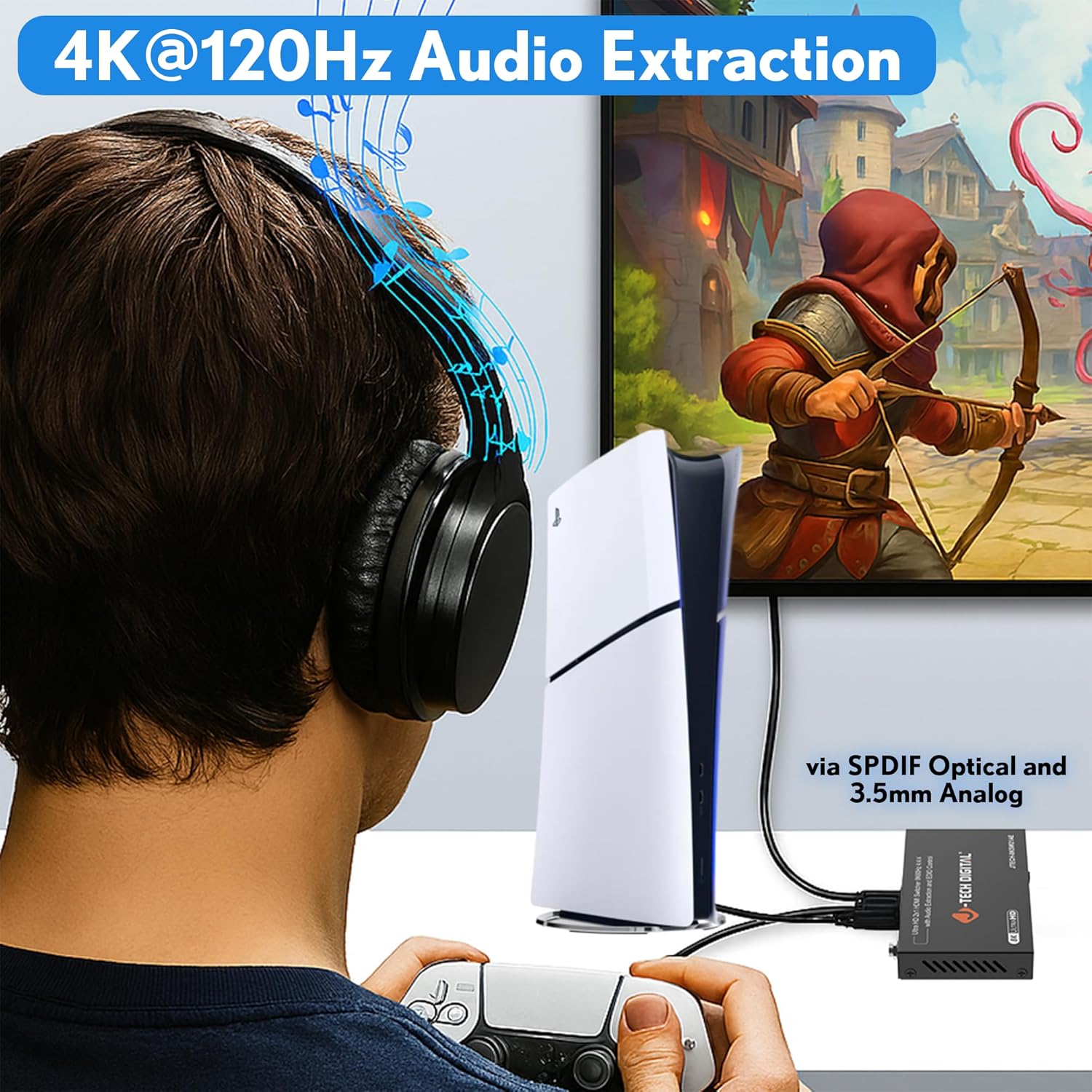
Imaj: Egzample of audio extraction in use, with a user enjoying audio through headphones connected to the switch while gaming.
Jesyon EDID:
The EDID (Extended Display Identification Data) settings on the switch help ensure optimal compatibility between your source devices and display. Use the EDID dip switches on the front panel to select the desired mode. Refer to the table below for common settings. More detailed EDID settings are available in the full user manual (if applicable).
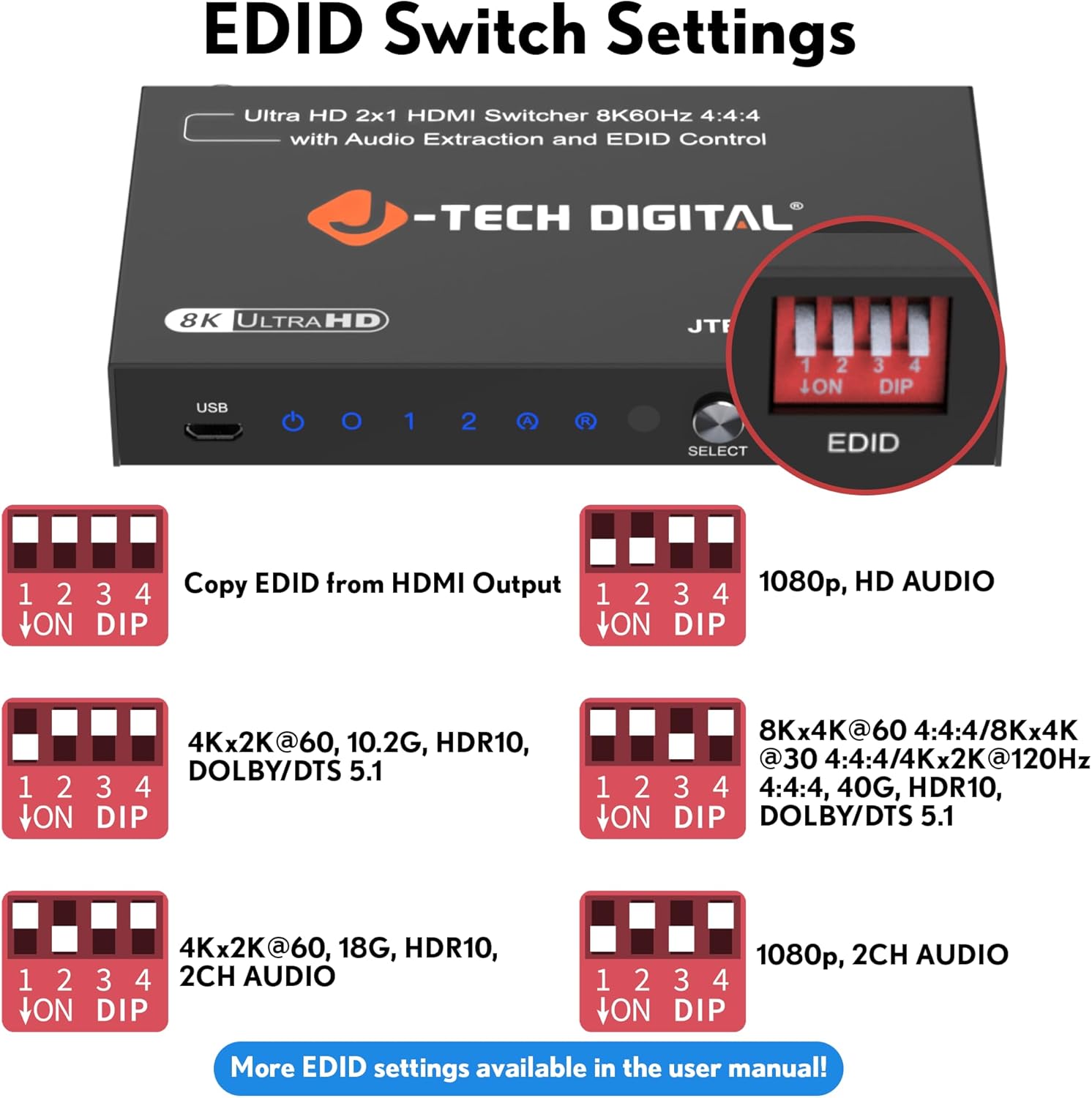
Image: Visual guide to EDID dip switch settings and their corresponding video and audio output modes.
| Dip Switch Setting (1 2 3 4) | Deskripsyon |
|---|---|
| ON DIP (all ON) | Copy EDID from HDMI Output (Bypass) |
| 1 ON, others OFF | 1080p, HD ODYO |
| 2 ON, others OFF | 4Kx2K@60, 10.2G, HDR10, DOLBY/DTS 5.1 |
| 3 ON, others OFF | 8Kx4K@60 4:4:4 / 8Kx4K@30 4:4:4 / 4Kx2K@120Hz 4:4:4, 40G, HDR10, DOLBY/DTS 5.1 |
| 4 ON, others OFF | 4Kx2K@60, 18G, HDR10, 2CH ODYO |
| 1 & 2 ON, others OFF | 1080p, 2CH ODYO |
Note: For specific EDID configurations not listed, please consult the comprehensive user manual or J-Tech Digital support.
Antretyen
To ensure the longevity and optimal performance of your J-Tech Digital 8K HDMI Switch, follow these maintenance guidelines:
- Netwayaj: Use a soft, dry cloth to clean the exterior of the unit. Do not use liquid cleaners or aerosol sprays, as they may damage the device.
- Vantilasyon: Ensure the unit is placed in a well-ventilated area to prevent overheating. Do not block the ventilation slots.
- Pouvwa: Always use the provided 5V 1A DC power adapter. Using an incorrect power supply may damage the unit and void the warranty.
- Jesyon kab: Keep HDMI and audio cables neatly organized to prevent strain on ports and accidental disconnections.
- Depo: If storing the device for an extended period, disconnect it from power and store it in a cool, dry place away from direct sunlight and extreme temperatures.
Depanaj
If you encounter issues with your J-Tech Digital 8K HDMI Switch, please refer to the following common problems and solutions:
| Pwoblèm | Kòz posib / Solisyon |
|---|---|
| Pa gen okenn pwodiksyon videyo sou ekran an. |
|
| No audio output from external audio device. |
|
| Intermittent video/audio. |
|
| Remote kontwòl pa travay. |
|
If the problem persists after trying these solutions, please contact J-Tech Digital Technical Support for further assistance.
Espesifikasyon
| Karakteristik | Detay |
|---|---|
| Nimewo Modèl | JTECH-8KSW21AE |
| Vèsyon HDMI | HDMI 2.1 |
| Version HDCP | HDCP 2.3 |
| Sipò pou rezolisyon videyo | 8K@60Hz (4:4:4), 4K@120Hz, 1080P@240Hz |
| Sipò HDR | HDR10, HDR10+, Dolby Vision |
| Ekstraksyon odyo | Optical (SPDIF) and 3.5mm Analog |
| Fòma odyo sipòte | Dolby TrueHD, DTS-HD Master Audio, Dolby Digital, LPCM |
| Jesyon EDID | 15 preset modes, EDID bypass function |
| Sipò CEC | Wi |
| Aparèy konpatib | PS5, Xbox Series X, Apple TV, Roku, Fire Stick, Blu-ray players, PCs, Home Theater Systems |
| Dimansyon pwodwi | 8 x 7.5 x 2 pous |
| Pwa atik | 14.4 ons |
| Koulè | Nwa |
| Pwovizyon pou pouvwa | DC 5V 1A |
Garanti ak sipò teknik
All J-Tech Digital products are backed by a commitment to quality and customer satisfaction.
- Manufacturer Replacement Warranty: Your JTECH-8KSW21AE includes a one-year manufacturer replacement warranty from the date of purchase.
- Sipò teknik pou tout lavi: J-Tech Digital provides free lifetime technical support for all its products. Our customer support team is based in Stafford, TX, USA.
- Orè sipò: Support is available from 9 AM – 6 PM CST, Monday – Friday.
- Enfòmasyon pou kontakte: For technical assistance or warranty claims, please refer to the contact information provided on the J-Tech Digital seller page or official websit.


