1. Entwodiksyon
This manual provides detailed instructions for the setup, operation, and maintenance of your LIGE EF12 Smart Watch. Please read this manual thoroughly before using the device to ensure proper function and to maximize your user experience. Keep this manual for future reference.
2. Pake kontni
Verifye ke tout atik yo prezan nan pakè a:
- LIGE EF12 Smart Watch (1 unit)
- Kab chaje (1 inite)
- Manyèl itilizatè (1 inite)
- Strap Adjuster (1 unit)
- Straps (3 units): 1 Steel strap, 2 Silicone straps
3. Pwodwi souview
The LIGE EF12 Smart Watch is designed for daily wear and fitness tracking, featuring a 1.75-inch HD display, Bluetooth 5.2 calling, and a 1000mAh battery. It includes health monitoring functions, multiple sports modes, and a built-in LED flashlight.

Imaj 3.1: Devan view of the LIGE EF12 Smart Watch, showcasing its round display, metal casing, and integrated flashlight. The screen displays time, date, steps, calories, heart rate, and weather information.
Karakteristik kle:
- Ekspozisyon: 1.75" HD Touchscreen (360x360 resolution)
- Koneksyon: Bluetooth 5.2 for calls and notifications
- Batri: 1000mAh, providing 10-15 days of typical use
- Siveyans Sante: Heart Rate, SpO2, Sleep Tracking, Breath Monitor
- Suivi Fòm: 120+ Sports Modes, Activity Tracker (steps, calories, distance)
- Karakteristik espesyal: Built-in LED Flashlight (3 modes), Custom Watch Faces, Music Control, Camera Control, Weather Forecast, Alarm Clock, Sedentary Alerts, Hydration Reminders, Voice Control
- Rezistans dlo: IP68
- Konpatibilite: Android 5.1+ ak iOS 9.0+
4. Enstalasyon
4.1 Chaje mont entelijan an
Before first use, fully charge your smart watch. Connect the magnetic charging cable to the charging contacts on the back of the watch and plug the USB end into a standard USB power adapter (not included) or a computer USB port. A full charge typically takes approximately 2.5 hours.

Imaj 4.1: Illustration highlighting the 1000mAh battery capacity of the LIGE EF12 Smart Watch, indicating longer battery life and faster charging compared to other models.
4.2 Enstalasyon ak koneksyon aplikasyon an
- Telechaje App a: Scan the QR code in the user manual or search for the companion app (e.g., "GloryFit" or similar, typically mentioned in the physical manual) in your smartphone's app store (Google Play Store for Android, Apple App Store for iOS).
- Enstale epi Anrejistre: Enstale aplikasyon an epi swiv enstriksyon ki parèt sou ekran an pou kreye yon kont oubyen konekte.
- Pèmèt Bluetooth: Asire w ke Bluetooth aktive sou smartphone ou.
- Konekte mont lan: Open the app, navigate to the device section, and search for your LIGE EF12 Smart Watch. Select the watch from the list to initiate pairing. Confirm the pairing request on both your phone and the watch if prompted.
Yon fwa li konekte, mont lan ap senkronize done yo ak telefòn ou, tankou lè, dat ak notifikasyon yo.
4.3 Strap Installation and Adjustment
The LIGE EF12 Smart Watch comes with three interchangeable straps. To attach a strap, align the spring bar with the lug holes on the watch body and slide it into place. Use the provided strap adjuster for the steel strap to remove or add links for a comfortable fit.

Imaj 4.2: The LIGE EF12 Smart Watch packaging, showing the watch, charging cable, user manual, strap adjuster, and the three included straps (steel and two silicone).
5. Operasyon Enstriksyon
5.1 Navigasyon debaz
- Ekran tactile: Swipe left/right to navigate between main screens (e.g., activity data, heart rate, weather). Swipe up/down to access quick settings or notifications.
- Bouton bò: The watch typically has two side buttons. One usually serves as a power/home button, while the other may be a shortcut to sports modes or other functions. Refer to the specific button functions in the app or physical manual.
- Reveye ekran: Raise your wrist or press a side button to wake the screen.
5.2 Apèl ak Notifikasyon Bluetooth
Once paired via Bluetooth, you can manage calls and receive notifications directly on your watch.
- Fè/Reponn apèl: Tap the phone icon on the watch screen to access the dial pad or recent calls. When an incoming call arrives, you can answer or reject it from the watch.
- Notifikasyon: Ensure app notifications are enabled in your phone's settings and the companion app. Swipe down on the watch face to view recent notifications from apps like WhatsApp, Twitter, Facebook, and InstagRAM.
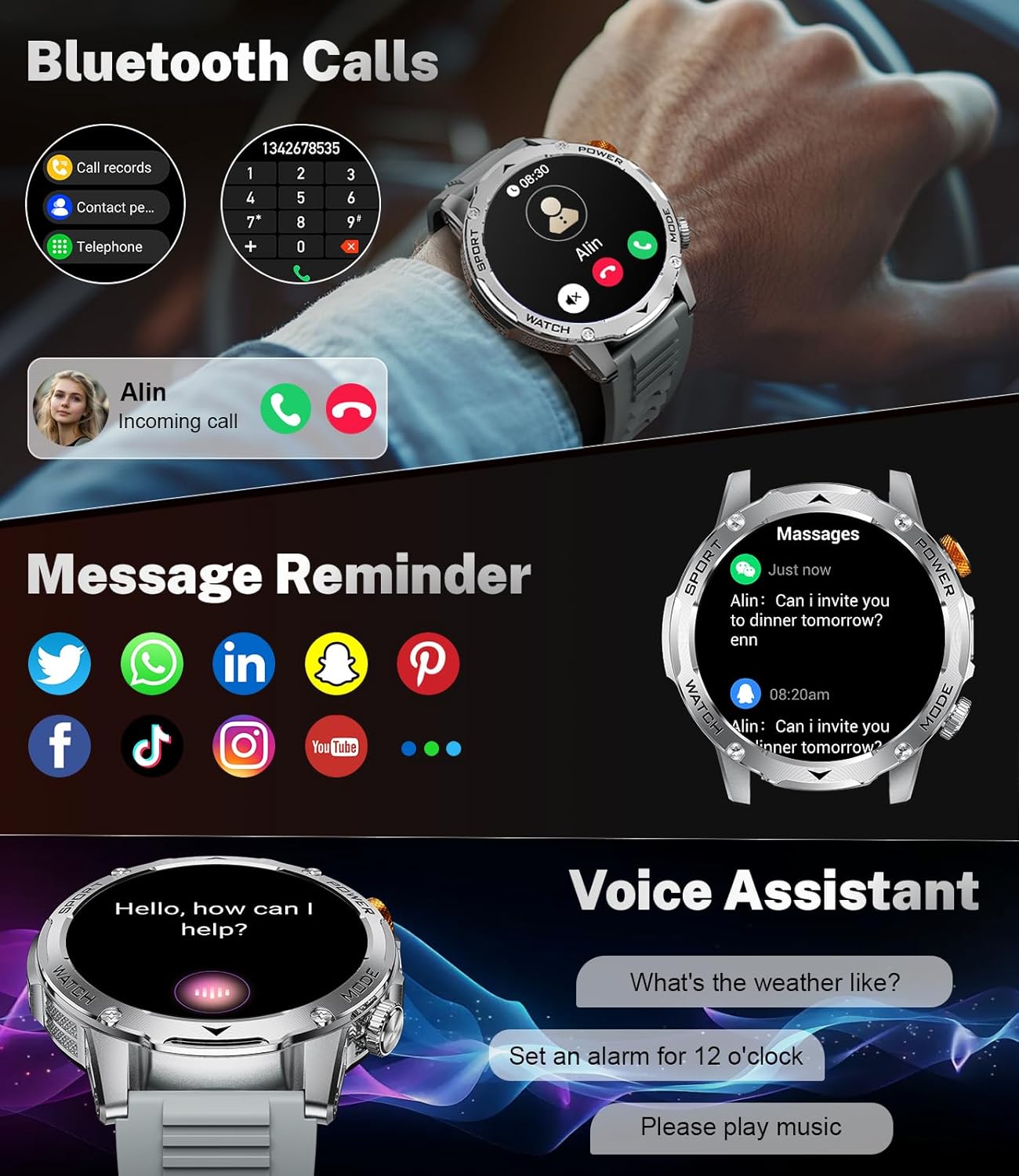
Imaj 5.1: The LIGE EF12 Smart Watch displaying an incoming call and various app icons for message reminders, including WhatsApp, Twitter, Facebook, and InstagRAM.
5.3 Flach LED entegre
The watch features an integrated LED flashlight with three modes:
- Limyè fò: Bay ekleraj kontinyèl.
- Flache: Emits a blinking light.
- SOS: Transmits an SOS signal.
To activate, typically a long press on a designated side button or a specific gesture on the screen will toggle the flashlight modes. Refer to your physical manual for the exact activation method.

Imaj 5.2: The LIGE EF12 Smart Watch screen, emphasizing its 1.75-inch HD display and illustrating the three flashlight modes: Constant-On, Warning (Flashing), and SOS, shown in different outdoor scenarios.
5.4 Pèsonalize Kadran Mont yo
The watch supports over 150 watch faces and allows for custom photo uploads. Access watch face settings through the companion app or by long-pressing the watch face on the device itself. You can switch styles to match your preference.
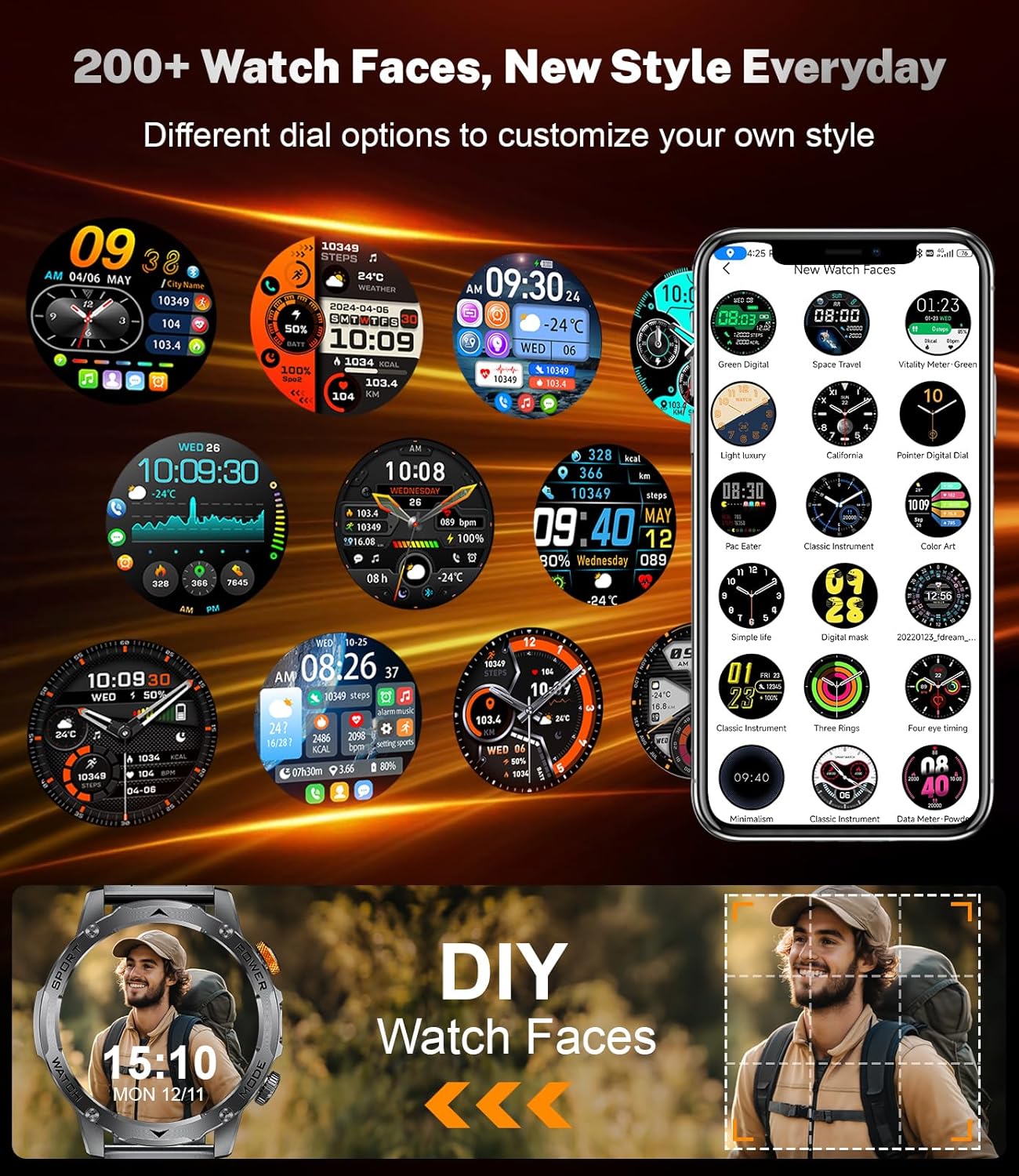
Imaj 5.3: A collage of different watch faces available for the LIGE EF12 Smart Watch, along with an illustration of how users can create their own custom watch faces using personal photos.
5.5 Health and Wellness Tracking
The LIGE EF12 Smart Watch continuously monitors several health metrics:
- Batman kè: Real-time heart rate monitoring. View done istorik nan aplikasyon an.
- SpO2 (oksijèn san): Mezire nivo oksijèn nan san an.
- Monitè dòmi: Suiv dòmitages (pwofon, lejè, REM) epi li bay apèsi sou kalite dòmi.
- Breath Monitor: Guides breathing exercises to help reduce stress.
For accurate readings, ensure the watch is worn snugly on your wrist, about one finger's width above the wrist bone.
5.6 Mòd Espò ak Suivi Aktivite
The watch supports over 120 sports modes to track your workouts. It records calories burned, steps taken, and distance covered.
- Aksè nan Mòd Espò yo: Navigate to the sports mode section on the watch or via a dedicated button. Select your desired activity to start tracking.
- Done Aktivite: View real-time data during your workout and detailed summaries in the companion app after completion.

Imaj 5.4: An image showing the LIGE EF12 Smart Watch interface for sports modes, displaying metrics like calories, steps, and distance, along with icons representing various activities such as running, cycling, and hiking.
5.7 Other Smart Tools
- Kontwòl Mizik: Kontwole lèktur mizik sou smartphone ou a (jwe, pran poz, sote mizik).
- Kontwòl kamera: Sèvi ak mont lan kòm yon deklanchè a distans pou kamera telefòn ou an.
- Pwedi metewolojik: View current weather and forecasts (requires app synchronization).
- Revèy Alam: Set alarms through the app or directly on the watch.
- Avètisman Sedantè: Receive reminders to move after periods of inactivity.
- Hydration Reminders: Set reminders to drink water.
- Asistan vwa: Interact with your phone's voice assistant (e.g., "What's the weather like?").

Imaj 5.5: The LIGE EF12 Smart Watch displaying various multi-functional features including music control, flashlight, camera control, weather, alarm clock, and drink reminders.
6. Antretyen
6.1 Netwayaj
Regularly clean your smart watch and straps to prevent skin irritation and maintain functionality.
- Wipe the watch screen and body with a soft, lint-free cloth. If necessary, slightly dampen twal la ak dlo.
- For silicone straps, wash with mild soap and water, then rinse thoroughly and dry.
- For steel straps, use a soft brush to clean crevices and wipe with a dry cloth. Avoid harsh chemicals.
6.2 Rezistans dlo (IP68)
The LIGE EF12 Smart Watch is IP68 rated, meaning it is resistant to dust and can withstand immersion in water up to 1.5 meters for up to 30 minutes. It is suitable for daily use, such as hand washing, rain, and shallow swimming. However, it is not recommended for hot showers, saunas, or diving, as steam and high water pressure can compromise the seals.
6.3 Swen Batri
- Evite dechaje batri a nèt souvan.
- Charge the watch using the provided cable and a compatible power adapter.
- Sere mont lan nan yon kote ki fre epi sèk lè w pa itilize li pou yon bon bout tan.
NAN. Depanaj
| Pwoblèm | Solisyon posib |
|---|---|
| Mont lan pa limen. | Asire w ke mont lan chaje nèt. Konekte l nan plato a pou omwen 30 minit. |
| Pa ka konekte ak telefòn entelijan an. |
|
| Yo pa resevwa notifikasyon. |
|
| Done sou sante ki pa egzak. |
|
| Batri vide byen vit. |
|
8. Espesifikasyon
| Karakteristik | Detay |
|---|---|
| Nimewo Modèl | EF12-G |
| Dimansyon pwodwi | 2.36 x 0.79 x 1.18 pous |
| Pwa atik | 10.8 ons |
| Gwosè ekran | 1.75 pous |
| Rezolisyon | 360x360 |
| Kapasite batri | 1000 Miliamp Èdtan (Lityòm Polymè) |
| Koneksyon | Bluetooth 5.2 |
| Sistèm operasyon konpatibilite | Android 5.1+, iOS 9.0+ |
| Evalyasyon rezistans dlo | IP68 |
| Kapasite Depo memwa | 128 MB |
| Karakteristik espesyal | LED Light, Activity Tracker, Breath Monitor, Distance Tracker, Heart Rate Monitor, Calorie Counter, Multisport Tracker, Music Player, Sleep Monitor, Phone Call, Touchscreen, Voice Control, Alarm Clock, Weather Forecast, Stress Monitor, Stopwatch, Timer, Calculator, Phone Finder |
9. Garanti ak sipò
For warranty information and customer support, please refer to the documentation included with your purchase or contact the manufacturer directly. Our dedicated support team aims to reply to inquiries within 24 hours.
For further assistance, visit the official LIGE websit oswa kontakte sèvis kliyan yo.


