Entwodiksyon
This manual provides detailed instructions for the safe and efficient use of your artfone G6 Pro 4G Senior Flip Phone. Please read this manual thoroughly before operating the device and keep it for future reference.

Image: The artfone G6 Pro 4G flip phone, showcasing its dual LCD screens and large keypad.
Ki sa ki nan bwat la
Verifye ke tout atik yo prezan nan pakè a:
- 1 x artfone G6 Pro Senior Flip Phone
- 1 x 1300 mAh Battery
- 1 x USB Chaje Kab
- 1 x Charging Head (Power Adapter)
- 1 x waf chaje
- 1 x Manyèl Itilizatè (Angle, Alman, Franse, Panyòl, Italyen)

Image: All components included in the artfone G6 Pro package: the phone, battery, USB cable, power adapter, charging dock, and user manual.
Enstalasyon
1. Installing the SIM Card, Micro SD Card, and Battery
- Retire kouvèti dèyè telefòn lan.
- Insert your Nano SIM card(s) into the designated slot(s). Ensure the gold contacts face downwards.
- If desired, insert a Micro SD card (up to 64GB) into the Micro SD slot for expanded storage.
- Insert the 1300mAh battery, aligning the contacts correctly.
- Remèt kouvèti dèyè a jiskaske li fè yon klik byen fèm nan plas li.
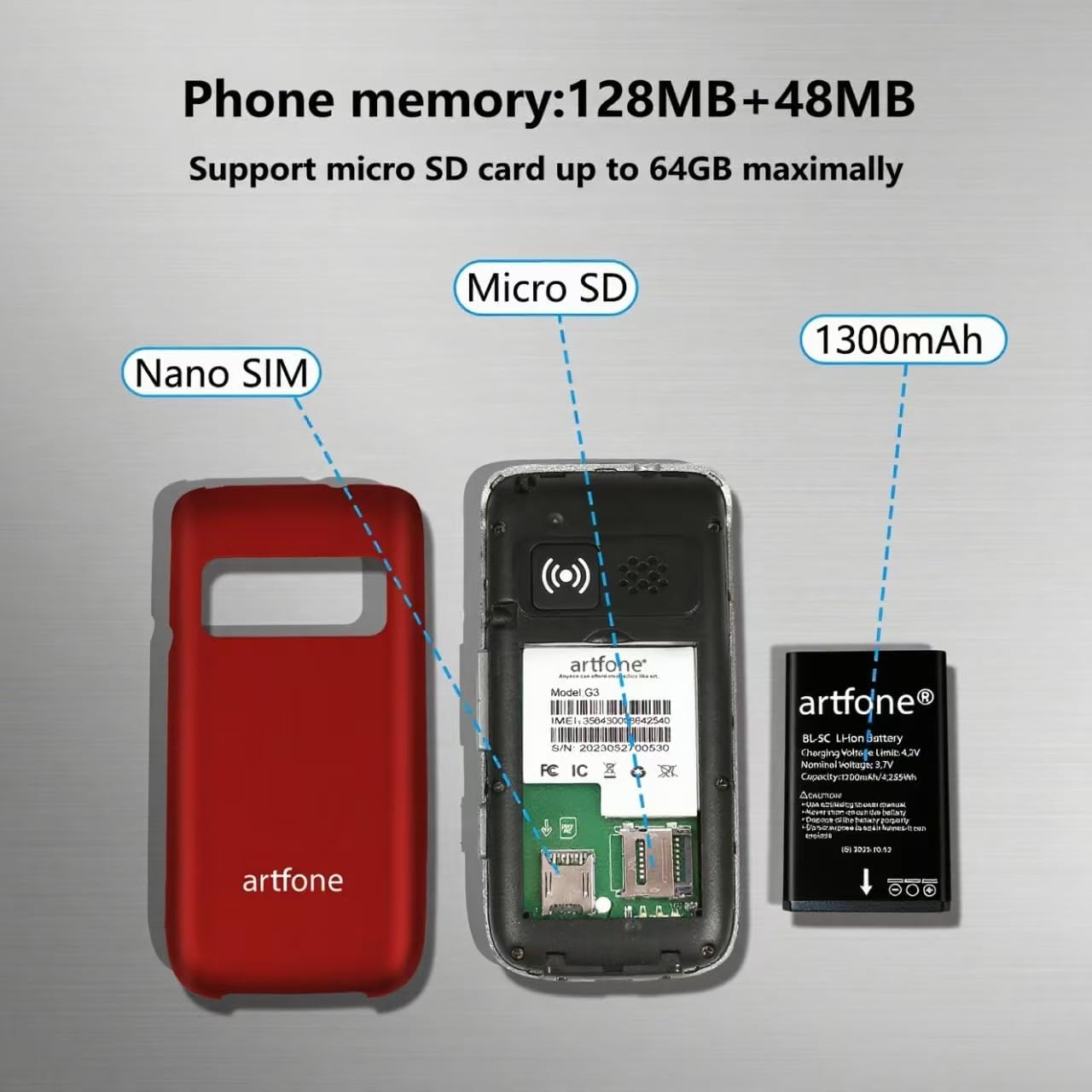
Imaj: Yon eksplozyon view of the artfone G6 Pro, showing the back cover removed, revealing slots for Nano SIM and Micro SD cards, and the 1300mAh battery.
2. Premye Chajman
Before first use, fully charge the phone. You can charge it using the provided charging dock or directly via the USB-C cable.
- Sèvi ak Dock Chaje a: Connect the USB cable to the charging head, then plug it into a power outlet. Place the phone into the charging dock. The phone will indicate charging status.
- Chaje dirèk: Connect the USB-C cable directly to the phone's charging port and the other end to the charging head, then plug into a power outlet.
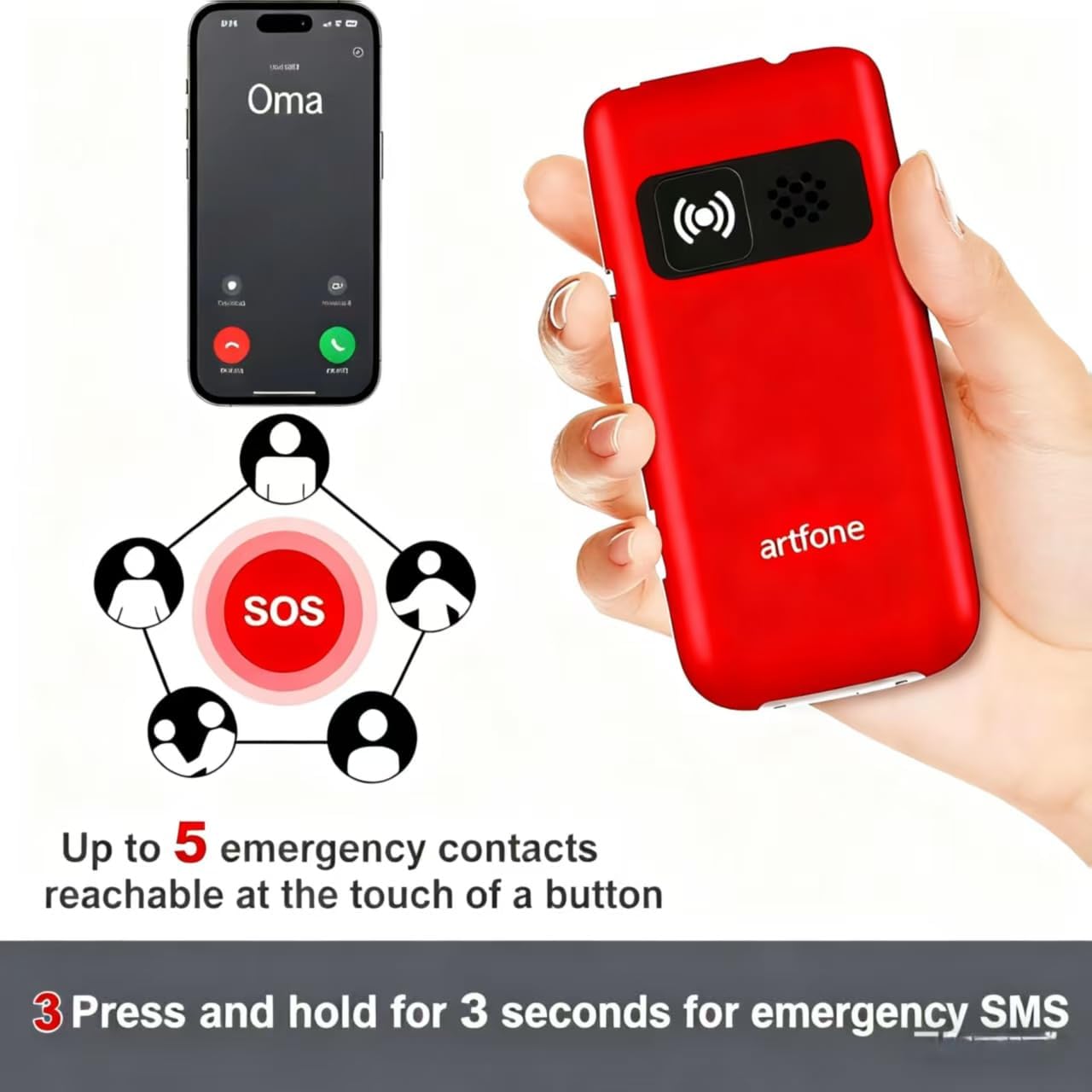
Image: The artfone G6 Pro phone placed in its charging dock, connected to a power source.
Enstriksyon Operasyon
1. Power On/Off
- Pou limen: Press and hold the red End Call/Power button (
 ) until the screen lights up.
 - Pou etenn: Press and hold the red End Call/Power button until the power-off options appear, then select 'Power Off'.
2. Fè ak resevwa apèl
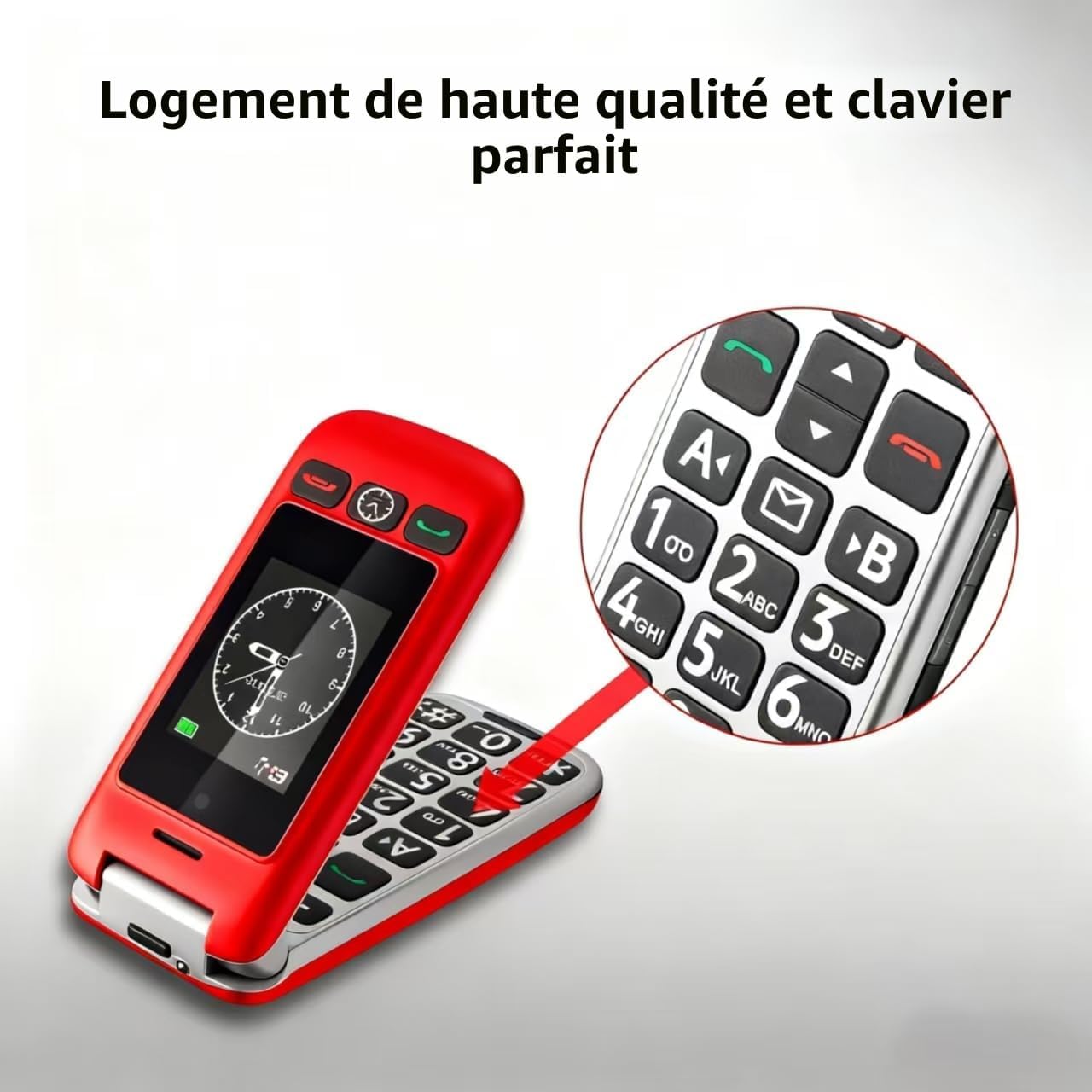
- Fè yon apèl: Dial the number using the large keypad and press the green Call button ().
- Resevwa yon apèl: Open the flip to answer, or press the green Call button. Close the flip or press the red End Call button to end a call.
- Ajiste Volim: Use the volume buttons on the side of the phone during a call.

Image: A close-up of the artfone G6 Pro's large, backlit keypad, designed for easy dialing.
3. Dual Screen Features
The artfone G6 Pro features a 2.4-inch internal screen and a 1.8-inch external screen.
- The external screen displays time, date, battery status, and caller ID without opening the phone.
- Press and hold the dedicated time announcement button (often located on the side or front) for 2 seconds to hear the current time spoken aloud.

Image: The artfone G6 Pro displaying the time on its external screen, with an illustration of the time announcement feature.
4. Fonksyon Ijans SOS
The SOS button provides quick access to emergency contacts.
- Mete nimewo SOS yo: Navigate to the 'SOS Settings' in the phone's menu to program up to 5 emergency contact numbers.
- Aktive SOS la: In an emergency, press and hold the SOS button on the back of the phone for 3 seconds. The phone will automatically call the programmed numbers in sequence until one answers. It will also send an emergency SMS to these contacts.

Image: The artfone G6 Pro with its SOS button highlighted, illustrating how it connects to up to 5 emergency contacts.
5. Vitès Dial
Assign frequently called numbers to speed dial keys (A, B, 1-9) for quick access.
- Setting Speed Dial: Go to 'Settings' > 'Speed Dial' to assign contacts to specific keys.
- Sèvi ak konpozisyon rapid: Press and hold the assigned key (e.g., 'A' or '1') to call the stored contact.
6. Lòt Karakteristik
- Kamera: Access the camera through the main menu to take basic photos.
- Radyo FM: Plug in headphones (3.5mm jack) to use the FM radio function.
- Flach: Activate the flashlight via a dedicated side switch or through the menu.
- Entèfas itilizatè: The phone features a simple, user-friendly interface with clear icons for easy navigation.

Image: A visual representation of the artfone G6 Pro's menu, showing large, clear icons for Contacts, Tools, Message, SOS, Calendar, Settings, Internet, Multimedia, and Call logs.

Image: A composite image illustrating the flashlight, FM radio, and 3.5mm headphone jack features of the artfone G6 Pro.
Antretyen
- Kenbe telefòn nan sèk. Imidite ka domaje sikui elektwonik yo.
- Do not expose the phone to extreme temperatures. High temperatures can shorten the life of electronic devices and warp or melt certain plastics.
- Pa sèvi ak pwodui chimik ki fò, solvan netwayaj, oswa detèjan fò pou netwaye telefòn nan. Siye l avèk yon twal mou.amp twal.
- Manyen telefòn nan ak anpil atansyon. Pa lage l, pa frape l, oswa pa souke l. Si ou manyen l byen, sa ka kraze sikwi entèn yo ak mekanik amann yo.
- Only use original or certified compatible batteries, chargers, and accessories.
Depanaj
| Pwoblèm | Kòz posib | Solisyon |
|---|---|---|
| Telefòn nan pa limen | Batri a fèb oswa li pa byen enstale. | Chaje batri a. Asire w ke batri a byen mete. |
| Pa ka fè oswa resevwa apèl | Pa gen kat SIM, kat SIM lan pa byen mete, oswa pa gen siyal rezo. | Ensure SIM card is inserted correctly. Check network coverage. Contact your service provider. |
| Poor call quality / Low volume | Weak signal, speaker blocked, or volume too low. | Move to an area with better signal. Ensure speaker is not obstructed. Adjust call volume using side buttons. |
| Batri vide byen vit | Frequent use, background applications, or old battery. | Diminye klète ekran an. Fèmen aplikasyon ou pa itilize yo. Konsidere ranplase batri a si li fin vye. |
| SOS function not working | SOS numbers not programmed or incorrect. | Verify and correctly program the emergency contact numbers in SOS settings. |
Si pwoblèm nan pèsiste apre ou fin eseye solisyon sa yo, tanpri kontakte sèvis kliyan.
Espesifikasyon
- Modèl: artfone G6 Pro
- Teknoloji rezo: 4G, 3G, 2G
- Sistèm operasyon: artfone Mocor RTOS
- Ekran prensipal: 2.4 pous
- Ekran ekstèn: 1.8 pous
- memwa: 128MB + 48MB
- Depo dilatabl: Mikwo SD kat jiska 64GB
- SIM Kat Kalite: Nano SIM
- Batri: 1300mAh Lityòm-ion
- Tan pou pale: Jiska 5-6 èdtan
- Tan sibstiti: Jiska 10 jou
- Koneksyon: Bluetooth
- Pò chaje: USB Kalite-C
- Karakteristik espesyal: SOS Button, Large Keys, Dual Screen, Charging Dock, FM Radio, Flashlight, Camera
Garanti ak sipò
Enfòmasyon sou Garanti
The artfone G6 Pro comes with a Garanti manifakti 2 zan apati dat acha a. Garanti sa a kouvri domaj nan materyèl ak nan fabrikasyon anba itilizasyon nòmal. Li pa kouvri domaj ki koze pa move itilizasyon, aksidan, modifikasyon san otorizasyon, oswa mete ak chire nòmal.
Sipò pou Kliyan
For technical assistance, warranty claims, or further inquiries, please refer to the contact information provided in your product packaging or visit the official artfone websit. Tanpri kenbe modèl pwodwi ou a ak detay acha ou yo pare lè w ap kontakte sipò a.


