1. Entwodiksyon
The CUBOT Kingkong 11 is a rugged 5G smartphone designed for durability and high performance. It features a powerful processor, extensive memory, a large battery, and an advanced camera system, all housed in a robust, water-resistant, and dustproof body.
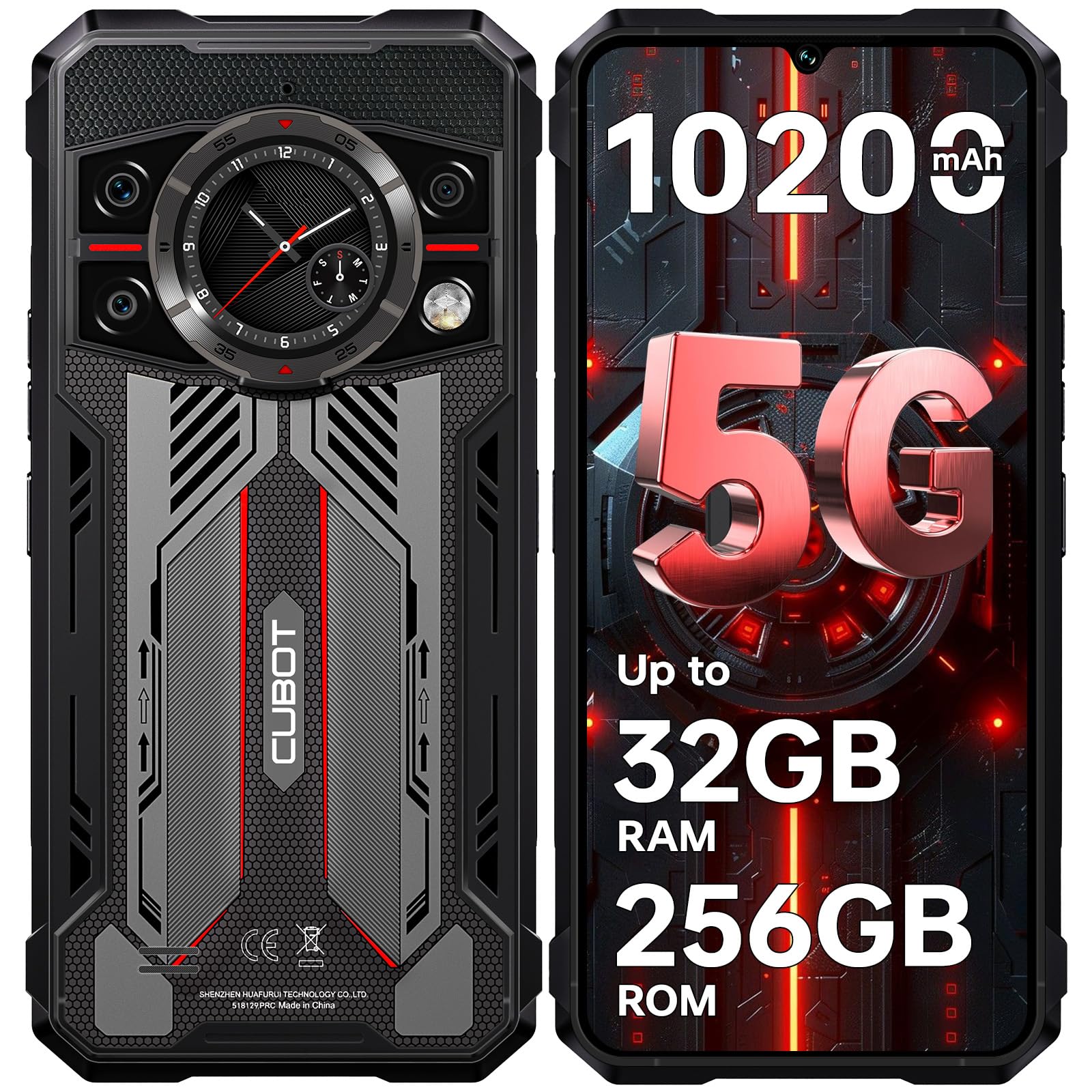
Imaj: Devan ak dèyè view of the CUBOT Kingkong 11 5G smartphone, highlighting its rugged design.
2. Inisyal Enstalasyon
2.1. Mete Kat SIM ak Kat MicroSD
The CUBOT Kingkong 11 supports dual SIM cards and a MicroSD card for expanded storage.
- Jwenn plato kat SIM lan sou bò aparèy la.
- Sèvi ak zouti ejèksyon SIM ki vini ak li a pou ouvri plato a.
- Carefully place your Nano-SIM cards and/or MicroSD card into the designated slots. Ensure correct orientation.
- Dousman pouse plato a tounen nan aparèy la jiskaske li kole ak kote a.

Image: Close-up of the CUBOT Kingkong 11 showing the SIM card tray with waterproof seals.
2.2. Limen epi premye chaje
- Press and hold the power button located on the side of the device until the CUBOT logo appears.
- For first-time use, it is recommended to fully charge the device. Connect the USB-C cable to the phone and the 33W fast charger to a power outlet.
- Endikatè batri a sou ekran an ap montre eta chaj la.

Image: Illustration of the 10200mAh battery capacity and 33W fast charging capability of the CUBOT Kingkong 11.
2.3. Konfigirasyon lojisyèl
Follow the on-screen prompts to complete the initial setup, including language selection, Wi-Fi connection, Google account login, and security settings (Face ID/Fingerprint).
3. Operasyon
3.1. Sistèm operasyon Android 15
The CUBOT Kingkong 11 runs on Android 15, offering an intuitive user interface and enhanced features. Navigate through apps, customize settings, and utilize smart functions for an optimized experience.

Image: Screenshot of the Android 15 operating system interface on the CUBOT Kingkong 11.
3.2. Main Display (6.72" FHD+ 120Hz)
The 6.72-inch FHD+ display provides vibrant visuals with a 120Hz refresh rate for smooth scrolling and gaming. The 1080x2400 resolution ensures clear and detailed content viewing.

Image: Visual representation of the 6.72-inch FHD+ display with 120Hz refresh rate on the CUBOT Kingkong 11.
3.3. Rear Smart Display (1.46")
The 1.46-inch rear smart display provides quick access to essential information such as time, notifications, battery status, and compass without activating the main screen. This feature is useful for quick glances during activities.

Image: The 1.46-inch rear smart display of the CUBOT Kingkong 11, showing widgets for clock, camera, music, battery, calls, compass, and alarm.
3.4. Sistèm Kamera
The device features a versatile quad-camera system:
- Kamera prensipal 108MP: Captures high-resolution photos with impressive detail.
- Kamera Devan 32MP: For high-definition selfies and video calls.
- Kamera Vizyon Lannwit 24MP: Equipped with infrared LEDs for clear imaging in complete darkness.
- Lantiy makro 8MP: Allows for close-up photography, capturing intricate details of small subjects.

Imaj: Plis paseview of the CUBOT Kingkong 11's quad-camera system, including the 108MP main, 32MP front, 24MP night vision, and 8MP macro lenses, with exampfoto yo.
3.5. Konektivite ak Navigasyon
The Kingkong 11 supports 5G full-band connectivity for fast data speeds. It includes NFC for contactless payments and data transfer, and a quadruple positioning system (GPS+GLONASS+BeiDou+Galileo) for accurate navigation.

Image: Graphic illustrating the CUBOT Kingkong 11's 5G ultra-fast global coverage and connectivity features.
4. Antretyen
4.1. Durabilite ak Pwoteksyon
The CUBOT Kingkong 11 is certified with IP68/IP69K for dust and water resistance, and MIL-STD-810H for shock resistance. It can withstand submersion in water up to 5 meters for 30 minutes.
- Rezistans dlo: Ensure all ports (USB-C, SIM tray) are properly sealed before exposing the device to water. After exposure to water, dry the device thoroughly before charging.
- Rezistans pousyè: The device is designed to prevent dust ingress. Clean any accumulated dust from ports and crevices using a soft, dry brush.
- Rezistans chòk: While rugged, avoid intentional drops or impacts from extreme heights to preserve the device's integrity.

Image: Visual representation of the CUBOT Kingkong 11's IP68, IP69K, and MIL-STD-810H certifications for water, dust, and shock resistance.
4.2. Netwayaj
Use a soft, lint-free cloth to clean the screen and body of the phone. For stubborn smudges, a slightly damp Ou ka itilize twal, epi kite l siye imedyatman.
NAN. Depanaj
5.1. Aparèy la pa limen
- Asire w batri a chaje. Konekte chajè a epi tann kèk minit anvan ou eseye limen l ankò.
- Peze epi kenbe bouton pouvwa a pou omwen 10-15 segonn pou fòse rekòmanse.
5.2. Poor Performance/Lag
- Fèmen aplikasyon background ki pa nesesè yo.
- Efase done kach pou aplikasyon yo itilize souvan.
- Ensure sufficient storage space is available. Consider moving large files to the MicroSD card or cloud storage.
- Restart the device periodically.
5.3. Pwoblèm Chaje
- Verifye ke kab chaje a ak adaptè a byen konekte epi yo pa domaje.
- Eseye itilize yon lòt chargeur ak kab konpatib.
- Check the USB-C port for any debris or obstruction.
5.4. Pwoblèm koneksyon rezo
- Ensure SIM cards are correctly inserted and activated.
- Check network settings (e.g., APN settings) with your service provider.
- Aktive oubyen dezaktive Mòd Avyon an.
- Rekòmanse aparèy la.
6. Espesifikasyon
| Karakteristik | Detay |
|---|---|
| Mak | KUBOT |
| Modèl | CUBOT KINGKONG 11 |
| Sistèm operasyon | Android 15 |
| Processeur | 5G Dimensity 7025 Octa-Core |
| RAM | Up to 32 GB (16 GB physical + 16 GB extended) |
| Depo Entèn | 256 GB |
| Depo dilatabl | Jiska 1 TB atravè kat MicroSD |
| Ekspozisyon prensipal | 6.72 inches FHD+ (1080x2400), 120Hz refresh rate, 450 nits brightness |
| Ekspozisyon dèyè | 1.46 inches Smart Display |
| Kamera prensipal | 108 MP |
| Kamera devan | 32 MP |
| Kamera Vizyon lannwit | 24 MP with IR LED |
| Macro Lens | 8 MP |
| Kapasite batri | 10200 mAh |
| Chaje | Chaje rapid 33W, chaje ranvèse OTG |
| Koneksyon | 5G, NFC, Dual SIM |
| Navigasyon | GPS+GLONASS+BeiDou+Galileo |
| Durability | IP68/IP69K, MIL-STD-810H (Water resistant up to 5m for 30 min) |
| Sekirite | ID figi, Capteur anprent |
| Dimansyon | 22.4 x 17.3 x 4.2 cm (Pakè) |
| Pwa | 700 g (Pake) |

Image: Energy label for the CUBOT Kingkong 11, showing battery life and durability ratings. View Fich Enfòmasyon sou Pwodwi EPREL la
7. Garanti ak sipò
CUBOT offers a comprehensive support package for the Kingkong 11:
- Retounen: Hassle-free returns within 30 days of purchase.
- Garanti: A two-year warranty covers manufacturing defects.
- Sipò teknik: Long-term technical assistance is available.
- Sèvis Kliyan: 24/7 online customer service is provided for any inquiries during your ownership.
For assistance, please contact CUBOT customer service through their official channels.


