1. Entwodiksyon
Thank you for choosing the AODSK 88-Key Weighted Hammer Action Digital Piano and Storage Bench. This manual provides essential information for the safe and efficient use of your new instrument. Please read it thoroughly before assembly and operation, and retain it for future reference.

Image 1.1: The AODSK 88-Key Digital Piano and accompanying white storage bench.
2. Enstriksyon Sekirite
- Pwovizyon pou pouvwa: Sèvi ak adaptè kouran espesifye a sèlman. Asire w ke vòl latage matche ak kondisyon rejyon ou an.
- Dlo ak imidite: Do not expose the instrument to rain, moisture, or excessive humidity. Avoid placing objects filled with liquids on or near the piano.
- Vantilasyon: Asire bon vantilasyon. Pa bloke ouvèti vantilasyon yo.
- Sous Chalè: Kenbe enstriman an lwen sous chalè tankou radyatè, recho, recho oswa lòt aparèy ki pwodui chalè.
- Netwayaj: Netwaye sèlman avèk yon twal sèk. Pa sèvi ak pwodui netwayaj likid oswa ayewosòl.
- Timoun: Supervise children when they are near the instrument. Small parts could be a choking hazard.
- Moving the Instrument: When moving the piano, ensure it is unplugged and handled carefully to prevent damage or injury.
3. Pake kontni
Tanpri verifye ke tout atik ki nan lis anba a yo enkli nan pakè ou a:
- AODSK 88-Key Digital Piano Unit
- White Storage Bench
- Inite Trip Pedal
- Furniture Stand Components
- Kouvèti kle glisman
- Adaptè pouvwa
- Ekoutè
- Kouvèti Pousyè
- Materyèl ak Zouti Asanblaj
- Manyèl Itilizatè (dokiman sa a)
- Online Lesson Access Information
4. Enstalasyon
4.1. Digital Piano Assembly
Follow these steps to assemble the digital piano and its stand:
- Depake tout konpozan yo epi mete yo sou yon sifas mou epi pwòp pou evite reyur.
- Attach the side panels of the furniture stand to the main piano body using the provided screws and tools. Ensure all connections are secure.
- Install the triple pedal unit into its designated slot on the stand. Connect the pedal cable to the corresponding port on the piano.
- Carefully place the assembled piano unit in its desired location.
- Slide the key cover into its tracks above the keyboard.
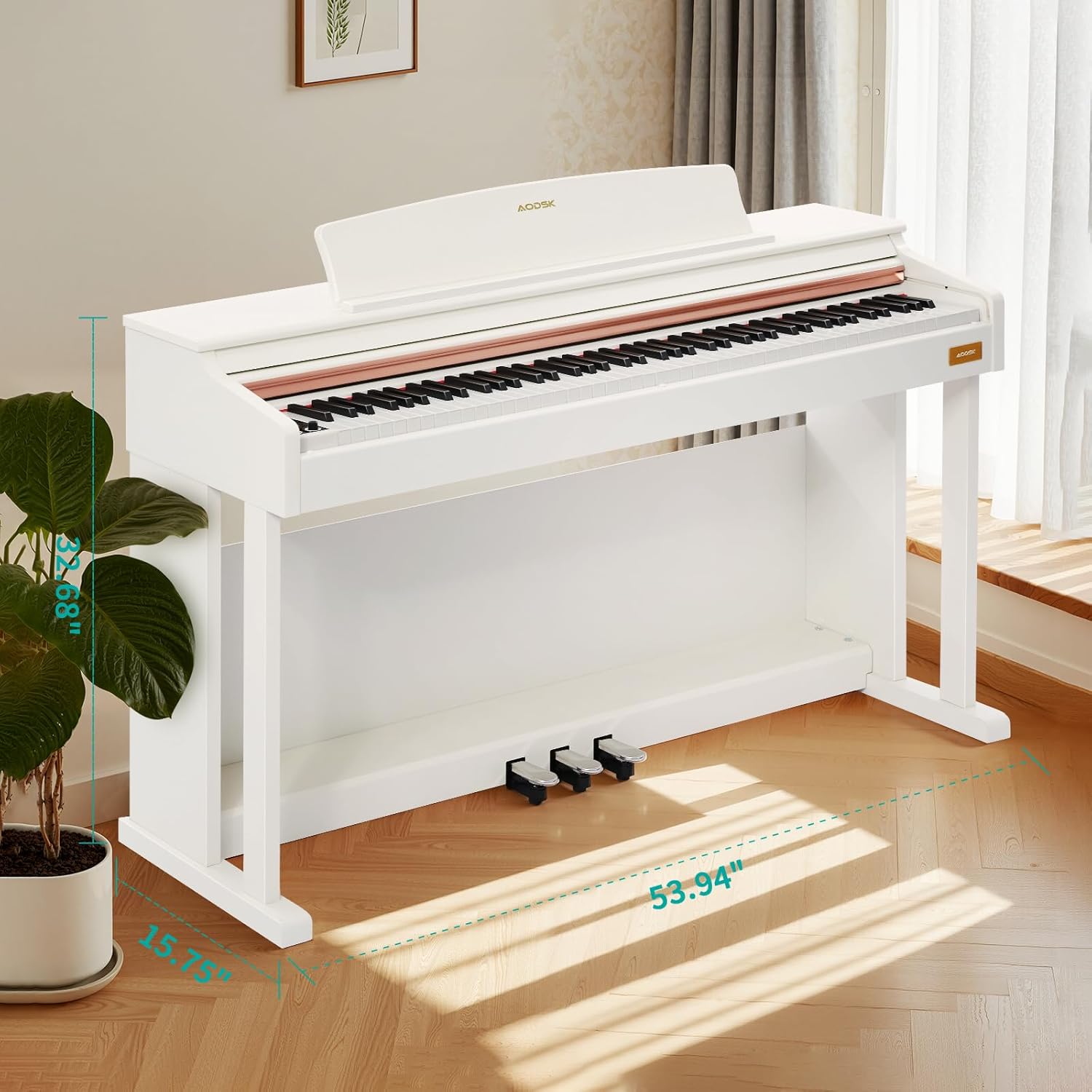
Image 4.1: Digital piano dimensions for placement planning. (Approx. 53.94" W x 15.75" D x 32.68" H)
4.2. Storage Bench Assembly
The storage bench is designed for quick, tool-free assembly:
- Remove the bench legs and hardware from the storage compartment under the seat.
- Screw each leg firmly into the designated corner mounts on the underside of the bench seat. No tools are typically required for this step.
- Ensure all legs are stable and the bench is level before use.

Image 4.2: The storage bench with its lid open, revealing the internal compartment.
5. Konpozan souview
5.1. Kontwòl Panel
The control panel provides access to various functions and settings of the digital piano.

Imaj 5.1: Gwo plan view of the digital piano's control panel, showing buttons for tone, rhythm, demo, volume, and other features.
- Bouton pouvwa: Limen oswa etenn pyano a.
- Bouton Volim: Ajiste volim mèt la.
- Bouton Ton: Selects from 680 available tones.
- Bouton ritm: Selects from 600 available rhythms.
- Bouton Demo: Plays demonstration songs (80 available).
- Bouton Split: Activates dual keyboard split tone function.
- MP3 Play/Pause: Controls MP3 playback via USB.
- Anrejistre/Jwe: Initiates and plays back two-track recordings.
- Numerical Select: Used to input specific tone, rhythm, or demo numbers.
- USB priz: For MP3 playback and potentially other data transfer.
5.2. Triple Pedal System
The piano features a standard triple pedal system for expressive playing.
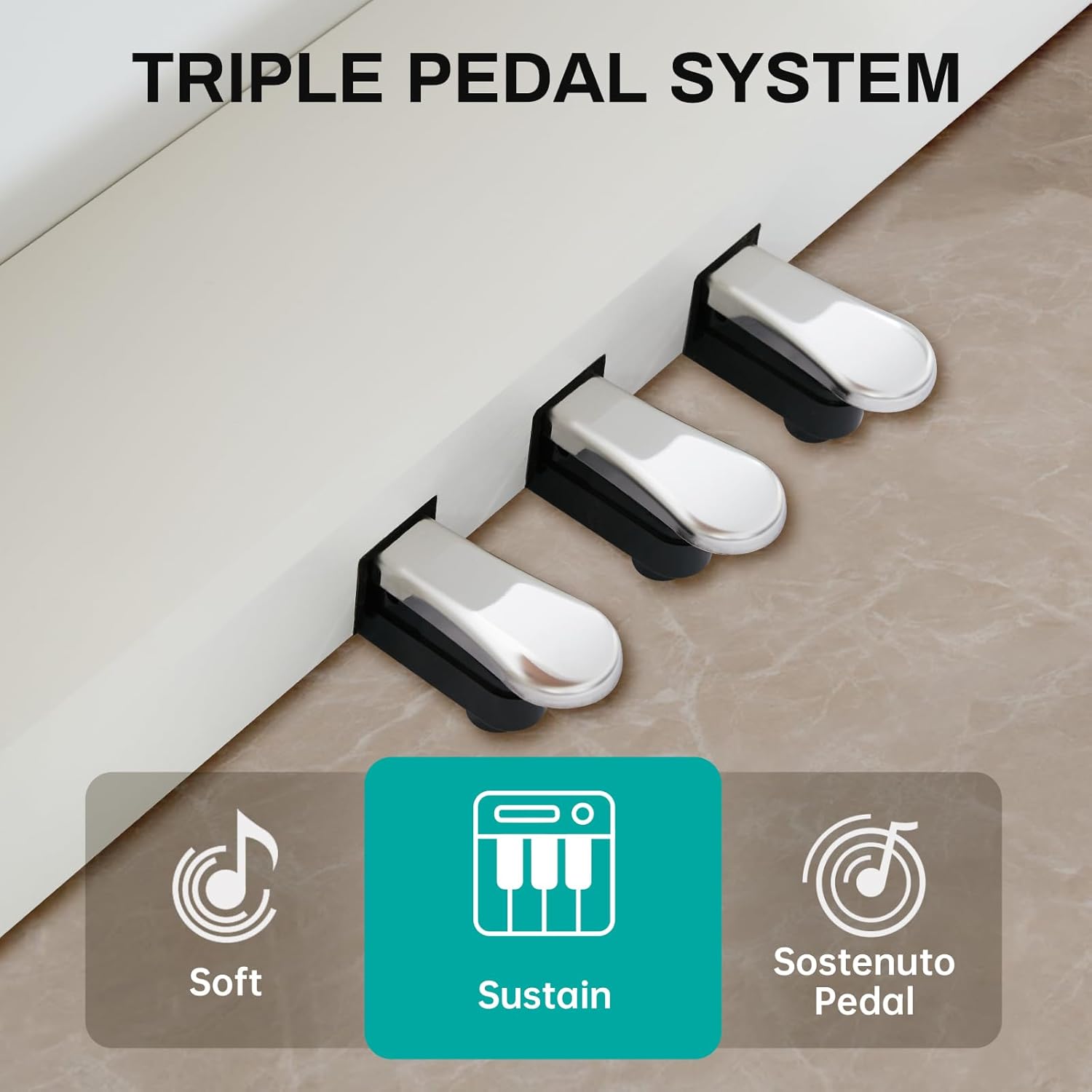
Image 5.2: Close-up of the three pedals: Soft, Sustain, and Sostenuto.
- Soft Pedal (Left): Reduces the volume and changes the timbre of the notes.
- Sustain Pedal (Middle): Sustains the notes, allowing them to ring out after the keys are released.
- Sostenuto Pedal (Right): Sustains only the notes that are held down at the moment the pedal is pressed, while subsequent notes remain unaffected.
5.3. 88-Key Weighted Hammer Action Keyboard
The 88-key keyboard is designed to replicate the feel of an acoustic grand piano, providing a realistic playing experience.
- Weighted Hammer Action: Provides a heavier touch in the lower register and a lighter touch in the higher register, similar to an acoustic piano.
- Manyen sansiblite: The piano responds to the force with which keys are played, allowing for dynamic expression.
6. Operasyon Enstriksyon
6.1. Power On/Off
Peze a Bouton pouvwa on the control panel to turn the piano on. Press it again to turn the piano off.
6.2. Kontwòl Volim
Sèvi ak la Volume Knobs on the control panel to adjust the overall output volume of the piano.
6.3. Seleksyon Ton
Peze a Bouton Ton, then use the numerical keys or navigation buttons to select from the 680 available instrument tones.
6.4. Seleksyon ritm
Peze a Bouton Ritm, then use the numerical keys or navigation buttons to select from the 600 available rhythm patterns.
6.5. Demonstration Songs
Peze a Bouton Demo to cycle through or select one of the 80 built-in demonstration songs.
6.6. Dual Keyboard Split Tone
Aktive la Bouton Split to divide the keyboard into two sections, allowing two different tones to be played simultaneously or for two players to use the keyboard independently.
6.7. Lekti MP3
Mete yon kondwi USB ak MP3 files nan USB priz. Sèvi ak la MP3 Play/Pause and navigation buttons to control playback.
6.8. Two-Track Recording
Peze a Bouton Dosye to start recording your performance. Press it again to stop. Use the Jwe bouton to listen to your recorded tracks.
6.9. Pedal Functions
Sèvi ak Soft, Sustain, and Sostenuto Pedals as described in Section 5.2 to add expression to your playing.
7. Antretyen
Proper maintenance ensures the longevity and performance of your digital piano.
- Netwayaj: Wipe the piano and bench surfaces with a soft, dry cloth. For stubborn dirt, slightly dampen the cloth with water and mild soap, then wipe dry immediately. Avoid abrasive cleaners or solvents.
- Kouvèti pousyè: Use the provided dust cover when the piano is not in use to protect it from dust and debris.
- Swen kle: Keep the keys clean. If they become dirty, wipe them gently with a soft, slightly damp twal.
- Kondisyon anviwònman: Store the piano in a stable environment, away from direct sunlight, extreme temperatures, and high humidity, which can affect electronic components and wood finishes.
NAN. Depanaj
If you encounter any issues, please refer to the table below for common problems and solutions.
| Pwoblèm | Kòz posib | Solisyon |
|---|---|---|
| Pa gen son | Power off; Volume too low; Headphones connected; Pedal issue. | Ensure power is on. Increase volume. Disconnect headphones. Check pedal connections. |
| Kle pa reponn | Instrument off; Specific setting activated (e.g., local control off). | Turn piano on. Check manual for advanced settings like local control. |
| Pedal yo pa mache | Pedal cable loose; Pedal unit faulty. | Ensure pedal cable is securely connected to the piano. |
| Pwoblèm lèktur MP3 | Kle USB a pa fòma byen; Enkonpatib file type; USB drive loose. | Ensure USB drive is FAT32 formatted. Use MP3 files. Reinsert USB drive. |
| Son defòme | Volume too high; Speaker interference. | Reduce volume. Ensure no objects are blocking speakers. |
Si pwoblèm nan pèsiste apre ou fin eseye solisyon sa yo, tanpri kontakte sèvis kliyan.
9. Espesifikasyon
- Klavye: 88-Key Weighted Hammer Action
- Polifoni: 128-nòt
- Ton: 680 ton entegre
- Ritm: 600 bati-an ritm
- Chan Demonstrasyon: 80
- Pedal: Triple Pedal System (Soft, Sustain, Sostenuto)
- Fonksyon: Dual Keyboard Split, MP3 Playback, Two-Track Recording
- Dimansyon ban: 29-inch width, 2.68-inch deep storage bin
- Bench Weight Capacity: 300 liv
- Koneksyon: USB priz
10. Garanti ak sipò
This AODSK product is covered by a standard manufacturer's warranty against defects in materials and workmanship. Please refer to the warranty card included in your package for specific terms and conditions, including the warranty period and how to make a claim.
For technical support, troubleshooting assistance, or warranty inquiries, please contact AODSK customer service through the retailer where you purchased the product or visit the official AODSK websit pou enfòmasyon kontak.


