Entwodiksyon
Thank you for choosing the WUBEN X4 EDC Flat Flashlight. This compact and versatile lighting tool is designed for various applications, offering powerful illumination and multiple functional modes. This manual provides essential information for proper setup, operation, and maintenance to ensure optimal performance and longevity of your device.

Image: The WUBEN X4 EDC Flat Flashlight, showcasing its compact design and dual light sources.
Karakteristik kle
- Portable Multi-functional Design: Dual light source with a main light offering up to 1500 lumens and a side light providing warm white and RGB options.
- Kontwòl entwisyon: Features a toggle switch for mode selection (lock, side light, main light, moonlight) and a rotary switch for stepless brightness dimming and RGB color control.
- Taktik ke switch: Integrated switch for instant 1500-lumen main light activation.
- Bouchon ke mayetik: Allows for hands-free attachment to metal surfaces.
- Dirab ak lejè: Constructed from aluminum, weighing only 137 grams (4.8 oz) with batteries, and measuring 1.5 x 1 x 3.8 inches.
- Evalyasyon ki enpèmeyab IP68: Built to withstand immersion in water up to 2 meters for 1 hour, and resistant to drops, dust, and rain.
- Pwolonje lavi batri: Up to 285 hours of operation with a 3350mAh high-capacity battery, fully rechargeable in 2.5 hours via USB-C.
- Endikatè batri: Monitor battery level at any time.
Kontni pake
Asire w tout atik yo la lè w ap debale bwat la:
- WUBEN X4 Flashlight x 1
- USB-C Chaje kab x 1
- Lanyard x 1
- Belt Clip x 1 (Pre-installed or included separately)
- Manyèl itilizatè x 1
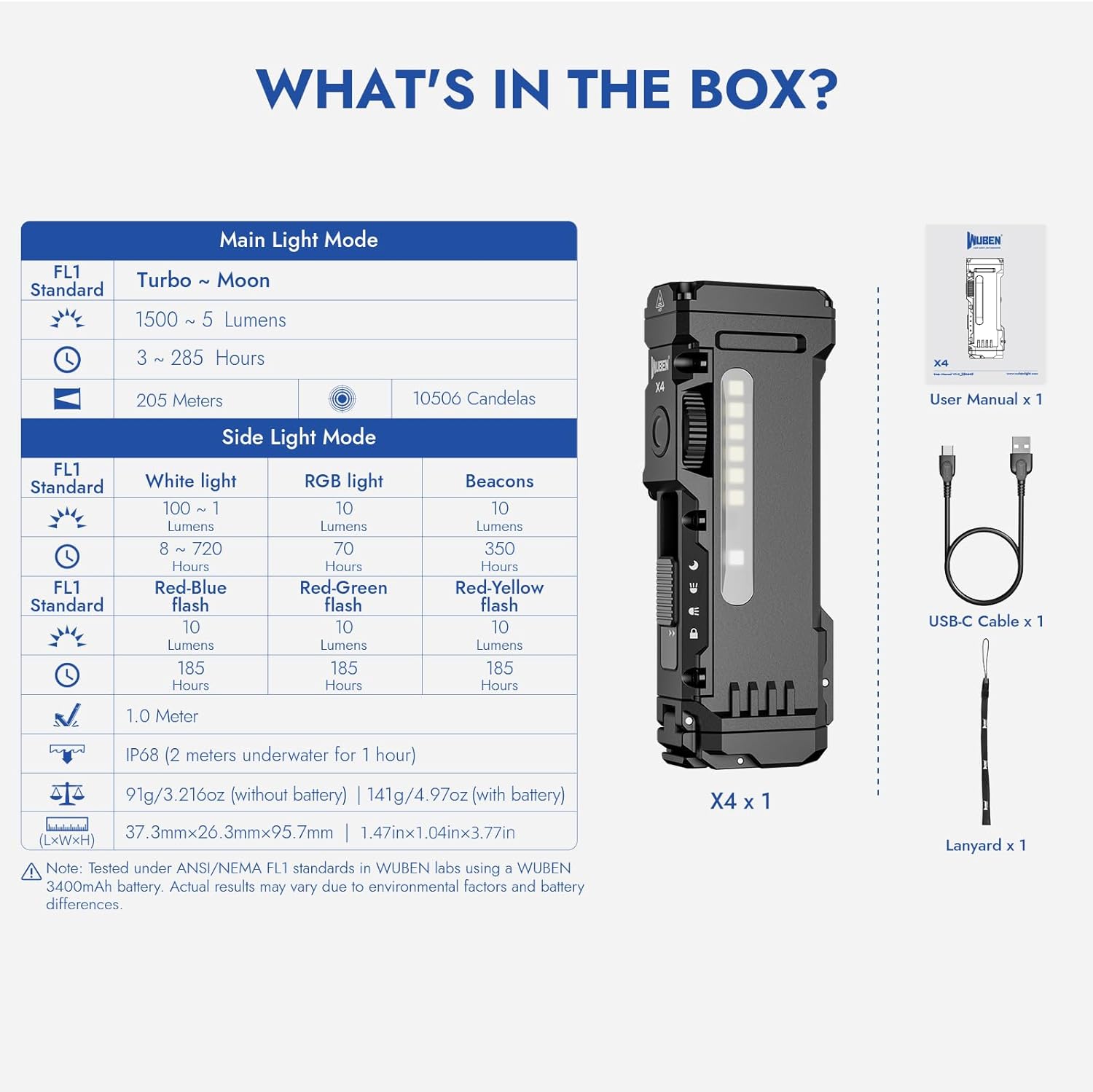
Image: Visual representation of the WUBEN X4 flashlight and its included accessories.
Enstalasyon
Enstalasyon batri ak ranplasman
- Locate the battery compartment at the tail end of the flashlight.
- Slide the lock switch to the unlocked position (if applicable) and open the battery cap.
- Insert the 18650 Lithium-Ion battery, ensuring the positive (+) and negative (-) terminals align correctly with the markings inside the compartment.
- Close the battery cap securely and slide the lock switch back to the locked position.
Chaje
- Slide the mode selection switch to the 'Moonlight' position to expose the USB-C charging port.
- Connect the provided USB-C charging cable to the flashlight's port and a compatible USB power source.
- The battery indicator lights will show the charging status. A full charge typically takes 2.5 hours.
- Once charging is complete, return the mode selection switch to the desired position, ensuring the USB-C port is covered for water resistance.
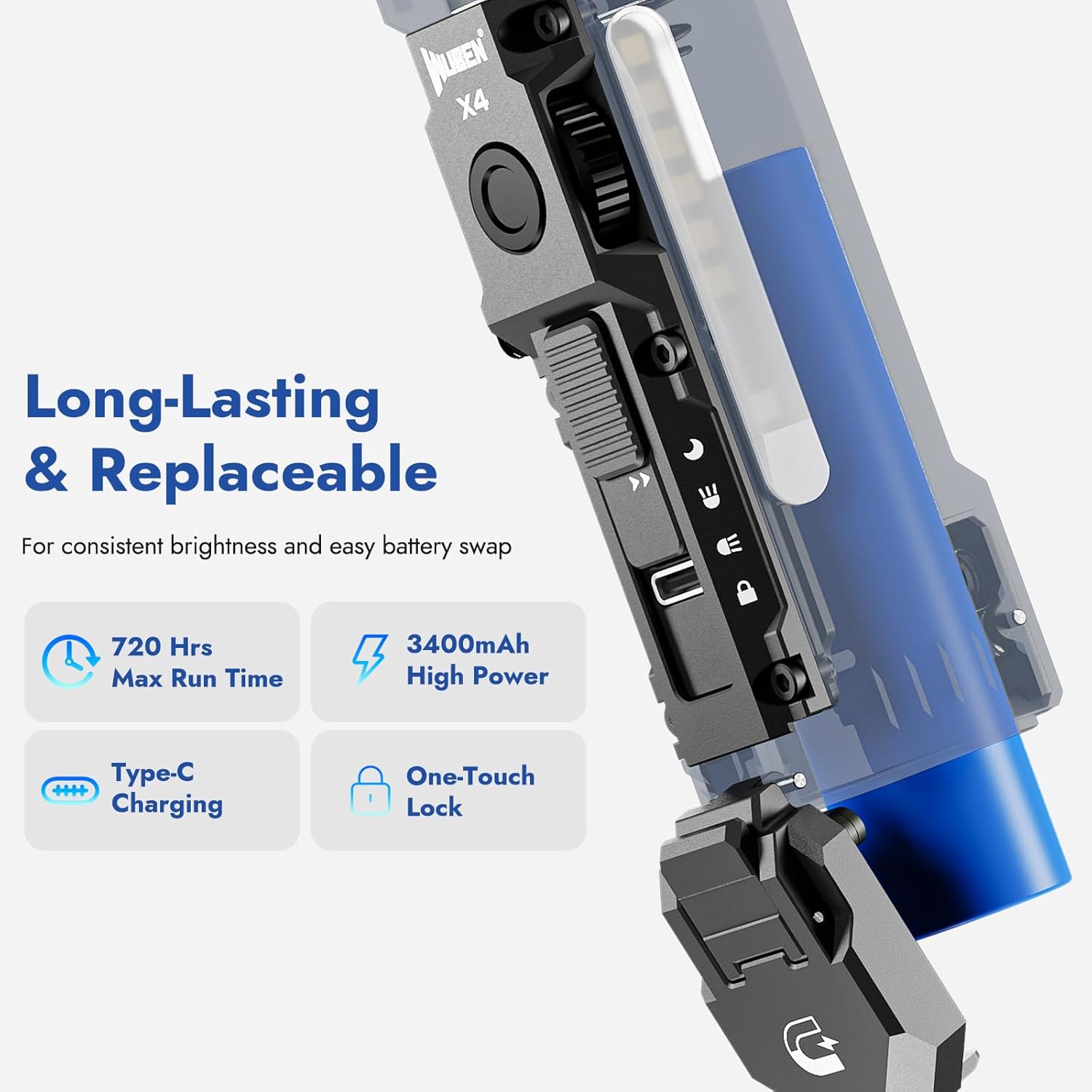
Image: The WUBEN X4 flashlight highlighting its replaceable battery and USB-C charging port.
Enstriksyon Operasyon
Mode Selection (Toggle Switch)
The toggle switch on the side of the flashlight allows you to select between different lighting modes:
- Lock Mode: Prevents accidental activation. Ensure the switch is in this position when not in use.
- Mòd Limyè Bò: Activates the side LED panel for area illumination.
- Mòd Limyè Prensipal: Activates the primary front LED for focused beam illumination.
- Moonlight Mode: Provides a very low light output, ideal for preserving night vision or discreet use. This position also exposes the USB-C charging port.
Brightness Adjustment (Rotary Switch)
Once a light mode (Main or Side) is selected, use the rotary switch to adjust the brightness steplessly. Rotate clockwise to increase brightness and counter-clockwise to decrease it.
RGB Light Modes (Side Light)
In Side Light Mode, press and hold the rotary switch to cycle through different RGB colors. Rotate the switch to fine-tune the color or select specific flashing patterns (e.g., red-blue flash for emergencies).

Image: The WUBEN X4 showcasing its multi-use side light with warm white and RGB color options.
Taktik ke switch
The integrated tactical tail switch provides quick access to maximum brightness:
- Instant 1500 Lumens: Press the tactical tail switch to instantly activate the main light at 1500 lumens, regardless of the current mode (Main Light or Side Light).
- Momantan sou: Lightly press and hold the tactical switch for momentary high output. Release to turn off.
- Strobe mòd: Double-press the tactical switch to activate strobe mode for signaling or self-defense.

Image: Diagram illustrating the functions of the innovative tactical tail switch on the WUBEN X4.
Magnetic Tail Cap and Clip
The magnetic tail cap allows the flashlight to be securely attached to metal surfaces, providing hands-free illumination. The extended clip offers versatile carrying options, allowing attachment to hats, waistbands, or backpacks.
Video: Demonstration of the WUBEN X4's back clip, lanyard, and magnetic tail features for hands-free use.
Antretyen
- Netwayaj: Siye kò flach la ak yon twal mou,amp twal. Pa sèvi ak pwodui netwayaj abrazif oswa solvang.
- Swen batri: Recharge the battery regularly to maintain its lifespan. If storing for an extended period, charge the battery to approximately 50% and store in a cool, dry place.
- Rezistans dlo: Ensure the USB-C port cover is properly sealed when not charging to maintain IP68 water resistance.
- Depo: When not using the X4 flashlight, always adjust the slide switch to the locked position to prevent accidental activation and battery drain.
Espesifikasyon
| Mak | WUBEN |
| Modèl | X4 |
| Main Light Output | Jiska lumèn 1500 |
| Side Light Output | 1 to 100 Lumens (Warm Light), RGB |
| Distans gwo bout bwa | Jiska 205 mèt |
| Sous pouvwa | Mache ak pil (3350mAh ityòm iyon) |
| Port chaje | USB-C |
| Tan pou chaje | Apeprè. 2.5 èdtan |
| Max kouri tan | Jiska 285 èdtan |
| Rezistans dlo | IP68 (enpèmeyab) |
| Materyèl | Aliminyòm |
| Dimansyon | 1.5"D x 3.8"W x 1"H |
| Pwa atik | 9.9 ons (0.28 kilogram) |

Image: The WUBEN X4 flashlight demonstrating its IP68 waterproof capability.
Garanti ak sipò
For warranty information, technical support, or any inquiries regarding your WUBEN X4 flashlight, please refer to the official WUBEN websit la oubyen kontakte sèvis kliyan yo dirèkteman. Kenbe resi acha w la pou reklamasyon garanti.
Vizite la WUBEN Store pou plis enfòmasyon.


