1. Entwodiksyon
This manual provides essential information for setting up, operating, and maintaining your HP OMEN 45L GT22 Gaming Desktop PC. Please read this manual thoroughly before using your new computer to ensure optimal performance and longevity.
The HP OMEN 45L GT22 is a high-performance gaming desktop computer designed for demanding applications and immersive gaming experiences. It features advanced cooling solutions, extensive connectivity options, and customizable RGB lighting.
2. Ki sa ki nan bwat la
Verifye ke tout atik yo prezan anvan ou kontinye ak konfigirasyon an:
- HP OMEN 45L Gaming Desktop
- Klavye
- Sourit
- Quick Setup Gid
- Pouvwa kab

Image: Contents of the HP OMEN 45L GT22 box, showing the desktop, keyboard, mouse, and power cable.
3. Gid Enstalasyon
3.1 Plasman Inisyal
Place your HP OMEN 45L GT22 on a stable, flat surface with adequate ventilation. Ensure that the air vents are not obstructed to allow for proper cooling.

Imaj: Devan view of the HP OMEN 45L GT22 Gaming Desktop PC, showcasing konsepsyon li yo ak ekleraj RGB li yo.
3.2 Konekte periferik
Connect your monitor(s), keyboard, mouse, and other peripherals to the appropriate ports on the rear and top panels of the desktop.
- Pò panèl dèyè: Four USB-A 2.0, two 5 Gb/s USB-A, one 10 Gb/s USB-C, one 40 Gb/s Thunderbolt 4 USB-C (with DisplayPort 2.1 alternate mode), RJ45 Ethernet.
- Top Panel Ports: Headphone jack, Microphone jack, two USB Type-A (5Gbps signaling rate).
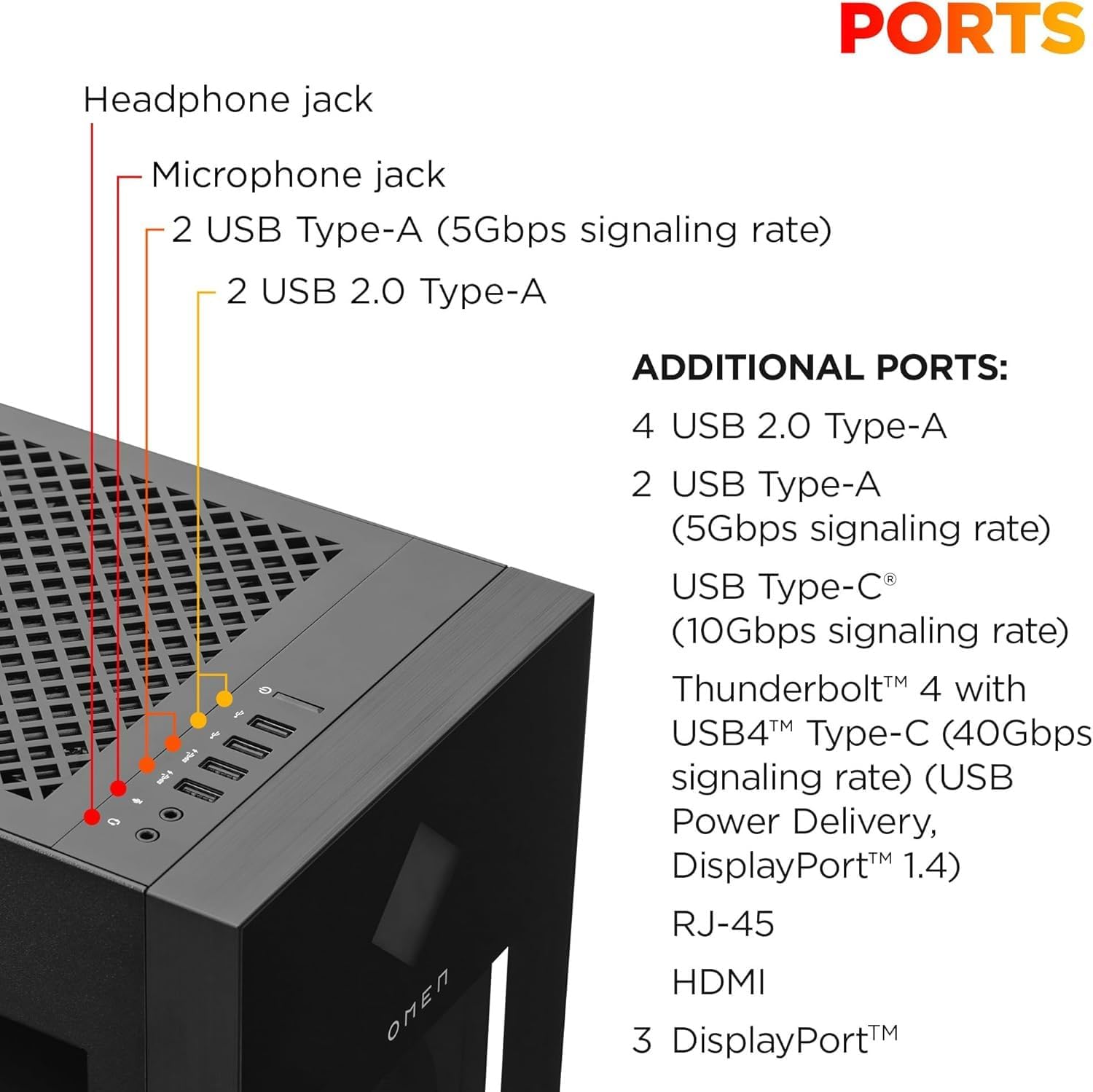
Image: Top panel ports of the HP OMEN 45L GT22, including headphone, microphone, and USB ports.
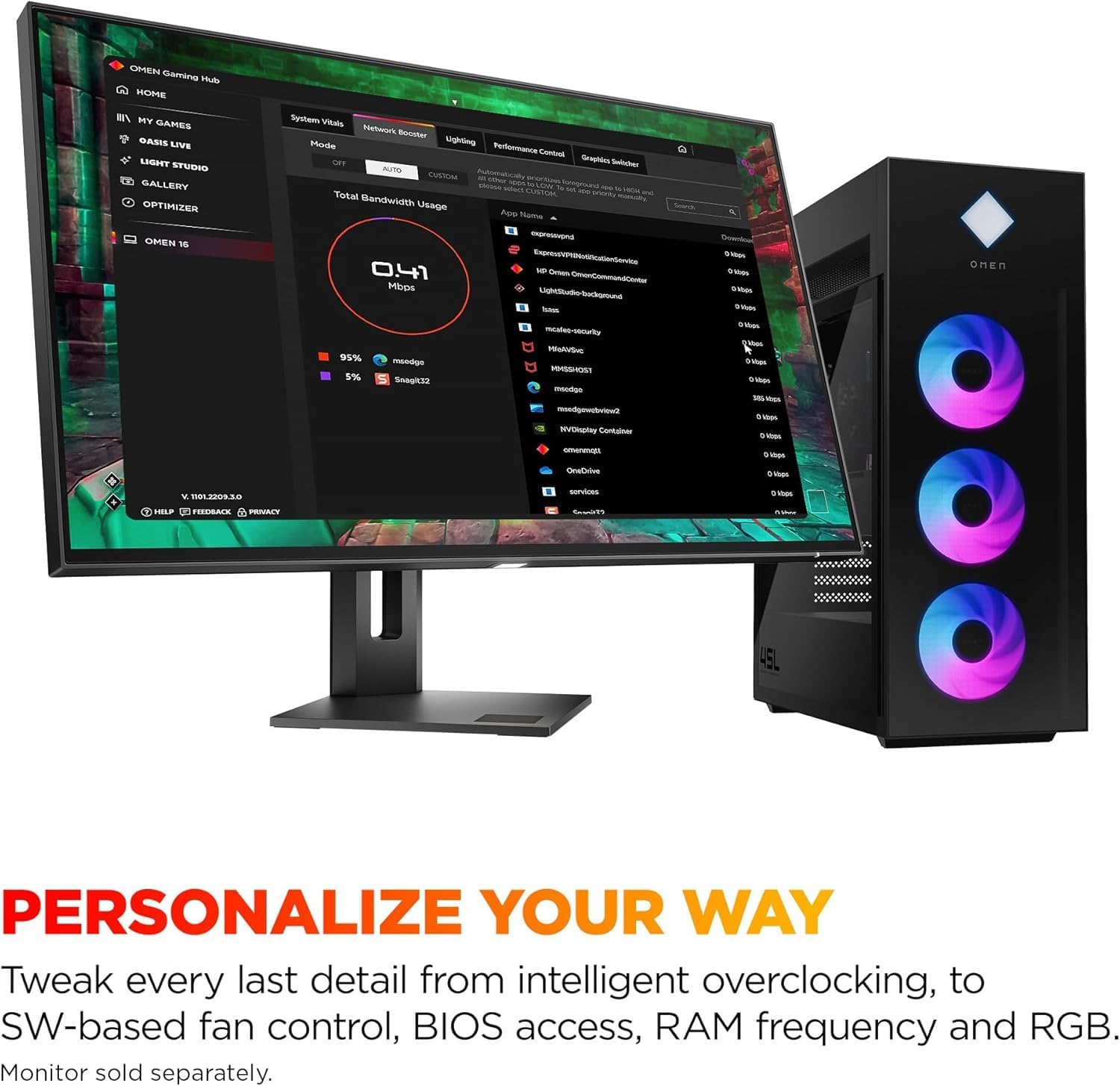
Image: Rear panel ports of the HP OMEN 45L GT22, detailing USB, Thunderbolt, HDMI, DisplayPort, and Ethernet connections.
3.3 Koneksyon pouvwa
Connect the power cable to the desktop and then to a grounded electrical outlet. Press the power button on the top panel to turn on the computer.
4. Kijan pou w itilize òdinatè w la
4.1 Premye Demaraj ak Enstalasyon Windows
Upon first boot, follow the on-screen instructions to complete the Windows 11 Pro setup. This includes setting up your user account, network connection, and privacy settings.
4.2 Koneksyon Rezo
Your OMEN 45L GT22 supports both wired and wireless network connections:
- Branche: Konekte yon kab Ethernet nan pò RJ45 sou panèl la dèyè.
- San fil: Utilize the built-in Wi-Fi 6E (802.11ax) for high-speed wireless connectivity. Bluetooth 5.3 is also available for connecting wireless peripherals.
4.3 OMEN Gaming Hub and RGB Control
The OMEN Gaming Hub software allows you to customize various aspects of your PC, including RGB lighting, system performance, and network boosting. Explore the four RGB case zones and OMEN Light Studio for personalized aesthetics.

Image: OMEN Gaming Hub software interface for system customization.
5. Antretyen
5.1 Sistèm refwadisman
The OMEN Cryo Chamber, combined with OMEN case RGB system fans and an AIO liquid cooler, is designed to prevent overheating. Regularly check for dust accumulation in the vents and clean them using compressed air to maintain optimal airflow.

Imaj: Bò kote view of the HP OMEN 45L GT22, highlighting the tempered glass panel and internal layout.
5.2 Mizajou Sistèm
Keep your Windows operating system, drivers, and OMEN Gaming Hub software updated to ensure security, compatibility, and the latest features. Windows 11 Pro provides continuous updates for enhanced performance.
5.3 Internal Access and Upgrades
The full-metal frame with toolless entry allows for easy access to internal components for upgrades or maintenance. The system includes one PCIe x16 and one PCIe x4 slot for expansion, along with two extra PCIe x4 slots for SSDs and one extra PCIe x4 for WLAN.
NAN. Depanaj
6.1 Pwoblèm Jeneral
- Pa gen pouvwa: Ensure the power cable is securely connected to both the PC and the electrical outlet. Check if the outlet is functional.
- Pa gen ekspozisyon: Verify that your monitor is correctly connected to the graphics card ports (HDMI or DisplayPort) and that the monitor is powered on and set to the correct input.
- Periferik pa detekte: Reconnect the peripheral to a different USB port. Ensure drivers are installed if required.
6.2 Pwoblèm Pèfòmans
- Pèfòmans Ralanti: Check for background applications consuming resources. Ensure sufficient free space on your NVMe SSD. Update drivers and operating system.
- Surchof: Ensure proper ventilation around the PC. Clean dust from vents and fans. Monitor temperatures using OMEN Gaming Hub.
7. Espesifikasyon
| Karakteristik | Detay |
|---|---|
| Processeur | Intel Core Ultra 9 285K 24-Core 3.70 GHz (up to 5.70 GHz Turbo Boost), Intel AI Boost 13 TOPS NPU |
| RAM | 32GB DDR5 5600 MHz Memory |
| Depo | Disk SSD 1TB PCIe NVMe M.2 |
| Kat grafik | NVIDIA GeForce RTX 5070 12GB GDDR7 (1x HDMI, 3x DisplayPort) |
| Sistèm operasyon | Windows 11 Pro (64-bit) |
| Koneksyon san fil | Wi-Fi 6E (802.11ax), Bluetooth 5.3 |
| Koneksyon filaire | Gigabit Ethernet (RJ45) |
| Pò devan | 1x Headphone/Microphone Input, 2x USB-A 3.2 Gen 1 (5Gbps) |
| Pò dèyè | 1x USB-C (Thunderbolt 4 with DisplayPort Alt Mode), 1x USB-C 3.2 Gen 2 (10Gbps), 2x USB-A 3.2 Gen 1 (5Gbps), 4x USB-A 2.0 |
| Fant ekspansyon | 1x PCIe x16, 1x PCIe x4, 2x extra PCIe x4 for SSDs, 1x extra PCIe x4 for WLAN |
| Refwadisman | OMEN Cryo Chamber, AIO Liquid Cooling, RGB System Fans |
| Dimansyon (LxWxH) | 21.85 x 8.03 x 18.5 pous |
| Pwa | 49.8 liv |

Image: Dimensions of the HP OMEN 45L GT22 Gaming Desktop PC.
8. Garanti ak sipò
8.1 Enfòmasyon sou Garanti
Your HP OMEN 45L GT22 Gaming Desktop PC comes with a 2-Year Warranty provided by Techno Intelligence. This warranty covers manufacturing defects and hardware malfunctions under normal use conditions.
Plan pwoteksyon opsyonèl disponib pou yon pwoteksyon pwolonje:
- Plan Pwoteksyon 3 Zan
- Complete Protect: Covers all eligible past and future purchases (monthly billing option available).
8.2 Sipò teknik
Free technical support is available from Techno Intelligence for the duration of your warranty. For assistance, please refer to the contact information provided with your purchase documentation or visit the Techno Intelligence support websit.
For general product information and resources, you can visit the official Magazen HP.