1. Entwodiksyon
The Eastar EDA-100 is a versatile digital woodwind instrument designed for both beginners and experienced musicians. It offers a wide range of instrument tones, silent practice capabilities, and modern connectivity options for musical creation.
1.1 Kontni pake a
Lè w ap debale, tanpri asire w ke tout bagay sa yo enkli:
- Eastar EDA-100 Digital Woodwind Instrument
- Soft Mouthpieces (2)
- USB Chaje Kab
- Sak Depo
- Manyèl Itilizatè (dokiman sa a)
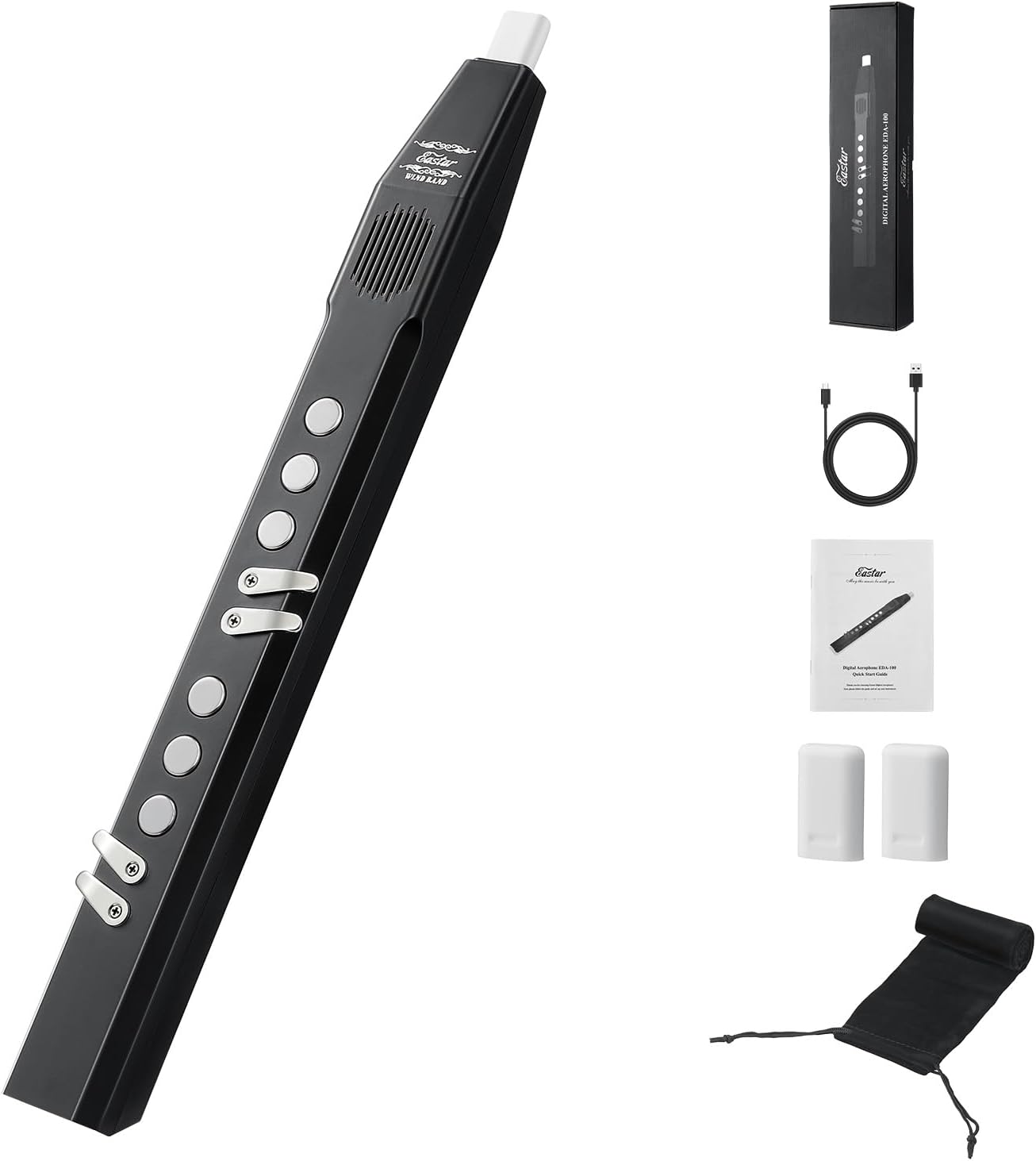
Figure 1: The Eastar EDA-100 Digital Woodwind Instrument with its complete set of accessories, including two mouthpieces, a USB cable, a storage bag, and the user manual.
2. Enstalasyon
2.1 Chaje batri a
Before first use, fully charge the instrument. Connect the provided USB cable to the Type-C port on the EDA-100 and to a standard USB power adapter (not included). The charging indicator light will illuminate during charging and turn off when fully charged. A full charge provides up to 5 hours of playing time.
2.2 Attaching the Mouthpiece
Gently insert one of the soft mouthpieces onto the instrument's mouthpiece receiver. Ensure it is securely fitted but do not force it.
2.3 Limen/Etenyen
Locate the power button on the instrument. Press and hold it for a few seconds to turn the EDA-100 on or off.

Figure 2: Ergonomic design features of the EDA-100, including adjustable airflow control, noiseless touch buttons, and a comfortable thumb rest for ease of play.
3. Operasyon Enstriksyon
3.1 Seleksyon Ton
The EDA-100 features 27 distinct instrument tones. Use the 'Tone Change' buttons (usually marked with arrows or 'Tone +/-') to cycle through the available sounds, which include saxophone, flute, trumpet, clarinet, and more. The current tone will be displayed on the instrument's interface.

Figure 3: The EDA-100 offers 27 instrument tones, providing a wide range of musical expression.
3.2 Fingering Modes
The instrument supports dual fingering modes: Saxophone and Flute. Refer to the included fingering chart for specific key combinations for each mode. A dedicated 'Fingering Change' button allows switching between these modes.
3.3 Kontwòl koule lè a
Adjust the 3-stage airflow control to match your playing style and comfort. This feature allows for a more natural and responsive playing experience.
3.4 Volume and Reverb Effects
Adjust the instrument's volume using the 'Volume' buttons. The EDA-100 also includes 30 reverb effects to add depth and spaciousness to your sound. Use the 'Reverb' button to cycle through or adjust these effects.

Figure 4: The EDA-100 features a built-in Hi-Fi 3W speaker for direct playback and an internal rechargeable battery providing up to 5 hours of use.
3.5 Pratik an silans
For private practice, connect headphones to the 3.5mm earphone jack. This mutes the built-in speaker, allowing you to practice without disturbing others.

Figure 5: The EDA-100 supports silent practice via its 3.5mm headphone jack, making it suitable for various environments. Its lightweight design also ensures portability.
3.6 Koneksyon MIDI
The EDA-100 supports both Bluetooth and wired MIDI transmission. Connect the instrument to a computer or other MIDI-compatible devices to use it as a MIDI controller for music production software or external sound modules. This allows for integration into various musical creation workflows.

Figure 6: The EDA-100 supports wireless/BT MIDI transmission and music accompaniment, enabling integration with digital audio workstations for musical creation.
4. Antretyen
4.1 Cleaning the Mouthpiece
After each use, remove the mouthpiece and rinse it with lukewarm water. Use a mild soap if necessary. Ensure it is completely dry before reattaching or storing. Regular cleaning prevents the buildup of residue.
4.2 Swen Batri
To prolong battery life, avoid fully discharging the instrument frequently. If storing for an extended period, charge the battery to approximately 50% and store in a cool, dry place. Recharge every few months to prevent deep discharge.
4.3 Netwayaj jeneral
Wipe the body of the instrument with a soft, dry cloth. Do not use abrasive cleaners or solvents, as these can damage the finish. Keep the instrument free from dust and moisture.
NAN. Depanaj
5.1 Pa gen Sòti Son
- Tcheke Volim: Ensure the volume is not set to zero.
- Koneksyon ekoutè: If headphones are plugged in, sound will only come through them. Unplug headphones if you wish to use the built-in speaker.
- Nivo batri: Ensure the instrument is sufficiently charged.
5.2 MIDI Connection Issues
- Bluetooth: Ensure Bluetooth is enabled on both the EDA-100 and your receiving device. Pair the devices correctly.
- Branche: Check the USB cable connection. Ensure your music software is configured to recognize the EDA-100 as a MIDI input device.
5.3 Instrument Not Powering On
- Chaj batri: Connect the instrument to a charger and allow it to charge for at least 30 minutes before attempting to power on again.
- Bouton pouvwa: Ensure you are pressing and holding the power button for the required duration.
6. Espesifikasyon
| Karakteristik | Spesifikasyon |
|---|---|
| Nimewo Modèl | EDA-100 (EB2018) |
| Pwa atik | 14.1 ons (0.4 kg) |
| Dimansyon pake | 18.7 x 4.33 x 2.36 pous |
| Kalite batri | 1 batri ityòm Ion (enkli) |
| Lavi batri | Jiska 5 èdtan |
| Ton | 27 instrument tones |
| Sampling To | 20-channel, 16-bit, 44.1kHz true sampling |
| Oratè | Built-in Hi-Fi 3W Speaker |
| Koneksyon | Bluetooth/Wired MIDI, 3.5mm earphone jack, Type-C USB |
| Efè reverb | 30 enkli |
| Materyèl | Plastik |
| Koulè | Nwa |
7. Garanti ak sipò
The Eastar EDA-100 Digital Woodwind Instrument comes with a 12-month product service period. For any technical assistance, troubleshooting, or warranty claims, please contact Eastar customer support through the retailer where the product was purchased or visit the official Eastar websit pou enfòmasyon kontak.
Tanpri konsève prèv acha ou a pou validasyon garanti a.


