1. Entwodiksyon
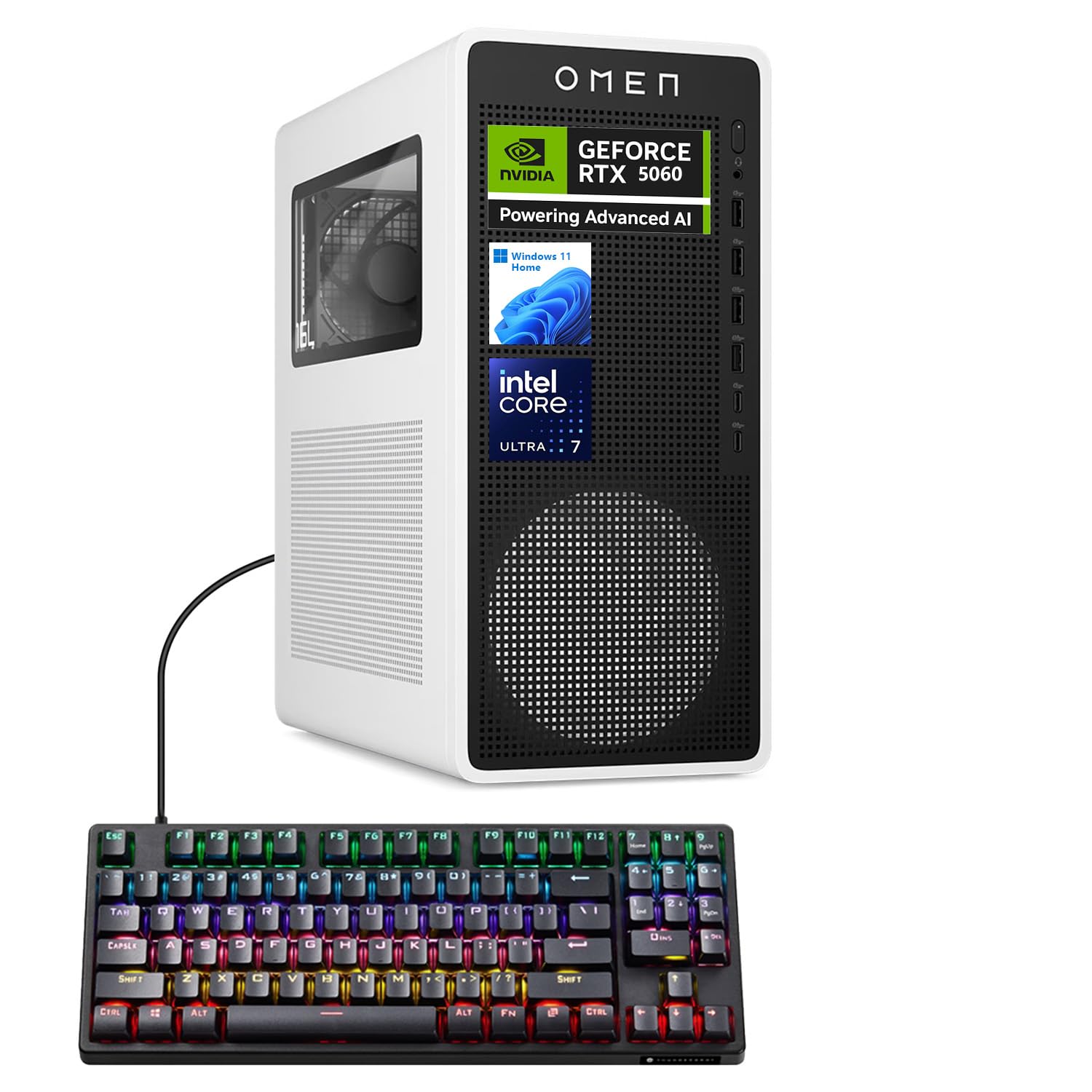
Welcome to the user manual for your new HP OMEN 16L TG03 Gaming Desktop. This powerful system is designed for high-performance gaming and demanding applications, featuring an Intel Core Ultra 7 265F processor, NVIDIA GeForce RTX 5060 graphics, 16GB DDR5 RAM, and a 1TB PCIe NVMe M.2 Solid State Drive. This manual provides essential information for setting up, operating, maintaining, and troubleshooting your desktop to ensure optimal performance and longevity.
2. Ki sa ki nan bwat la
Upon unpacking your HP OMEN 16L TG03 Gaming Desktop, please ensure all the following items are present:
- HP Omen 16L Gaming Tower Desktop
- Thunderobot KG3089R Gaming Keyboard (bundled item)
- Pouvwa kab
- Dokimantasyon (Gid Demaraj Rapid, Enfòmasyon sou Garanti)
Note: Additional accessories such as a monitor, mouse, and speakers are sold separately unless specified in your purchase bundle.
3. Gid Enstalasyon
Follow these steps to set up your HP OMEN 16L TG03 Gaming Desktop:
- Depake Desktop la: Carefully remove the desktop tower and all accessories from their packaging.
- Konekte periferik:
- Connect your monitor(s) to the graphics card ports (HDMI, DisplayPort) on the rear of the desktop.
- Connect the Thunderobot KG3089R Gaming Keyboard and your mouse to the available USB ports.
- Konekte nenpòt lòt periferik tankou oratè, kas ekoutè, oswa dis lou ekstèn.
- Konekte pouvwa: Plug the power cable into the desktop's power input and then into a grounded electrical outlet.
- Pouvwa sou: Peze bouton pouvwa a ki sou devan òdinatè biwo a.
- Premye enstalasyon Windows: Follow the on-screen instructions to complete the Windows 11 Home operating system setup, including language, region, network connection, and user account creation.

Pò souview:
- Devan: Headphone/MIC combo jack, 4 x Superspeed USB Type-A (5Gbps), 2 x Superspeed USB Type-C (10Gbps)
- Dèyè: 3 x Headphone/MIC combo jack, HDMI Out, 4 x USB Type-A 2.0, 1 x RJ-45 (Ethernet), Power input
4. Operasyon Enstriksyon
Your HP OMEN 16L TG03 Gaming Desktop comes pre-installed with Windows 11 Home, offering a user-friendly interface and enhanced performance features.
4.1 Operasyon debaz
- Limen/Etenyen: Peze bouton pouvwa a pou limen. Pou fèmen, klike sou bouton Kòmanse a, answit sou Pouvwa > Fèmen.
- Koneksyon Entènèt: Connect via Ethernet (RJ-45 port) or Wi-Fi 6 (802.11ax) for wireless internet access.
- Odyo: Connect headphones or speakers to the audio jacks.
4.2 Karakteristik jwèt yo
The OMEN 16L TG03 is optimized for gaming with its powerful hardware and dedicated software.

- Sant jwèt OMEN: Utilize the pre-installed OMEN Gaming Hub for performance optimization, system monitoring, and customizing RGB lighting effects. This hub provides advanced controls to fine-tune your gaming experience.
- NVIDIA GeForce RTX 5060: Experience hyperrealistic graphics and high frame rates with the NVIDIA GeForce RTX 5060. Leverage features like NVIDIA DLSS 4 for enhanced performance and AI-powered creativity.
- AI-Ready Workstation: The Intel Core Ultra 7 265F processor and NVIDIA RTX 5060 make this desktop suitable for AI-driven tasks, including gaming and content creation.
4.3 Thunderobot KG3089R Keyboard Shortcuts
The bundled Thunderobot KG3089R Gaming Keyboard offers several shortcut key combinations for enhanced control:

- FN+F9: Chanje efè ekleraj.
- FN + genyen: Lock the Windows key to prevent accidental presses during gaming.
5. Antretyen
Antretyen regilye ede asire lonjevite ak pèfòmans optimal òdinatè Desktop ou a.
- Kenbe li pwòp: Regularly clean the exterior of the desktop with a soft, dry cloth. Use compressed air to clear dust from vents and fans to prevent overheating.
- Mizajou lojisyèl: Keep your Windows operating system, drivers (especially graphics drivers), and OMEN Gaming Hub software updated to the latest versions for security and performance improvements.
- Pwoteksyon antivirus: Install and regularly update antivirus software to protect against malware and viruses.
- Sovgad done: Detanzantan, fè kopi done enpòtan yo sou yon disk ekstèn oswa yon depo nan nwaj la pou evite pèt done.
- Bon vantilasyon: Ensure the desktop is placed in a well-ventilated area, away from direct sunlight and heat sources, to allow for proper airflow.
NAN. Depanaj
If you encounter issues with your HP OMEN 16L TG03 Gaming Desktop, refer to the following common troubleshooting steps:
| Pwoblèm | Kòz posib | Solisyon |
|---|---|---|
| Desktop does not power on | Kab kouran an dekonekte, pwoblèm priz kouran | Check power cable connections to the desktop and wall outlet. Test the outlet with another device. |
| Pa gen ekspozisyon sou monitè a | Monitor cable loose, incorrect input selected on monitor | Ensure monitor cables are securely connected to both the desktop's graphics card and the monitor. Select the correct input source on your monitor. |
| Sistèm nan ralanti oswa li pa reponn | Too many applications running, outdated drivers, overheating | Close unnecessary applications. Update graphics and system drivers. Ensure proper ventilation and clean dust from vents. |
| Games crashing or freezing | Outdated graphics drivers, overheating, software conflicts | Update NVIDIA graphics drivers. Monitor system temperatures. Ensure OMEN Gaming Hub is optimized. |
| Klavye pa reponn | USB connection issue, driver problem | Try connecting the keyboard to a different USB port. Restart the desktop. Check for keyboard driver updates in Device Manager. |
For more complex issues, please refer to the HP support websit oswa kontakte sèvis kliyan.
7. Espesifikasyon
Detailed technical specifications for the HP OMEN 16L TG03 Gaming Desktop (Model: HSC-F007MT):
| Karakteristik | Detay |
|---|---|
| Nimewo Modèl | HSC-F007MT |
| Processeur | Intel Core Ultra 7 265F (20 Cores, 20 Threads, 30MB L3 Cache, 1.80GHz base, up to 5.30GHz max turbo) |
| Kat grafik | NVIDIA GeForce RTX 5060 (8GB GDDR7 Dedicated) |
| RAM | 16GB DDR5 (4800 MHz) |
| Depo | Disk SSD 1TB PCIe NVMe M.2 |
| Sistèm operasyon | Windows 11 Kay |
| Koneksyon san fil | Wi-Fi 6 (802.11ax) & Bluetooth |
| Pò devan | 1x Headphone/MIC combo jack, 4x Superspeed USB Type-A (5Gbps), 2x Superspeed USB Type-C (10Gbps) |
| Pò dèyè | 3x Headphone/MIC combo jack, 1x HDMI, 3x DisplayPort, 4x USB Type-A 2.0, 1x RJ-45 (Ethernet) |
| Dimansyon (LxWxH) | 13.26 x 12.12 x 6.1 pous |
| Pwa atik | 49.8 liv |
| Koulè | Nwa |
| Sous pouvwa | AC |
8. Garanti ak sipò
Your HP OMEN 16L TG03 Gaming Desktop comes with a standard manufacturer's warranty. For specific warranty terms and conditions, please refer to the documentation included in your product packaging or visit the official HP support websit.
Pou sipò teknik:
- Vizite ofisyèl la Sipò HP Websit for drivers, manuals, and troubleshooting guides.
- Contact HP Customer Service for direct assistance.
Plan Pwoteksyon Opsyonèl:
Extended protection plans may be available for purchase to cover your device beyond the standard warranty period. Examples yo enkli:
- Plan Pwoteksyon 3 Zan
- Pwoteksyon Konplè (plan mansyèl ki kouvri acha ki kalifye yo)
Please check with your retailer or HP for details on available protection plans.