1. Entwodiksyon
Thank you for choosing the HTC GT-288 Electric Shaver. This manual provides essential information for the safe and effective operation, maintenance, and care of your new shaver. Please read these instructions thoroughly before first use and retain them for future reference.
2. Enfòmasyon sou Sekirite
To reduce the risk of electric shock, injury, or damage, always follow these basic safety precautions:
- Do not immerse the charging cable or power adapter in water or other liquids.
- Kenbe aparèy la lwen timoun yo.
- Ensure the shaver is fully dry before connecting it to the charging cable.
- Do not use the shaver if the blade or foil is damaged, as this may cause injury.
- Itilize sèlman kab chaje USB yo bay la.
- This appliance is designed for personal use only.
3. Pake kontni
Tanpri tcheke pake a pou atik sa yo:
- 1 x HTC GT-288 Electric Shaver
- 1 x USB Chaje Kab
- 3 x Precision Combs (1mm, 3mm, 5mm)
- 1 x netwayaj bwòs
- 1 x Lwil lubrifyan
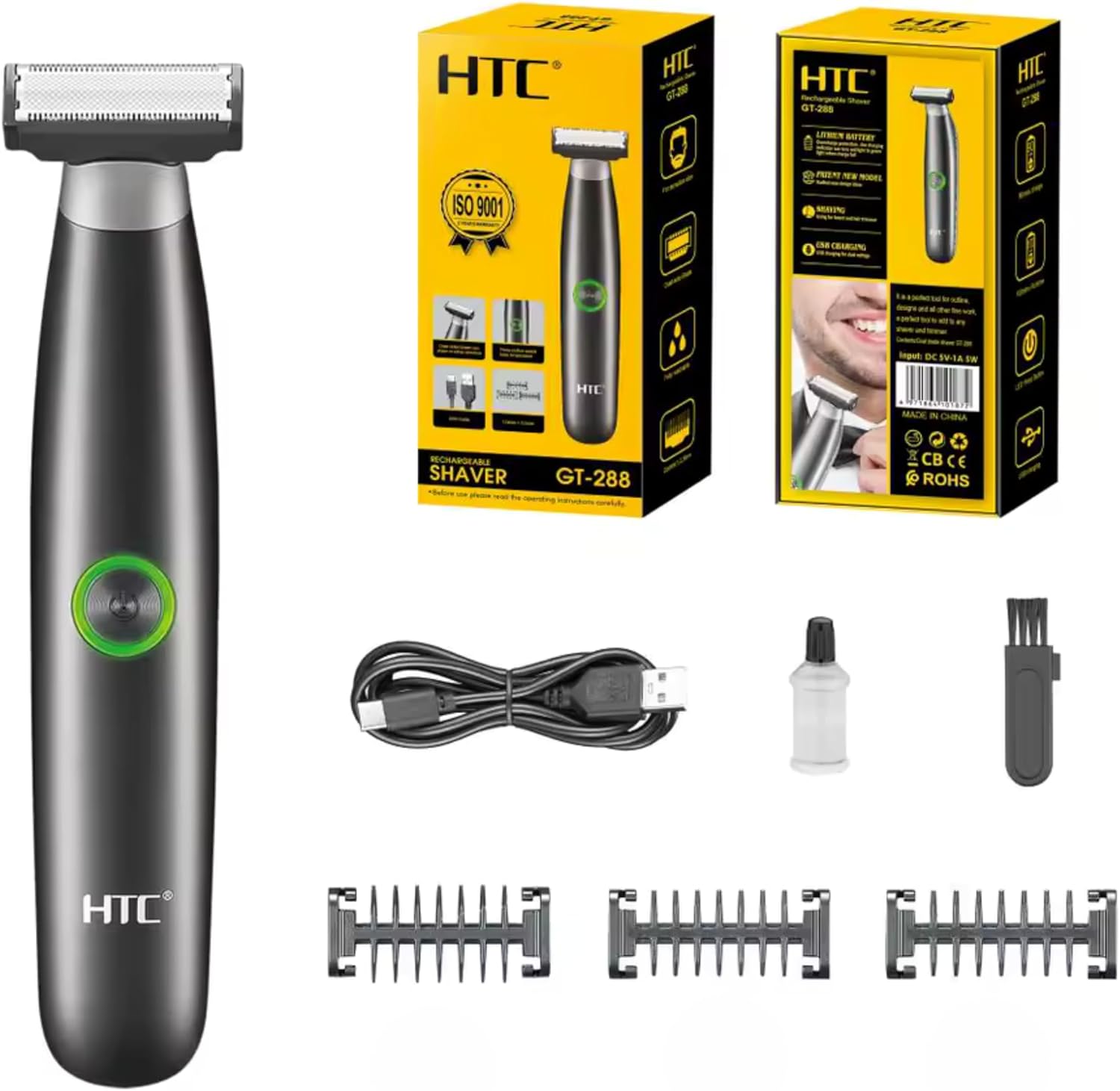
Image 3.1: Contents of the HTC GT-288 Electric Shaver package, including the shaver, USB cable, three precision combs, cleaning brush, and lubricating oil.
4. Pwodwi souview
The HTC GT-288 Electric Shaver features a sleek design with a dual-sided blade for efficient trimming and shaving. It includes an easy-to-operate press-button switch and is fully washable for convenient cleaning.
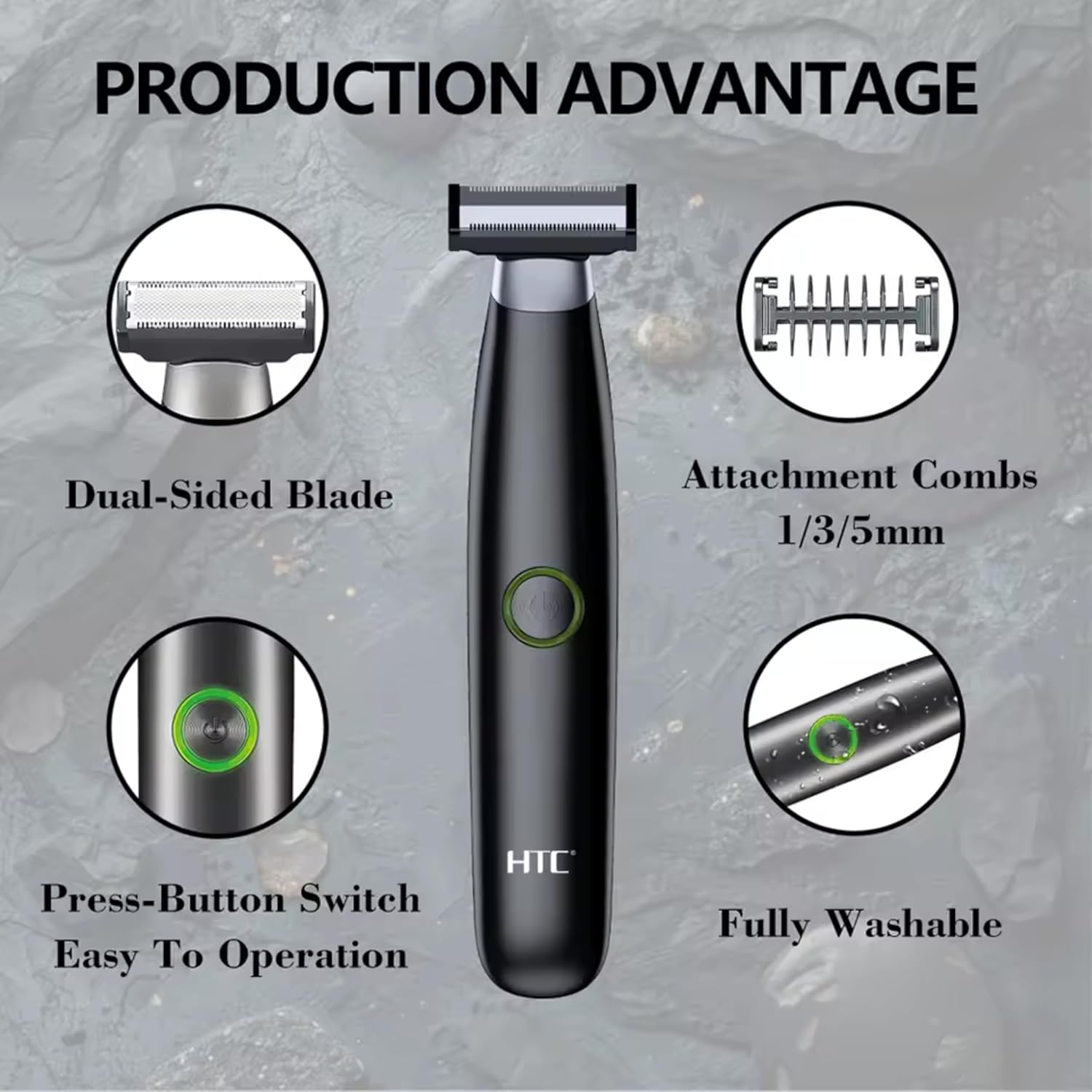
Imaj 4.1: Plis paseview of the HTC GT-288 Electric Shaver's key features, highlighting the dual-sided blade, attachment combs (1/3/5mm), press-button switch, and fully washable design.

Image 4.2: Detail of the LED press button, which serves as the on/off switch for easy operation.
5. Enstalasyon
- Dekonpoze: Ak anpil atansyon retire tout eleman nan anbalaj la.
- Inisyal chaj: Before first use, fully charge the shaver. Refer to Section 6 for charging instructions.
- Attach Comb (Optional): If desired, select one of the three precision combs (1mm, 3mm, or 5mm) and slide it onto the shaver head until it clicks into place. Ensure it is securely attached.
6. Chaje
The HTC GT-288 Electric Shaver is equipped with a rechargeable battery for cordless operation.
- Asire w ke razwa a etenn.
- Connect the small end of the USB charging cable to the charging port on the shaver.
- Connect the larger end of the USB cable to a compatible USB power source (e.g., computer, USB wall adapter).
- The LED indicator on the shaver will illuminate to show that it is charging.
- Allow the shaver to charge completely before its first use. A full charge typically takes several hours.
- Yon fwa li chaje nèt, dekonekte kab USB a.
7. Operasyon Enstriksyon
The HTC GT-288 shaver can be used for both wet and dry shaving.
- Pouvwa sou: Press the LED button to turn on the shaver.
- Raze sèk: For dry shaving, ensure your skin is clean and dry. Gently press the shaver against your skin and move it in slow, even strokes against the direction of hair growth.
- Raze mouye: For wet shaving, apply shaving foam or gel to your skin. The shaver is waterproof, allowing for use in the shower or with water. Move the shaver in gentle, even strokes.
- Using Precision Combs: Attach the desired 1mm, 3mm, or 5mm comb for trimming beards, sideburns, or other facial hair to a specific length. Move the shaver with the comb attached against the direction of hair growth for an even trim.
- Pouvwa Off: Press the LED button again to turn off the shaver after use.
8. Antretyen ak netwayaj
Netwayaj regilye asire pèfòmans optimal epi pwolonje lavi razwa ou a.
- Etenn: Toujou etenn razwa a anvan ou netwaye li.
- Rinse Head: The shaver is fully washable (IPX6 rated). You can rinse the shaver head directly under running water to remove hair clippings.
- Sèvi ak bwòs netwayaj: For more thorough cleaning, use the provided cleaning brush to remove stubborn hair particles from the blade and comb attachments.
- Lubrifye lam yo: After cleaning and drying, apply a small drop of the provided lubricating oil to the blades. Turn on the shaver for a few seconds to distribute the oil evenly. This helps maintain blade performance.
- Sèk: Kite razwa a seche nèt nan lè a anvan ou sere l oswa rechaje l.

Image 8.1: The HTC GT-288 Electric Shaver being rinsed under a faucet, illustrating its IPX6 fully washable design for easy cleaning.
NAN. Depanaj
| Pwoblèm | Kòz posib | Solisyon |
|---|---|---|
| Raswa a pa limen. | Batri ap vide. | Chaje razwa a nèt. |
| Shaver does not cut effectively. | Lam yo bouche ak cheve oswa yo pa file. | Clean the shaver head thoroughly. Apply lubricating oil. If problem persists, blades may need replacement. |
| Razwa ap rale cheve. | Battery is low or blades are clogged. | Charge the shaver. Clean the shaver head. |
| Razwa a sispann pandan w ap itilize li. | Batri ap vide. | Rechaje razwa a. |
10. Espesifikasyon
- Mak: HTC
- Non modèl: GT-288
- Sous pouvwa: USB Rechargeable
- Karakteristik espesyal: USB Cable, Adjustable Combs, Rechargeable, Water Resistant, Wet & Dry Use
- Itilizasyon Rekòmande: Facial Shaving, Beard Trimming, Daily Use, Travel
- Eleman ki enkli: Electric Shaver, USB Cable, 3 Precision Combs, Cleaning Brush, Lubricating Oil
- Pwa pwodwi: 250 gram
- Koulè: Nwa
- Materyèl lam: Nerjaveèi asye
- Kalite tèt: Precision régler
11. Garanti ak sipò
This product is manufactured by HTC. For any questions, technical support, or warranty claims, please contact the seller or manufacturer directly through your purchase platform. Please retain your proof of purchase for warranty purposes.


