1. Entwodiksyon
The PreSonus StudioLive Series III SE 16 is a versatile and powerful 40-channel digital console mixer, designed for both portable and rack-mountable applications. It offers extensive input and mixing capabilities, making it suitable for a wide range of audio environments from live sound to studio recording. This manual provides essential information for setting up, operating, and maintaining your StudioLive SE 16 mixer.
Key features include 16 studio-grade, fully recallable XMAX-R preamps, vintage-style EQ and compression options on every channel and bus, and 16 FlexMixes configurable as subgroups, auxes, or matrix mixes. It also boasts 24 DCA groups, 4 dedicated subgroup mixes, and 4 FX mixes with dedicated processing. For recording and integration, the mixer features a 64x64 USB 2.0 audio interface, an onboard 34x34 SD recorder, and Milan-certified AVB audio networking. Comprehensive software integration with Capture multitracking, virtual soundcheck, and Studio One Pro enhances its functionality.

2. Enstalasyon
2.1 Debalaj ak Premye Enspeksyon
Carefully remove the mixer from its packaging. Inspect the unit for any signs of damage during transit. Retain all packaging materials for future transport or service needs.
2.2 Koneksyon pouvwa
Connect the provided power cable to the mixer's power input and a suitable AC power outlet. Ensure the power source matches the mixer's voltage requirements (100-240V, 50-60Hz).
2.3 Koneksyon Audio
The StudioLive SE 16 features 16 XMAX-R mic/line preamps. Connect your microphones, instruments, and other audio sources to the appropriate input jacks. Main outputs are available for connecting to your PA system or studio monitors.
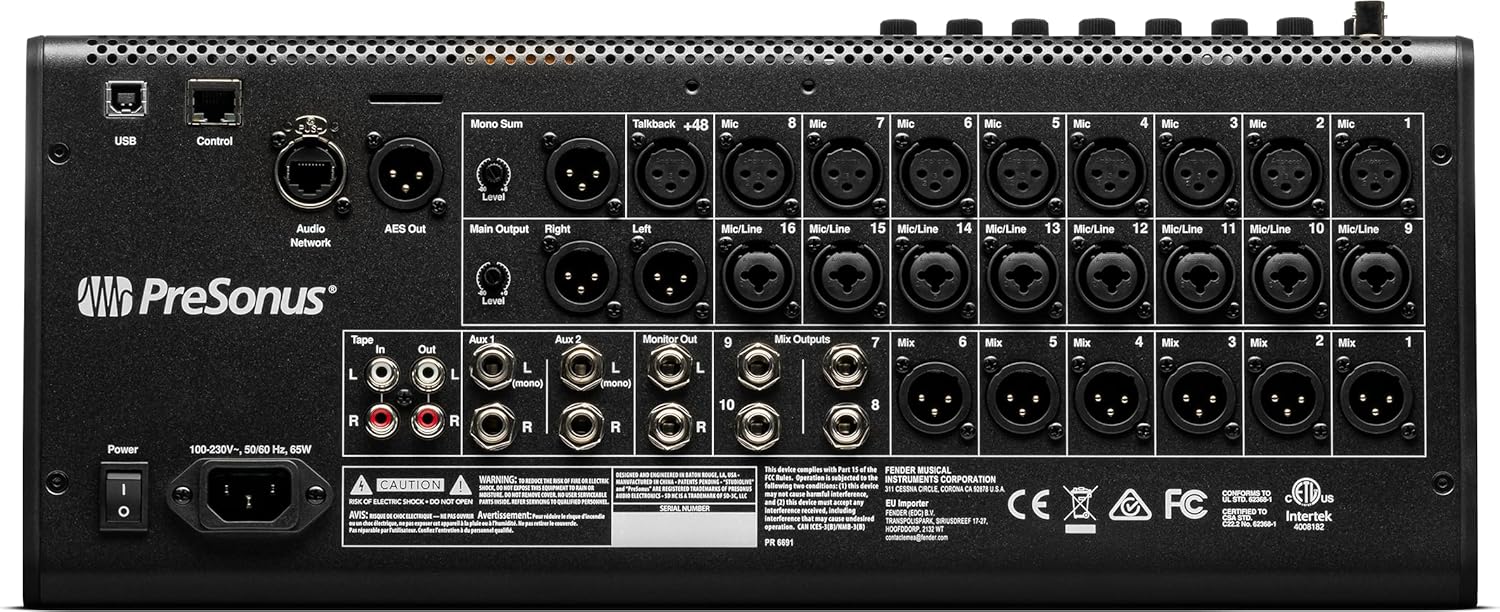
2.4 Computer and Network Connectivity
- USB 2.0: Connect the mixer to your computer via USB for 64x64 audio interface functionality. This allows for multitrack recording and playback.
- AVB Audio Networking: Utilize the Milan-certified AVB port for integration with other AVB-compatible devices such as stage boxes (e.g., PreSonus NSB), personal monitor mixers (e.g., EarMix 16M), or other StudioLive Series III mixers.
- Wi-Fi/Ethernet: For remote control via Universal Control software on a computer or tablet, connect the mixer to a wireless router or directly via Ethernet.
2.5 Enstalasyon lojisyèl
Install the Universal Control software on your computer or tablet for remote mixer control. The mixer also includes Capture multitracking software and a perpetual license for Studio One Pro for recording and production tasks.
3. Opere mixer la
3.1 Operasyon debaz
The StudioLive SE 16 features a user-friendly interface with physical controls and a touch-sensitive display. Each channel offers comprehensive processing including XMAX-R preamps, EQ, and compression. The motorized faders provide tactile control and visual feedback for mix adjustments.
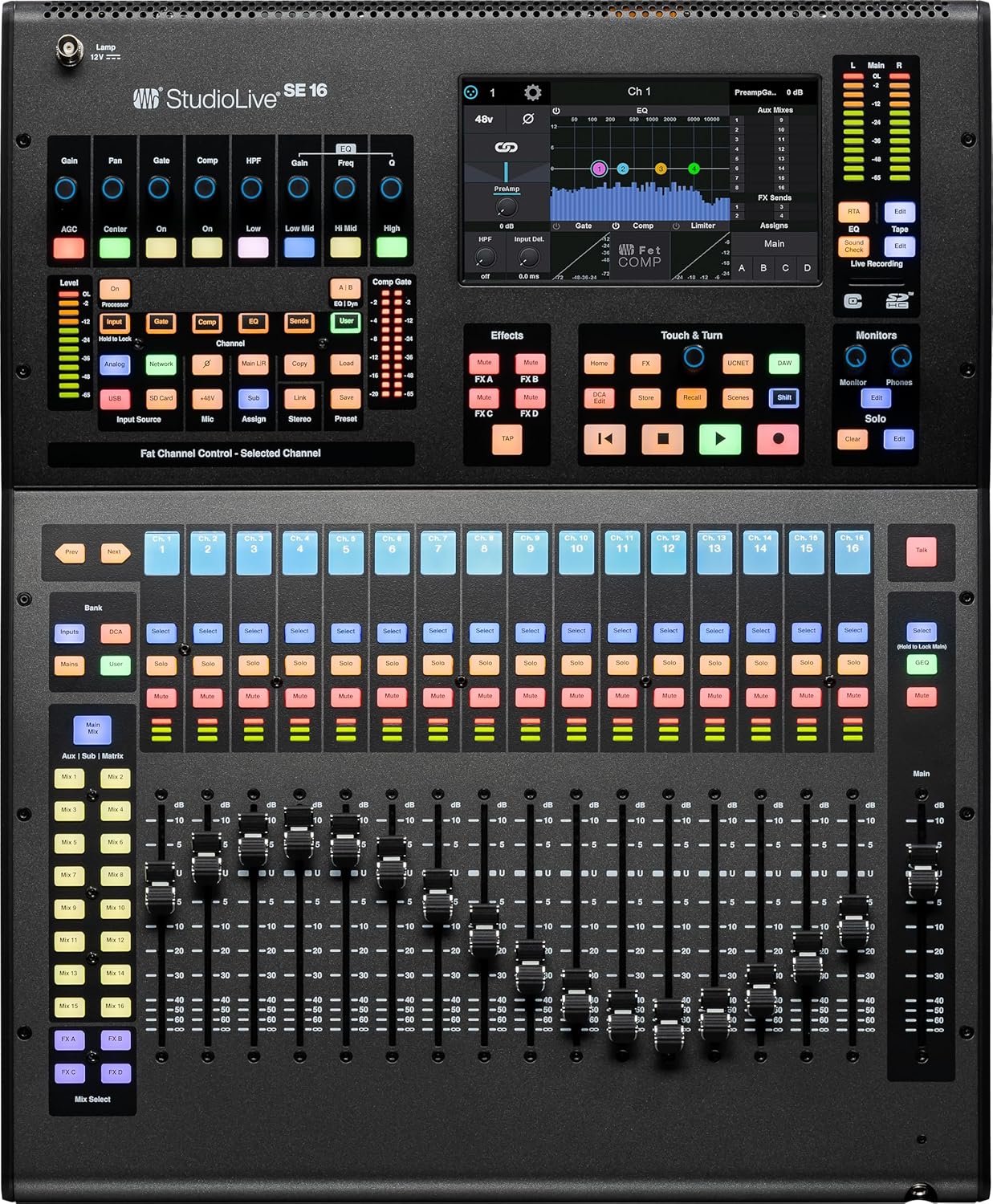
3.2 Mixing and Routing
- FlexMixes: Configure the 16 FlexMixes as subgroups, auxiliary sends (for monitors or effects), or matrix mixes to create custom mixes for various outputs.
- DCA Groups: Use the 24 DCA groups to control multiple channels simultaneously without altering their relative levels.
- FX Mixes: Access 4 dedicated FX mixes with stereo returns, offering lush reverbs and delays for enhancing your sound.
- Chanje sous: Easily switch each channel's input source between analog, USB, SD, and AVB for flexible integration of your gear.
3.3 Kontwòl Remote
The StudioLive SE 16 can be remotely controlled using Universal Control software on your computer or tablet. PreSonus Metro allows for control over the internet with real-time audio monitoring, providing flexibility for mixing from anywhere.
3.4 Anrejistreman ak Lektur
- USB 2.0 Entèfas: Record and play back up to 64 channels simultaneously with your computer using the integrated USB 2.0 audio interface.
- SD Recorder: The onboard 34x34 SD recorder allows for direct recording and playback without a computer.
- Capture Software: Utilize the included Capture software for multitrack recording and automated Virtual Soundcheck, streamlining your workflow.
4. Antretyen
4.1 Netwayaj
Regularly clean the mixer's surface with a soft, dry cloth. Avoid using abrasive cleaners or solvents that could damage the finish or electronic components. Keep faders and knobs free from dust and debris.
4.2 Mizajou Firmware
Tcheke PreSonus la regilyèman website for firmware updates. Keeping your mixer's firmware up-to-date ensures optimal performance, new features, and bug fixes.
4.3 Depo ak transpò
When not in use, store the mixer in a cool, dry environment away from direct sunlight and extreme temperatures. For transport, use appropriate cases to protect the unit from physical damage.
NAN. Depanaj
5.1 Pa gen pouvwa
Asire w kab kouran an byen konekte ak mixer a ak yon priz kouran ki fonksyone. Tcheke switch kouran an ak nenpòt disjonktè.
5.2 Pa gen Sòti Odyo
Verify that input sources are connected correctly and gain levels are set appropriately. Check main output connections and ensure faders are up and channels are not muted. Confirm correct routing in Universal Control.
5.3 Pwoblèm koneksyon
For USB connections, ensure drivers are installed and the correct audio device is selected in your computer's settings. For network issues, check Ethernet cable connections, router functionality, and Wi-Fi signal strength. Restarting the mixer and connected devices can often resolve temporary glitches.
6. Espesifikasyon
| Spesifikasyon | Valè |
|---|---|
| Mak | PreSonus |
| Nimewo Modèl | 2779200308 |
| Pwa atik | 32 liv |
| Dimansyon pwodwi | 22.97 x 17.59 x 6.51 pous |
| Kantite Chanèl | 40 |
| Koneksyon Teknoloji | Ethernet, USB, Wi-Fi |
| Sous pouvwa | Fil elektrik |
| Non koulè | Nwa |
7. Garanti ak sipò
For detailed warranty information and technical support, please refer to the official PreSonus websit la oubyen kontakte sèvis kliyan yo. Kenbe resi acha w la kòm prèv acha pou reklamasyon garanti.
Online resources, including FAQs, user forums, and software downloads, are available on the PreSonus support page. Regular software and firmware updates are provided to enhance product functionality and address any potential issues.