Entwodiksyon
This manual provides detailed instructions for the setup, operation, and maintenance of your SPYPOINT FORCE-PRO 30 Megapixel 4K Trail Camera. Designed for outdoor monitoring, this camera captures high-resolution photos and videos, making it ideal for wildlife observation and security. Please read this manual thoroughly to ensure proper use and optimal performance of your device.
Kontni pake
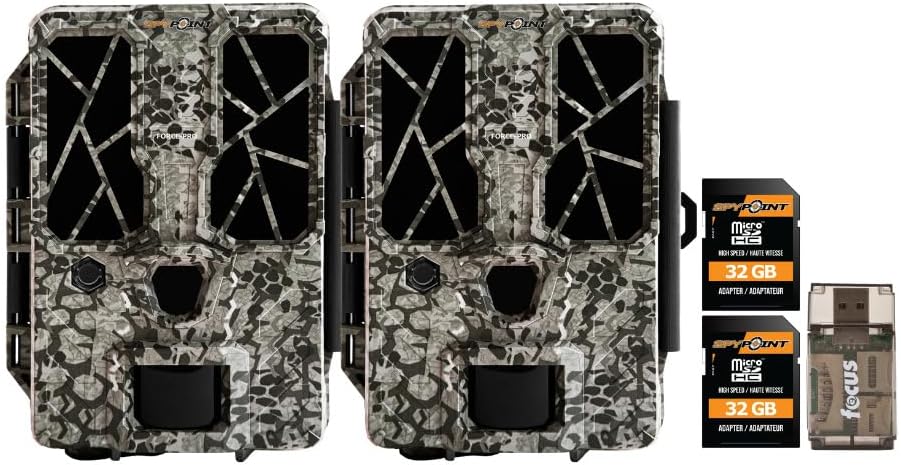
Verify that all items listed below are present in your package. If any items are missing or damaged, please contact SPYPOINT customer support.
- 2 x SPYPOINT FORCE-PRO 30 Megapixel Trail Camera
- 2 x SPYPOINT MicroSD 32GB Ultra High Speed Class 10 Memory Card
- 1 x Focus All-In-One High Speed Card Reader

Pwodwi souview
The SPYPOINT FORCE-PRO is a robust trail camera designed for reliable performance in outdoor environments. It features advanced imaging capabilities and user-friendly controls.
Karakteristik kle
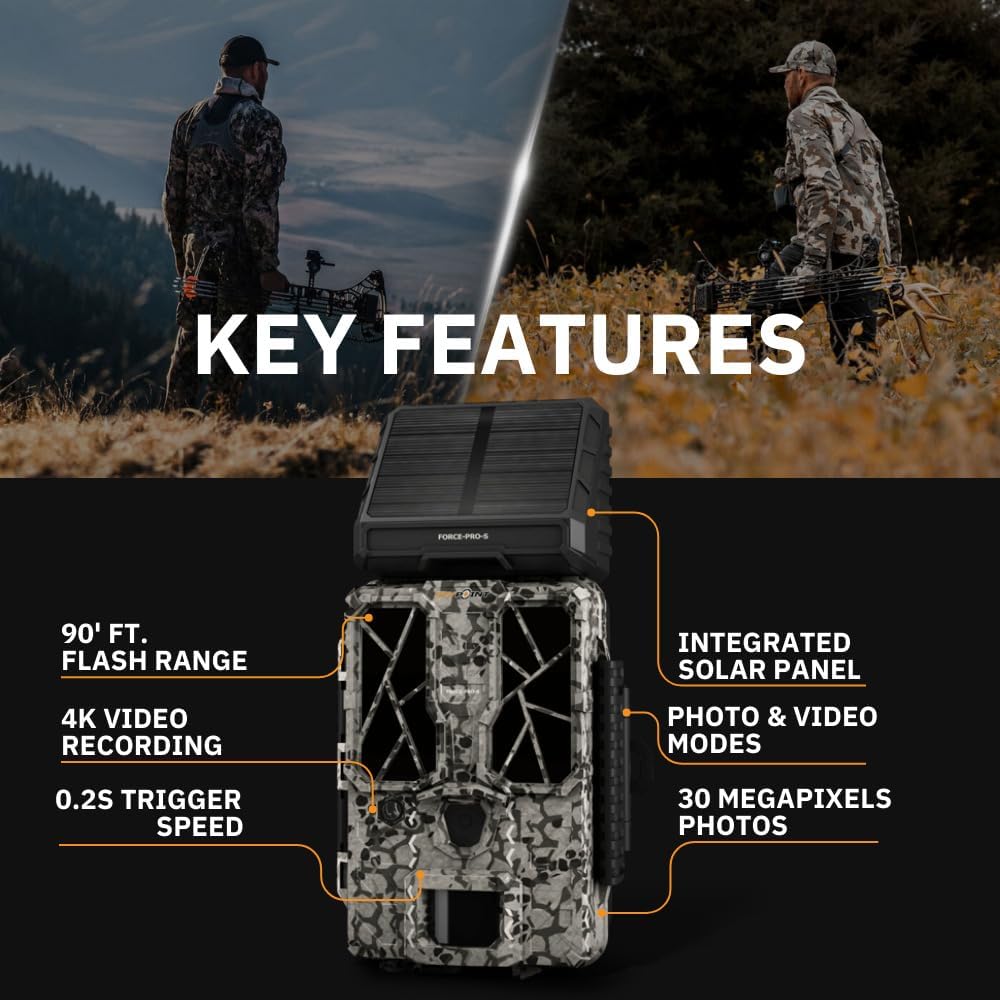
- Segondè rezolisyon: 30 Megapixel photos and 4K video recording with sound.
- Vitès deklanchman rapid: Ultra-fast 0.2-second trigger speed to capture quick movements.
- Lajè ranje deteksyon: 110-foot detection range.
- Powerful Flash: 90-foot flash range with 54 LEDs for clear night images.
- Panèl Solè Entegre: For extended battery life and reduced maintenance.
- Dual-SIM Cellular: Automatically connects to the best available network for reliable transmission (if cellular model).



Enstalasyon
1. Enstalasyon Sous Kouran
The FORCE-PRO camera is equipped with an integrated solar panel for charging its internal battery. For initial setup or extended use without sufficient sunlight, an external power source can be used.
- Entèn batri: Ensure the camera's internal battery is charged. The integrated solar panel will charge it during daylight hours.
- External Power (Optional): If using an external 12V power source (not included), connect it to the camera's 12V jack.
2. Mete Kat MicroSD
A MicroSD card is required to store photos and videos. Two 32GB MicroSD cards are included in this bundle.
- Jwenn fant kat MicroSD a sou kamera a.
- Mete kat MicroSD a ak kontak lò yo fè fas dèyè kamera a jiskaske li fè yon klik.
- Pou retire kat la, peze l dousman jiskaske li soti.
3. Premye Limen ak Konfigirasyon Debaz
- Turn the camera ON using the power switch.
- Follow the on-screen prompts (if available) or refer to the camera's menu for initial settings such as date, time, and language.
- Format the MicroSD card through the camera's menu for optimal performance.
4. Monte Kamera a
The camera can be mounted using a strap, tripod, or other compatible mounting accessories. While specifications mention 'Tabletop Mount', for outdoor use, secure mounting is crucial.
- Chwazi yon kote ki bay yon limyè klè view nan zòn siveyans lan vle a.
- Ensure the camera is securely fastened to prevent movement from wind or animals.
- Position the camera to avoid direct sunlight into the lens, which can cause overexposure.
Enstriksyon Operasyon
Mòd kamera
- Foto mòd: Li pran imaj fiks lè li deklanche.
- Mòd videyo: Anrejistre klip videyo lè li deklanche.
- Foto + Videyo mòd: Captures a photo followed by a video clip.
Ajiste Anviwònman
Access the camera's menu using the built-in screen and navigation buttons to customize settings:
- Rezolisyon: Select desired photo (up to 30MP) and video (up to 4K) resolution. Higher resolutions consume more storage.
- Reta deklanche: Fikse reta ant deklanchman youn apre lòt.
- Sansiblite: Adjust the motion sensor sensitivity to suit the environment and avoid false triggers.
- Orè operasyon: Define specific times the camera should be active.
- Dat/Lè Stamp: Enable or disable the date and time overlay on images/videos.
Rekipere Done
- Kat MicroSD: Remove the MicroSD card from the camera and insert it into the included Focus All-In-One High Speed Card Reader. Connect the card reader to a computer to access files.
- SPYPOINT App: For cellular models, use the SPYPOINT mobile application to view and manage captured media remotely. The app also allows for camera settings adjustments and firmware updates.
Antretyen
- Netwayaj: Regularly clean the camera lens and housing with a soft, dry cloth. Avoid abrasive materials or harsh chemicals.
- Tcheke batri: Monitor battery levels, especially during periods of low sunlight. The integrated solar panel helps maintain charge, but supplemental charging may be needed.
- Mizajou mikrolojisyèl: Periodically check for and install firmware updates via the SPYPOINT app or websit la pou asire pèfòmans optimal ak aksè a nouvo fonksyonalite yo.
- Depo: When not in use, store the camera in a cool, dry place away from direct sunlight.
Depanaj
- Camera Not Triggering: Check motion sensor sensitivity, ensure no obstructions, and verify battery level.
- Kalite imaj/videyo ki pòv: Clean the lens, check resolution settings, and ensure proper lighting conditions.
- Pwoblèm pouvwa: Ensure the internal battery is charged or an external power source is properly connected. Check for any damage to power cables.
- Erè kat MicroSD: Reformat the MicroSD card (backing up data first) or try a different card. Ensure the card is properly inserted.
- Connectivity Problems (Cellular Models): Verify cellular signal strength in the camera's location. Check your SPYPOINT app for data plan status.
Espesifikasyon
| Karakteristik | Spesifikasyon |
|---|---|
| Modèl | FÒS-PRO |
| Rezolisyon foto | 30 megapiksèl |
| Rezolisyon videyo | 4K |
| Deklanche vitès | 0.2 segonn |
| Ranje deteksyon | 110 pye |
| Flash Range | 90 pye |
| dirije | 54 |
| Sous pouvwa | Integrated Solar Panel, Corded Electric (external 12V option) |
| Koneksyon | USB, Wired (for data transfer), Cellular (for remote management) |
| Materyèl | Plastik |
| Rezistans dlo | Dlo rezistan |
| Kalite Konsantre | Konsantre oto |
| UPC | 196271434986 |
Garanti ak sipò
For warranty information, technical support, or service inquiries, please refer to the official SPYPOINT websit la oubyen kontakte depatman sèvis kliyan yo dirèkteman. Kenbe prèv acha ou pou reklamasyon garanti.
SPYPOINT Websit: www.spypoint.com


