1. Entwodiksyon
This manual provides detailed instructions for the setup, operation, and maintenance of your ATTACK SHARK G3PRO Wireless Gaming Mouse. Please read this manual thoroughly to ensure proper use and to maximize the performance of your device.
2. Pwodwi Features
- Pro-Grade Precision & Speed: Equipped with PixArt PAW3311 gaming sensor and Broadcom BK52820 custom MCU for zero latency and pixel-perfect tracking. Adjustable DPI from 100 to 25000, polling rate up to 1000Hz, tracking speed 300IPS, and acceleration 40G.
- Legendary Durability & Tactile Clicks: Features genuine mechanical switches rated for 100 million clicks, providing crisp, responsive, and reliable feedback. The unique F-Switch encoder ensures precise scrolling.
- Ultra-Light Agility & Effortless Glide: Weighs only 59±3 grams, reducing wrist fatigue during extended use. Ergonomic design supports palm, claw, and finger grip styles. Double-layer premium mouse feet offer smooth, consistent glide.
- Seamless Tri-Mode Connectivity: Supports stable 2.4GHz wireless, low-latency Bluetooth, and reliable wired USB-C connections. Quickly switch between modes using the button at the bottom of the mouse. Compatible with desktops, laptops, smartphones, and tablets.
- AI Designed Driver: Utilizes an innovative cloud-driven webpage for customization, eliminating the need for traditional software installation. Allows for DPI adjustment, polling rate, competitive mode, customized buttons, macro recording, and personalized key mapping.
- RGB Backlight Charging Base: The included charging dock features cool RGB backlighting and allows for quick recharging. It also serves as a convenient passthrough for the 2.4GHz USB receiver, optimizing wireless signal reception.
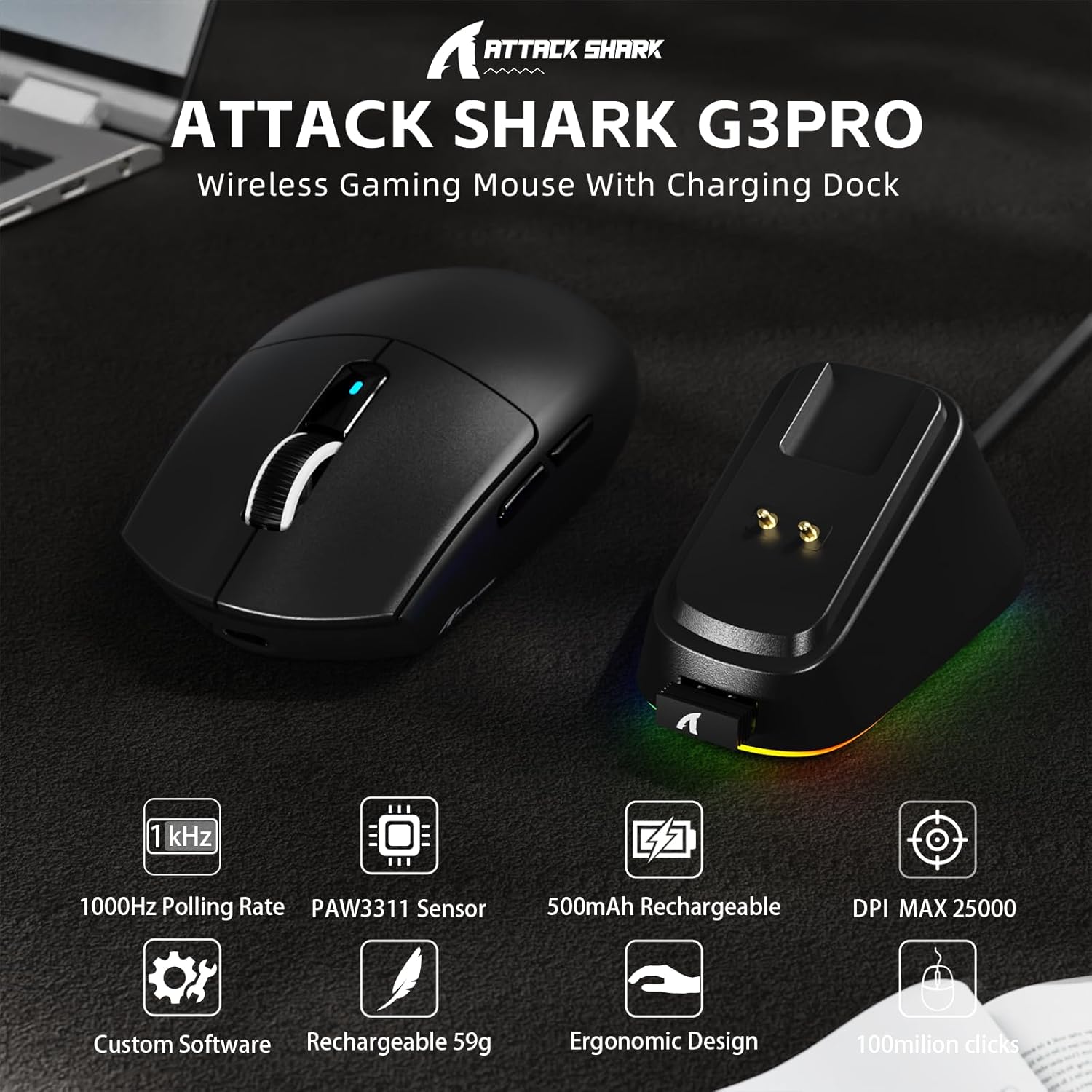
Imaj: Plis paseview of the ATTACK SHARK G3PRO mouse and its charging dock, highlighting key features such as 1000Hz polling rate, PAW3311 sensor, 500mAh rechargeable battery, 25K DPI, custom software, lightweight design, ergonomic shape, and 100 million click lifespan.

Image: A composite image detailing the internal components and features of the G3PRO mouse, including the 1K polling rate, PixArt PAW3311 sensor, Omron microswitches, 500mAh battery, BK52820 MCU, and the web driver interface.
3. Pake kontni
Tanpri verifye ke tout atik yo prezan nan pakè ou a:
- ATTACK SHARK G3PRO Wireless Gaming Mouse
- RGB Backlight Charging Dock
- USB-C pou USB-A kab
- USB 2.4GHz Wireless Receiver (often stored inside the mouse or dock)
- Manyèl itilizatè
- Stickers (may vary)
- Grip Tape (if included with your specific bundle)
4. Enstalasyon
4.1 Chaje Sourit la
Before first use, it is recommended to fully charge the mouse. Connect the USB-C cable to the charging dock and then to a power source (e.g., computer USB port, USB wall adapter). Place the mouse onto the charging dock. The RGB lighting on the dock will indicate charging status.

Image: The ATTACK SHARK G3PRO Wireless Gaming Mouse resting on its RGB backlight charging dock, connected via a USB-C cable. This illustrates the primary charging method.
4.2 Konekte Sourit la
The G3PRO mouse offers three connectivity modes: 2.4GHz Wireless, Bluetooth, and USB-C Wired.

Image: A visual representation of the three connectivity options for the G3PRO mouse: USB-C Wired, 2.4G Wireless, and Bluetooth, showing the mouse interacting with a charging dock and a laptop.
4.2.1 Koneksyon san fil 2.4GHz
- Locate the USB 2.4GHz receiver. It may be stored in a compartment on the underside of the mouse or within the charging dock.
- Plug the receiver into an available USB port on your computer. For optimal signal, you can plug the receiver into the USB port on the charging dock, then connect the dock to your computer.
- Switch the mode selector switch on the bottom of the mouse to the '2.4G' position.
- The mouse should automatically connect. If not, press and hold the 'Left/Center/Right' buttons simultaneously for 3 seconds to force pairing.
4.2.2 Bluetooth Koneksyon
- Switch the mode selector switch on the bottom of the mouse to the 'BT' position.
- Sou òdinatè w la oswa aparèy ou an, ale nan paramèt Bluetooth yo epi aktive Bluetooth.
- Chèche pou new devices. The mouse should appear as 'ATTACK SHARK G3PRO' or similar.
- Select the mouse to pair. If prompted, press and hold the 'Left/Center/Right' buttons simultaneously for 3 seconds to force pairing.
4.2.3 USB-C Wired Connection
- Connect the USB-C end of the cable to the mouse and the USB-A end to your computer.
- Switch the mode selector switch on the bottom of the mouse to the 'OFF' position (or ensure it's not in 2.4G/BT mode). The mouse will operate in wired mode.
5. Operasyon Enstriksyon
The ATTACK SHARK G3PRO mouse features multiple programmable buttons and adjustable settings for enhanced gaming and productivity.

Image: A detailed diagram illustrating the multi-functional buttons on the G3PRO mouse (Left Key, Right Key, Center Key, Backward Button, Forward Button, DPI Switch) and the components of the charging dock (Type C Port, Charging Thimble, Receiver Interface, RGB Light Switch, Receiver Organizer).
5.1 Fonksyon bouton
- Kle Goch: Prensipal fonksyon klike sou.
- Kle dwat: Segondè klike sou fonksyon.
- Center Key (Scroll Wheel Click): Middle click function.
- Bouton Avant: Navige pi devan nan web navigatè oswa aplikasyon yo.
- Bouton dèyè: Navige bak nan web navigatè oswa aplikasyon yo.
- DPI switch: Sikle nan nivo DPI predetèmine yo.
5.2 DPI Ajisteman
Press the DPI switch button (located on the top of the mouse, usually behind the scroll wheel) to cycle through different DPI sensitivity levels. The default DPI settings can be customized using the AI Designed Driver.
5.3 Kontwòl ekleraj RGB
The RGB lighting on the charging dock can be controlled via a switch on the dock itself. The mouse's internal lighting (if any) and effects can be customized through the AI Designed Driver.
6. Customization (AI Designed Driver)
The ATTACK SHARK G3PRO features an innovative cloud-driven web driver for advanced customization. This eliminates the need for software installation.

Image: A screenshot of the web-based driver interface for the ATTACK SHARK G3PRO mouse, showing options for button settings, DPI settings, parameter settings, macro editing, and a personal center for customization.
6.1 Aksè nan Web Chofè
To access the customization options, open a web navigatè epi navige nan URL provided in the product documentation or on the official ATTACK SHARK website. The driver is designed to automatically identify your computer system.
6.2 Opsyon pèsonalizasyon
Atravè a web driver, you can:
- Adjust DPI levels and create custom profiles.
- Modify polling rate.
- Program individual buttons for various functions (e.g., multimedia controls, keyboard shortcuts, macros).
- Record and assign complex macros.
- Personalize key mapping.
- Configure competitive modes and other advanced functions.
7. Chaje ak Batri
The G3PRO mouse is equipped with a 500mAh built-in battery for extended playtime.
7.1 Metòd chaje
- Via Charging Dock: Simply place the mouse onto the RGB backlight charging dock. The magnetic connection will ensure proper alignment and charging.
- Via kab USB-C: Connect the mouse directly to your computer or a USB power adapter using the provided USB-C cable.
7.2 Estati batri
Battery status can typically be monitored through the AI Designed Driver interface or your operating system's Bluetooth device settings.
8. Antretyen
To ensure the longevity and optimal performance of your ATTACK SHARK G3PRO mouse, follow these maintenance guidelines:
- Netwayaj: Use a soft, dry cloth to wipe the mouse and charging dock. For stubborn dirt, a slightly damp Ou ka itilize twal, men asire w pa gen imidite ki antre nan aparèy la. Evite pwodui chimik ki agresif oswa materyèl abrazif.
- Swen Capteur: Kenbe detèktè optik ki anba sourit la pwòp epi san pousyè oswa debri. Sèvi ak yon ti sèvyèt koton oswa lè konprese si sa nesesè.
- Depo: Lè w pa itilize sourit la pou yon bon bout tan, sere l nan yon kote ki fre epi sèk.
- Evite kondisyon ekstrèm: Pa ekspoze sourit la nan tanperati ekstrèm, limyè solèy dirèk, oswa imidite ki wo.
NAN. Depanaj
If you encounter issues with your ATTACK SHARK G3PRO mouse, please refer to the following common solutions:
| Pwoblèm | Kòz posib / Solisyon |
|---|---|
| Sourit la pa reponn (san fil) |
|
| Sourit la pa reponn (ak fil) |
|
| Ajisteman DPI a pa fonksyone |
|
| Charging dock RGB not lighting up |
|
| Mouse tracking issues / erratic movement |
|
10. Espesifikasyon
- Mak: ATAK REKEN
- Modèl: G3PRO
- Koulè: Nwa
- Koneksyon Teknoloji: 2.4Ghz Wireless, Bluetooth, USB-C Wired
- Teknoloji deteksyon mouvman: Optical (PixArt PAW3311 Sensor)
- Ranje DPI: 100 - 25000 DPI (Reglabl)
- Pousantaj biwo vòt: Jiska 1000Hz
- Vitès Suivi: 300 ONSÈY
- Akselerasyon: 40G
- Chanjman: Mechanical (100 million click lifespan)
- Kapasite batri: 500mAh
- Pwa: 59 ± 3 gram
- Karakteristik espesyal: Ergonomic Design, Lightweight, Programmable Buttons, Rechargeable, Wireless, RGB Charging Dock
- Dimansyon pake: 6.57 x 4.37 x 1.93 pous
- Pwa atik: 8.1 ons
11. Videyo pwodwi
Videyo: Yon prezantasyon videyo pwodwi ofisyèlasing the ATTACK SHARK G3PRO Wireless Gaming Mouse, highlighting its design, features, and various color options. This video provides a dynamic view of the mouse and its charging dock.
12. Garanti ak sipò
For warranty information and technical support, please refer to the official ATTACK SHARK weboswa kontakte machann kote ou te achte pwodwi a. Kenbe prèv acha ou pou reklamasyon garanti.


