Entwodiksyon
This manual provides comprehensive instructions for the installation, operation, and maintenance of your Dormakaba Rose Biometric Digital Door Lock. Designed for modern access control, this lock offers advanced security features including fingerprint and PIN code access. Please read this manual thoroughly before installation and use to ensure proper function and longevity of your device.
Enfòmasyon sou Sekirite
- Asire w tout konpozan yo prezan epi yo pa domaje anvan enstalasyon an.
- Do not expose the lock to direct water or extreme temperatures.
- Use only specified AAA alkaline batteries. Do not mix old and new batteries.
- Keep fingerprints and PIN codes confidential.
- For emergency power, use a Type C USB cable with a compatible power source.
- This lock is designed for internal doors with a thickness of 32-50mm.
Pwodwi souview ak Konpozan
The Dormakaba Rose Biometric Door Lock integrates a fingerprint scanner, a backlit keypad, and a lever handle for secure and convenient access. It is designed for easy installation and reversible for left or right-handed doors.
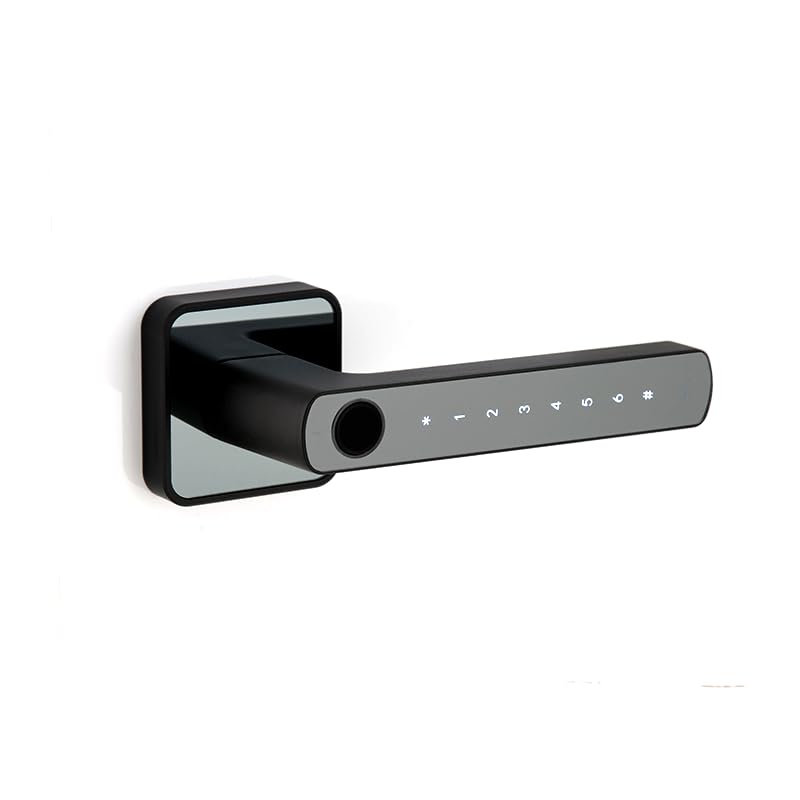
Figi 1: Devan view of the Dormakaba Rose Biometric Door Lock, highlighting the fingerprint sensor and keypad.
Konpozan kle:
- Capteur anprent: For biometric access.
- Klavye ki eklere: For PIN code entry (6-10 digits).
- Lever Handle: For manual operation.
- Lòj batri: Holds 3 AAA alkaline batteries.
- USB-C pò: For emergency power.
- Dormakaba 60mm Tubular Deadlatch: Internal locking mechanism.
Espesifikasyon
| Karakteristik | Detay |
|---|---|
| Mak | dormakaba |
| Non modèl | Rose Biometric Silver |
| Kalite fèmen | Biometric Digital Lever Lock |
| Mòd aksè | Fingerprint, PIN Code (6-10 digits) |
| Kapasite itilizatè | Up to 200 Fingerprints & PIN Codes |
| Epesè Pòt | 32-50mm (Internal Doors) |
| Sous pouvwa | 3 x pil AAA alkalin |
| Pouvwa Ijans | Kalite C USB |
| Dimansyon (LxWxH) | 14.2 x 2.5 x 5 santimèt |
| Pwa | 1.15 Kilogram |
| Materyèl | Metal |
| Karakteristik espesyal | Voice Navigation, High Resolution Backlit Keypad, Reversible Handing |
Enstalasyon ak Enstalasyon
The Dormakaba Rose lock is designed for straightforward installation. It can be installed on both left and right-handed doors. Ensure your door thickness is between 32mm and 50mm.
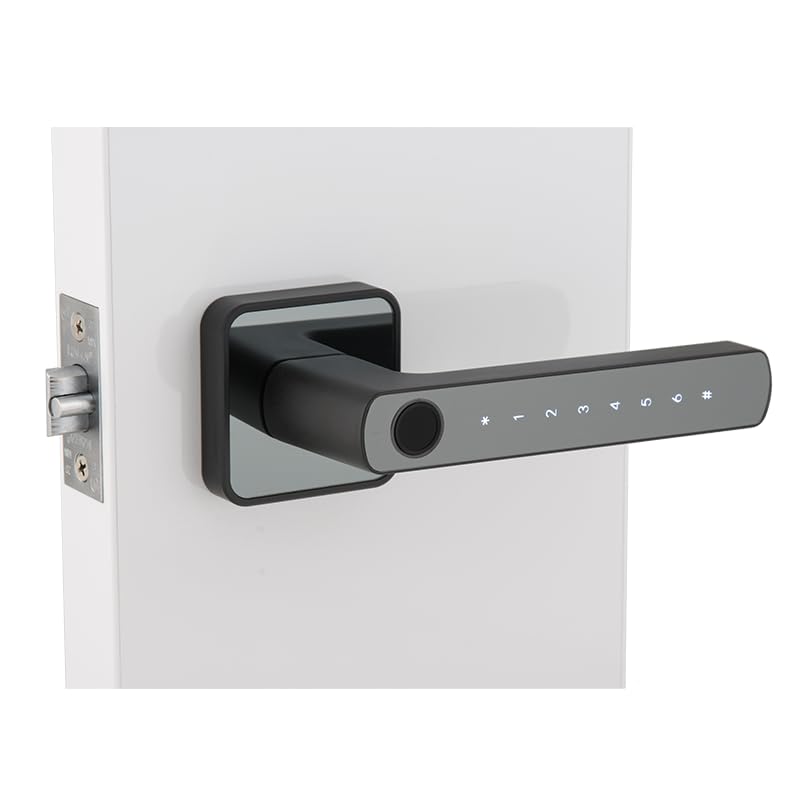
Figure 2: Dormakaba Rose Biometric Door Lock installed on a door.
Etap enstalasyon:
- Prepare pòt la: Ensure the door is clean and the existing boreholes are compatible with the lock's dimensions. If necessary, drill new holes according to the provided template (not included in this manual, refer to packaging).
- Enstale Latch la: Insert the dormakaba 60mm tubular deadlatch into the door edge. Secure it with screws.
- Detèmine remèt: The lock is reversible. Adjust the lever handle direction if needed before final assembly.
- Mount Exterior Assembly: Feed the spindle and connecting cables through the latch and door. Position the exterior lock assembly.
- Mount Interior Assembly: Connect the cables from the exterior unit to the interior unit. Align the interior unit with the spindle and secure it to the exterior unit using the provided screws.
- Enstale pil: Open the battery cover on the interior unit and insert 3 AAA alkaline batteries, observing polarity.
- Operasyon tès: After installation, test the lock's mechanical and electronic functions before closing the door.
Enstriksyon Operasyon
The Dormakaba Rose lock offers multiple access methods and operating modes for enhanced security and convenience.
Initial Setup (First Use):
- Upon first power-up, the lock will prompt for initial administrator setup. Follow the voice navigation prompts.
- Register the first administrator fingerprint and/or PIN code. This administrator will have full control over user management.
Mòd aksè:
- Mòd estanda: Requires a single valid fingerprint or PIN code to unlock.
- Mòd pasaj: Allows the door to remain unlocked for continuous access during specific periods. This mode is typically set by an administrator.
- Mòd Doub Itilizatè: Requires two different valid fingerprints or PIN codes to unlock, providing an extra layer of security.
Debloke pòt la:
- Itilizasyon anprent dijital: Place a registered finger on the fingerprint sensor. The lock will verify and unlock if successful.
- Sèvi ak kòd PIN lan: Enter your registered 6-10 digit PIN code on the backlit keypad, then press the '#' key. The lock will verify and unlock if successful.
Emergency Power Option:
If the batteries are completely drained, the lock can be temporarily powered using a Type C USB cable connected to an external power bank or adapter. Connect the USB-C cable to the port on the exterior unit, then use your fingerprint or PIN code to unlock.
Antretyen
Regular maintenance ensures the optimal performance and longevity of your Dormakaba Rose lock.
- Netwayaj: Wipe the lock surface with a soft, dry cloth. Do not use abrasive cleaners, solvents, or harsh chemicals, as these can damage the finish and electronic components.
- Ranplasman batri: Replace all 3 AAA alkaline batteries when the low battery indicator appears or when voice prompts indicate low power. Do not mix old and new batteries.
- Capteur anprent: Keep the fingerprint sensor clean and free of dirt or moisture for accurate readings.
- Verifikasyon mekanik: Periodically check that the lever handle operates smoothly and the latch retracts fully.
Depanaj
This section addresses common issues you might encounter with your Dormakaba Rose Biometric Door Lock.
| Pwoblèm | Kòz posib | Solisyon |
|---|---|---|
| Lock pa reponn. | Pil ki mouri. | Replace batteries or use emergency Type C USB power. |
| Anprent dwèt la pa rekonèt. | Dwèt la sal/mouye, detèktè a sal, oubyen anprent lan pa byen anrejistre. | Netwaye dwèt la ak detèktè a. Anrejistre anprent la ankò si pwoblèm nan pèsiste. |
| Kòd PIN lan pa fonksyone. | Incorrect PIN entered, or PIN not properly registered. | Ensure correct PIN is entered. Re-register PIN if necessary. |
| Voice navigation is too loud/quiet or off. | Volume settings adjusted. | Refer to the lock's menu for voice volume adjustment. |
| Lock is difficult to install. | Door thickness incompatibility or incorrect drilling. | Verify door thickness (32-50mm). Ensure proper alignment and drilling as per template. |
Garanti ak sipò
Your Dormakaba Rose Biometric Door Lock comes with a 1 ane garanti apati dat acha a. Garanti sa a kouvri domaj fabrikasyon ak fonksyònman ki pa kòrèk nan itilizasyon nòmal.
Eksklizyon garanti:
- Damage caused by improper installation or unauthorized repairs.
- Damage due to misuse, abuse, neglect, or accidents.
- Mete nòmal ak chire.
- Damage from natural disasters or power surges.
Sipò Kliyan:
For technical assistance, warranty claims, or further inquiries, please contact Dormakaba customer support. Refer to your product packaging or the official Dormakaba websit la pou jwenn enfòmasyon kontak ki pi resan yo.
Tanpri konsève prèv acha ou a pou validasyon garanti a.


