1. Entwodiksyon
This manual provides detailed instructions for the proper use and maintenance of your OnePlus Buds 4 Wireless Earbuds. Please read this manual thoroughly before using the product to ensure optimal performance and longevity.
Kontni pake
Verifye ke tout atik yo prezan nan pakè a:
- Ekoutè OnePlus Buds 4 (Agòch ak Dwat)
- Ka chaje
- USB-C Chaje Kab
- Multiple Ear Tip Sizes (S, M, L)
- Manyèl Itilizatè (dokiman sa a)

Image: Contents of the OnePlus Buds 4 retail package, showing the earbuds, charging case, USB-C cable, and various ear tip sizes.
2. Enstalasyon
2.1 Premye chaj
Before first use, fully charge the OnePlus Buds 4 and their charging case. Connect the provided USB-C charging cable to the charging port on the case and a power source. The indicator light on the case will show charging status.
- A full charge provides extended playback time.
- Bwat chaj la gen yon batri ki gen yon kapasite 530mAh.

Image: OnePlus Buds 4 earbuds in their open charging case, highlighting the extended battery life capability.
2.2 Pairing ak yon Aparèy
- Asire w ekoutè yo nan bwat chaje a epi kouvèti a louvri.
- Peze epi kenbe bouton fonksyon an sou bwat chaje a jiskaske limyè endikatè a flache an blan, sa ki endike mòd koneksyon.
- On your device (smartphone, tablet, etc.), go to Bluetooth settings and select "OnePlus Buds 4" from the list of available devices.
- Once connected, the indicator light will turn solid white or off.
The OnePlus Buds 4 utilize Bluetooth 5.4 for stable connectivity and support Fast Pair for quick setup with compatible Android devices.

Image: OnePlus Buds 4 earbuds and charging case with a Bluetooth signal icon, illustrating stable connectivity via Bluetooth 5.4.
2.3 Mete ekoutè yo
Choose the ear tips that provide the best seal and comfort for your ears. A proper fit is crucial for optimal sound quality and effective Active Noise Cancellation.
- Mete ekoutè yo dousman nan kanal zòrèy ou.
- Rotate them slightly until they feel secure and comfortable.
3. Operasyon Enstriksyon
3.1 Kontwòl manyen
The OnePlus Buds 4 feature intuitive touch controls on the stem of each earbud.
| Aksyon | Fonksyon |
|---|---|
| Single Tap | Jwe/Poz mizik, Reponn/Fen apèl |
| Double Tap | Next track, Reject call |
| Triple Tap | Track Previous |
| Press and Hold (Left/Right) | Switch Noise Control Mode (ANC/Transparency) |
| Swipe Up/Down (Stem) | Ajiste Volim |

Image: Close-up of OnePlus Buds 4 earbuds showing the area for volume swipe control on the stem.
3.2 Anilasyon Bri Aktif (ANC) ak Mòd Transparans
The earbuds feature advanced Active Noise Cancellation to reduce ambient noise and a Transparency Mode to allow you to hear your surroundings.
- Anile aktif bri: Reduces external sounds for an immersive listening experience.
- Mòd transparans: Ampamelyore son anbyen yo, sa ki pèmèt ou rete okouran de anviwònman ou san ou pa retire ekoutè yo.
- Mòd adaptasyon: Intelligently switches between ANC and Transparency modes based on your environment.
Switch between these modes by pressing and holding the touch area on either earbud.

Image: A person wearing OnePlus Buds 4 earbuds outdoors, illustrating the effect of Active Noise Cancellation.
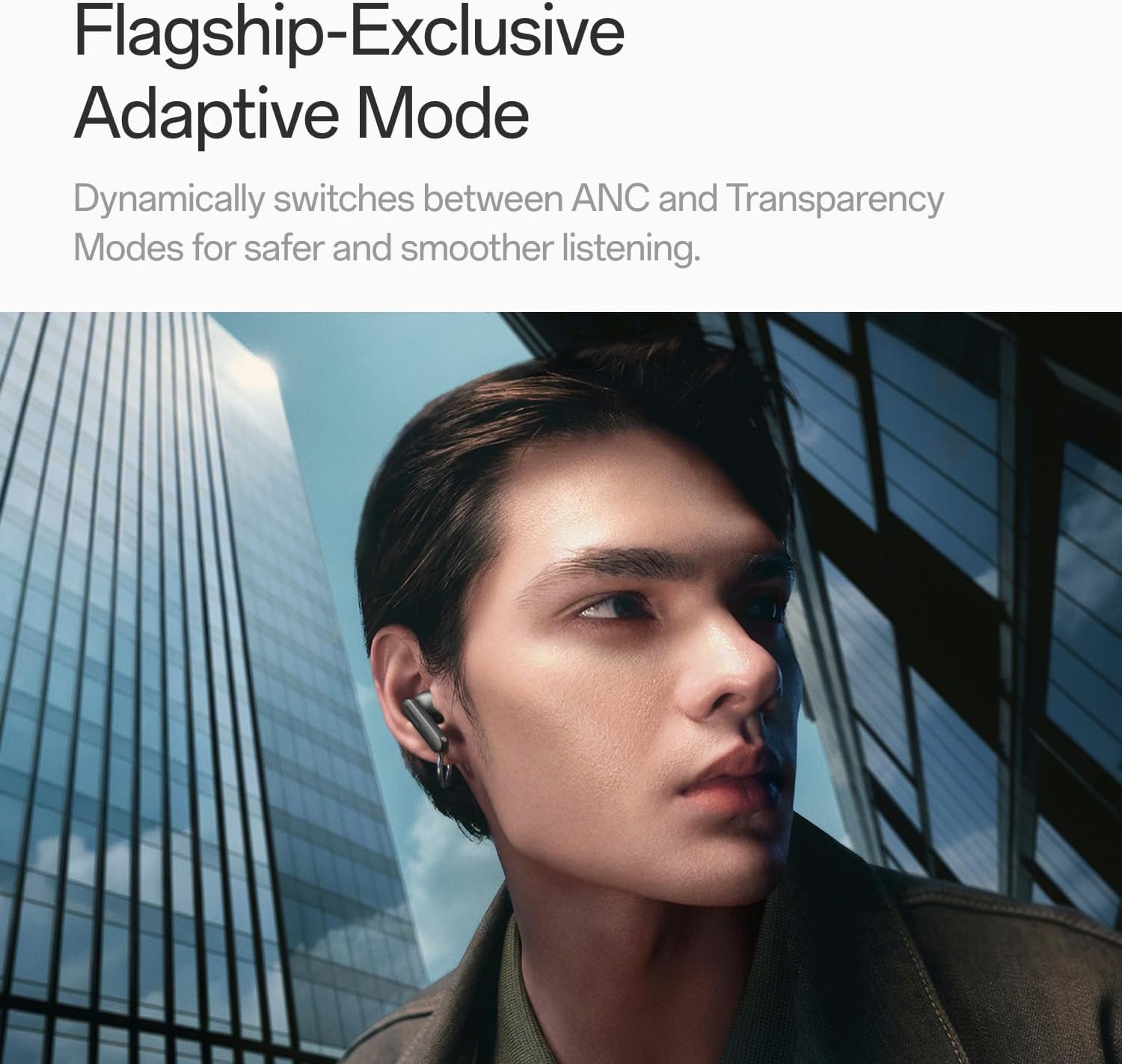
Image: A person wearing OnePlus Buds 4 earbuds in a city setting, highlighting the Adaptive Mode feature.
3.3 Karakteristik odyo
The OnePlus Buds 4 deliver high-quality audio with advanced technologies.
- 11mm Audio Drivers: Provide balanced, true-to-life acoustics.
- Hi-Res Audio & LHDC 5.0: For detailed, studio-grade sound reproduction.
- Odyo Espasyal 3D Imersif: Creates a richer, surrounding sound experience.

Image: OnePlus Buds 4 earbuds with Hi-Res Audio and LHDC 5.0 branding, emphasizing advanced audio capabilities.

Image: OnePlus Buds 4 earbuds depicted with a visual effect suggesting immersive 3D Spatial Audio.

Imaj: Yon eksplozyon view diagram of a OnePlus Buds 4 earbud, highlighting its internal sound components and drivers.
3.4 Karakteristik Apèl
The earbuds are equipped with features to enhance call clarity.
- Anilasyon bri apèl AI 3 mikwofòn: Filters out noise and wind for clear calls in various environments.
- 3x Voice Cancellation: Reduces vocal distractions in noisy settings like cafes or trains.

Image: A person lying down with OnePlus Buds 4 earbuds, representing the effect of voice cancellation for undisturbed listening.
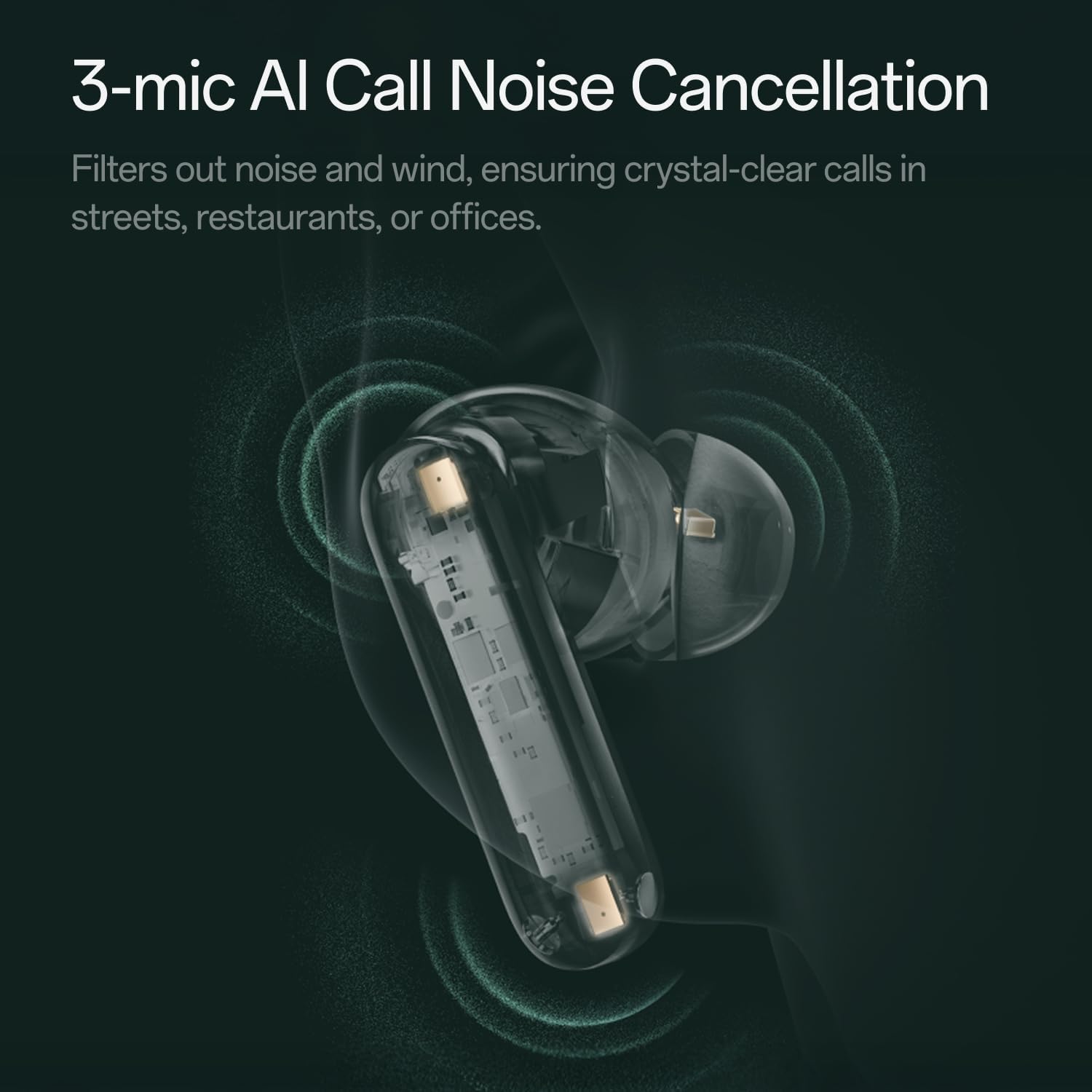
Imaj: Yon transparan view of a OnePlus Buds 4 earbud, highlighting the 3-mic system for AI Call Noise Cancellation.
3.5 AI Translation
With a compatible OnePlus phone, the earbuds can facilitate real-time conversations in multiple languages.

Image: OnePlus Buds 4 earbuds alongside a smartphone screen demonstrating AI translation functionality.
4. Antretyen
4.1 Netwayaj
- Netwaye ekoutè yo ak bwat chaje a regilyèman avèk yon twal mou, sèk, epi ki pa gen pousyè.
- Remove ear tips and clean them with water and mild soap if necessary, ensuring they are completely dry before reattaching.
- Do not use abrasive materials or harsh chemicals.
4.2 Rezistans dlo
The OnePlus Buds 4 are water resistant. This means they can withstand splashes and sweat, making them suitable for workouts. However, they are not waterproof and should not be submerged in water.
4.3 Depo
Lè w pa ap itilize ekoutè yo, sere yo nan bwat chaje yo pou pwoteje yo epi asire yo rete chaje.
NAN. Depanaj
Si ou rankontre pwoblèm ak OnePlus Buds 4 ou yo, gade solisyon komen sa yo:
5.1 Pwoblèm koneksyon
- Ensure the earbuds are charged and in pairing mode (flashing white light).
- Etenn epi aktive Bluetooth sou aparèy ou an.
- Bliye aparèy la nan paramèt Bluetooth ou yo epi eseye konekte li ankò.
- Try resetting the earbuds (refer to the full user manual for specific reset instructions).
5.2 Pwoblèm Son
- Check the earbud fit and try different ear tip sizes.
- Clean the ear tips and speaker meshes to remove any debris.
- Ensure the volume on both your device and earbuds is adjusted correctly.
5.3 Pwoblèm chaj
- Verifye ke kab chaje a byen konekte ak tou de bwat la ak sous kouran an.
- Asire w ke kontak chaje yo sou ekoutè yo ak anndan bwat la pwòp epi pa gen okenn obstak.
- Eseye yon diferan USB-C kab oswa adaptè pouvwa.
6. Espesifikasyon
| Karakteristik | Detay |
|---|---|
| Non modèl | OnePlus Buds 4 |
| Nimewo Modèl | E513A |
| Mak | OnePlus |
| Koulè | Zen Green |
| Plasman Zòrèy | Nan Zòrèy |
| Faktè fòm | Nan Zòrèy |
| Kontwòl bri | Anile aktif bri |
| Gwosè Chofè Audio | 11 Milimèt |
| Kalite chofè odyo | Chofè dinamik |
| Repons Frekans | 40 Hz |
| Sansiblite | 100 dB |
| Enpedans | 18 Ohm |
| Koneksyon Teknoloji | Bluetooth |
| Teknoloji kominikasyon san fil | Bluetooth |
| Bluetooth vèsyon | 5.4 |
| Gamme Bluetooth | 33 pye |
| Metòd kontwòl | Manyen |
| Kalite kontwolè | Kontwòl manyen |
| Chaje Ka Kapasite | 530mAh |
| Nivo rezistans dlo | Dlo rezistan |
| Pwa atik | 0.15 kilogram (5.3 ons) |
| Konpozan ki enkli | Cable, Charging Case, Eartip, User Manual |
7. Garanti ak sipò
7.1 Garanti manifakti a
The OnePlus Buds 4 are backed by a one-year manufacturer warranty. This warranty covers defects in materials and workmanship under normal use. For specific terms and conditions, please refer to the warranty card included in your product packaging or visit the official OnePlus support websit.
7.2 Sipò pou Kliyan
For further assistance, technical support, or warranty claims, please contact OnePlus customer service through their official websit la oswa enfòmasyon kontak yo bay nan dokimantasyon pwodwi ou a.
Official OnePlus Store: Magazen OnePlus sou Amazon


