1. Entwodiksyon
The COLMI R12 Smart Ring is a wearable device designed to monitor various health metrics and enhance your daily activities. It features a touch display for quick access to information, health tracking capabilities including heart rate, blood oxygen, and sleep, multiple sports modes, and convenient wireless charging. This manual provides detailed instructions to help you get the most out of your smart ring.

Image: The COLMI R12 Smart Ring, showcasing its integrated display and the compact wireless charging dock.
2. Ki sa ki nan bwat la
- COLMI R12 Smart Ring
- Pòtab chaje kanpe
- Chaje kab
- Manyèl Enstriksyon (dokiman sa a)
3. Gid Enstalasyon
3.1 Choosing the Right Size
For optimal comfort and accurate data collection, selecting the correct ring size is crucial. If you have not already, consider using a COLMI Sizing Kit to determine your ideal fit. A snug fit ensures proper sensor contact with your skin.
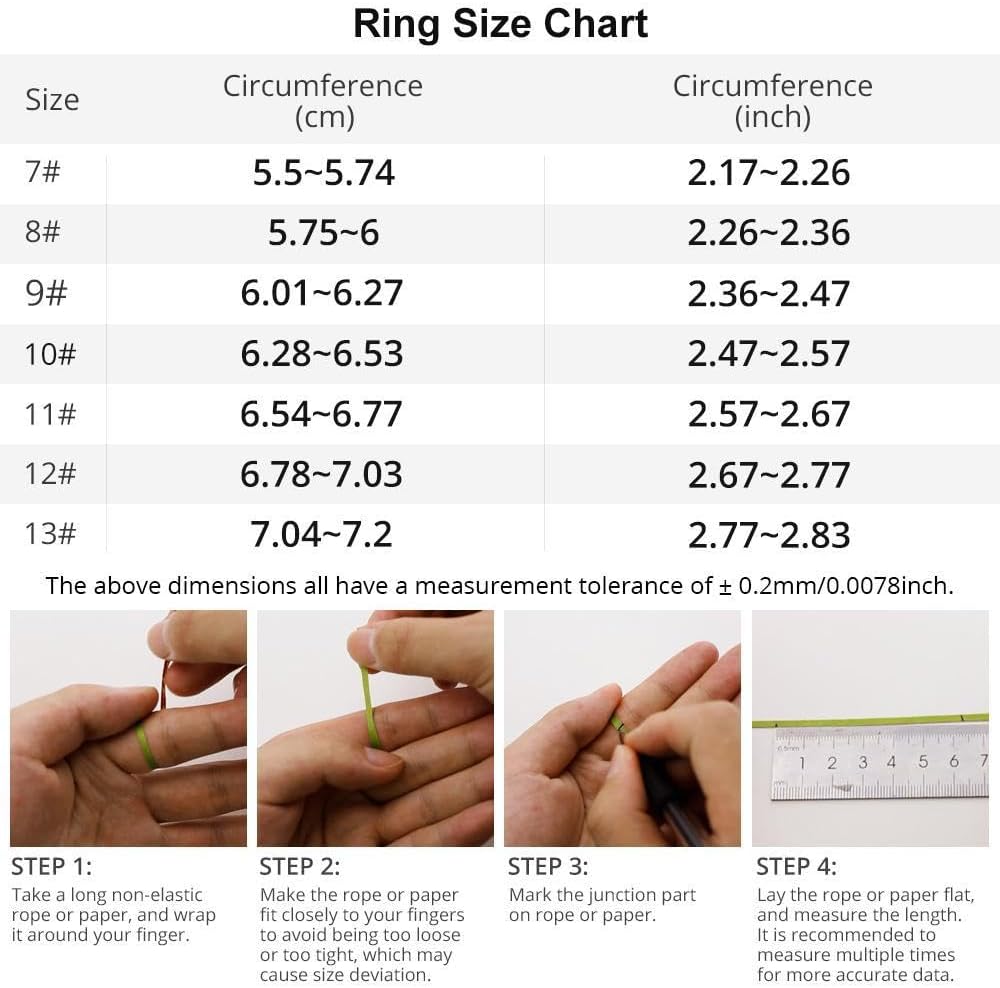
Image: A detailed ring size chart with circumference measurements in centimeters and inches, alongside a four-step visual guide on how to measure your finger using a string or paper.
3.2 Premye chaj
Before first use, fully charge your COLMI R12 Smart Ring. Place the ring onto the provided wireless charging stand. Connect the charging stand to a power source using the included charging cable. The ring's display will indicate charging status.

Image: The COLMI R12 Smart Ring resting on its wireless charging dock, with a charging cable connected, illustrating the smart charging process.
3.3 Telechaje Aplikasyon an ak Koneksyon
- Download the official 'Q Ring' application from your smartphone's app store (compatible with Android and iOS).
- Louvri app a epi swiv enstriksyon ki sou ekran an pou kreye yon kont oswa konekte.
- Asire w ke Bluetooth smartphone ou a aktive.
- Within the 'Q Ring' app, search for your COLMI R12 Smart Ring and initiate the pairing process. Confirm any pairing requests on both your phone and the ring if prompted.

Image: A visual representation of the four setup steps: purchasing a sizing kit, selecting the ring, downloading the 'Q Ring' app, and enjoying the health journey, with images of the sizing kit, the ring, and the app interface.
4. Kijan pou w itilize bag entelijan w lan
4.1 Multi-functional Display
The COLMI R12 features a touch-sensitive display that allows you to quickly check essential information without needing your phone. Tap the ring's display to cycle through various data points such as current time, step count, and battery level.
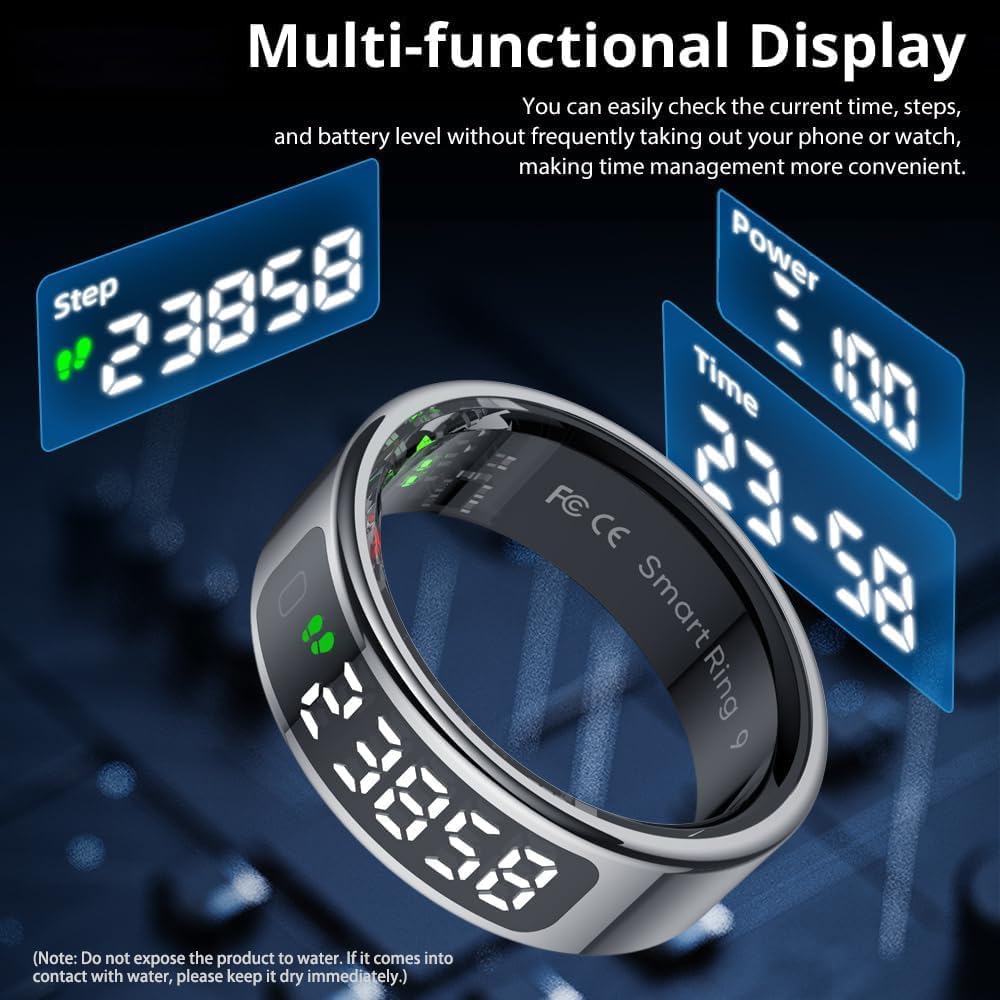
Image: The COLMI R12 Smart Ring displaying various metrics like step count, power level, and time on its integrated screen, highlighting its multi-functional display capability.
4.2 Siveyans Sante
The ring continuously monitors key health metrics. All data is synchronized with the 'Q Ring' app for detailed analysis and historical tracking.
- Batman kè: Tracks your heart rate throughout the day. You can manually check your heart rate via the app at any time.
- Oksijèn san: Li kontwole nivo oksijèn nan san ou.
- Suivi dòmi: Analyzes your sleep patterns, including light sleep, deep sleep, and awake times, to help you understand and improve your sleep quality.

Image: Graphs illustrating heart rate, sleep stages (light, REM, deep), and blood oxygen levels, demonstrating the COLMI R12 Smart Ring's health measurement capabilities.

Image: A screenshot from the 'Q Ring' app showing detailed heart rate data and the option to manually check heart rate, emphasizing 24/7 monitoring.

Image: A user sleeping with the COLMI R12 Smart Ring, accompanied by a graphic displaying sleep duration and percentages for light and deep sleep, illustrating the sleep tracking feature.
4.3 Espò mòd
Connect your ring to the 'Q Ring' app to access and utilize multiple sports modes. These modes record specific data relevant to your activity, such as exercise time, steps, distance, and calories burned.

Image: Screenshots of the 'Q Ring' app displaying daily, weekly, and monthly activity statistics, including total steps, distance, and calories, demonstrating data visualization for sports modes.
4.4 Kontwòl Kamera
When your COLMI R12 Smart Ring is connected to your mobile phone, you can use a simple hand gesture to remotely control your phone's camera, allowing for convenient photo taking.

Image: A person wearing the COLMI R12 Smart Ring, using a finger wave gesture to control a smartphone camera, illustrating the smart fingertip control feature.
5. Antretyen
5.1 Netwayaj
To maintain optimal performance and hygiene, regularly clean your smart ring. Use a soft, dry cloth to wipe the ring. For stubborn dirt, a slightly damp Ou ka itilize twal, epi kite l siye imedyatman.
5.2 Rezistans dlo
The COLMI R12 Smart Ring features 1ATM water resistance. This means it is resistant to splashes, rain, and brief immersion in water. However, it is not suitable for swimming, showering, or diving. Avoid exposing the product to hot water or steam. If the ring comes into contact with water, please dry it immediately.
5.3 Swen Chaje
Always use the provided charging stand and cable. Ensure the charging contacts on both the ring and the stand are clean and dry before charging to prevent damage.
NAN. Depanaj
- Sonri a pa limen: Ensure the ring is fully charged. Place it on the charging stand for at least 30 minutes.
- Pa ka konekte ak aplikasyon an: Make sure Bluetooth is enabled on your phone and the ring is within range. Restart both the ring and your phone, then try pairing again. Ensure the 'Q Ring' app is updated to the latest version.
- Done sou sante ki pa egzak: Ensure the ring is worn snugly on your finger and the sensors are clean. Avoid wearing it too loosely or too tightly.
- Kout lavi batri: Battery life can vary based on usage. Reduce frequent display checks or continuous monitoring if not needed. Ensure the ring is fully charged each time.
- Ekran an pa reponn: Try restarting the ring (if an option is available in the app) or place it on the charger to reset.
7. Espesifikasyon
| Karakteristik | Detay |
|---|---|
| Nimewo Modèl | KOLMI R12 |
| Pwa atik | 100 gram (3.53 ons) |
| Batri | 1 Nonstandard Battery (included), 15 Milliamp Hours Lithium Polymer |
| Sistèm operasyon konpatibilite | Android, iOS |
| Koneksyon Teknoloji | Bluetooth |
| Wireless Kominikasyon Creole | Bluetooth |
| Kapasite Depo memwa | 1 MB |
| Karakteristik espesyal | Control photography, Multiple sports modes, Record exercise data |
| GPS | Pa gen GPS |
| Rezistans dlo | 1ATM |
8. Garanti ak sipò
COLMI provides professional after-sales service for your R12 Smart Ring. If you encounter any usage or quality problems, please refer to the warranty information provided at the time of purchase or contact COLMI customer support directly. Contact details can typically be found on the official COLMI websit entènèt la oubyen atravè revandè w la.


