Entwodiksyon
This manual provides detailed instructions for the setup, operation, and maintenance of your LEFFOT M1 Plus 4K Ultra HD Streaming Device. Please read this manual thoroughly before use to ensure optimal performance and longevity of your device.
The LEFFOT M1 Plus is a high-performance streaming device designed to deliver an immersive entertainment experience with 4K Ultra HD resolution, powered by Android 14. It features robust connectivity options and intelligent voice control for seamless interaction.
Ki sa ki nan bwat la

Image: Contents of the LEFFOT M1 Plus package. This includes the streaming device, remote control, HD cable, power adapter, and user manual.
- LEFFOT M1 Plus Streaming Device (x1)
- Voice Remote Control (x1)
- HD Cable (x1)
- Pouvwa adaptè (x1)
- Manyèl itilizatè (x1)
Gid Enstalasyon
- Konekte ak televizyon an: Insert one end of the provided HD cable into the HDMI port on the LEFFOT M1 Plus device and the other end into an available HDMI port on your television.

Image: Step-by-step visual guide for connecting the TV Box to your television's HDMI port, connecting to the internet, and starting to stream content.
- Pouvwa sou: Connect the power adapter to the DC port on the device and then plug the adapter into a power outlet. The device will automatically power on.
- Remote Control Pairing: Insert two AAA batteries (not included) into the voice remote. Follow the on-screen instructions to pair the remote via Bluetooth. This typically involves holding down specific buttons on the remote near the device until a pairing confirmation appears.
- Rezo Koneksyon: On the initial setup screen, select your preferred language and connect to your Wi-Fi network. The device supports dual-band WiFi 6 (802.11ax) for fast and stable connections. Alternatively, you can connect via an Ethernet cable to the LAN port.
- Konfigirasyon kont Google: Konekte avèk kont Google ou pou jwenn aksè nan Google Play Store ak lòt sèvis Google yo.
Enstriksyon Operasyon
Navigasyon
Use the directional pad and 'OK' button on the voice remote to navigate the Android TV interface. The home screen provides quick access to your favorite apps, recommended content, and system settings.
Kontwòl Vwa (Asistan Google)
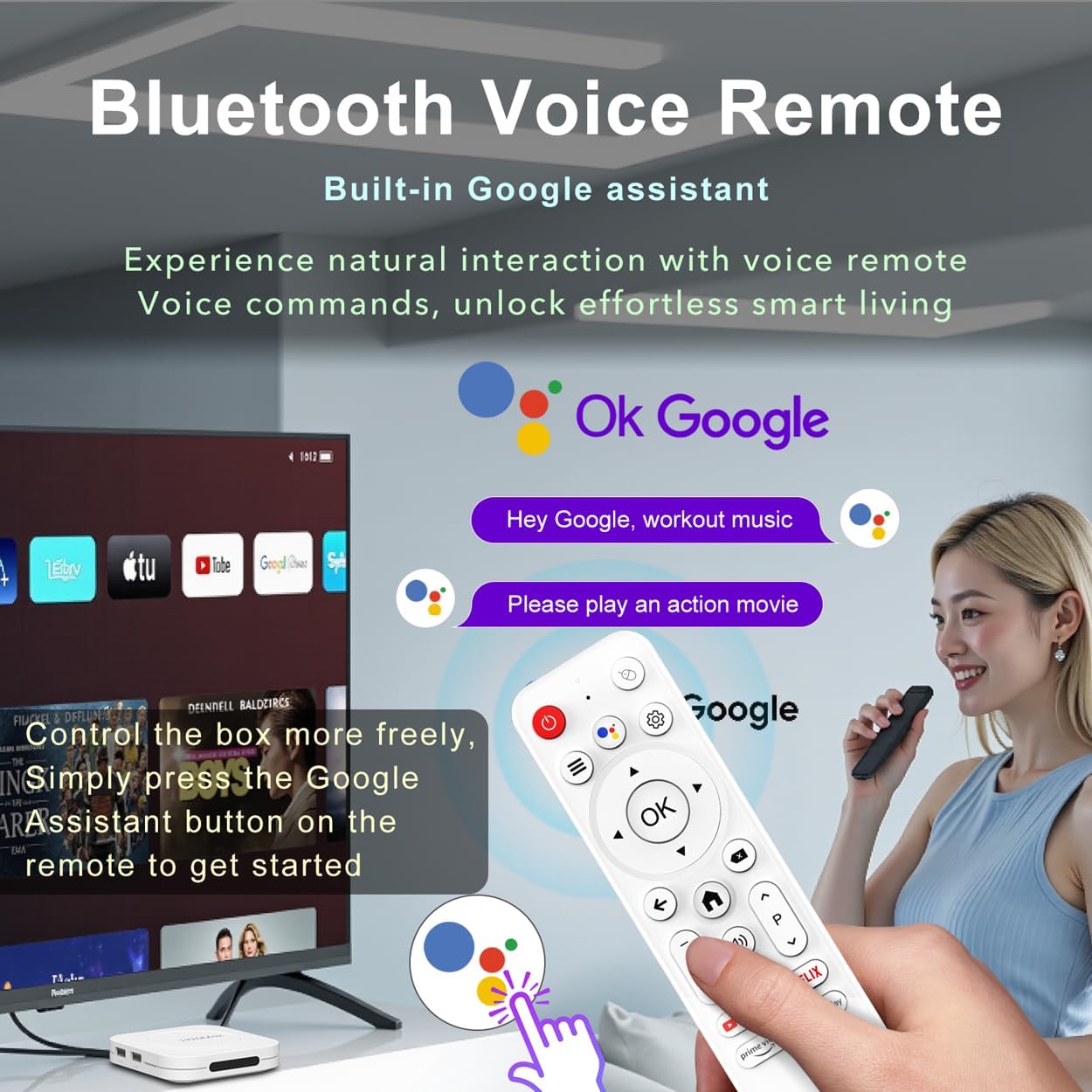
Image: The LEFFOT M1 Plus remote control, highlighting the Google Assistant button for voice commands.
The device features built-in Google Assistant integration via the BT 5.4 voice remote. Press the Google Assistant button on the remote and speak your commands to search for content, adjust volume, open apps, or check information hands-free.
Ekran Mirroring
Effortlessly share content from your mobile devices (smartphones, tablets) to your TV using Airplay, DLNA, or WiFidisplay functions. This is ideal for sharing photos, videos, or playing mobile games on the big screen.
Lektur Media
Access thousands of apps from the Google Play Store, including popular streaming services like Netflix, Prime Video, YouTube, Hulu, and Disney+. The device supports 8K@23fps decoding and 4K@60fps HDR10 output for a high-quality vieweksperyans nan.
Karakteristik kle
- Ultimate 4K Ultra HD Resolution: Experience stunning clarity with 8K@23fps decoding and 4K@60fps HDR10 output, delivering cinema-quality picture with vibrant colors and crisp details.

Imaj: Yon emisyon sou ekran televizyonasing the clarity and detail of 8K Ultra HD decoding, emphasizing vibrant colors and sharp details.
- Powerhouse Performance: Equipped with a Rockchip RK3528 Quad-Core A53 processor and 4GB RAM, ensuring flawless multitasking, smooth streaming, and responsive gaming.
- Military-Grade Connectivity: Features dual-band WiFi 6 (802.11ax) and 100M Ethernet for stable and high-speed 4K streaming, minimizing buffering. Bluetooth 5.4 is also included for peripheral connections.

Image: Visual representation of the device's advanced connectivity features, including 2.4G & 5G Dual-band WiFi 6 and 100M Ethernet for stable streaming.
- Android 14 Entertainment Hub: Runs the latest Android 14 OS, providing access to over 5,000 apps from the Google Play Store for endless entertainment options.
- Massive 128GB Storage Capacity: Store hundreds of apps, games, and offline media. Additional storage expansion is available via USB ports.
- Complete Connectivity Suite: Includes BT 5.4, USB 2.0 (x2), HD 2.0b, Ethernet, DC, and AV ports for connecting various external devices like soundbars, game controllers, and external storage.
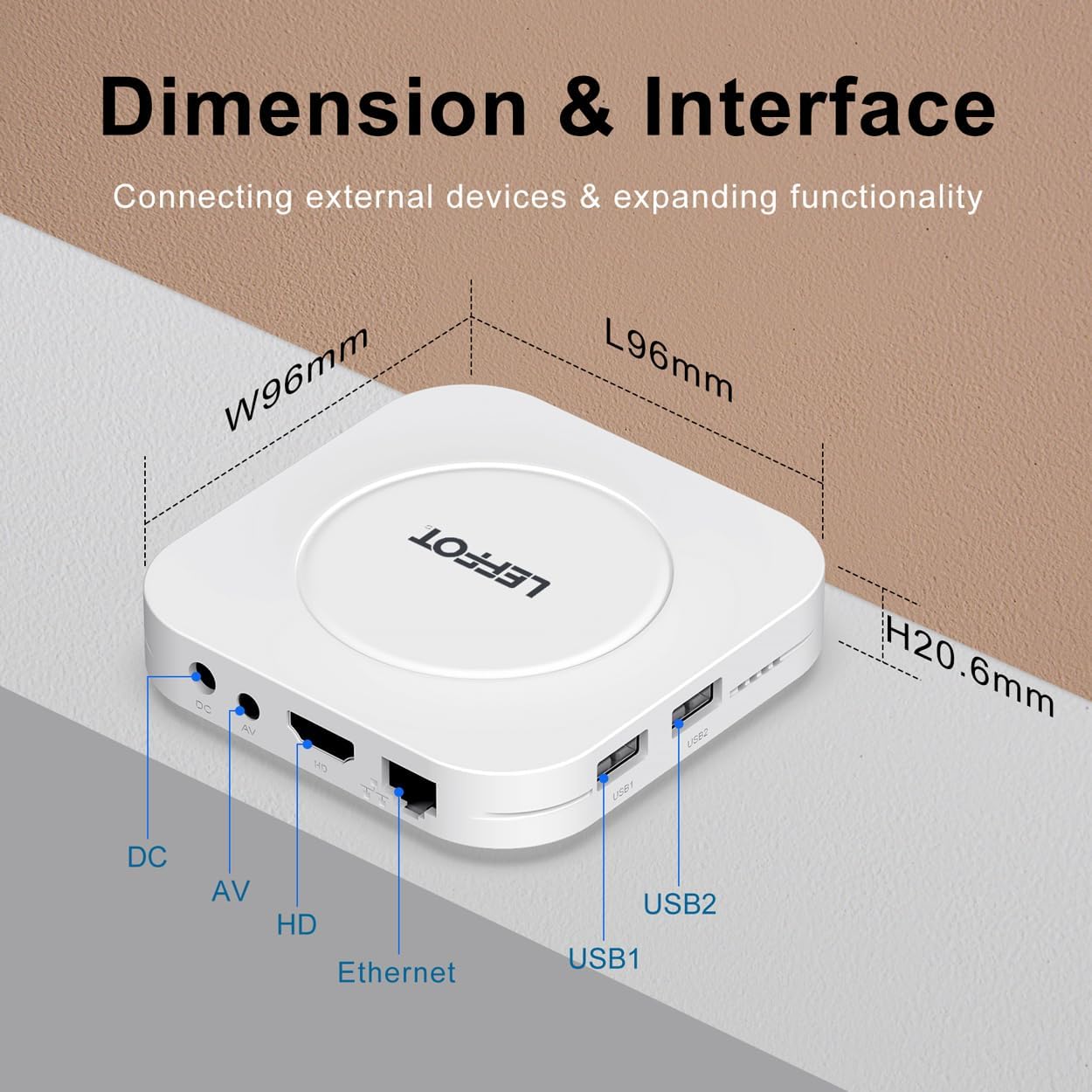
Image: An illustration detailing the dimensions and various interface ports of the LEFFOT M1 Plus, including DC, AV, HD, Ethernet, USB1, and USB2.
Antretyen
- Netwayaj: Sèvi ak yon twal mou epi sèk pou netwaye aparèy la. Evite pwodui netwayaj likid oswa materyèl abrazif.
- Mizajou lojisyèl: Ensure your device's software is up-to-date by checking for system updates periodically in the settings menu. This ensures optimal performance and security.
- Jesyon Depo: Regularly clear cached data and uninstall unused apps to free up storage space and maintain device speed.
Depanaj
- Pa gen pouvwa: Ensure the power adapter is securely connected to both the device and a working power outlet. Try a different outlet if necessary.
- Pa gen imaj sou televizyon: Verify the HD cable connections. Ensure your TV input is set to the correct HDMI port. Try a different HD cable if the issue persists.
- Remote pa reponn: Check the batteries in the remote control. Re-pair the remote by following the instructions in the Setup Guide.
- Pwoblèm koneksyon Wi-Fi: Ensure your Wi-Fi router is on and functioning correctly. Re-enter your Wi-Fi password in the device settings. Try moving the device closer to the router or connecting via Ethernet.
- Aplikasyon an bloke/kraze: Close and restart the app. Clear the app's cache or data in the device settings (Settings > Apps > [App Name] > Storage). If the issue continues, uninstall and reinstall the app.
Espesifikasyon
| Karakteristik | Detay |
|---|---|
| Mak | LEFFOT |
| Non modèl | M1Plus |
| Sistèm operasyon | Android 14 |
| Processeur | Rockchip RK3528 Quad-Core A53 |
| RAM | 4GB |
| ROM | 128GB |
| Rezolisyon | 8K (decoding), 4K@60fps HDR10 (output) |
| Koneksyon | Dual-band WiFi 6 (802.11ax), Bluetooth 5.4, 100M Ethernet |
| Pò | HD 2.0b, USB 2.0 (x2), Ethernet, DC, AV |
| Karakteristik espesyal | Google Assistant, Airplay, DLNA, WiFidisplay |
| Dimansyon | 3.8 x 3.8 x 0.81 pous |
| Pwa atik | 4.4 ons |
Garanti ak sipò
Your LEFFOT M1 Plus device comes with a standard manufacturer's warranty. For detailed warranty information, technical support, or service inquiries, please refer to the contact information provided in your product packaging or visit the official LEFFOT websit.