1. Entwodiksyon
Thank you for choosing the AULA SC680 Wireless Gaming Mouse. This manual provides detailed instructions to help you set up, operate, and maintain your device for optimal performance. The SC680 features tri-mode connectivity, a high-performance PAW3395 sensor, and customizable options designed for both gaming and professional use.

Imaj: Anlè view of the AULA SC680 Wireless Gaming Mouse in black, showcasing konsepsyon ergonomik li yo ak bouton prensipal yo.
2. Karakteristik kle
- Koneksyon Tri-Mòd: Supports USB-C wired, 2.4GHz wireless, and Bluetooth 5.2 connections for versatile use across multiple devices and operating systems (Windows 7/8/10, Vista, XP, Mac, Windows 2000, Linux).
- High-Performance PAW3395 Sensor: Delivers precise tracking with up to 26000 programmable DPI, 650 IPS speed, 50g acceleration, and an 8000Hz polling rate.
- Durable & Responsive Buttons: Equipped with switches rated for up to 80 million clicks, ensuring longevity and quick response.
- Konsepsyon ultra lejè: Weighs only 58g for comfortable, extended use, reducing hand fatigue. Includes anti-slip and sweat-proof stickers for enhanced grip.
- Long lavi batri: Built-in 500mAh rechargeable battery provides up to 75 hours of continuous use.
- Lojisyèl personnalisable: Allows users to personalize DPI settings, button functions, macro files, and polling rates (Windows systems only for driver functionality).

Image: Diagram illustrating the PAW3395 flagship sensor and its performance specifications including DPI adjustment, IPS, and accelerated speed.
3. Pake kontni
Tanpri tcheke pake a pou atik sa yo:
- AULA SC680 Wireless Gaming Mouse
- Kab chaje/done USB-C
- 2.4GHz USB Reseptè
- Anti-slip Stickers (optional application)
- Spare Foot Pads
- Manyèl Itilizatè (dokiman sa a)
4. Enstalasyon ak Koneksyon
4.1 Chaje Sourit la
Before first use, it is recommended to fully charge the mouse. Connect the provided USB-C cable to the mouse's front port and the other end to a USB power source (e.g., computer USB port, USB wall adapter). The indicator light on the mouse will blink red while charging and turn solid when fully charged. A full charge provides up to 75 hours of battery life.

Image: The AULA SC680 mouse connected via USB-C cable for charging, highlighting its 500mAh battery and up to 75 hours of battery life.
4.2 Connecting the Mouse (Tri-Mode)
The AULA SC680 offers three connection modes: 2.4GHz Wireless, Bluetooth 5.2, and USB-C Wired.
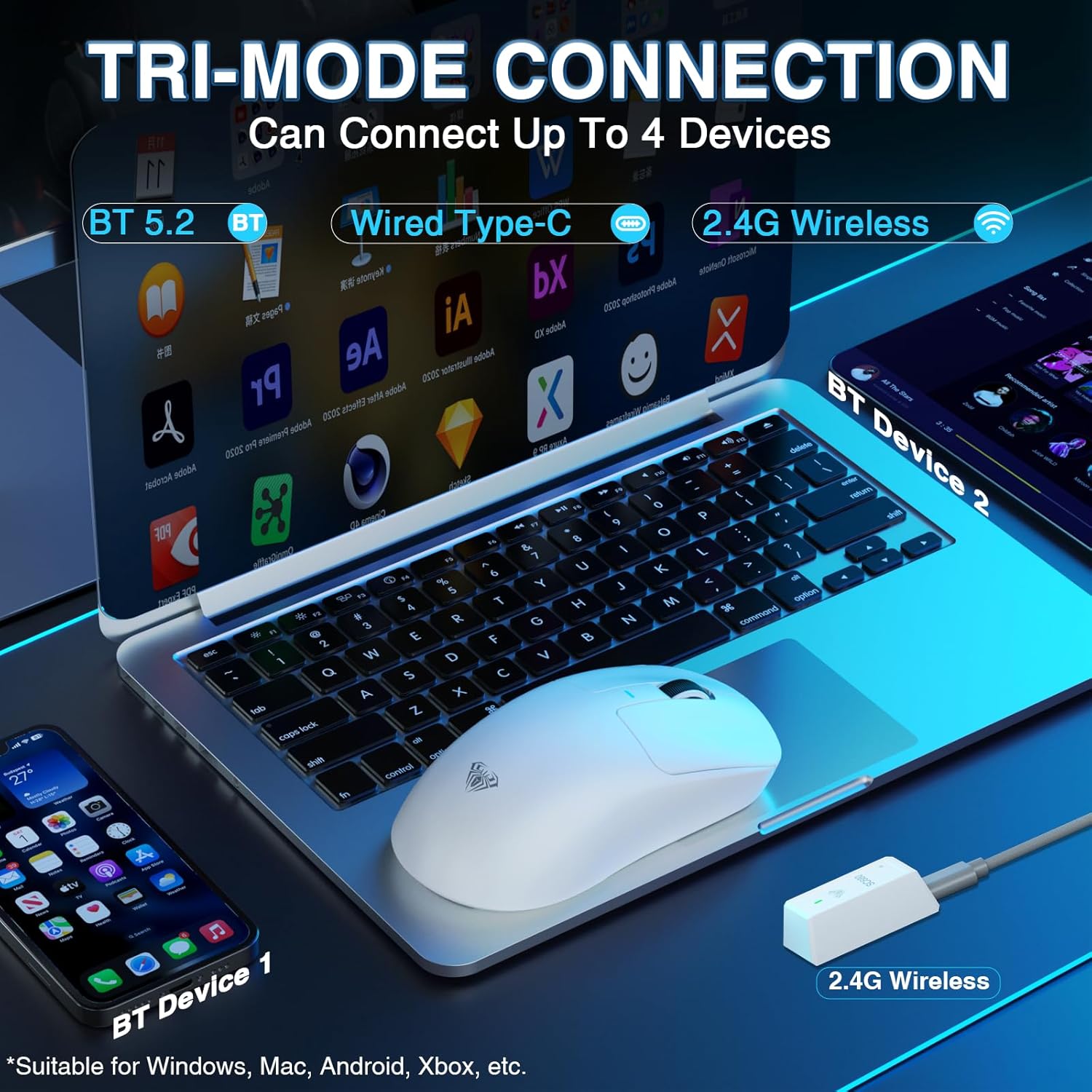
Image: The AULA SC680 mouse demonstrating its tri-mode connection capabilities, including Bluetooth, wired USB-C, and 2.4GHz wireless with a receiver.
- 2.4GHz Wireless Mode:
- Locate the 2.4GHz USB receiver (often stored in a compartment on the bottom of the mouse).
- Ploge reseptè a nan yon pò USB ki disponib sou òdinatè w lan.
- Slide the switch on the bottom of the mouse to the "2.4G" position. The mouse should connect automatically.
- Mòd Bluetooth 5.2:
- Slide the switch on the bottom of the mouse to the "BT" position.
- On your device (PC, laptop, Mac, PS5), go to Bluetooth settings and search for new devices.
- Select "AULA-SC680" from the list to pair. The mouse supports two Bluetooth connections (BT1 and BT2).
- For BT1: Hold down the DPI key for 5 seconds; the blue light will flash.
- For BT2: Hold down the middle key + back key for 5 seconds; the green light will flash.
- To switch between BT1 and BT2: Hold down the middle key + forward key for 5 seconds.
- Mòd USB-C filaire:
- Connect the provided USB-C cable to the mouse and to your computer's USB port.
- Sourit la ap fonksyone tankou yon sourit filaire epi li pral chaje an menm tan.
Video: An official product video demonstrating the AULA SC680 Tri-Mode Wireless Gaming Mouse, highlighting its features and connectivity options.
5. Operasyon Enstriksyon
5.1 Fonksyon bouton
The AULA SC680 mouse features several programmable buttons:
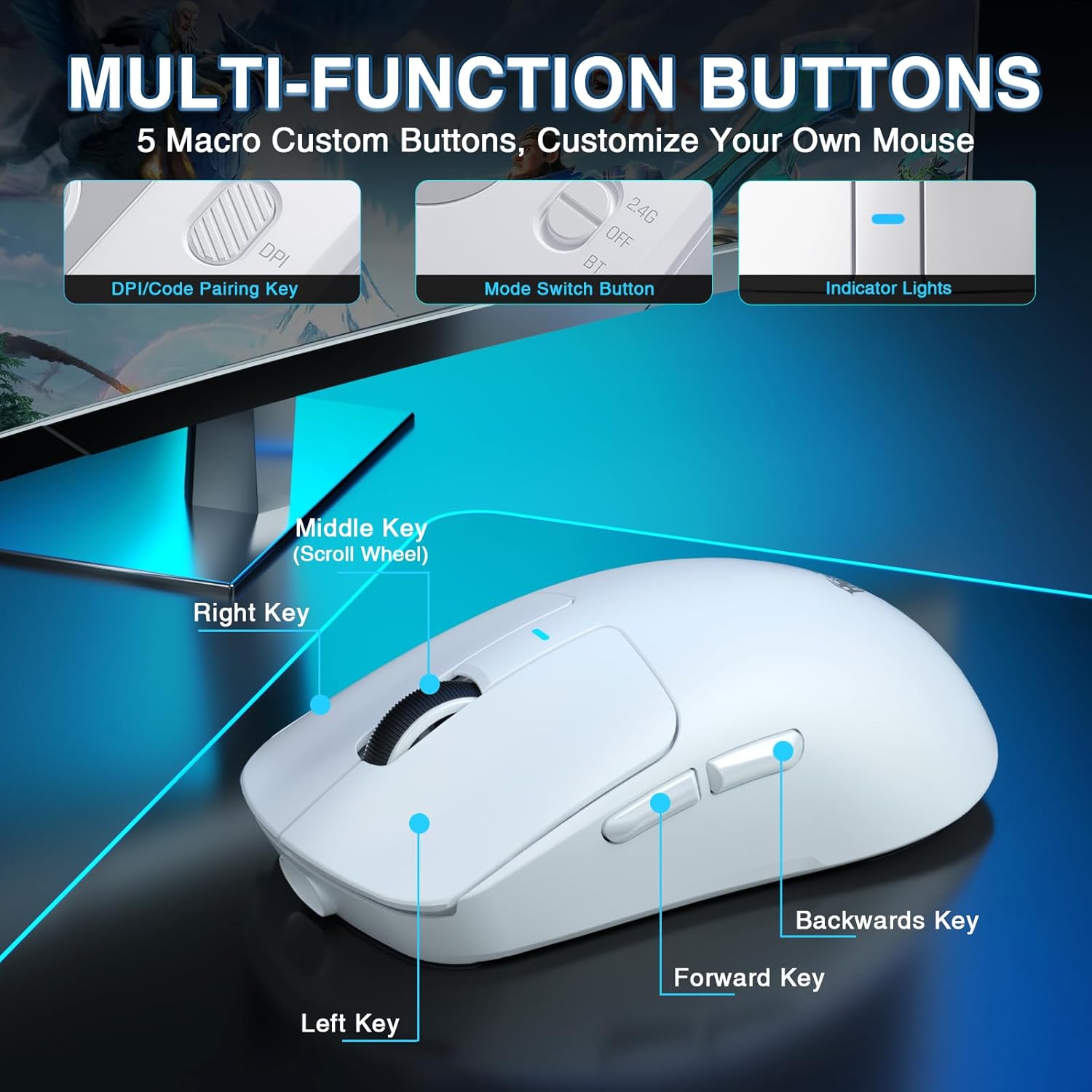
Image: A detailed diagram labeling the multi-function buttons on the AULA SC680 mouse, including Left Key, Right Key, Middle Key (Scroll Wheel), Forward Key, Backwards Key, DPI/Code Pairing Key, Mode Switch Button, and Indicator Lights.
- Klike Goch: Klike prensipal estanda.
- Klike sou dwa: Klike segondè estanda.
- Kle mitan (wou defile): Scroll up/down, click for middle button function.
- Avant kle: Navige pi devan nan web navigatè oswa file eksploratè.
- Backwards Key: Navige bak nan web navigatè oswa file eksploratè.
- DPI/Code Pairing Key (Bottom): Cycles through DPI settings and initiates Bluetooth pairing.
- Mode Switch Button (Bottom): Toggles between 2.4G, OFF, and BT modes.
5.2 DPI Ajisteman
The mouse supports up to 26000 programmable DPI. You can cycle through preset DPI levels using the DPI button on the bottom of the mouse. The indicator light on the mouse will change color to indicate the current DPI setting. Default levels are typically 400-800-1600-3200-6400.
5.3 Customizable Software
For advanced customization, including precise DPI settings, macro programming, and button remapping, download the official AULA driver software.
- Telechaje chofè: Vizite bit.ly/m/AULA
- Nòt konpatibilite: The gaming driver is compatible only with Windows systems and supports 2.4GHz wireless mode and USB-C wired mode. For Bluetooth connection mode, Windows 10 or higher is required.
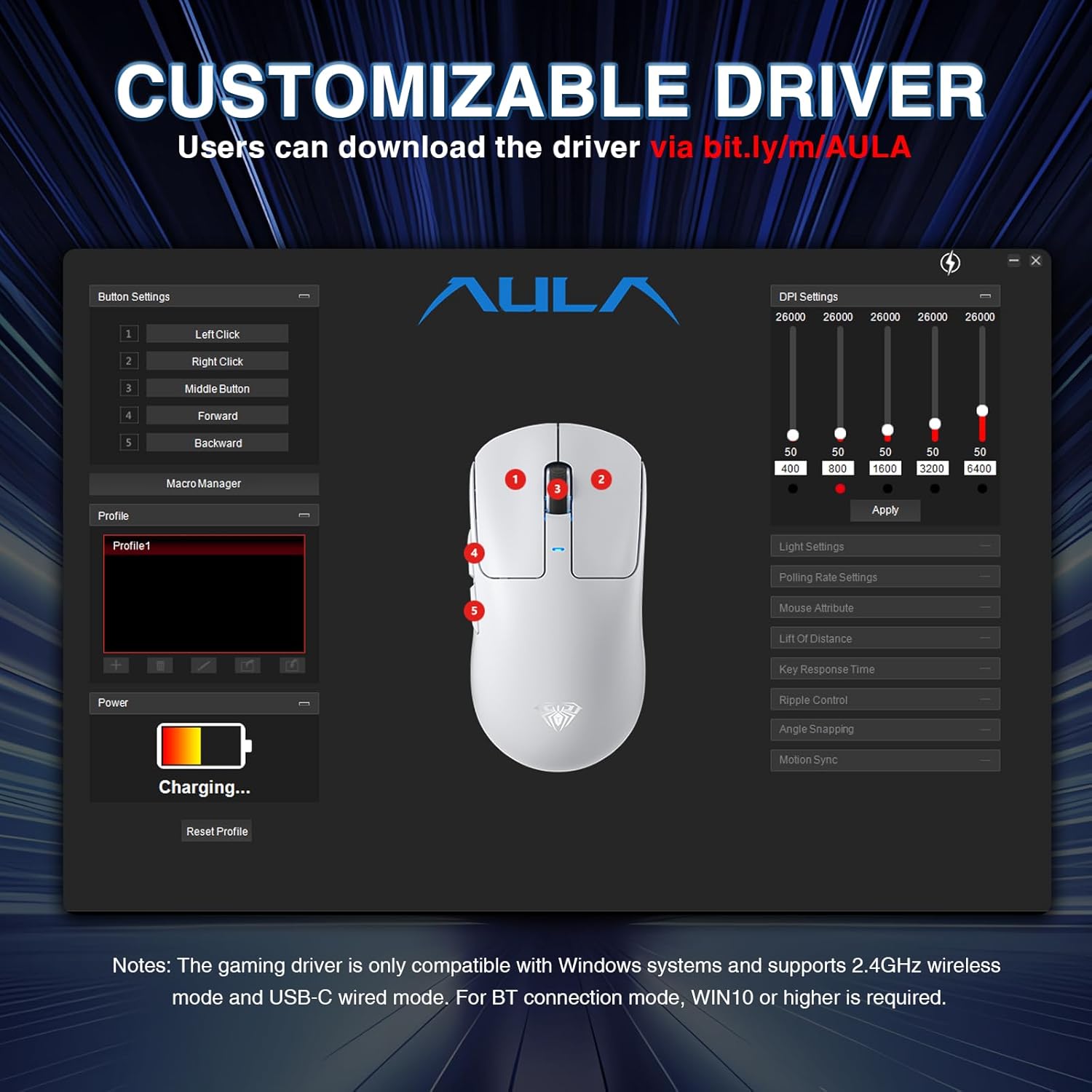
Image: A screenshot of the AULA customizable driver software, showing options for button settings, DPI adjustments, polling rate, and other mouse attributes.
6. Antretyen
To ensure the longevity and optimal performance of your AULA SC680 mouse, follow these maintenance guidelines:
- Netwayaj: Sèvi ak yon twal mou epi sèk pou siye sifas sourit la. Pou pousyè tè ki difisil pou retire, siye yon ti kras.amp Ou ka itilize twal, men asire w pa gen imidite ki antre nan konpozan entèn yo. Evite pwodui chimik ki agresif oswa pwodui netwayaj abrazif.
- Depo: Lè w pa itilize sourit la pou yon bon bout tan, sere l nan yon kote ki fre epi sèk.
- Swen batri: Avoid fully discharging the battery frequently. Charge the mouse when the battery indicator is low.
- Swen kab: Do not sharply bend or pull the USB-C cable to prevent damage.
- Kousinen pou pye: The mouse comes with spare foot pads. Replace them if the original pads show significant wear to maintain smooth gliding.
- Anti-slip Stickers: Apply the included anti-slip stickers for improved grip and a personalized aesthetic. Ensure the mouse surface is clean and dry before application.

Image: The AULA SC680 mouse with colorful anti-slip stickers applied, demonstrating the customizable grip and aesthetic options.
NAN. Depanaj
If you encounter issues with your AULA SC680 mouse, please refer to the following common solutions:
- Sourit la pa reponn:
- Ensure the mouse is charged. Connect it via USB-C cable to charge and check if it works in wired mode.
- Verify the connection mode switch (2.4G/OFF/BT) on the bottom of the mouse is set correctly for your desired connection type.
- Pou 2.4GHz: Asire w ke reseptè USB a byen branche nan yon pò USB ki fonksyone. Eseye yon lòt pò USB.
- For Bluetooth: Ensure Bluetooth is enabled on your device and the mouse is paired correctly. Re-initiate pairing if necessary (refer to Section 4.2).
- Rekòmanse òdinatè w la oswa aparèy ou an.
- Koneksyon ki ralanti oswa ki pa konekte:
- Move the mouse closer to the 2.4GHz receiver or Bluetooth device to reduce interference.
- Ensure there are no large metal objects or other wireless devices causing interference between the mouse and receiver/device.
- Check battery level; low battery can affect wireless performance.
- Update mouse drivers (if applicable, via customizable software).
- Paramèt DPI yo pa chanje:
- Ensure you are pressing the correct DPI button on the bottom of the mouse.
- If using customizable software, ensure the settings are applied and the mouse is in a compatible mode (2.4GHz or wired).
- Bouton ki pa fonksyone:
- Check if the buttons are remapped in the customizable software. Reset to default if unsure.
- Ensure the mouse is clean and there's no debris obstructing the buttons.
8. Espesifikasyon
| Karakteristik | Detay |
|---|---|
| Mak | AULA |
| Modèl | SC680 |
| Koneksyon Teknoloji | 2.4GHz san fil, Bluetooth 5.2, USB-C ak fil |
| Capteur | Capteur optik PAW3395 |
| DPI (Pwen pou chak pous) | Up to 26000 (Programmable), Default: 400-800-1600-3200-6400 |
| IPS (pous pa segonn) | 650 |
| Akselerasyon | 50g |
| Pousantaj biwo vòt | 8000Hz |
| Viv bouton | 80 milyon klik |
| Kalite batri | Lityòm Ion (Enkli) |
| Kapasite batri | 500mAh |
| Lavi batri | Jiska 75 èdtan |
| Pwa atik | 58g (Ultra-lejè) |
| Karakteristik espesyal | Ergonomic Design, Lightweight, Programmable Buttons, Rechargeable |
| Konpatibilite | Windows 7/8/10, Vista, XP, Mac, Windows 2000, Linux (BT requires WIN10+) |
9. Garanti ak sipò
For warranty information and technical support, please refer to the official AULA websit la oubyen kontakte revandè w la. Kenbe resi acha w la pou reklamasyon garanti.
For further assistance or to download the latest drivers and software, please visit the AULA official support page.


