1. Entwodiksyon
Mèsi pou acha aasing the AIKELA ZJ-027 5-in-1 Induction Bluetooth Speaker. This versatile device combines a wireless induction speaker, Bluetooth speaker, power bank, phone stand, and LED light, designed to enhance your audio and mobile experience. Please read this manual carefully to ensure proper use and optimal performance.
2. Enfòmasyon sou Sekirite
- Kenbe aparèy la lwen dlo, imidite, ak tanperati ekstrèm.
- Pa eseye demonte oswa repare aparèy la tèt ou. Kontakte sipò kliyan pou asistans.
- Sèvi sèlman ak kab chaje ki vini ak li a oswa yon kab ekivalan sètifye.
- Evite mete objè lou sou aparèy la.
- Kenbe soti nan atenn timoun yo.
3. Pake kontni
Verifye ke tout atik yo prezan nan pakè ou a:
- AIKELA 5-in-1 Induction Speaker (Model: ZJ-027) x 1
- Kalite-C Chaje Kab x 1
- User's Manual x 1
- Gid Quick Start x 1

Image: What you will receive with your AIKELA ZJ-027 speaker.
4. Pwodwi souview
The AIKELA ZJ-027 is a multifunctional device designed for convenience and enhanced audio. It features:
- Induction Speaker: Play audio by simply placing your phone on the stand, no Bluetooth pairing needed.
- Bluetooth Oratè: Connect wirelessly via Bluetooth 5.3 for stable, high-quality audio.
- Telefòn kanpe: Adjustable 360° vertical rotation for optimal viewang ing.
- Pouvwa Bank: Built-in 3500mAh battery for emergency phone charging.
- Limyè ki ap dirije: Colorful ambient lighting with multiple modes.

Image: The AIKELA ZJ-027 5-in-1 Induction Speaker in use, highlighting its multiple functions.

Imaj: Detaye view of the speaker driver, illustrating its capability for massive, booming sound with crystal-clear quality.
5. Enstalasyon
5.1 Chaje Oratè a
Before first use, fully charge the speaker. Connect the provided Type-C cable to the charging port on the speaker and the other end to a USB power adapter (not included). A full charge takes approximately 2 hours and provides 5-8 hours of playtime, depending on volume levels.

Image: Battery life and charging time information.
5.2 Adjusting the Phone Stand
The integrated phone stand can be rotated 360° vertically to achieve your desired viewing angle. Ensure the non-slip silicone on the base, back, and slot keeps your phone secure.
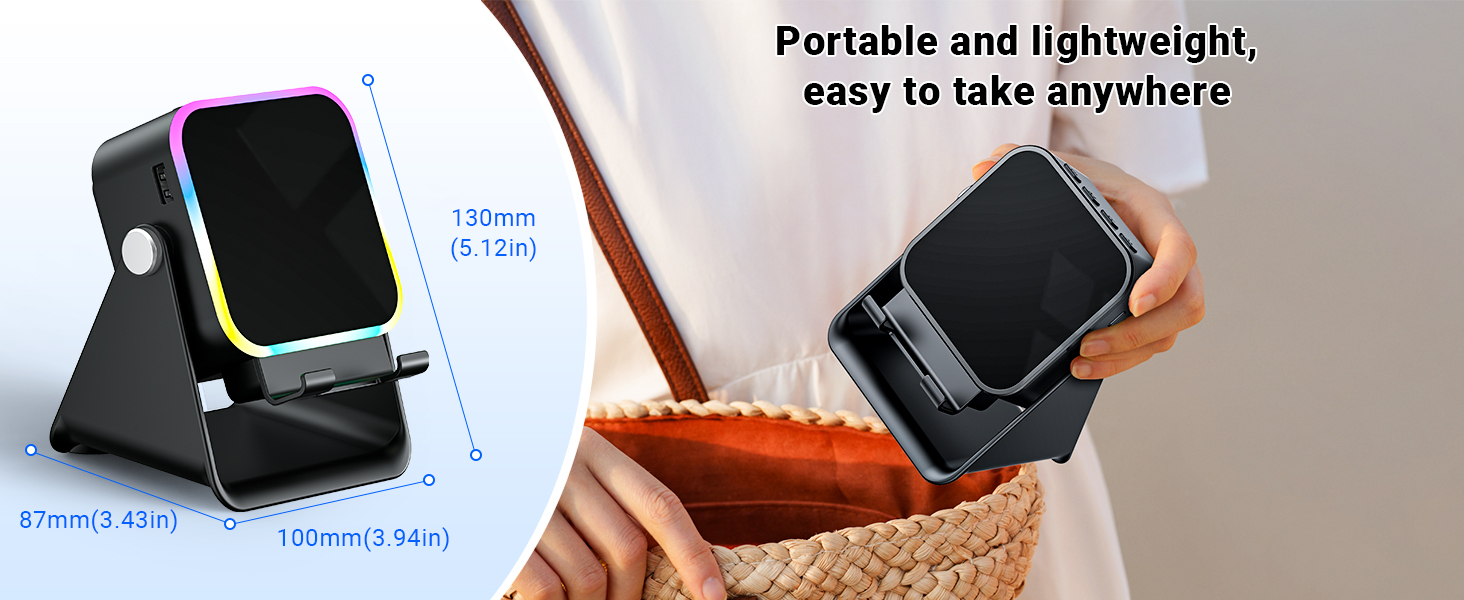
Image: Adjustable stand with 360° rotation and non-slip base for stability.
6. Operasyon
6.1 Power On/Off
Long peze bouton pouvwa a (⏻) pou limen oswa etenn aparèy la.
6.2 Switching Modes (Induction / Bluetooth)
After powering on, the device will typically start in Induction Mode. To switch between Induction Mode and Bluetooth Mode, short press the 'M' button.
Video: Demonstrates how to use both Induction and Bluetooth modes, including switching between them and proper phone placement.
6.3 Mòd endiksyon
In Induction Mode, no Bluetooth connection is required. Simply place your smartphone correctly on the stand. The speaker's inductive chip will capture and amplify audio directly from your phone.
- Plasman Telefòn: Ensure your phone is placed correctly on the stand, typically in portrait orientation, for optimal sound transfer.
- Ajisteman Volim: Adjust your phone's volume to 50% or higher for the best playback experience. You can also use the volume buttons on the speaker.
- Konpatibilite: Induction mode is primarily compatible with smartphones. It does not support iPads or tablets.
- Otomatik: The speaker will automatically turn off after 10 minutes of standby in Induction Mode.

Image: Guide on how to correctly place your phone and adjust volume for Induction Mode.
6.4 Bluetooth mòd
For wireless audio streaming, switch to Bluetooth Mode:
- Long peze bouton pouvwa a pou limen oratè a.
- Short press the 'M' button to switch to Bluetooth Mode (you will hear an audible prompt).
- On your phone or tablet, go to Bluetooth settings and search for "ZJ-027".
- Select "ZJ-027" to pair. For Android devices, enable "Sync volume with phone" in Bluetooth settings after pairing for optimal control.
- Once connected, you can play audio from your device through the speaker.
In Bluetooth mode, you can place your phone horizontally or vertically on the stand. The Bluetooth range is approximately 10 meters.

Image: Visual representation of Induction Mode (no Bluetooth) and Bluetooth Mode (10m range).
6.5 Fonksyon Limyè LED
The speaker features colorful LED lights:
- Chanje Mòd Ekleraj yo: Single-click the 'M' button to cycle through different light colors and patterns.
- Limen/Etenyen Limyè: Long-press the 'M' button to turn the LED lights on or off.

Image: Multiple light strip patterns to choose from.
6.6 Power Bank Function (Emergency Charge)
The speaker can act as an emergency power bank for your phone. Connect your phone's charging cable (not included) to the USB-A output port on the speaker and to your phone. This is a wired charging function, not wireless charging.
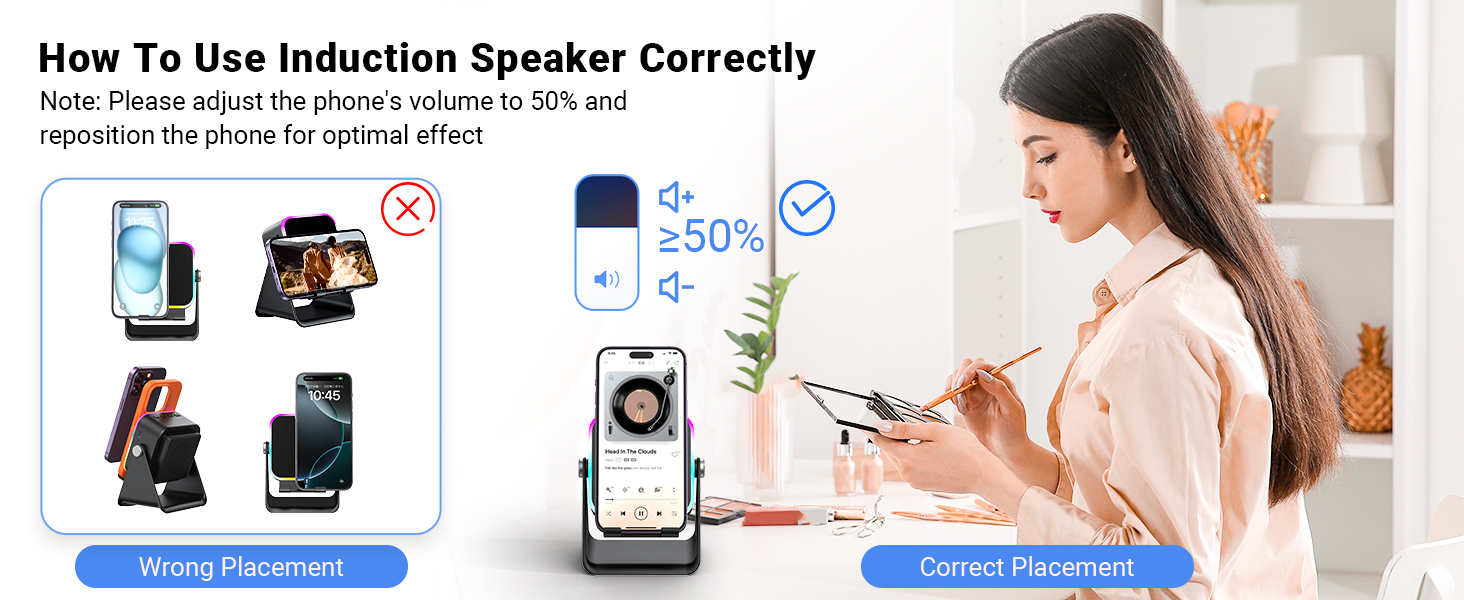
Image: The speaker's 3500mAh power bank function for emergency charging.
7. Antretyen
- Netwaye aparèy la avèk yon twal mou epi sèk. Pa sèvi ak pwodui netwayaj abrazif oswa solvan.
- Evite ekspoze aparèy la nan limyè solèy la dirèk pou peryòd pwolonje.
- Sere aparèy la nan yon kote ki fre, sèk lè li pa itilize.
NAN. Depanaj
Q1: What should I do if the volume is too low?
- If in Induction mode, place the phone correctly on the holder, and then adjust the phone's volume to 50% or higher.
- If you are using an Android device and using Bluetooth mode, first pair the Bluetooth device. Then enable "Sync volume with phone" in your phone's Bluetooth settings.
Q2: What should I do if the sound cuts in and out in Induction mode?
- Ensure the phone is correctly placed on the holder.
- The working principle of Induction mode is that the speaker's inductive chip captures audio from the phone and amplifies it through the speaker. The louder the phone's volume, the louder the speaker's output. Therefore, we recommend setting the phone's volume to 50% or higher to ensure uninterrupted playback.
9. Espesifikasyon
| Karakteristik | Detay |
|---|---|
| Non modèl | ZJ-027 |
| Kalite Oratè | Portable oratè |
| Karakteristik espesyal | Bluetooth Speaker, Built-In Powerbank, Induction Speaker, LED Light, Phone Stand |
| Aparèy konpatib | Android Phone, iPad, iPhone |
| Koulè | Nwa |
| Dimansyon pwodwi | 5"D x 2"W x 3"H |
| Pwa atik | 0.34 kilogram (12 ons) |
| Maksimòm ranje Bluetooth | 10 mèt |
| Batri | 1 Yon batri obligatwa (enkli) |
| Manifakti | AIKELA |
| Oratè maksimòm pwodiksyon pouvwa | 1 Watts |
| Koneksyon Teknoloji | Bluetooth, Induction |
| Materyèl | Akrilonitrile butadien stirèn (ABS) |
10. Garanti & Sipò
AIKELA provides 12 months of support for your Phone Amplifier Speaker. If you encounter any issues or have questions, please contact customer service. You can typically find contact information by navigating to 'Find Order' on the platform where you purchased the product.


