1. Entwodiksyon
This manual provides essential information for the proper installation, operation, and maintenance of your X-Sense XS0E-iR Smart Wi-Fi Smoke Detector. Please read this manual thoroughly before use and retain it for future reference. This device is designed to detect smoke and provide early warning of potential fires.
2. Pwodwi souview
The X-Sense XS0E-iR is a smart Wi-Fi smoke detector featuring a photoelectric sensor for reliable fire protection. It connects directly to your 2.4 GHz Wi-Fi network, allowing for remote monitoring and control via the X-Sense Home Security application. Key features include a 10-year sensor lifespan, a replaceable battery, an 85 dB alarm, and a multi-color LED status indicator.
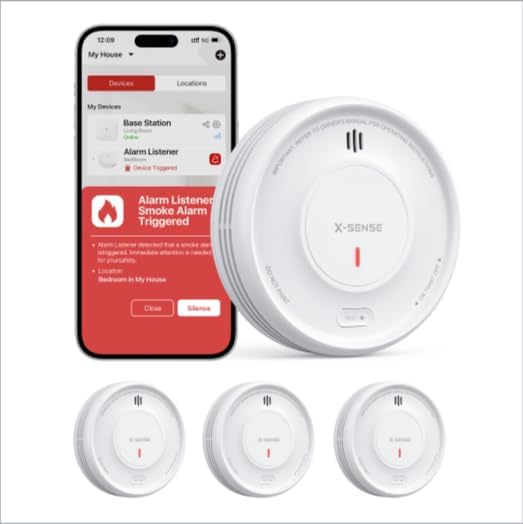
Image 1: X-Sense XS0E-iR Smart Wi-Fi Smoke Detectors and the accompanying mobile application interface. The image displays three smoke detectors and a smartphone screen showing an alarm notification within the app.
3. Pake kontni
Verifye ke tout konpozan yo prezan lè w ap ouvri pake a:
- 3 x X-Sense XS0E-iR Smart Wi-Fi Smoke Detectors
- 6 x Vis
- 6 x Anchors mi yo
- 1 x manyèl itilizatè
4. Enstalasyon ak Enstalasyon
4.1 Enstalasyon batri
- Twist the mounting bracket counter-clockwise to detach it from the detector.
- Insert the provided CR123A battery into the battery compartment, ensuring correct polarity.
- Reattach the mounting bracket by aligning it and twisting clockwise until it clicks into place.
4.2 Enstalasyon Detektè a
Choose a suitable location for installation, typically on the ceiling in the center of a room or hallway. Avoid corners or areas near vents.
- Mark two drill holes on the ceiling using the mounting bracket as a template.
- Fè twou epi mete lank miray yo.
- Secure the mounting bracket to the ceiling with the screws.
- Attach the smoke detector to the mounting bracket by aligning and twisting clockwise until it is firmly in place.
4.3 App Connection and Pairing
The XS0E-iR connects directly to your 2.4 GHz Wi-Fi network.
- Telechaje la Sekirite Kay X-Sense aplikasyon an nan magazen aplikasyon aparèy ou an.
- Kreye yon kont oswa konekte.
- Follow the in-app instructions to add a new device. Ensure your smartphone is connected to a 2.4 GHz Wi-Fi network.
- The app will guide you through the pairing process, which typically involves pressing a button on the detector to initiate Wi-Fi pairing mode (indicated by a blue LED).
5. Operasyon Enstriksyon
5.1 Device Power On/Off
The device powers on automatically upon battery installation. To power off, remove the battery.
5.2 Tès Detektè a
Press and hold the test button on the detector for a few seconds. The alarm will sound (85 dB) and the LED will flash red. This confirms the detector is functioning correctly. Perform this test weekly.
5.3 Konpòtman alam
When smoke is detected, the alarm will sound loudly (85 dB) and the red LED will flash rapidly. Notifications will also be sent to your connected smartphone via the X-Sense Home Security app.
5.4 Fonksyonalite Kontwòl Aplikasyon an
- Dezaktivasyon alam: Silence the alarm directly from the app.
- Verifikasyon Estati: View the current status of your detectors.
- Notifikasyon: Receive real-time alerts for alarms, malfunctions, or low battery.
- Mòd lannwit: Deactivates the green LED light for undisturbed sleep. This setting can be managed through the app.
- Istwa: Access a log of past events and alarms.
- Pataje Aparèy: Share access to the device with family members through the app.
6. Gid Endikatè ki ap dirije
The 4-color LED indicator provides visual status updates:
- Vèt: Indicates standby mode or normal operation.
- Wouj: Indicates an alarm condition (smoke detected).
- Papye jòn: Indicates a malfunction or alert (e.g., low battery, end of product life).
- Ble: Indicates Wi-Fi pairing mode.
7. Ranplasman batri
The XS0E-iR uses a replaceable CR123A battery with an estimated lifespan of up to 1 year. When the battery is low, the detector will emit a yellow LED flash and send a notification to your app.
- Tòde detektè a nan sans kontrè zegwi mont lan pou retire li nan sipò montaj la.
- Louvri lòj batri a.
- Remove the old CR123A battery and dispose of it properly.
- Insert a new CR123A battery, observing correct polarity.
- Close the battery compartment and reattach the detector to the mounting bracket.
8. Antretyen
Regular maintenance ensures optimal performance of your smoke detector.
- Tès chak semèn: Press the test button weekly to ensure the alarm functions.
- Netwayaj chak mwa: Gently vacuum the detector's cover and vents using a soft brush attachment to remove dust and debris. Do not use water or cleaning solutions.
- Tcheke batri: Replace the battery promptly when a low battery alert is received.
NAN. Depanaj
| Pwoblèm | Kòz posib | Solisyon |
|---|---|---|
| Detector not connecting to Wi-Fi | Incorrect Wi-Fi band (only 2.4 GHz supported); weak signal; incorrect password. | Ensure your router is set to 2.4 GHz. Move the detector closer to the router. Re-enter Wi-Fi password carefully. |
| Fo alam | Dust accumulation; steam from bathroom/kitchen; cooking fumes. | Clean the detector monthly. Relocate the detector away from sources of steam or cooking fumes. |
| Yellow LED flashing/App alert | Low battery; end of product life; malfunction. | Replace the battery. If the issue persists after battery replacement, the detector may have reached its end of life and requires replacement. |
| No alarm during test | Dead battery; device malfunction. | Replace the battery. If still no alarm, the device may be faulty and needs replacement. |
10. Espesifikasyon
| Karakteristik | Detay |
|---|---|
| Nimewo Modèl | XS0E-iR |
| Kalite Capteur | Photoelektrik |
| Sous pouvwa | 1 x CR123A Battery (included) |
| Lavi batri | Up to 1 year (replaceable) |
| Alam Loudness | 85 dB |
| Koneksyon | Wi-Fi 2.4 GHz |
| Dimansyon (L x W x H) | 110 x 110 x 30 mm (4.33 x 4.33 x 1.18 pous) |
| Materyèl | ABS plastik |
| Operasyon Imidite | ≤ 85% |
| Koulè | Blan |
11. Enfòmasyon sou Sekirite
- Pa pentire detektè lafimen an. Penti ka bouche chanm deteksyon yo epi anpeche aparèy la fonksyone byen.
- Do not install in areas with high humidity, such as bathrooms, or near cooking appliances where steam or smoke could cause false alarms.
- Ensure the detector is installed according to local building codes and regulations.
- Regularly test the detector to ensure it is functioning properly.
- This device is designed for residential use.
12. Garanti ak sipò
Enfòmasyon konsènan kondisyon garanti espesifik ak detay kontak pou sèvis kliyan pa disponib nan done pwodwi yo bay la. Tanpri gade anbalaj pwodwi a oswa dokiman ofisyèl manifakti a. website for warranty claims and technical assistance.


