1. Entwodiksyon
Thank you for choosing the ZIPRO Ramble Treadmill. This manual provides essential information for the safe assembly, operation, and maintenance of your new fitness equipment. Please read this manual thoroughly before first use and keep it for future reference. The ZIPRO Ramble Treadmill is designed for home use, offering a versatile workout experience with adjustable speed, incline, and various training programs.
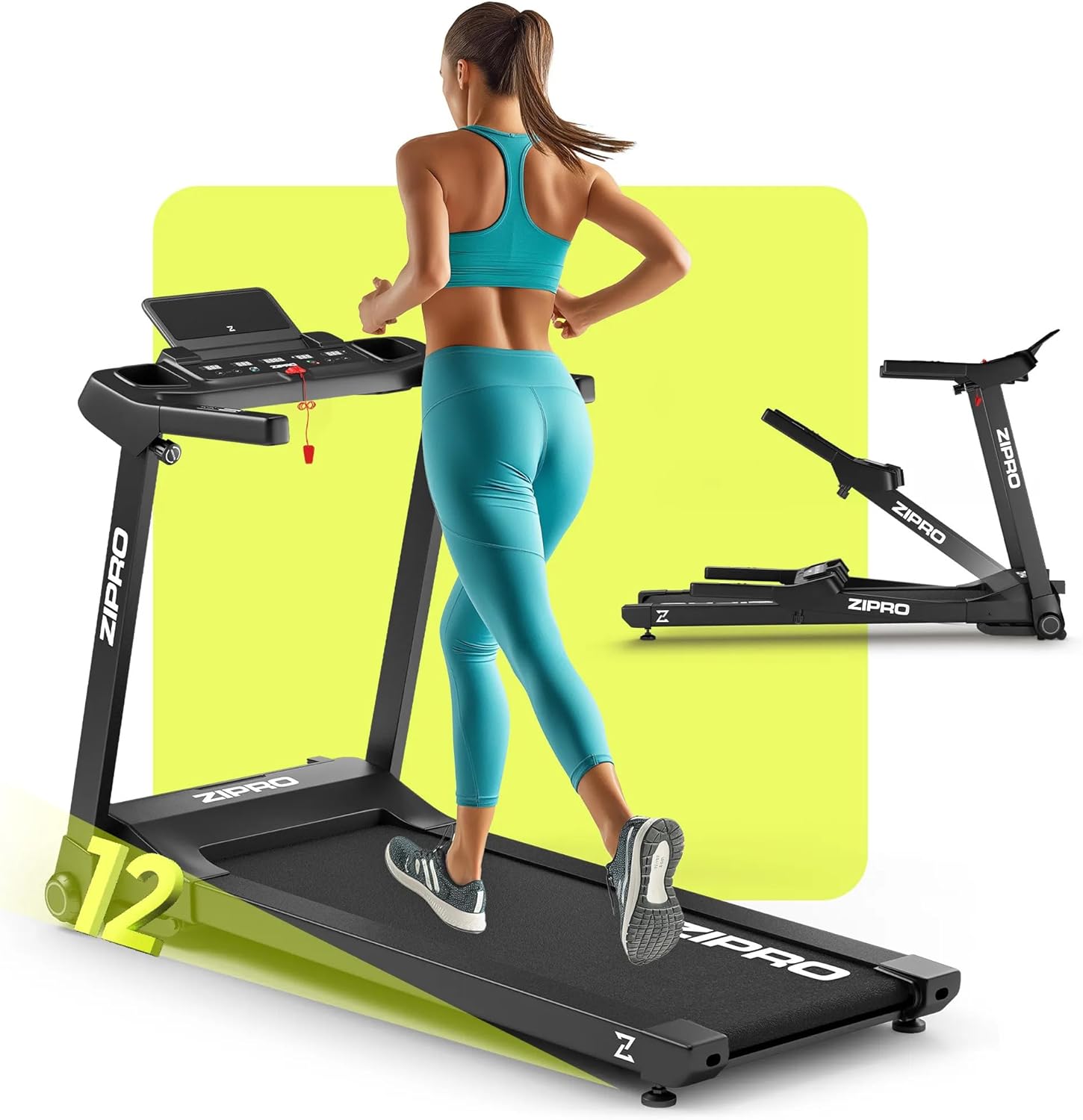
Image 1.1: The ZIPRO Ramble Treadmill in operation, demonstrating its design and functionality.
2. Enstriksyon Sekirite Enpòtan
To reduce the risk of serious injury, read all instructions before using the treadmill. The manufacturer assumes no responsibility for personal injury or property damage sustained by or through the use of this product.
- Konsilte yon doktè anvan ou kòmanse nenpòt pwogram egzèsis.
- Kenbe timoun ak bèt kay lwen tapi a pandan operasyon an.
- Mete tapi kous la sou yon sifas plat, ki estab, avèk ase espas toutotou li.
- Mete rad espò ak soulye atletik ki apwopriye.
- Pa sèvi ak tapi kous la si fil la oswa ploge a domaje, oubyen si li pa ap fonksyone byen.
- Always use the safety key. Attach the clip to your clothing before starting your workout.
- Pa monte oswa desann tapi kous la pandan senti kous la ap deplase.
- Do not attempt to service the treadmill yourself. Contact qualified personnel for repairs.
- Debranche tapi kous la nan priz kouran an lè w pa ap itilize l oswa anvan w netwaye l/antretyen.
3. Pake kontni
Carefully unpack the box and ensure all components are present and undamaged. If any parts are missing or damaged, do not assemble the treadmill and contact customer support.
- 1x ZIPRO Ramble Inclinable Treadmill (main unit)
- Manyèl itilizatè
- Zouti asanblaj (si yo enkli)
- Kle sekirite
4. Enstalasyon ak Asanble
The ZIPRO Ramble Treadmill comes largely pre-assembled. Follow these steps for final setup:
- Debake: Remove all packaging materials and place the treadmill on a clear, level surface.
- Dewoulman: Carefully lift the console and handlebars into the upright position until they lock securely. Ensure all locking mechanisms are engaged.
- Pozisyon: Place the treadmill in a location with at least 2 meters (6.5 feet) of clear space behind it and 0.5 meters (1.6 feet) on each side.
- Koneksyon pouvwa: Ploge kòd elektrik la nan yon priz elektrik ki gen tè.
- Kle sekirite: Place the safety key in its designated slot on the console. The treadmill will not operate without the safety key in place.

Image 4.1: Demonstrating the folding and transport features of the treadmill.
The treadmill is equipped with transport wheels for easy relocation when folded. To fold, ensure the running deck is lowered, then lift the rear of the running deck until it locks into the upright position. To unfold, gently release the locking mechanism and lower the running deck to the floor.
5. Operasyon Enstriksyon
5.1 Konsole Souview

Image 5.1: The control panel with integrated phone holder and bottle holders.
The console features an LED display showing time, speed, distance, calories burned, and heart rate. It also includes quick-access buttons for speed and incline, as well as a smartphone holder and two bottle holders.
5.2 Kòmanse yon antrennman
- Pouvwa sou: Ensure the treadmill is plugged in and the safety key is in place.
- Mòd manyèl: Peze bouton 'Kòmanse' a. Senti a ap kòmanse deplase a yon vitès ki ba.
- Ajiste vitès: Use the '+' and '-' buttons on the console or handlebars to adjust the speed from 1 km/h to 16 km/h.
- Ajiste enklinasyon an: Use the 'Incline +' and 'Incline -' buttons to adjust the incline level (12 levels available).

Image 5.2: The treadmill's electronic incline adjustment system.
5.3 Predefined Programs
The treadmill offers 12 predefined training programs and 3 customizable modes. To select a program:
- From standby, press the 'Program' button to cycle through available programs (P1-P12).
- Press 'Start' to begin the selected program. The treadmill will automatically adjust speed and incline according to the program profile.

Imaj 5.3: Plis paseview of training programs and app integration.
5.4 Koneksyon App
The ZIPRO Ramble Treadmill can connect to fitness applications like FitShow via Bluetooth. Download the compatible app to your smartphone, enable Bluetooth, and follow the app's instructions to pair with your treadmill. This allows for enhanced workout tracking and control.
5.5 Siveyans batman kè
Grip the pulse sensors on the handlebars to display your heart rate on the LED screen. For accurate readings, ensure both hands are firmly placed on the sensors.
5.6 Stopping the Treadmill
Press the 'Stop' button to gradually slow down and stop the treadmill. In an emergency, pull the safety key to immediately stop the belt.
6. Antretyen
Antretyen regilye asire lonjevite ak pèfòmans optimal tapi kous ou a.
- Netwayaj: Siye sifas tapi woulant lan ak piblisiteamp twal apre chak itilizasyon. Evite pwodui netwayaj abrazif oswa solvan.
- Lubrification Belt: The running belt requires periodic lubrication to reduce friction. Refer to the specific instructions provided with your lubricant for frequency and application. Generally, lift the edge of the belt and apply silicone lubricant to the center of the deck.
- Ajisteman senti: If the running belt slips or drifts to one side, it may need adjustment. Consult the troubleshooting section or contact customer support for guidance.
- Kòd pouvwa: Regilyèman enspekte fil elektrik la pou nenpòt domaj.
NAN. Depanaj
Si ou rankontre pwoblèm ak tapi kous ou a, gade pwoblèm ak solisyon komen sa yo:
| Pwoblèm | Kòz posib | Solisyon |
|---|---|---|
| Treadmill pa kòmanse | Kòd kouran an debranche, kle sekirite a pa nan plas li, switch kouran an etenn. | Tcheke koneksyon kouran an, asire w kle sekirite a byen antre, epi limen switch kouran an. |
| Kouri glise senti | Belt too loose, belt needs lubrication. | Adjust belt tension (refer to specific instructions), lubricate the running deck. |
| Bri dwòl pandan operasyon an | Pyès ki lach, pwoblèm motè, friksyon senti. | Check all bolts and screws for tightness. Lubricate belt. If noise persists, contact customer support. |
| Lekti batman kè ki pa egzak | Hands not firmly on sensors, dry hands. | Ensure firm contact with both sensors. Lightly moisten hands if they are too dry. |
For issues not listed here or if solutions do not resolve the problem, please contact ZIPRO customer support.
8. Espesifikasyon
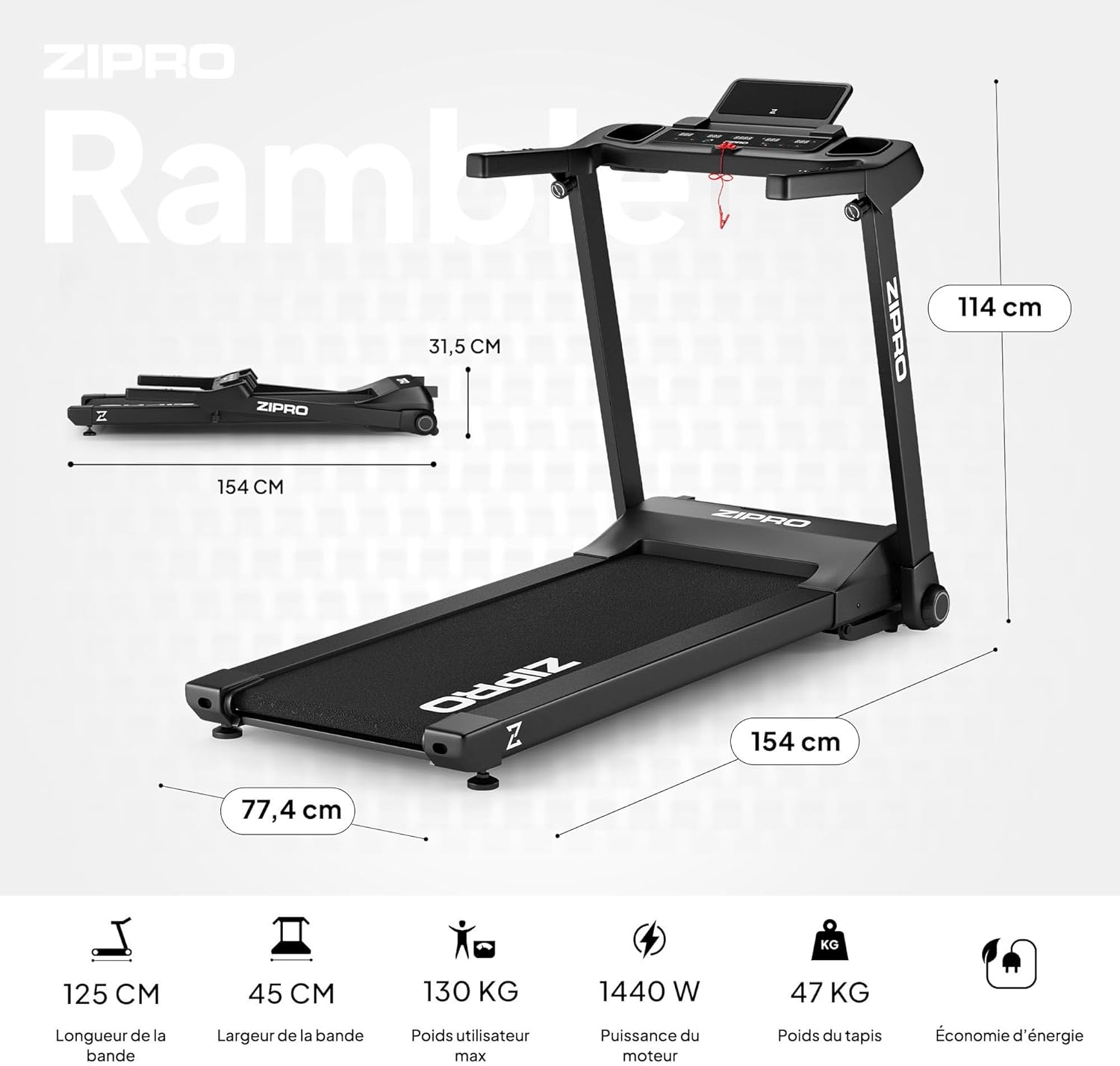
Image 8.1: Key dimensions and specifications of the ZIPRO Ramble Treadmill.
| Karakteristik | Spesifikasyon |
|---|---|
| Modèl | Ramble |
| Mak | ZIPRO |
| Pouvwa motè | 1.96 HP (Continuous Duty) / 1440 W |
| Range vitès | 1 - 16 kilomèt pa èdtan |
| Nivo Enklinasyon | 12 (Automatic Electronic Adjustment) |
| Sifas kous (L x W) | 125 cm x 45 cm |
| Pwa maksimòm itilizatè | 130 kg |
| Pwogram yo | 12 Predefined, 3 Customizable |
| Ekspozisyon | LED (Time, Speed, Distance, Calories, Heart Rate) |
| Koneksyon | Bluetooth (for fitness apps like FitShow) |
| Dimansyon Depliye (L x W x H) | 154 cm x 77.4 cm x 114 cm |
| Dimansyon ki plwaye (L x W x H) | 154.2 cm x 77.4 cm x 31.5 cm (height) |
| Pwa pwodwi | 47.7 kg |
| Karakteristik espesyal | Foldable design, Transport wheels, Heart rate monitor, Bottle holder, Smartphone holder, Shock absorption system (VIBGUARD PRO) |
| Materyèl | Polyethylene (PE), Metal, Plastic |
9. Garanti ak sipò
For information regarding warranty coverage, please refer to the warranty card included with your product or visit the official ZIPRO website. If you require technical assistance, spare parts, or have any questions not covered in this manual, please contact ZIPRO customer support through their official channels.
Please have your product model (Ramble) and purchase information ready when contacting support.


