Entwodiksyon
The Marshall Kilburn III is a premium portable Bluetooth speaker designed to deliver exceptional audio quality with a classic aesthetic. It features 360° True Stereophonic sound, robust dust and water resistance, and an extended battery life, making it suitable for various environments. This manual provides detailed instructions for setting up, operating, maintaining, and troubleshooting your Kilburn III speaker.
Ki sa ki nan bwat la
- Marshall Kilburn III Speaker
- USB-C pou USB-C chaje kab
- Gid Quick Start
- Enfòmasyon legal ak sekirite
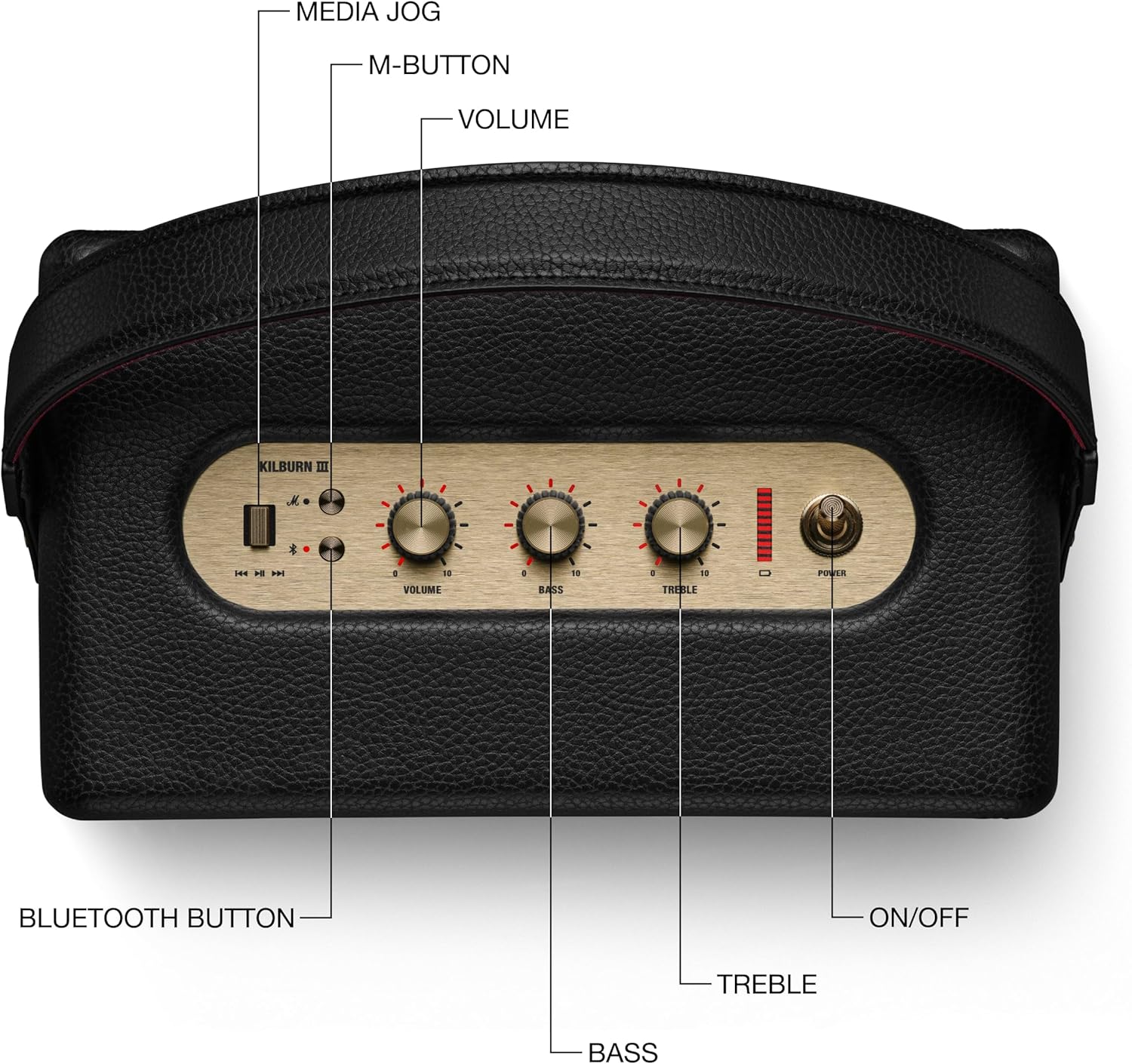
Figure 1: Included components with the Marshall Kilburn III speaker.
Pwodwi souview
The Kilburn III features intuitive controls and a durable design. Familiarize yourself with the main components and controls:

Figure 2: Top panel controls of the Kilburn III speaker.
- Volim bouton: Adjusts the overall sound output level.
- Bouton bas: Controls the low-frequency audio output.
- Treble bouton: Controls the high-frequency audio output.
- Pouvwa switch: Toggles the speaker on/off.
- Bouton Bluetooth: Lanse mòd koneksyon Bluetooth la.
- M-Button: Allows switching between custom EQ modes (configurable via the Marshall app).
- Endikatè batri: LED bar indicating remaining battery life.

Figure 3: Rear panel connections of the Kilburn III speaker.
- USB-C Power Input/Output: Used for charging the speaker and for using the speaker as a power bank to charge other devices.
- AUX 3.5mm Input: For connecting audio devices via a 3.5mm audio cable.
Enstalasyon
Chaje Oratè a
Before first use, fully charge the Kilburn III speaker. Use the included USB-C to USB-C charging cable.
- Connect one end of the USB-C cable to the USB-C port on the rear of the speaker.
- Connect the other end of the USB-C cable to a compatible USB power adapter (not included) or a USB-C power source.
- The battery indicator LEDs on the top panel will illuminate to show charging progress. All LEDs will be solid when fully charged.

Figure 4: Charging the Kilburn III speaker via USB-C.
Pè Bluetooth
To connect your audio device to the Kilburn III via Bluetooth:
- Rale switch pouvwa a devan jiskaske oratè a limen.
- Push and hold the Bluetooth button on the top panel until the LED turns to a slow pulse, indicating pairing mode.
- On your audio device (smartphone, tablet, laptop), open the Bluetooth settings.
- Select "Kilburn III" from the list of available devices.
- Once connected, the Bluetooth LED on the speaker will turn solid.

Figure 5: Marshall Kilburn III ready for Bluetooth pairing.
Enstriksyon Operasyon
Lektur debaz
- Ensure the speaker is powered on and connected via Bluetooth or AUX.
- Kòmanse jwe odyo apati aparèy ki konekte a.
- Adjust the Volume knob on the speaker to your desired listening level.

Figure 6: Adjusting the volume on the Kilburn III.
Ajiste son
Customize your audio experience using the dedicated Bass and Treble knobs:
- Vire a Bouton Bass clockwise to increase bass, or counter-clockwise to decrease it.
- Vire a Treble bouton clockwise to increase treble, or counter-clockwise to decrease it.
Using the M-Button (Custom Modes)
The M-button allows you to cycle through pre-set or custom equalizer modes. To configure these modes, you may need to use the official Marshall app (if available for this model).
- Peze a M-bouton to switch between available sound modes.
Chaje Aparèy Ekstèn (Fonksyon Bank Pouvwa)
The Kilburn III can act as a power bank to charge your mobile devices:
- Connect your device's USB-C charging cable to the USB-C port on the rear of the Kilburn III.
- Oratè a pral kòmanse chaje aparèy ou an. Remake byen ke lè w sèvi ak fonksyon sa a, oratè a ap diminye tan lekti li.
Antretyen
To ensure the longevity and optimal performance of your Marshall Kilburn III speaker, follow these maintenance guidelines:
- Netwayaj: Use a soft, dry cloth to wipe the speaker's surfaces. Do not use abrasive cleaners, alcohol, or chemical solvents.
- Rezistans dlo ak pousyè: The speaker is IP54 rated, meaning it is resistant to dust and water splashes from any direction. However, it is not waterproof and should not be submerged in water. Ensure all ports are dry before charging.
- Depo: Sere oratè a nan yon kote ki fre epi sèk, lwen limyè solèy dirèk ak tanperati ekstrèm.
- Swen batri: Pou yon batri ki dire pi lontan, evite dechaje batri a nèt souvan. Chaje oratè a regilyèman, menm si ou pa itilize li pandan yon bon bout tan.
Depanaj
If you encounter issues with your Kilburn III, try the following solutions:
| Pwoblèm | Solisyon posib |
|---|---|
| Oratè pa limen. | Asire w batri a chaje. Konekte oratè a nan yon sous kouran avèk kab USB-C a. |
| Pa ka konekte atravè Bluetooth. |
|
| Pa gen son oswa volim nan ba. |
|
| Son deformation. |
|
| Batri vide byen vit. |
|
Espesifikasyon
| Karakteristik | Detay |
|---|---|
| Non modèl | Kilburn III |
| Kalite Oratè | Portable oratè |
| Koulè | Nwa ak kwiv |
| Dimansyon pwodwi | 10.75"D x 5.91"W x 6.65"H |
| Pwa atik | 6.17 liv |
| Lavi batri | 50 èdtan |
| Tan pou chaje | 3 èdtan |
| Teknoloji kominikasyon san fil | Bluetooth |
| Gamme Bluetooth | 33 pye |
| Nivo rezistans dlo | Water Resistant (IP54 rated) |
| Oratè maksimòm pwodiksyon pouvwa | 36 Watts |
| Audio Sòti Mode | Stereo |
| Metòd kontwòl | Manyen (Bouton) |
| Sous pouvwa | Batri Powered |
Garanti ak sipò
The Marshall Kilburn III comes with a Limited Warranty. For detailed warranty information, please refer to the "Legal and Safety Information" document included in your product packaging.
For further assistance, technical support, or to purchase replacement parts, please visit the official Marshall websit la oubyen kontakte sèvis kliyan yo. Ou kapab tou al gade nan Manyèl itilizatè (PDF) pou plis detay.


