1. Entwodiksyon
The EUQQ AI Translation Earbuds, Model YYK-Q16 PRO H3 AI, are designed to facilitate global communication through real-time, bidirectional translation across 144 languages. These earbuds integrate advanced features such as an AI assistant, AI chat, and AI image generation, making them a versatile tool for various scenarios including personal conversations, travel, and business. This manual provides detailed guidance to help you maximize your device's capabilities.
2. Pake kontni
Verifye ke tout atik yo prezan nan anbalaj pwodwi ou a:
- 2 x EUQQ AI Language Translation Earbuds
- 1 x Charging Case with LCD Touchscreen
- 1 x USB Kalite-C Chaje Kab
- 1 x Manyèl Itilizatè (dokiman sa a)
3. Pwodwi souview
3.1 Ekoutè ak bwat chaje

The EUQQ AI Translation Earbuds, featuring an open-ear design, are shown alongside their charging case, which includes a vibrant LCD touchscreen display.
The EUQQ AI Translation Earbuds feature an open-ear design for comfort during extended use, weighing approximately 8 grams each. They are designed to allow awareness of your surroundings while providing audio. The accompanying charging case is equipped with an LCD touchscreen for intuitive control.
3.2 Multifunctional Smart Touchscreen

A close-up of the charging case's LCD touchscreen, displaying various icons for functions like call history, dial settings, music playback, AI translation, timer, calendar, camera, key settings, language switch, counter, and multi-settings.
The charging case features a vibrant color touchscreen that allows direct control over various functions without needing your phone. These functions include:
- Music playback control (play, pause, skip tracks)
- Call management (answer/end calls)
- Noise cancellation activation
- Ajisteman volim
- Kontwòl kamera
- Switching between 7 interface languages
- Pèrsonalizasyon D '
- Ajisteman klète ekran an
- Earphone search function
- Revèy entegre
4. Enstalasyon
4.1 Initial Setup and App Installation
To begin using your EUQQ AI Translation Earbuds, follow these steps:
- Telechaje App a: Locate the QR code in the charging case or within this user manual. Scan the QR code to download the dedicated AI app, named "NebulaBuds".
- Pèmèt Bluetooth: On your smartphone, navigate to your device's settings and ensure Bluetooth is turned on.
- Louvri aplikasyon an: Launch the "NebulaBuds" app. The app will prompt you to allow necessary permissions for connection. Grant these permissions.
- Pè ekoutè: The app will automatically detect nearby devices. Select "YYK-Q16 Pro H3 AI" from the list and confirm to establish a successful connection.

A four-step visual guide demonstrating how to connect the earbuds: 1. Download the 'NebulaBuds' app. 2. Turn on phone's Bluetooth. 3. Open the app and allow permissions. 4. Select 'YYK-Q16 Pro H3 AI' to connect.
No membership fees are required to use the core translation features.
4.2 Koneksyon Bluetooth
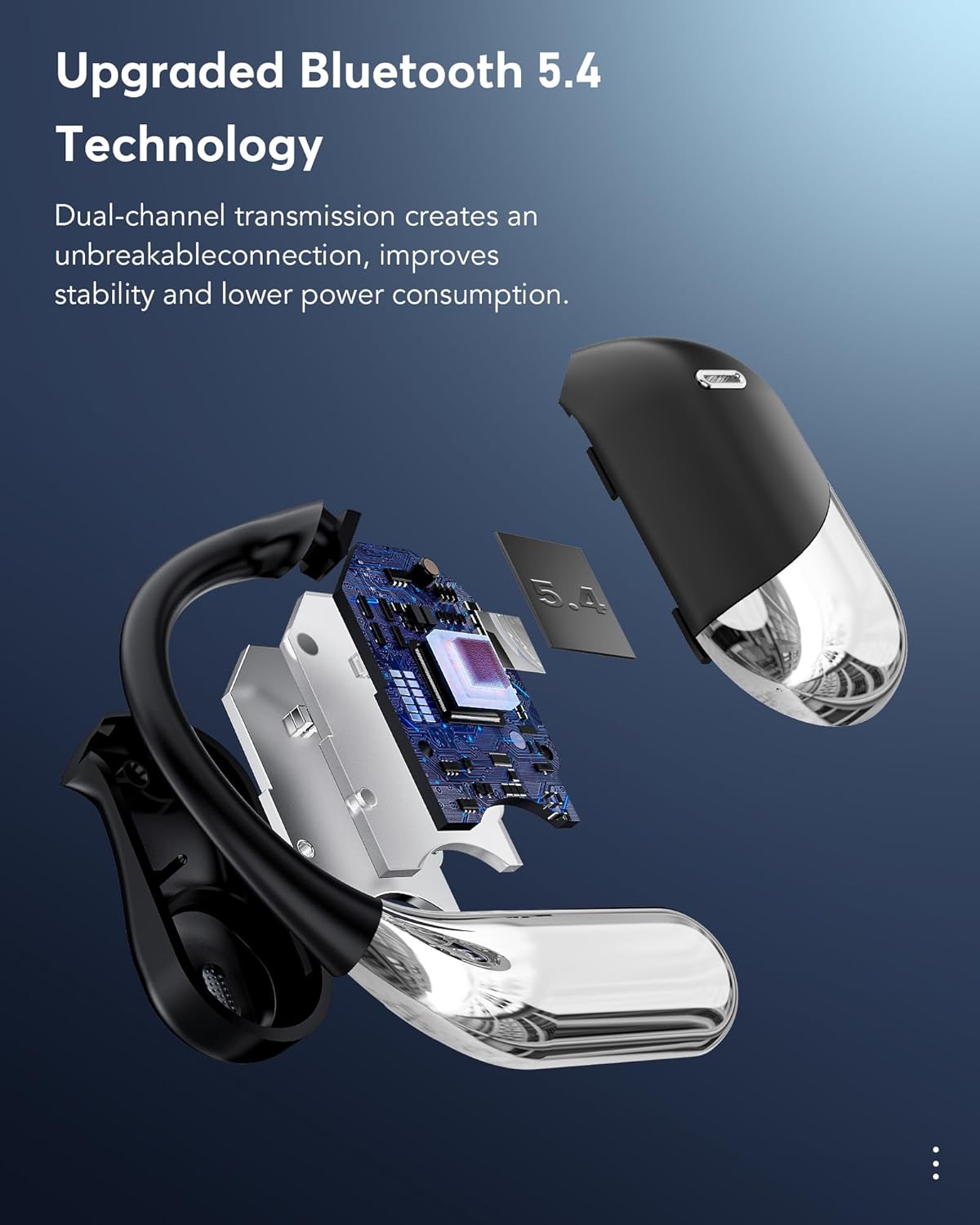
Yon te eksploze view of an earbud showcasing the internal components and highlighting the Bluetooth 5.4 chip, emphasizing dual-channel transmission for stable connection and lower power consumption.
The earbuds utilize Bluetooth 5.4 technology, providing a stable and efficient wireless connection. This advanced connectivity ensures reliable performance and optimized power consumption.
5. Operasyon Enstriksyon
5.1 Real-Time Translation Modes
The EUQQ AI Translation Earbuds support real-time, bidirectional translation for 144 languages. The device offers several translation modes to suit different communication needs:

An illustration showing two individuals communicating with the aid of the earbuds, demonstrating real-time translation across multiple languages, including English, German, Spanish, French, Chinese, Russian, Japanese, and Arabic.

An image illustrating the four primary translation modes: Touch Mode, Free-speech Mode, Speaker Mode, and Offline Mode. Offline translation is supported in most regions.
- Mòd manyen: Tap the earbud to initiate translation.
- Free-speech Mode: Continuous translation for natural conversations.
- Mode Oratè: Use your phone's speaker for translation output, ideal for group settings.
- Mòd Offline: Supports translation in most parts of the world without an internet connection.
- Entèpretasyon Similtane: Real-time voice translation suitable for international conferences.
- Face-to-Face Translation (Earphones + Mobile Phone): Two-way translation for negotiations or travel.
- Face-to-Face Translation (Dual-Ear Mode): Share earbuds with another person for simultaneous two-way communication.
5.2 Karakteristik Kominikasyon
The earbuds offer integrated communication functionalities:
- Apèl vwa: Make and receive calls directly through the earbuds.
- Apèl videyo: Conduct video calls with real-time translation. The accompanying app generates an invitation link for seamless communication via a web browser, eliminating the need for the other party to install the app.
- Anrejistreman an dirèk: Record conversations and convert them to text for meeting notes or documentation.
- Audio and Video History: Fasil view past call records and redial directly from the device.
5.3 AI Assistant and Advanced Features
Beyond translation, the earbuds integrate advanced AI capabilities:
- Asistan AI: Access over 200 AI small applications for various tasks.
- Chat IA: Engage in text-based conversations with the AI.
- AI Voice Smart Dialogue: Interact with the AI using real-time voice commands.
- Text-to-Image Generation: Create images based on provided text descriptions.
- Image-to-Image Generation: Generate new images based on a reference image and text description.
- Summary & Playback: The AI can summarize historical recordings and identify speakers.
5.4 Audio Features and EQ Modes

Yon koupe view of an earbud, illustrating the internal 15mm dynamic driver and precision directional sound design, which contribute to an immersive audio experience.
The earbuds are equipped with 14.2mm bio-carbon fiber dynamic drivers, delivering robust bass and clear mid-high frequencies. You can customize your listening experience with five Equalizer (EQ) modes:
- Estanda
- Klasik
- Jazz
- Wòch
- Pop
Select your preferred EQ mode via the charging case touchscreen or the companion app.
5.5 Scene-Adaptive Design
The earbuds offer various listening modes to adapt to your environment:
- Silans Mode: For focused listening.
- Headset Mode: Standard earbud use.
- Mode Speakerphone: Utilizes the phone's speaker for audio output.
- Mòd Binaural: Both earbuds active for stereo sound and immersive translation.
6. Batri ak Chaje

An image highlighting the charging capabilities and battery life: 1.5 hours for fast charging via Type-C, 60 hours total playtime with the case, and 8 hours of single playtime for the earbuds. It also shows power displays for both the case and earbuds.
The earbuds and charging case provide extended battery life:
- Tan Lektur ekoutè: Jiska 8 èdtan sou yon sèl chaj.
- Total tan jwèt ak ka a: Up to 60 hours (standby time).
- Chaje: The case supports fast charging via a Type-C cable. A full charge for the case takes approximately 1.5 hours.
The LCD touchscreen on the charging case displays the current battery levels for both the case and the individual earbuds.
7. Antretyen
To ensure the longevity and optimal performance of your EUQQ AI Translation Earbuds, follow these maintenance guidelines:
- Netwayaj: Siye ekoutè yo ak bwat chaje a regilyèman avèk yon twal mou, sèk, epi ki pa gen pousyè. Evite itilize materyèl abrazif oswa pwodui chimik ki agresif.
- Rezistans dlo: The earbuds have an IPX7 water resistance rating, meaning they can withstand sweat and splashes. However, they are not designed for submersion in water. Avoid exposing them to strong jets of water or prolonged water contact.
- Depo: Lè w pa ap itilize ekoutè yo, sere yo nan bwat chaj yo pou pwoteje yo kont pousyè ak domaj. Sere yo nan yon kote ki fre epi sèk, lwen limyè solèy dirèk ak tanperati ekstrèm.
- Chaje: Use only the provided Type-C charging cable or a certified equivalent. Avoid overcharging the device.
- Mizajou lojisyèl: Periodically check the "NebulaBuds" app for firmware updates to ensure your earbuds have the latest features and performance improvements.
NAN. Depanaj
If you encounter issues with your EUQQ AI Translation Earbuds, refer to the following common solutions:
| Pwoblèm | Kòz posib | Solisyon |
|---|---|---|
| Ekoutè yo pa konekte/pa konekte | Bluetooth is off; earbuds are out of charge; app permissions not granted. | Ensure Bluetooth is enabled on your phone. Charge the earbuds and case. Verify that the "NebulaBuds" app has all necessary permissions. Restart the app and your phone. |
| Translation not working accurately | Incorrect language selection; poor microphone input; internet connection issues (for online translation). | Confirm the correct source and target languages are selected in the app. Speak clearly and directly into the earbud's microphone. Ensure a stable internet connection for online translation modes. Download offline language packs if available. |
| Yon ekoutè pa travay | Low battery; connection issue with one earbud. | Place both earbuds back into the charging case and ensure they are charging. Re-pair the earbuds with your device. Check for any debris blocking the charging contacts. |
| Touchscreen pa reponn | Temporary software glitch; low battery. | Ensure the charging case is adequately charged. Try restarting the case by closing and reopening it, or by connecting it to power. |
| Pòv kalite odyo | Earbuds not positioned correctly; debris in earbud; Bluetooth interference. | Adjust the earbuds for a secure and comfortable fit. Clean the earbud speakers gently. Move away from other wireless devices that may cause interference. |
Si pwoblèm nan pèsiste apre ou fin eseye solisyon sa yo, tanpri kontakte sèvis kliyan.
9. Espesifikasyon
| Karakteristik | Detay |
|---|---|
| Non modèl | YYK-Q16 PRO H3 AI |
| Mak | EUQQ |
| Koneksyon Teknoloji | San fil (Bluetooth 5.4) |
| Lang Tradiksyon | 144 Languages (Bidirectional) |
| Metòd kontwòl | Touch (on earbuds and charging case) |
| Lavi batri ekoutè | Jiska 8 èdtan pou chak chaj |
| Dire total batri a (ak bwat la) | Up to 60 hours (standby) |
| Port chaje | USB Kalite-C |
| Chofè Audio | 14.2mm Bio-Carbon Fiber Dynamic Driver |
| Fòm ekoutè | Zòrèy ouvè |
| Rezistans dlo | IPX7 (rezistan a swè ak dlo) |
| Materyèl | Polikarbonat (PC) |
| Kontwòl bri | Anile bri |
| Pwa atik | 6.7 ons |
| Batri | 2 pil ityòm Polymère (enkli) |
10. Enfòmasyon sou Sekirite
Please read and follow these safety precautions to prevent damage to your device or injury to yourself:
- Do not attempt to disassemble, repair, or modify the earbuds or charging case.
- Kenbe aparèy la lwen tanperati ekstrèm, limyè solèy dirèk, ak flanm dife.
- Evite ekspoze aparèy la nan gwo chan mayetik.
- Pa sèvi ak ekoutè yo nan yon volim twò wo pandan yon peryòd pwolonje, paske sa ka lakòz domaj nan tande.
- Exercise caution when using earbuds in situations requiring awareness of your surroundings, such as driving or cycling.
- Jete pil ak konpozan elektwonik yo yon fason responsab dapre règleman lokal yo.
11. Garanti ak sipò
For warranty information and customer support, please refer to the warranty card included in your product packaging or visit the official EUQQ website. If you require assistance with setup, troubleshooting, or have questions about your device, please contact our support team through the provided channels.


