1. Pwodwi souview
The ATTACK SHARK X82 PRO HE is a high-performance 75% layout mechanical gaming keyboard designed for competitive gaming and efficient daily use. It features Hall Effect magnetic switches, rapid trigger technology, adjustable actuation points, and versatile tri-mode connectivity (wired, 2.4GHz wireless, and Bluetooth). With an 8000Hz polling rate and a 5000mAh battery, it delivers ultra-low latency and extended usage.
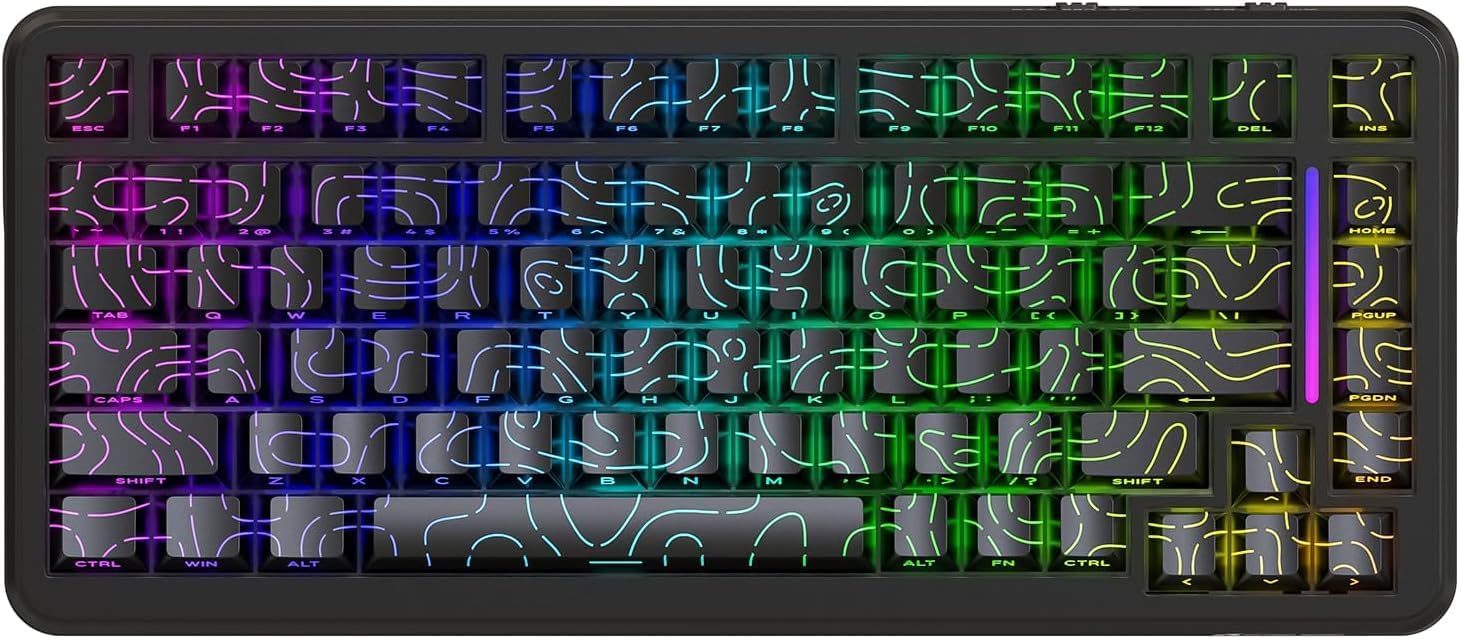
Figi 1: Devan view of the ATTACK SHARK X82 PRO HE Gaming Keyboard, showcasing its RGB lighting and compact 75% layout.

Figure 2: Visual summary of key features including 75% TKL layout, magnetic switches, web driver, tri-mode connectivity, long battery life, full RGB, 8000Hz polling rate, and low latency.
2. Enstalasyon ak Koneksyon
The X82 PRO HE keyboard offers three versatile connection methods:
2.1. Koneksyon filaire (USB-C)
Connect the provided USB-C cable from the keyboard to an available USB port on your computer. The keyboard will be automatically recognized and ready for use. This mode supports the full 8000Hz polling rate.
2.2. Koneksyon san fil 2.4GHz
- Locate the 2.4GHz USB receiver, typically stored in a compartment on the keyboard.
- Ploge reseptè USB a nan yon pò USB ki disponib sou òdinatè w lan.
- Switch the keyboard to 2.4GHz wireless mode. Refer to the keyboard's physical switch or key combination for mode selection (e.g., FN + R).
- The keyboard should automatically pair with the receiver.
2.3. Koneksyon Bluetooth 5.0
- Switch the keyboard to Bluetooth mode. Refer to the keyboard's physical switch or key combination for mode selection (e.g., FN + Q/W/E for different Bluetooth profiles).
- On your device (computer, phone, tablet), enable Bluetooth and search for new devices.
- Select "ATTACK SHARK X82 PRO HE" from the list of available devices to pair.
- Swiv nenpòt envit ki sou ekran pou konplete pwosesis kouple a.

Figure 3: Illustration of the three connectivity modes: USB-C wired, 2.4GHz wireless, and Bluetooth, with corresponding key combinations for switching.
2.4. Premye Chajman
Before first use, it is recommended to fully charge the keyboard using the provided USB-C cable. The 5000mAh battery provides extended usage time.
3. Mòd ak Fonksyon Operasyon
3.1. Polling Rate and Latency
The X82 PRO HE supports an 8000Hz polling rate in wired mode, ensuring ultra-low latency of 0.1ms and a 128K scanning rate. This provides immediate response to keystrokes, crucial for competitive gaming. In 2.4GHz wireless mode, the polling rate is 1000Hz.

Figure 4: Visual representation of the 8000Hz polling rate in wired mode and 1000Hz in wireless mode, highlighting the ultra-low latency.
3.2. Hall Effect Magnetic Switches
Equipped with self-developed Hall Effect magnetic switches, the keyboard offers 0.01mm actuation precision. These switches are hot-swappable, allowing for easy replacement with other N-pole downward magnetic switches.
3.3. Rapid Trigger and Adjustable Actuation
Rapid Trigger (RT) technology allows keys to register actuation and reset based on movement distance rather than a fixed point, enabling faster repeated inputs. The adjustable actuation point feature allows users to customize the key travel distance required for a keystroke to register, from 0.1mm to 3.4mm, providing personalized responsiveness.

Figure 5: Diagram illustrating the difference between a regular switch and a rapid trigger switch, emphasizing improved accuracy and zero dead zone for gaming.

Figi 6: Detaye view of the magnetic switch and its specifications, including actuation range and operation force, highlighting the adjustable actuation point.
3.4. Kontwòl ekleraj RGB
The keyboard features south-facing RGB lighting with over 20 dynamic backlight effects and side-bar effects, offering 16.8 million colors. Use the following key combinations to control the lighting:
- FN + \|: Chanje mòd limyè
- FN + A: Switch light bar color
- FN + ↑Klète limyè dèyè +
- FN + ↓: Backlight brightness -
- FN + ←: Backlight speed -
- FN + →: Backlight speed +
- FN + Antre: Switch light color
- FN + Caps: Switch light bar mode

Figure 7: Visual guide to the full RGB light effects and the key combinations for controlling various lighting parameters.
3.5. WIN and Mac Compatibility
The keyboard supports one-key switching between Windows and Mac operating systems, enhancing versatility for different user environments.
4. Pèsonalizasyon ak Lojisyèl
The ATTACK SHARK X82 PRO HE keyboard offers extensive customization options through its web-based software. This allows users to fine-tune various settings to match their preferences and optimize performance for different applications.
4.1. Aksè a Web Chofè
To access the customization software, navigate to qmk.top nan ou web browser. This network-driven platform provides a comprehensive interface for managing your keyboard settings.
4.2. Karakteristik pèsonalizasyon
- Rapid Trigger (RT) Settings: Adjust the sensitivity and behavior of the rapid trigger function for individual keys.
- SOCD (Simultaneous Opposite Cardinal Directions): Configure how simultaneous opposing inputs are handled, useful for fighting games.
- Fonksyon avanse: Utilize features like DKS (Dynamic Keystroke), MT (Macro Toggle), and TGL (Toggle) for complex key behaviors.
- Key Remapping and Macros: Freely remap any key and create custom macros for automated sequences of commands.
- Deadzones: Define deadzones for key actuation to prevent accidental inputs.
- Personnalisation ekleraj: Personalize RGB lighting effects, colors, and patterns beyond the onboard controls.
- Profiles: Create and save unlimited profiles for different games, work applications, or user preferences, allowing quick switching between configurations.

Figure 8: Interface of the web-based driver, showing options for rapid trigger settings, key personalization, and RGB lighting control.
5. Antretyen
Proper maintenance ensures the longevity and optimal performance of your ATTACK SHARK X82 PRO HE keyboard.
5.1. Netwayaj
- Netwayaj jeneral: Sèvi ak yon ti moso twal mou, ki san pèl dampened with water or a mild cleaning solution to wipe down the keycaps and keyboard frame. Avoid excessive moisture.
- Retire pousyè: Sèvi ak lè konprese pou retire pousyè ak debri ki ant bouchon kle yo ak switch yo.
- Netwayaj kle: For deeper cleaning, keycaps can be carefully removed. Use a keycap puller to avoid damage. Clean keycaps with mild soap and water, then ensure they are completely dry before reattaching.
5.2. Switch ki ka ranplase a cho
The X82 PRO HE features hot-swappable Hall Effect magnetic switches. This allows for easy replacement or customization of switches without soldering. Use a switch puller to carefully remove switches. Ensure replacement switches are compatible N-pole downward magnetic switches.

Figure 9: Close-up of the Doubleshot PBT keycaps, highlighting their contour design and OEM profile, which are durable and easy to clean.
NAN. Depanaj
If you encounter issues with your ATTACK SHARK X82 PRO HE keyboard, refer to the following common solutions:
| Pwoblèm | Kòz posib | Solisyon |
|---|---|---|
| Klavye a pa reponn (ak fil) | Loose cable connection, faulty USB port. | Ensure USB-C cable is securely connected. Try a different USB port or cable. |
| 2.4GHz Wireless not connecting | Receiver not plugged in, keyboard in wrong mode, low battery. | Ensure receiver is plugged in. Switch keyboard to 2.4GHz mode (FN + R). Charge the keyboard. |
| Bluetooth pa asosye | Keyboard not in pairing mode, device Bluetooth off, interference. | Switch keyboard to Bluetooth mode (FN + Q/W/E). Ensure device Bluetooth is on. Try re-pairing. |
| RGB lighting not working/incorrect | Incorrect lighting mode, software settings override. | Chanje mòd ekleraj yo lè l sèvi avèk FN + \|. Check lighting settings in the web driver (qmk.top). |
| Kle yo pa anrejistre oswa yo tape de fwa | Switch issue, software calibration needed. | Ensure switches are properly seated. Calibrate actuation points and deadzones using the web chofè. |
| Keyboard feels unstable (uneven feet) | Manufacturing variance. | If the issue persists and affects usability, contact customer support. |
For advanced troubleshooting or issues not listed here, please refer to the official ATTACK SHARK support resources or the web-based customization software.
7. Espesifikasyon
| Karakteristik | Detay |
|---|---|
| Modèl | ATTACK SHARK X82 PRO HE |
| Layout | 75% (83 kle) |
| Chanje Kalite | Hall Effect Magnetic Switches (Hot-swappable) |
| Koneksyon | USB-C ak fil, 2.4GHz san fil, Bluetooth 5.0 |
| Pousantaj biwo vòt | 8000Hz (Wired), 1000Hz (2.4GHz Wireless) |
| Latansi | 0.1ms (Wired) |
| Actuation Precision | 0.01mm |
| Actuation Range | 0.1mm - 3.4mm (Adjustable) |
| Kapasite batri | 5000mAh |
| Keycaps | Doubleshot PBT (Contour Design) |
| Ekleraj | Full RGB (South-facing, 20+ effects, 16.8M colors) |
| N-Kle Rollover | Ranpli N-Kle konplè |
| Konstriksyon | Top Mounted, Aluminum Alloy Positioning Plate, Dual-layer PORON foam |
| Lojisyèl | Web-based Driver (qmk.top) |
| Sistèm operasyon konpatibilite | Windows, macOS |
| Pwa atik | 1.16 kg |
| Dimansyon pake | 36.79 x 19.3 x 5.3 cm |
8. Garanti ak sipò
For warranty information, technical support, or service inquiries, please contact ATTACK SHARK customer support through their official website or the retailer from whom you purchased the product. Keep your proof of purchase for warranty claims.
Ofisyèl Websit: ATTACK SHARK Store on Amazon


