1. Enfòmasyon sou Sekirite
Please read all safety instructions carefully before using your iFFALCON TV. Retain this manual for future reference.
- Sekirite elektrik: Do not expose the TV to rain or moisture. Ensure the power cord is securely plugged into a grounded outlet. Do not overload electrical outlets.
- Plasman: Place the TV on a stable, level surface or mount it securely to a wall. Ensure adequate ventilation around the TV to prevent overheating. Do not block ventilation openings.
- Netwayaj: Debranche televizyon an anvan ou netwaye li. Sèvi ak yon twal mou epi sèk. Pa sèvi ak pwodui netwayaj likid oswa pwodui netwayaj an ayewosòl.
- Timoun: Supervise children to prevent them from climbing on the TV or stand. Small parts can be a choking hazard.
- Sèvis: Pa eseye fè reparasyon televizyon an tèt ou. Konfye tout reparasyon bay pèsonèl sèvis kalifye.
2. Ki sa ki nan bwat la
Verifye ke tout konpozan yo prezan lè w ap debale l:
- iFFALCON 85-Inch U85 Series QD-Mini LED 4K UHD Google Smart TV
- Kab pouvwa
- 2 x AAA pil pou aleka
- 6 x Kanpe vis
- Table stands (2 pieces)
- 5 x klip kab
- Gid Quick Start
- Televizyon aleka
3. Enstalasyon
3.1 Enstalasyon fizik
Before powering on, ensure the TV is securely placed or mounted.
- Enstalasyon kanpe: If using the table stands, carefully attach them to the designated slots at the bottom of the TV using the provided stand screws. Ensure they are tightened securely.
- Montaj mi: If wall mounting, follow the instructions provided with your wall mount kit. Ensure the mount is compatible with VESA standards for the 85U85 model.
- Koneksyon pouvwa: Konekte kab kouran an nan antre kouran televizyon an epi answit nan yon priz miray.
- Aparèy ekstèn: Connect any external devices (e.g., cable box, gaming console, Blu-ray player) to the appropriate HDMI or other input ports on the TV.

Image: The iFFALCON 85-Inch U85 Series TV, showcasing konsepsyon mens li yo ak ekran vibran li an.
3.2 Premye Limen ak Konfigirasyon Google TV
After connecting power, press the power button on the remote control or TV to turn it on.
- Remote Control Pairing: If the remote does not respond, insert the AAA batteries and follow on-screen instructions to pair it via Bluetooth.
- Seleksyon Lang: Chwazi lang ou prefere.
- Rezo Koneksyon: Select your Wi-Fi network and enter the password. A stable internet connection is required for Google TV features.
- Koneksyon kont Google: Sign in with your Google account to access Google TV features, personalized recommendations, and app downloads.
- Enstalasyon Asistan Google la: Follow prompts to set up Google Assistant for voice control.

Image: A user interacting with the iFFALCON TV using hands-free voice control, demonstrating the integrated Google TV interface.
4. Opere televizyon ou
4.1 Fonksyon kontwòl Remote
The provided remote control allows full navigation and control of your iFFALCON TV.
- Bouton pouvwa: Limen oswa etenn televizyon an.
- Navigasyon Pad: Sèvi ak bouton direksyon yo pou deplase nan meni yo epi bouton OK a pou chwazi.
- Volim +/-: Ajiste nivo volim.
- Chèn +/-: Chanje chanèl televizyon yo.
- Antre: Chwazi sous antre a (HDMI 1, HDMI 2, elatriye).
- Bouton Asistan Google la: Activates voice control. Press and speak your command.
- Bouton Kay: Retounen nan ekran prensipal Google TV a.
- Bouton rakoursi aplikasyon yo: Aksè rapid nan sèvis difizyon popilè yo.
4.2 Fonksyonalite Entelijan ak Google TV
Your iFFALCON U85 Series TV runs on Google TV, offering a personalized and integrated smart experience.
- Google TV Home Screen: Provides access to movies, shows, and apps from all your subscriptions, organized for easy discovery.
- Kontwòl vwa: Use Google Assistant or Alexa (via compatible devices) to search for content, control smart home devices, and manage TV settings hands-free.
- Bibliyotèk Aplikasyon: Telechaje epi enstale yon pakèt aplikasyon nan Google Play Store la.
- Chromecast entegre: Voye kontni ki soti nan telefòn entelijan, tablèt, oswa òdinatè konpatib ou dirèkteman sou televizyon an.
4.3 Anviwònman Imaj ak Son
Customize ou vieweksperyans mizik ak koute atravè meni paramèt televizyon an.
- Mòd foto: Chwazi nan plizyè mòd imaj predefini (pa egzanp, Estanda, Vivid, Fim, Jwèt) oubyen pèsonalize paramèt tankou klète, kontras, koulè ak netteté.
- Mini LED Precision: The TV features 352 local dimming zones and 1000 nits peak brightness for enhanced contrast and detail.
- Dolby Vision IQ: Automatically adjusts HDR brightness based on the room's ambient light for optimal viewing.
- Mòd son: Choose from sound presets (e.g., Standard, Music, Movie, Speech) or adjust equalizer settings.
- Dolby Atmos & DTS Virtual X: Experience immersive spatial audio with the integrated 2.1-channel 50W sound system.

Image: Visual comparison illustrating the superior contrast and detail of Mini LED technology compared to conventional TVs.

Image: Depiction of the immersive audio experience with the TV's 2.1 speaker system and Dolby Atmos technology.
4.4 Karakteristik jwèt yo
The iFFALCON U85 Series TV is equipped with features designed for an enhanced gaming experience.
- Mòd Jwèt 144Hz Pwofesyonèl: Provides a high refresh rate for smooth, responsive gameplay.
- 288Hz DLG Acceleration: Amelyore plis klète mouvman pou jwèt konpetitif.
- FreeSync Premium Pwofesyonèl: Reduces screen tearing and stuttering for fluid visuals.
- Mòd Auto Low Latansi (ALLM): Automatically switches to a low-latency mode when a gaming console is detected.
- Ba jwèt: Access and adjust key gaming settings quickly during gameplay.
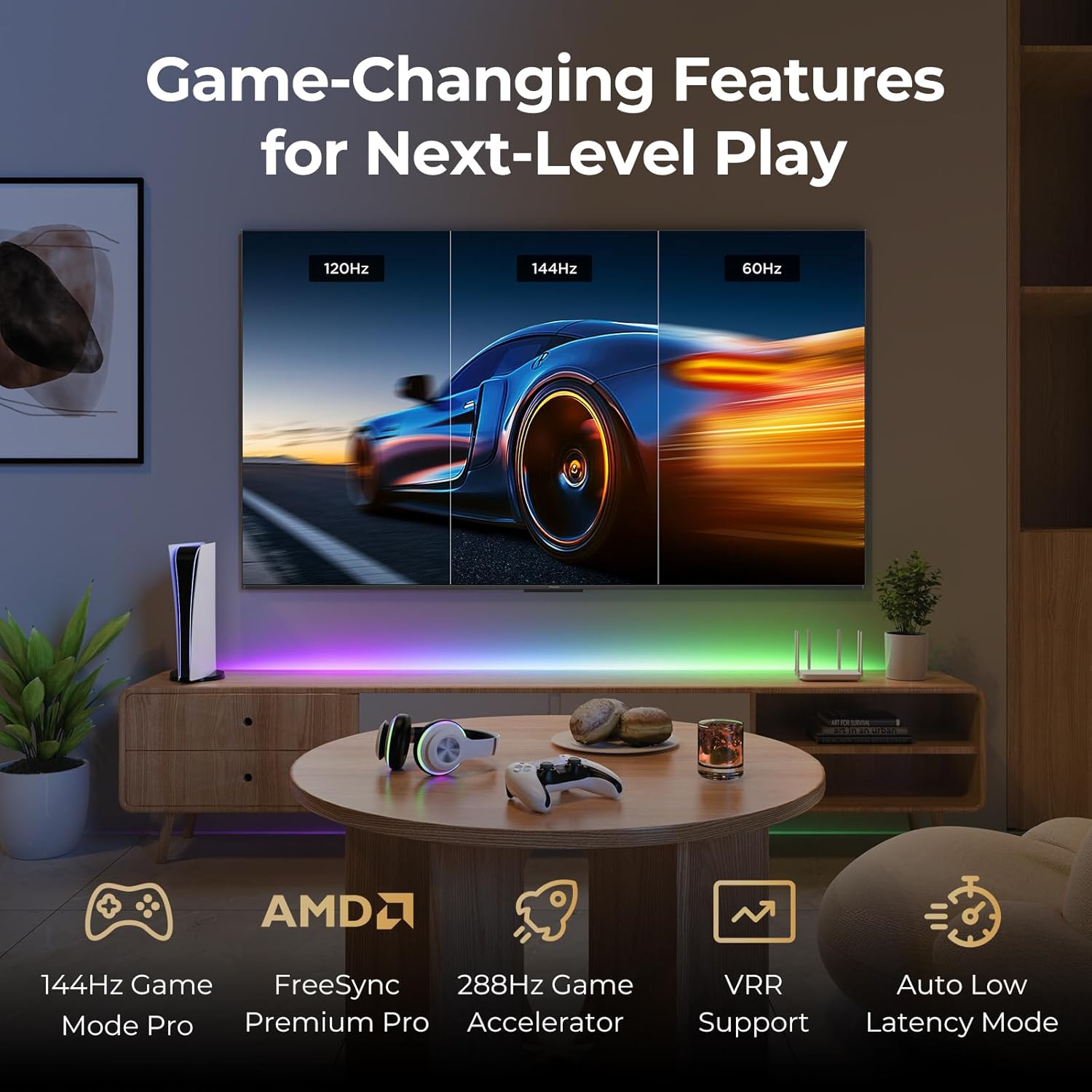
Image: A gaming setup featuring the iFFALCON TV, illustrating its high refresh rate and gaming-specific features for an optimized experience.
5. Antretyen
5.1 Netwaye televizyon an
Regular cleaning helps maintain the TV's appearance and performance.
- Ekran: Siye ekran an dousman avèk yon twal mou ki pa gen pousyè. Pou mak ki difisil pou retire, siye l dousman.ampRense twal la avèk dlo oswa yon solisyon netwayaj espesifik pou ekran (pa flite dirèkteman sou ekran an).
- Kò: Use a soft, dry cloth to wipe the TV's frame and back panel. Avoid abrasive materials or harsh chemicals.
- Pò: Ensure ports are free of dust. Use compressed air if necessary, holding the can upright.
5.2 Mizajou lojisyèl
Your TV may receive automatic software updates to improve performance and add new features. Ensure your TV is connected to the internet for these updates.
- You can check for updates manually in the TV's settings menu under System > About > System update.
NAN. Depanaj
Si ou rankontre pwoblèm, eseye solisyon komen sa yo anvan ou kontakte sipò teknik la.
- Pa gen pouvwa: Ensure the power cable is securely plugged into both the TV and the wall outlet. Test the outlet with another device.
- Pa gen imaj/son: Check the selected input source. Ensure all cables to external devices are connected correctly. Restart the TV and connected devices.
- Remote pa travay: Ranplase pil yo. Asire w pa gen okenn obstak ant telekòmand lan ak televizyon an. Rekonekte telekòmand lan si li itilize Bluetooth.
- Pwoblèm Koneksyon Rezo: Restart your Wi-Fi router. Check TV network settings to ensure correct Wi-Fi password and connection.
- Pwoblèm Kalite Imaj: Ajiste paramèt imaj la (klète, kontras, koulè). Asire w ke sous kontni an gen bon kalite.
- Reset faktori: If problems persist, a factory reset can resolve many software-related issues. Navigate to Settings > System > About > Reset. Avètisman: This will erase all personal data and settings.
7. Espesifikasyon
| Karakteristik | Deskripsyon |
|---|---|
| Mak | iFFALCON |
| Nimewo Modèl | 85U85 |
| Gwosè ekran | 85 pous |
| Teknoloji ekspozisyon | QD-Mini dirije |
| Rezolisyon | 4K UHD (3840 x 2160) |
| Rafrechisman pousantaj | 144 Hz (Native), 288Hz DLG |
| Pik klète | Jiska 1000 nits |
| Pwopòsyon kontras | Jiska 6500:1 |
| Zòn gradyasyon lokal yo | 352 |
| Processeur | AiPQ Pro processeur |
| Sistèm operasyon | Google TV |
| Asistan vwa | Google Assistant, Alexa compatible |
| Sistèm Audio | 2.1-channel 50W, Dolby Atmos, DTS Virtual X |
| Sipò HDR | HDR10+, Dolby Vision IQ |
| Karakteristik Gaming | 144Hz VRR, FreeSync Premium Pro, ALLM, Game Bar |
| Koneksyon | Bluetooth, fil |
| Dimansyon pwodwi (D x W x H) | 15.2 x 74.4 x 45.5 pous |
| Pwa atik | 76.7 liv |
8. Garanti ak sipò
Your iFFALCON U85 Series TV is covered by a manufacturer's warranty. Please refer to the warranty card included with your product for specific terms and conditions.
For technical support, service inquiries, or additional information, please visit the official iFFALCON support website or contact their customer service. Keep your purchase receipt and product serial number handy for warranty claims.
Ou ka jwenn plis enfòmasyon ak resous sipò lè w vizite iFFALCON Store on Amazon.


