1. Entwodiksyon
The INGCO DM310002 is a True RMS 6000-count digital multimeter designed for precise electrical measurements. It offers a wide range of functions including AC/DC voltage, AC/DC current, resistance, diode test, continuity, non-contact voltage (NCV) detection, data hold, and features a built-in flashlight and backlight for enhanced visibility. This manual provides essential information for safe and effective operation of your multimeter.
2. Enfòmasyon sou Sekirite
Always adhere to safety precautions when using any electrical testing equipment. Failure to do so may result in electric shock, injury, or damage to the meter or equipment under test.
- Pa depase limit maksimòm antre yo for any function.
- Inspect test leads for damaged insulation or exposed metal before use.
- Pa sèvi ak mèt la si li sanble domaje or if the case is open.
- Egzèsis anpil prekosyon lè w ap travay ak voltagpi wo pase 30V AC RMS, 42V pik, oswa 60V DC. Volim sa yotages poze yon danje chòk.
- Remove test leads from the circuit before changing functions.
- Ranplase batri a immediately when the low battery indicator appears.
- Do not operate the meter in explosive gas, vapor, or dust.
3. Pwodwi souview
The INGCO DM310002 Digital Multimeter features a clear display and intuitive controls for various electrical measurements.
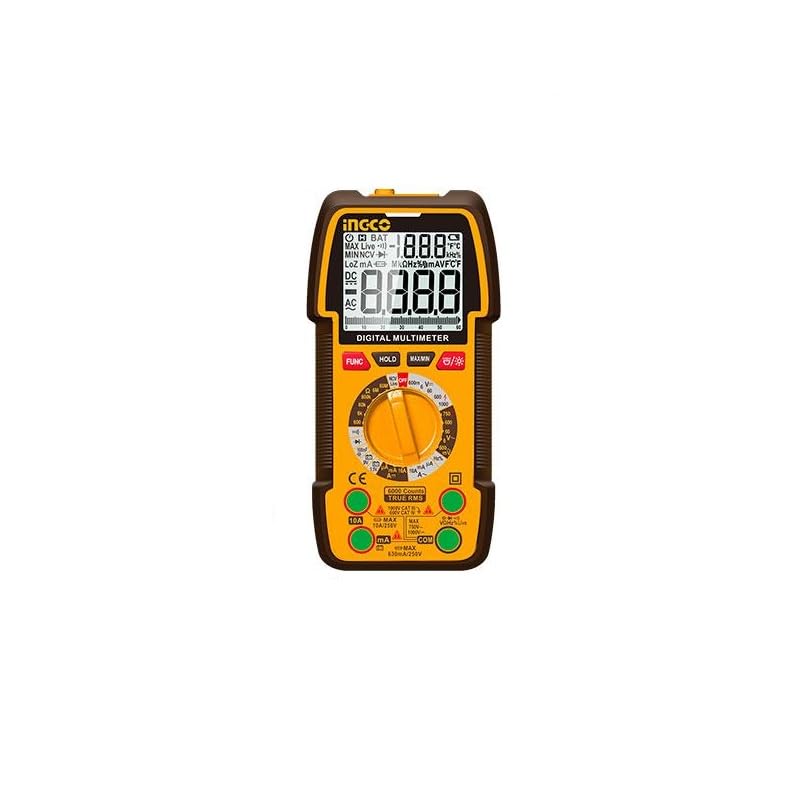
Figi 1: INGCO DM310002 Digital Multimeter showing its front panel, display, rotary switch, input jacks, and approximate dimensions (188mm height, 90mm width, 58mm depth).
3.1 Ekspozisyon Karakteristik
- True RMS 6000 Counts: Bay lekti egzat pou fòm ond ki pa sinisoyidal.
- Ekleraj: Amelyore vizibilite nan kondisyon ki pa twò klere.
- Done kenbe: Li bloke lekti aktyèl la sou ekran an.
- Endikatè NCV: Ki pa Peye-Kontakte Voltage deteksyon.
- Endikatè batri ki ba: Avètisman lè li nesesè pou ranplase batri.
3.2 Controls and Input Jacks
- Rotary switch: Chwazi fonksyon mezi ou vle a.
- Bouton FONKSYON: Toggles between different measurement modes within a single rotary switch position (e.g., AC/DC, Diode/Continuity).
- Bouton HOLD: Activates/deactivates data hold.
- Bouton MAX/MIN: Anrejistre valè maksimòm ak minimòm pandan yon mezi.
- Bouton Limyè dèyè/Fòlch: Activates the display backlight and the built-in flashlight.
- Jack Antre VΩmA: Antre pozitif pou volimtage, rezistans, ak miliampmezi aktyèl yo.
- COM Antre Jack: Antre komen (negatif) pou tout mezi yo.
- Jack Antre 10A: Positive input for high current (up to 10A) measurements.
4. Enstalasyon
4.1 Enstalasyon batri
The DM310002 requires batteries for operation. To install or replace batteries:
- Asire w ke miltimèt la etenn epi fil tès yo dekonekte.
- Jwenn kouvèti konpatiman pil la sou dèyè mèt la.
- Devise vis (yo) ki kenbe yo epi retire kouvèti a.
- Insert new batteries, observing correct polarity (+ and -).
- Remèt kouvèti konpatiman batri a epi byen sere l ak vis(yo).
4.2 Konekte fil tès yo
Toujou konekte fil tès nwa a nan COM jack. Connect the red test lead to the appropriate input jack based on the measurement type:
- Pou voltage, resistance, diode, continuity, and milliampere current: Connect the red lead to the VΩmA Jack.
- For 10A current: Connect the red lead to the 10A Jack.
5. Operasyon Enstriksyon
Before taking any measurement, ensure the test leads are correctly connected and the rotary switch is set to the desired function.
5.1 Measuring DC/AC Voltage
- Konekte plon tès wouj la nan VΩmA jack and the black test lead to the COM Jack.
- Mete switch la Rotary nan la V~ (Volim AC)tage) oswa V- (DC Voltage) position. If the symbol is combined, press the FUNC button to select AC or DC.
- Konekte fil tès yo an paralèl atravè sikwi a oswa konpozan ki pral mezire a.
- Li voltage valè sou ekspozisyon an.
5.2 Measuring DC/AC Current (up to 10A)
Atansyon: Never connect the meter in parallel to a voltage source when measuring current. This can blow the fuse or damage the meter.
- For currents up to 600mA: Konekte plon tès wouj la nan VΩmA Jack.
- For currents up to 10A: Konekte plon tès wouj la nan 10A Jack.
- Konekte plon tès nwa a nan COM Jack.
- Set the rotary switch to the appropriate A~ (Kouran AC) oubyen A- (DC Current) position. Press FUNC si sa nesesè.
- Open the circuit where current is to be measured and connect the meter in series with the load.
- Li valè aktyèl la sou ekran an.
5.3 Mezire rezistans
- Konekte plon tès wouj la nan VΩmA jack and the black test lead to the COM Jack.
- Mete switch la Rotary nan la Ω Pozisyon (Rezistans).
- Asire w ke sikwi ki anba tès la pa gen enèji.
- Konekte fil tès yo atravè konpozan ou vle mezire a.
- Li valè rezistans nan ekspozisyon an.
5.4 Diode Test and Continuity
- Konekte plon tès wouj la nan VΩmA jack and the black test lead to the COM Jack.
- Mete switch la Rotary nan la Dyòd/Kontinuite position. Press FUNC to toggle between diode test and continuity.
- For Diode Test: Connect the red lead to the anode and the black lead to the cathode of the diode. The display will show the forward voltage drop. Reverse the leads; the display should show OL (Open Loop) for a good diode.
- Pou tès kontinwite: Connect the test leads across the circuit or component. If continuity exists (resistance below a certain threshold), the buzzer will sound.
5.5 NCV (Volim san kontak)tage) Deteksyon
- Mete switch la Rotary nan la NCV pozisyon.
- Move the top part of the meter near a live AC voltage sous.
- The meter will beep and the NCV indicator will light up, indicating the presence of AC voltage.
5.6 Data Hold, MAX/MIN, Backlight/Flashlight
- RETE: Peze a KENBE bouton an pou bloke lekti aktyèl la sou ekran an. Peze ankò pou lage.
- MAX / MIN: Peze a MAX/MIN button to enter MAX/MIN recording mode. The meter will display the maximum or minimum value detected. Press again to cycle through MAX, MIN, and exit.
- Limyè dèyè/Flanch: Peze a Backlight / Flach button to turn on the display backlight. Press and hold to activate the built-in flashlight. Press again to turn off.
6. Antretyen
6.1 Netwayaj
Siye kontè a ak piblisiteamp twal ak yon savon dou. Pa sèvi ak pwodui abrazif oswa solvan. Asire w ke mèt la byen sèk anvan w itilize li.
6.2 Ranplasman batri
When the low battery indicator appears on the display, replace the batteries as described in Section 4.1. Use the specified battery type.
6.3 Depo
If the meter is not used for an extended period, remove the batteries to prevent leakage and damage. Store the meter in a cool, dry place.
NAN. Depanaj
- Pa gen ekspozisyon oswa ekspozisyon an fèb: Check battery installation and charge level. Replace batteries if necessary.
- "OL" displayed: Indicates an overload or open circuit. Check connections and ensure the measurement range is appropriate.
- Lekti ki pa kòrèk: Verify the correct function is selected, test leads are properly connected, and the circuit is within the meter's specified range.
- Pa gen bip kontinwite: Ensure the function is set to continuity and the resistance is below the threshold for continuity.
8. Espesifikasyon
| Karakteristik | Spesifikasyon |
|---|---|
| Ekspozisyon | True RMS 6000 Counts Digital Display |
| DC Voltage Range | 600mV / 6V / 60V / 600V / 1000V |
| AC Voltage Range | 600mV / 6V / 60V / 600V / 750V |
| DC Kouran Range | 6000µA / 60mA / 600mA / 10A |
| AC Range Kouran | 6000µA / 60mA / 600mA / 10A |
| Ranje Rezistans | Yes (Specific ranges not detailed in source, typical for 6000 counts) |
| Tès dyòd | Wi |
| Tès kontinwite | Wi |
| NCV (Vol ki pa gen kontaktage) | Wi |
| Done kenbe | Wi |
| Flach | Bati-an |
| Ekleraj | Wi |
| Sous pouvwa | Battery Powered (Batteries Required) |
| Dimansyon | 10 x 20 x 37 cm (apeprè) |
| Pwa | 209 g (0.21 kg) |
| Rating sekirite | CAT III 1000V (implied by 1000V DC max) |
9. Garanti ak sipò
For warranty information and technical support, please refer to the documentation provided with your purchase or contact your local INGCO distributor. Keep your purchase receipt as proof of purchase for warranty claims.


