1. Entwodiksyon
Thank you for choosing the GOBOULT Astra Neo Bluetooth In-Ear Earbuds. This manual provides essential information for setting up, operating, and maintaining your earbuds to ensure optimal performance and longevity. Please read this manual thoroughly before use.
2. Enfòmasyon sou Sekirite
- Pa ekspoze ekoutè yo oswa bwat chaje a nan tanperati, imidite, oswa likid ekstrèm.
- Evite lage l, frape l, oswa demonte aparèy la.
- Sèvi sèlman ak kab chaje ki vini ak aparèy la oswa yon kab Kalite-C sètifye pou chaje.
- Koute nan yon volim modere pou evite domaj nan zòrèy ou.
- Kenbe lwen timoun ak bèt kay.
3. Pake kontni
Verifye ke tout atik yo prezan nan pakè ou a:
- GOBOULT Astra Neo Earbuds (Left and Right)
- Ka chaje
- Kalite-C chaje kab
- Kousen zòrèy (divès gwosè)
- Manyèl itilizatè
- Kat Garanti
4. Pwodwi souview
The GOBOULT Astra Neo earbuds feature a sleek design with touch controls and a compact charging case. The case includes breathing LED lights for status indication.

Image: GOBOULT Astra Neo Earbuds and Charging Case. The image displays the black earbuds removed from their charging case, which features a glowing blue LED strip.

Image: GOBOULT Astra Neo Comfort Grip Case and Earbuds. This image highlights the textured surface of the charging case and earbuds, along with the breathing case lights.
5. Enstalasyon
5.1 Chaje ekoutè yo ak bwat la
Anvan premye itilizasyon an, chaje ekoutè yo ak bwat chaje a nèt.
- Mete ekoutè yo nan bwat chaje a. Asire w yo byen chita.
- Connect the Type-C charging cable to the charging port on the case and to a power source.
- The LED indicator on the case will illuminate during charging and turn off or change color when fully charged.
A 10-minute charge provides approximately 100 minutes of playtime.

Image: GOBOULT Astra Neo Fast Charging Feature. This image illustrates the 70-hour playtime and the fast charging capability: 10 minutes of charge equals 100 minutes of playtime.
5.2 Konekte ak yon Aparèy (Bluetooth 5.4)
The Astra Neo uses Bluetooth 5.4 with Blink & Pair technology for quick and stable connections.
- Louvri bwat chaje a. Ekoutè yo ap antre otomatikman nan mòd koneksyon.
- Sou aparèy ou an (telefòn entelijan, tablèt, òdinatè pòtab), aktive Bluetooth.
- Chèche pou available Bluetooth devices and select "GOBOULT Astra Neo" from the list.
- Yon fwa konekte, yon mesaj vokal ap konfime koneksyon an reyisi.

Image: GOBOULT Astra Neo Bluetooth 5.4 Pairing. This image shows a smartphone screen displaying a successful Bluetooth 5.4 connection to 'Astra Neo', emphasizing power efficiency and stable connection.
6. Operasyon Enstriksyon
6.1 Kontwòl manyen
The Astra Neo earbuds feature intuitive touch controls on each earbud:
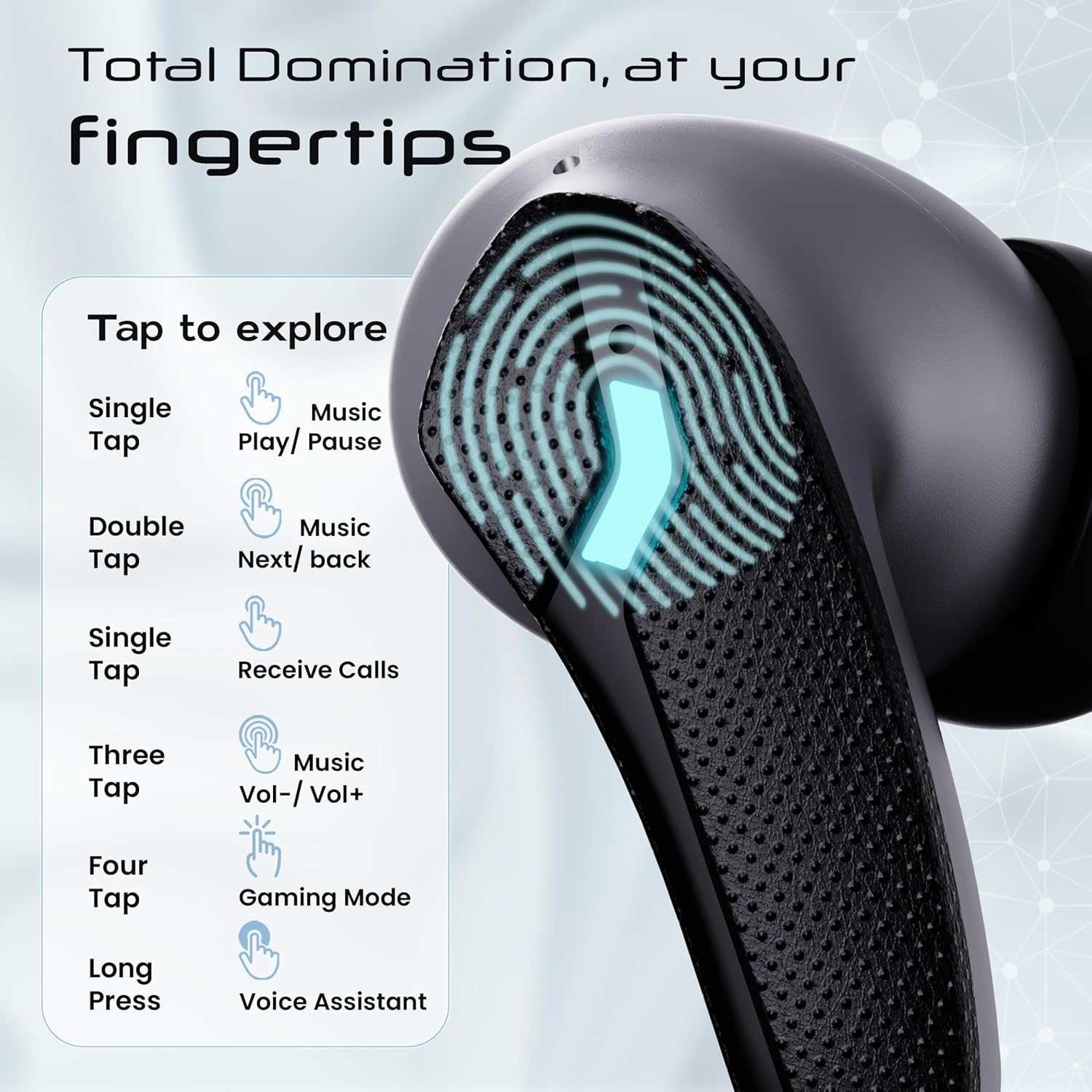
Image: GOBOULT Astra Neo Touch Controls Guide. This graphic details the various touch gestures for controlling music, calls, gaming mode, and voice assistant.
- Tap sèl: Play/Pause music, Receive Calls.
- Double Tap: Music Next/Back (specific earbud for each function).
- Three Tap: Music Volume Up/Down (specific earbud for each function).
- Four Tap: Activate Gaming Mode.
- Long Press: Activate Voice Assistant (Google Assistant/Siri).
6.2 Gaming Mode (40ms Low Latency)
Activate Gaming Mode for a synchronized audio experience during gameplay, reducing audio delay to 40ms.
- To activate: Four tap on either earbud.
- To deactivate: Four tap again on either earbud.

Image: GOBOULT Astra Neo Gaming Mode with 40ms Low Latency. This image depicts a user playing a mobile game with the earbuds, highlighting the ultra-low latency feature for an immersive gaming experience.
6.3 ZEN Quad Mic ENC for Calls
The ZEN Quad Mic Environmental Noise Cancellation (ENC) system ensures clear voice calls by filtering out background noise.

Image: GOBOULT Astra Neo ZEN Quad Mic ENC Technology. This image illustrates the internal components and the function of the 4 microphones for clear in-game communication and crystal-clear calling with Acoustic Echo Cancellation (AEC).
6.4 mòd EQ
The Astra Neo earbuds support 4 EQ modes for customized audio experiences. Refer to the product packaging or official GOBOULT website for specific instructions on how to switch between these modes, as this functionality is typically managed via a companion app or specific touch gestures not detailed here.
7. Antretyen
7.1 Netwayaj
- Siye ekoutè yo ak bwat chaje a dousman avèk yon twal mou, sèk, epi ki pa gen pousyè.
- Pa sèvi ak pwodui chimik piman bouk, solvang netwayaj, oswa detèjan fò.
- Clean the charging contacts on both the earbuds and the case regularly to ensure proper charging.
7.2 Rezistans dlo (IPX5)
The Astra Neo earbuds are IPX5 water-resistant, meaning they are protected against sweat, rain, and splashes. They are not designed for submersion in water.
- Pa plonje ekoutè yo nan dlo espre.
- If exposed to sweat or rain, wipe them dry before placing them back in the charging case.

Image: GOBOULT Astra Neo IPX5 Water Resistance and Voice Assistant. This image highlights the earbuds' sweatproof, rainproof, and splashproof capabilities, along with compatibility with Google Assistant and Hey Siri.
7.3 Depo
Lè w pa ap itilize ekoutè yo, sere yo nan bwat chaje yo pou pwoteje yo epi kenbe yo chaje.
NAN. Depanaj
- Ekoutè yo pa konekte: Ensure both earbuds are in the charging case, then open the lid to re-enter pairing mode. Check your device's Bluetooth settings and try reconnecting.
- Se yon sèl ekoutè k ap fonksyone: Mete tou de ekoutè yo tounen nan bwat la, fèmen kouvèti a, tann kèk segonn, epi ouvri l ankò. Souvan, sa senkronize yo ankò.
- Pa gen son: Tcheke nivo volim nan sou aparèy ou an ak ekoutè yo. Asire w ke ekoutè yo byen konekte ak aparèy ou an.
- Pwoblèm chaj: Clean the charging contacts on the earbuds and inside the case. Ensure the charging cable is securely connected and the power source is active.
- Move kalite apèl: Asire w ke mikwofòn yo pa bloke. Eseye deplase nan yon anviwònman ki pi trankil.
9. Espesifikasyon
Key technical specifications for the GOBOULT Astra Neo Earbuds:
| Karakteristik | Spesifikasyon |
|---|---|
| Non modèl | Astra Neo |
| Bluetooth vèsyon | 5.4 |
| Playtime | Jiska 70 èdtan (avèk chaje ka) |
| Chaje vit | 10 minit chaj = 100 minit tan lekti |
| Ba Latansi | 40ms (Mòd Jwèt) |
| Gwosè Chofè | Chofè BoomX 13mm |
| Mikwofòn | ZEN Quad Mic ENC |
| Rezistans dlo | IPX5 |
| Metòd kontwòl | Manyen |
| Koneksyon Teknoloji | Bluetooth, San fil |
| Ekoutè Jack | Jack chaje rapid tip C |
| Pwa atik | 47 gram |
| Dimansyon pwodwi | 6.2 x 5.3 x 3.2 cm |
| Kalite batri | Lityòm Polymère |
| Gamme Bluetooth | 10 mèt |
| Enpedans | 32 Ohm |

Image: GOBOULT Astra Neo 13mm BoomX Drivers. This image highlights the 13mm BoomX drivers, emphasizing crystal clear sound and support for MSBC, SBC, and AAC codecs.
10. Garanti ak sipò
The GOBOULT Astra Neo Earbuds come with a 1-ane garanti manifakti from the date of purchase. This warranty covers manufacturing defects. For warranty claims or technical support, please refer to the contact information provided on your warranty card or visit the official GOBOULT websit.