Entwodiksyon
The Victrola Journey II is the next generation of the iconic Victrola portable suitcase record player. It features improved sound, updated design details, and modern wireless capabilities. This manual provides essential information for setting up, operating, and maintaining your record player.

Image: The Victrola Journey II record player in black, showcasing its open design with a vinyl record placed on the turntable. The Victrola logo is visible on the inside lid.
Karakteristik kle
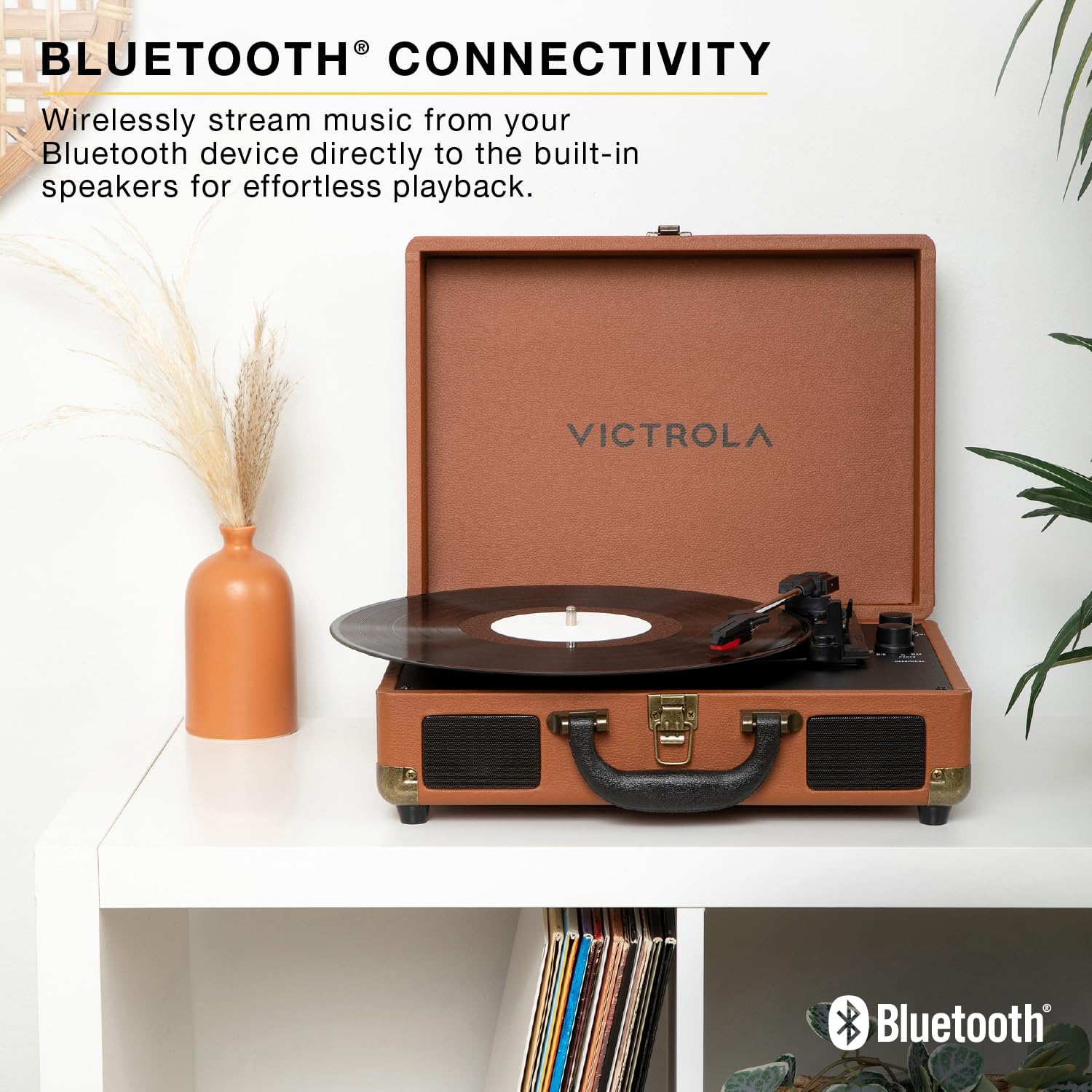
- Son Stereo Amelyore: Upgraded stereo speakers with an integrated bass port for richer, more dynamic audio.
- Platin 3 vitès: Supports 33 1/3, 45, and 78 RPM records with an auto-stop function.
- Antre Bluetooth: Stream music wirelessly from your Bluetooth device to the built-in speakers.
- VINYLSTREAM™ Bluetooth Output: Play records wirelessly through Bluetooth headphones or external speakers.
- Koneksyon versatile: Includes RCA output for external speakers, 3.5mm line input for external devices, and a headphone jack for private listening.
- Compact Suitcase Design: Pòtab ak fasil nan magazen.
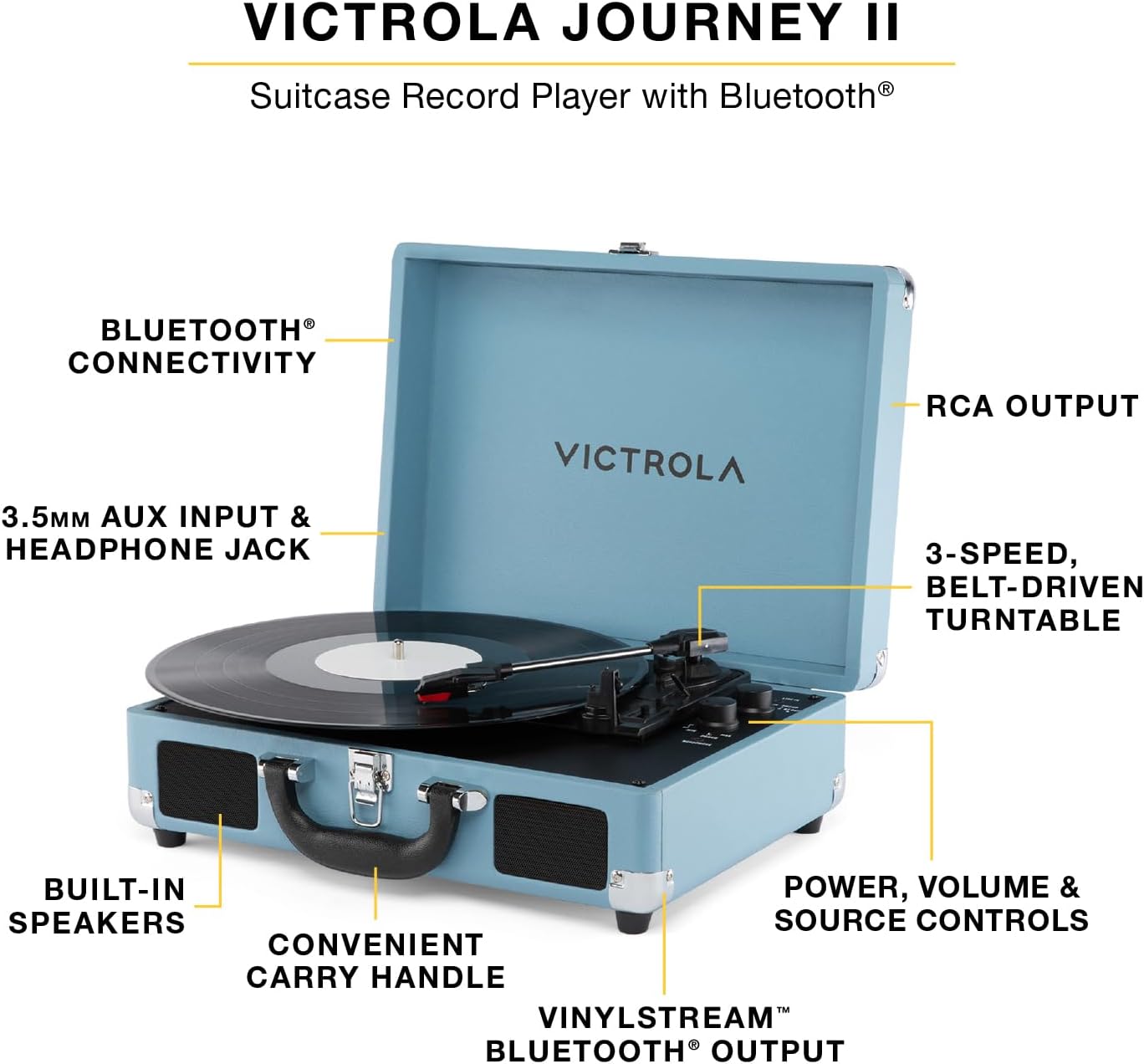
Image: A turquoise Victrola Journey II record player, open to reveal its components. Labels highlight key features such as Bluetooth connectivity, RCA output, 3-speed belt-driven turntable, built-in speakers, convenient carry handle, and power/volume/source controls.
Enstalasyon
- Debake: Carefully remove the record player from its packaging. Ensure all components listed in the box are present.
- Koneksyon pouvwa: Connect the included power adapter to the DC 5V 1A input port on the back of the unit. Plug the adapter into a wall outlet.
- Remove Needle Guard: Before first use, gently remove the white needle guard from the stylus.
- Tone Arm Release: Release the tone arm clip to allow the tone arm to move freely.
Imaj: Yon imaj detaye view of the Victrola Journey II's control panel and turntable. The tone arm with its red stylus is visible, along with knobs for power/volume and a switch for input selection (Line In, Phono, BT). A headphone jack is also present.
Enstriksyon Operasyon
Jwe yon dosye vinyl
- Pouvwa sou: Turn the POWER/VOLUME knob clockwise to power on the unit. The power indicator light will illuminate.
- Chwazi Sous: Set the FUNCTION switch to "PHONO".
- Dosye Kote: Mete yon dosye vinil sou plato platin lan.
- Chwazi vitès: Adjust the SPEED SELECTOR switch to match the RPM of your record (33 1/3, 45, or 78 RPM). Use the included 45 RPM adapter for 7-inch records with large center holes.
- Kòmanse Lekti: Gently lift the tone arm using the cue lever and position it over the desired track on the record. Slowly lower the tone arm using the cue lever. The record will begin to play.
- Ajiste Volim: Rotate the POWER/VOLUME knob to adjust the listening volume.
- Fonksyon Auto-Stop: The turntable features an auto-stop function that will stop the platter from spinning when the record finishes. To disable this, set the AUTO STOP switch to OFF.
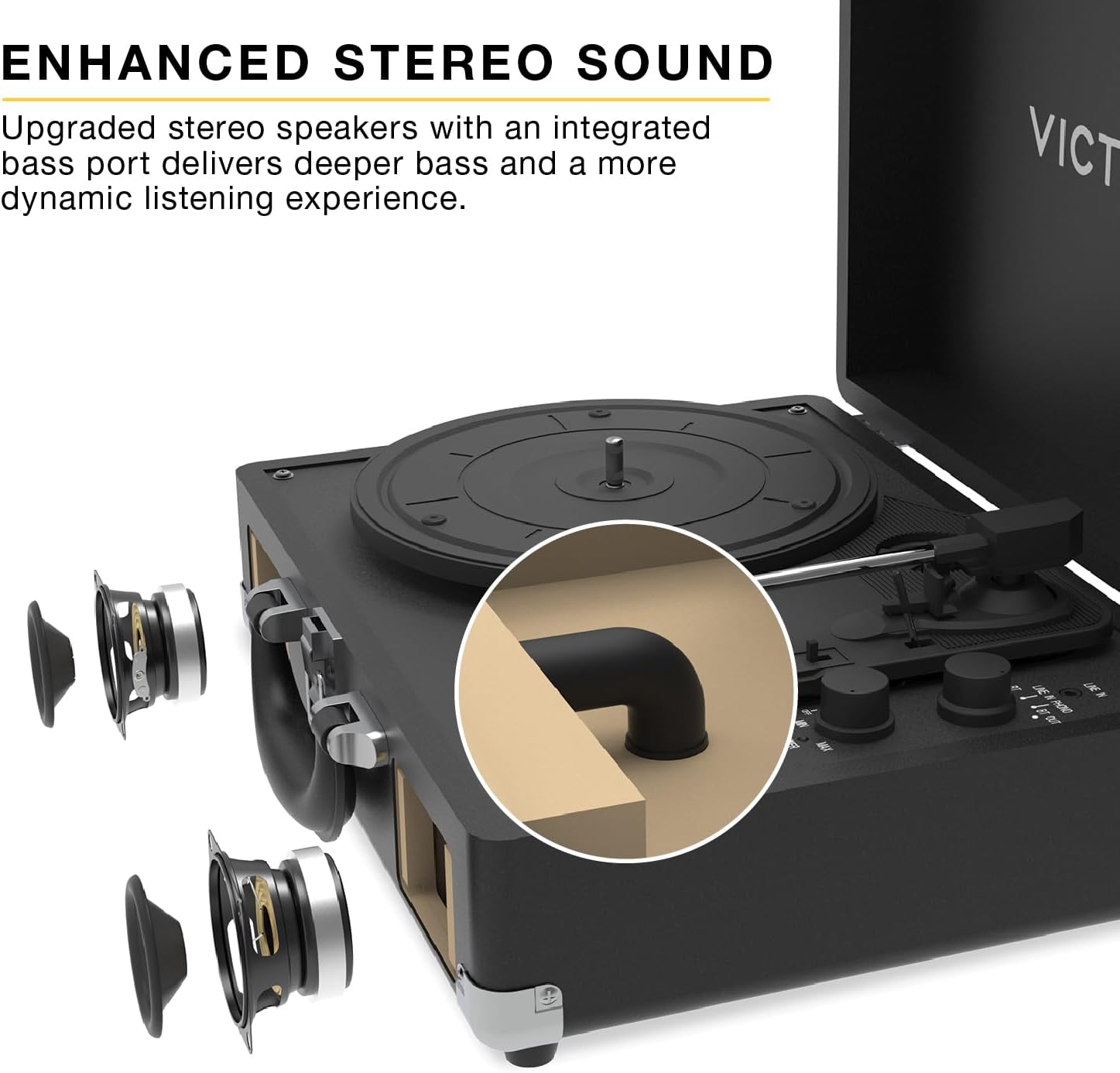
Image: A close-up of the Victrola Journey II turntable in action, with a vinyl record spinning and the tone arm positioned on the record's grooves, indicating playback.
Bluetooth Input (Streaming from a Device)
- Pouvwa sou: Turn the POWER/VOLUME knob clockwise to power on the unit.
- Chwazi Sous: Set the FUNCTION switch to "BT IN". The Bluetooth indicator light will flash, indicating pairing mode.
- Pè aparèy: On your Bluetooth-enabled device (smartphone, tablet, etc.), search for "Victrola Journey II" in the Bluetooth settings and select it to pair. Once paired, the indicator light will stop flashing and remain solid.
- Jwe Mizik: Begin playing music on your device. The audio will stream through the record player's built-in speakers.
- Ajiste Volim: Adjust the volume using both your device's volume controls and the POWER/VOLUME knob on the record player.

Image: A brown Victrola Journey II record player is displayed open on a white shelf, with a vinyl record on its platter. The image emphasizes its Bluetooth connectivity feature, allowing users to stream music from their devices to the player's built-in speakers.
VINYLSTREAM™ Bluetooth Output (Streaming to Headphones/Speakers)
- Pouvwa sou: Turn the POWER/VOLUME knob clockwise to power on the unit.
- Chwazi Sous: Set the FUNCTION switch to "BT OUT". The Bluetooth indicator light will flash, indicating pairing mode.
- Pè aparèy: Ensure your Bluetooth headphones or external speaker are in pairing mode. The record player will automatically search for and connect to the nearest Bluetooth audio device. Once paired, the indicator light will stop flashing and remain solid.
- Jwe Anrejistreman: Follow the steps for "Playing a Vinyl Record" to start playing your vinyl. The audio will stream wirelessly to your paired Bluetooth headphones or speaker.
- Ajiste Volim: Adjust the volume directly on your Bluetooth headphones or external speaker. The record player's volume knob will not control the output volume in this mode.

Image: A pink Victrola Journey II record player is shown open on a white shelf, with a vinyl record on its platter. The image emphasizes its VINYLSTREAM Bluetooth output feature, allowing users to stream vinyl audio wirelessly to compatible Bluetooth headphones or speakers.
Using External Audio Devices (Line In)
- Konekte aparèy: Connect an external audio device (e.g., MP3 player, CD player) to the 3.5mm LINE IN port on the back of the record player using an audio cable (not included).
- Chwazi Sous: Set the FUNCTION switch to "LINE IN".
- Jwe Mizik: Begin playing music on your external device.
- Ajiste Volim: Adjust the volume using both your external device's volume controls and the POWER/VOLUME knob on the record player.
Connecting to External Speakers (RCA Output)
- Konekte kab: Connect RCA audio cables (not included) from the "OUT" ports on the back of the record player to the corresponding audio input ports on your external stereo system or powered speakers.
- Chwazi Sous: Ensure the FUNCTION switch on the record player is set to "PHONO".
- Jwe Anrejistreman: Follow the steps for "Playing a Vinyl Record".
- Ajiste Volim: Adjust the volume directly on your external stereo system or powered speakers. The record player's volume knob will not control the output volume in this mode.

Image: The rear panel of a turquoise Victrola Journey II record player, clearly showing the red and white RCA "OUT" ports for connecting to external speakers, and the DC 5V 1A power input jack.
Sèvi ak kas ekoutè
Plug 3.5mm headphones into the HEADPHONE jack on the front of the unit for private listening. The built-in speakers will be muted when headphones are connected.
Antretyen
- Netwaye inite a: Use a soft, dry cloth to wipe the exterior of the record player. Avoid using harsh chemicals or abrasive cleaners.
- Netwaye Stylus la: Gently brush the stylus (needle) from back to front with a soft brush designed for stylus cleaning. Do not use excessive force.
- Swen Dosye: Kenbe disk vinil ou yo pwòp epi san pousyè. Sere yo vètikalman nan manch yo pou anpeche yo defòme.
- Depo: When not in use, close the lid of the record player to protect the turntable and stylus from dust and damage.
Depanaj
| Pwoblèm | Kòz posib | Solisyon |
|---|---|---|
| Pa gen pouvwa | Adaptè kouran an pa konekte oswa priz la pa fonksyone. | Asire w adaptè kouran an byen konekte epi li branche nan yon priz ki fonksyone. |
| Pa gen son ki soti nan moun kap pale | Volume too low, incorrect source selected, or headphones connected. | Increase volume, select correct source (PHONO for vinyl, BT IN for Bluetooth input), or disconnect headphones. |
| Sote anrejistreman | Dirty or damaged record, dirty stylus, or unit not on a stable surface. | Clean record, clean stylus, or place unit on a flat, stable surface away from vibrations. |
| Pwoblèm appariement Bluetooth | Device too far, incorrect mode, or device already paired. | Ensure device is within range, select correct BT mode (BT IN or BT OUT), or unpair from other devices. |
Espesifikasyon
- Nimewo Modèl: VSC-600SB-BLK
- Mak: Victrola
- Vitès platin: 33 1/3, 45, 78 RPM
- Koneksyon: Bluetooth Input, VINYLSTREAM™ Bluetooth Output, RCA Output, 3.5mm Line Input, 3.5mm Headphone Output
- Oratè: Built-in Stereo Speakers with Enhanced Bass Port
- Pouvwa: DC 5V 1A
- Dimansyon: 13.78 x 10 x 5 pous (apeprè 350 x 255 x 126 mm)
- Pwa: 7.76 liv (apeprè 3.52 kg)
- Materyèl: Plastik
- Eleman ki enkli: Record Player, 45 RPM Adapter
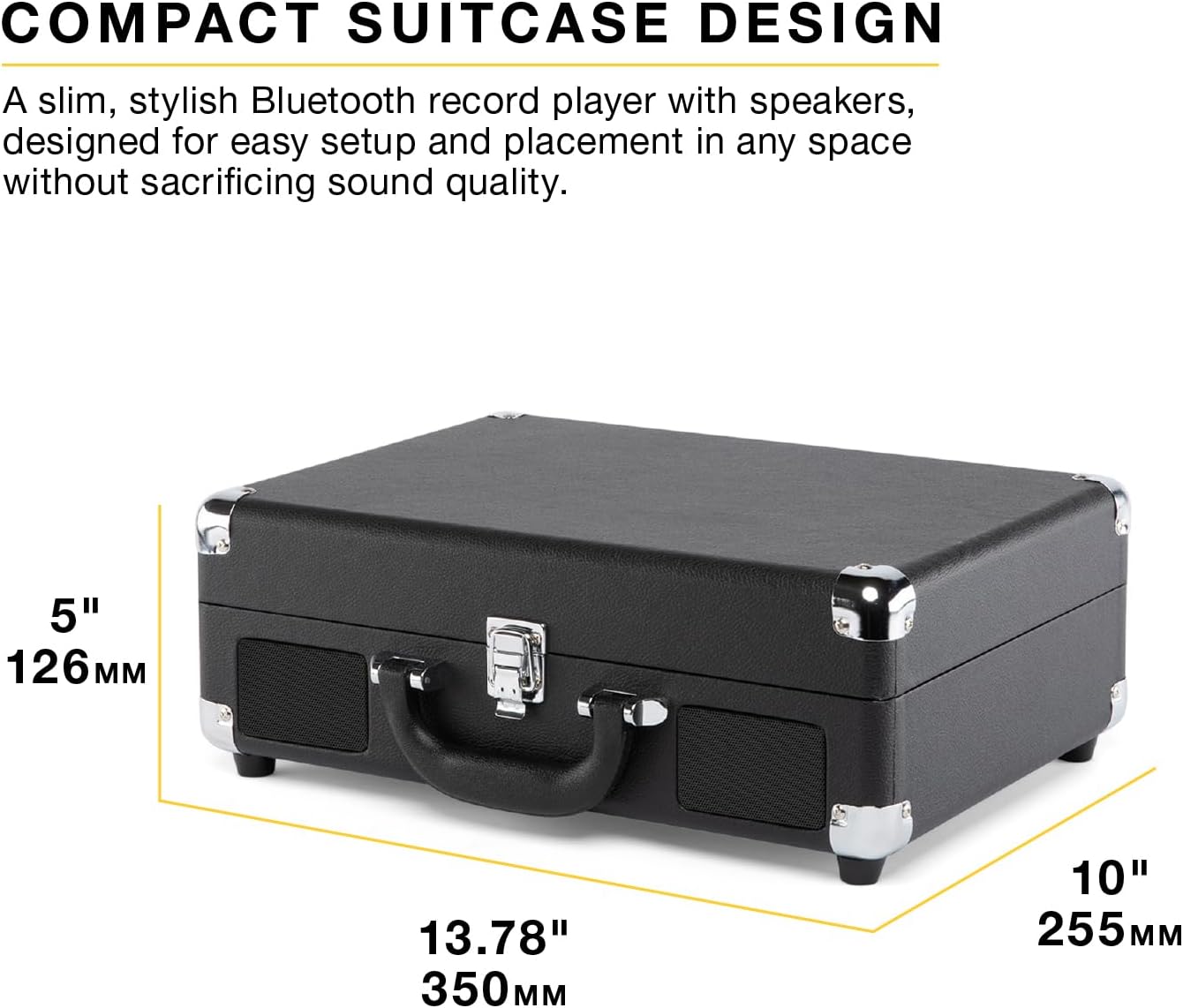
Image: A black Victrola Journey II record player, closed in its suitcase form, with its approximate dimensions clearly labeled: 13.78 inches (350mm) in width, 10 inches (255mm) in depth, and 5 inches (126mm) in height.
Garanti ak sipò
The Victrola Journey II includes 1 year of dedicated after-sales support and US-based customer support. For warranty claims or technical assistance, please refer to the contact information provided in your product packaging or visit the official Victrola websit.
Videyo pwodwi
Victrola Journey II Overview
Videyo: Yon ofisyèl finiview of the Victrola Journey II record player, showcasing its classic suitcase design, 3-speed turntable, upgraded stereo sound with bass port, Bluetooth input for streaming music, and VINYLSTREAM Bluetooth output for wireless record playback. This video highlights the product's main features and various color options.


