Entwodiksyon
Welcome to the realme Buds Wireless 5 ANC Bluetooth Headphones. These advanced in-ear headphones are designed to provide an immersive audio experience with powerful noise cancellation, dynamic bass, and convenient features for daily use. Please read this manual carefully to ensure proper setup and optimal performance of your device.
Ki sa ki nan bwat la
- realme Buds Wireless 5 ANC Headphones
- USB-C Chaje Kab
- Multiple Pairs of Ear Cushions (various sizes)
- Manyèl itilizatè
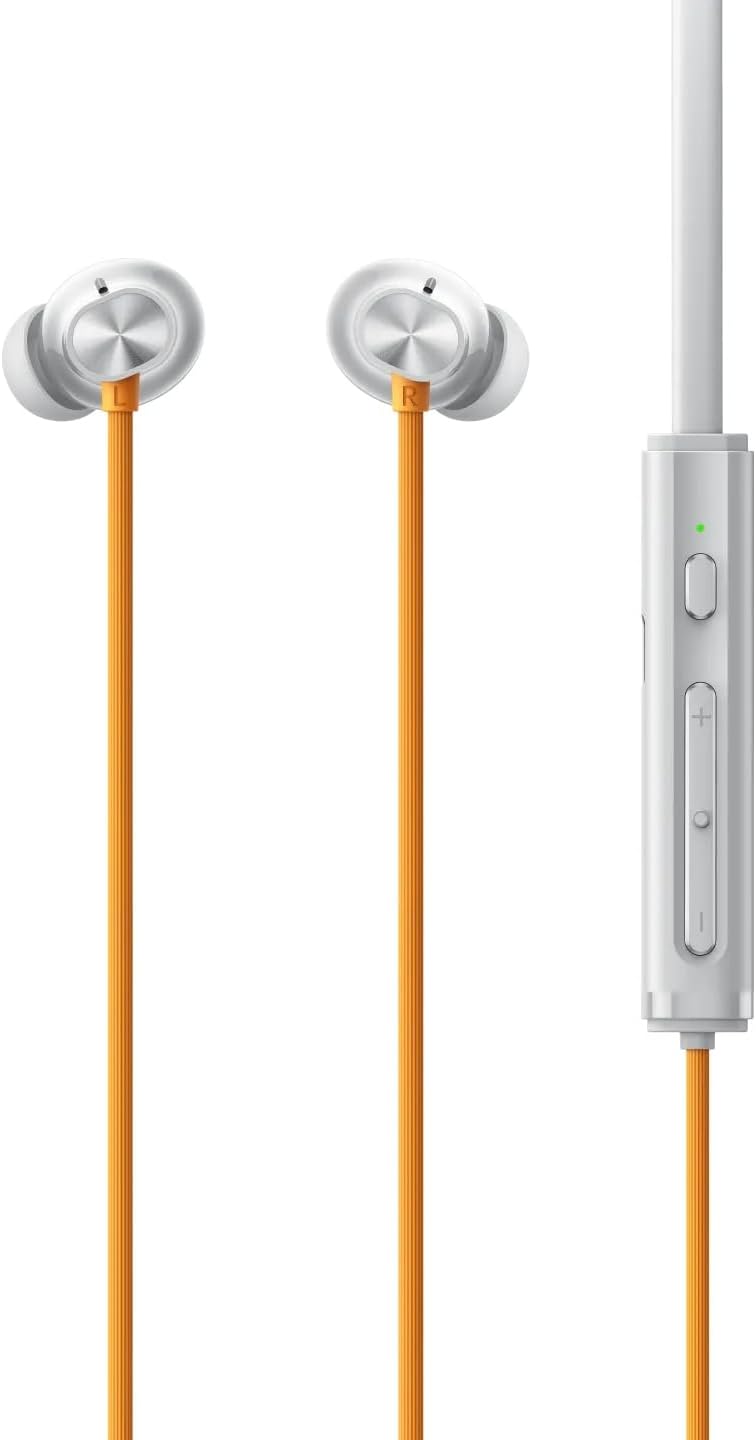
Pwodwi souview
The realme Buds Wireless 5 ANC features a flexible neckband design with in-ear earbuds. The control modules are integrated into the neckband for easy access.


The earbuds are magnetic, allowing them to snap together when not in use, preventing tangling and ensuring they stay securely around your neck.
Enstalasyon
1. Chaje kas ekoutè yo
Before first use, fully charge your realme Buds Wireless 5 ANC headphones. Connect the provided USB-C charging cable to the charging port located on the right control module of the neckband. Connect the other end to a compatible USB power source. The LED indicator will show charging status. A 10-minute charge provides up to 20 hours of playback.
2. Pè Bluetooth
- Asire w ke kas ekoutè yo etenn.
- Press and hold the multifunction button on the right control module until the LED indicator blinks blue rapidly, indicating pairing mode.
- Sou smartphone ou oswa aparèy, aktive Bluetooth epi chèche aparèy ki disponib.
- Select "realme Buds Wireless 5 ANC" from the list to connect. The LED will turn solid blue once paired.
3. Seleksyon pwent zòrèy
For optimal sound quality and comfort, choose the ear tips that best fit your ears. The package includes multiple sizes of ear cushions. Experiment with different sizes to find a secure and comfortable seal.
Enstriksyon Operasyon
1. Power On/Off
- Pouvwa sou: Peze epi kenbe bouton miltifonksyon an jiskaske endikatè LED la limen.
- Pouvwa Off: Press and hold the multifunction button until the LED indicator turns off. Alternatively, connect the magnetic earbuds together to automatically power off.
2. Mizik lèktur
- Jwe/Poz: Peze bouton multifonksyon an yon fwa.
- Pwochen Track: Press and hold the '+' volume button.
- Track Previous: Press and hold the '-' volume button.
- Volim moute: Press the '+' volume button briefly.
- Volim desann: Press the '-' volume button briefly.
3. Rele Jesyon
- Reponn/Fen Apèl: Peze bouton multifonksyon an yon fwa.
- Rejte apèl: Peze epi kenbe bouton miltifonksyon an.
4. Asistan vwa
Double-press the multifunction button to activate your device's voice assistant (e.g., Siri, Google Assistant).
5. Karakteristik Odyo Avanse
- 50dB Active Noise Cancellation (ANC): Reduces ambient sounds for an immersive listening experience. The headphones feature adaptive three-level noise reduction to intelligently adjust to your environment.
- Odyo Espasyal 360°: Creates an expansive, theater-like soundstage for your music.
- Mòd jwèt 45ms ak latans ki ba: Minimizes audio delay, providing synchronized audio-visual experience ideal for gaming and video watching.
- Koneksyon Doub Aparèy: Allows seamless switching between two paired devices.


Antretyen
1. Rezistans kont dlo ak pousyè
The headphones have an IP55 rating, making them resistant to water splashes and dust. This means they can withstand sweat during workouts or light rain. However, they are not designed for swimming or submersion in water.
2. Netwayaj
Regularly clean the ear tips and the neckband with a soft, dry cloth. If necessary, the ear tips can be gently removed and cleaned with a mild soap solution, then rinsed and thoroughly dried before reattaching.
Depanaj
- Pa ka konekte: Ensure the headphones are in pairing mode (rapid blue LED blink) and within range of your device. Try restarting both the headphones and your device.
- Pa gen son/Move kalite son: Check the volume levels on both the headphones and your connected device. Ensure the ear tips are properly seated in your ears for a good seal. Re-pair the headphones if necessary.
- Batri drenaj byen vit: Ensure the headphones are fully charged. High volume levels or continuous ANC use can reduce battery life.
Espesifikasyon
| Karakteristik | Spesifikasyon |
|---|---|
| Non modèl | realme Buds Wireless ANC |
| Nimewo Modèl Atik | realme wireless5 |
| Kontwòl bri | Anilasyon Bri Aktif (50dB) |
| Gwosè Chofè Audio | Chofè bas dinamik 13.6mm |
| Latansi Audio | 45 Milisegond (Mòd Latans ki ba) |
| Lavi batri | Up to 38 Hours Playback |
| Nivo rezistans dlo | IP55 Water and Dust Resistant |
| Koneksyon Teknoloji | Bluetooth 5.0 |
| Metòd kontwòl | Manyen / Bouton |
| Karakteristik espesyal | 360° Spatial Audio, Dual Device Connection |
Garanti ak sipò
Please activate your product warranty within 1 month of receiving the item. For any product issues or support inquiries, please contact customer support via email.
Sipò Imèl: support@rythflo.co


