1. Entwodiksyon
This manual provides detailed instructions for the setup, operation, and maintenance of your Thundeal TD93 Pro Mini Projector. Please read this manual thoroughly before using the product to ensure proper functionality and to extend its lifespan.

Image 1.1: Thundeal TD93 Pro Mini Projector overview.
2. Ki sa ki nan bwat la
Verifye ke tout atik ki nan lis anba a yo enkli nan pakè ou a:
- Thundeal TD93 Pro Projector
- Kontwòl Remote
- Kòd pouvwa
- Manyèl Itilizatè (dokiman sa a)
- AV Kab
- HDMI kab
- Kouvri lantiy pwojektè

Image 2.1: Package contents of the TD93 Pro Projector.
3. Product Specifications and Features
3.1. Espesifikasyon teknik
| Nimewo Modèl | TD93 Pro (Item Model Number: TD97) |
| Rezolisyon natif natal | 1920 x 1080 (Full HD) |
| Sipò Rezolisyon Maksimòm | 2K 4K UHD (from HD Signal) |
| Klète | 12000 Lumen |
| Pwopòsyon kontras | 15000:1 |
| Aspè rapò | 4:3 / 16:9 / Oto |
| Sistèm operasyon | Android 9.0 OS |
| Koneksyon san fil | 2.4G / 5G WiFi, Bluetooth-compatible |
| memwa | RAM 1G DDR3 + ROM 8G |
| Koreksyon Keystone | 6D Keystone (4-point corner +/- 60°, Vertical +/- 60°) |
| Fonksyon Zoom | 50-100% Proportional Reduction |
| Gwosè pwojeksyon | 49 to 300 inches (recommended 93-150 inches) |
| Distans pwojeksyon | 1.6 to 6.5 meters (recommended 3-5 meters) |
| Lamp Tout lavi | 50,000 èdtan |
| Odyo | Built-in 5W stereo speakers with SRS sound system |
| Karakteristik espesyal | 3D-Ready (Red-Blue 3D), Auto Horizontal Keystone, Built-In Wi-Fi, Portable, Dust Removal Net |
3.2. Karakteristik kle
- High Definition Visuals: Native 1080P resolution with support for 2K/4K UHD signals, delivering clear and vibrant images.
- Sistèm operasyon Android entelijan: Integrated Android 9.0 operating system allows direct app downloads and streaming.
- Doub Band WiFi: 2.4G and 5G WiFi connectivity for stable and fast wireless streaming and screen mirroring.
- Koneksyon Bluetooth: Konekte oratè Bluetooth ekstèn oswa kas ekoutè pou amelyore odyo.
- Advanced Image Correction: 6D Keystone correction (4-point and vertical) for flexible placement and precise image alignment.
- Pwojeksyon fleksib: Adjustable zoom from 50% to 100% and support for screen sizes up to 300 inches.
- Long Dire Lamp: Dirije lamp designed for up to 50,000 hours of operation.
- Multi-Media Compatibility: Supports various input sources including HDMI, USB, AV, and direct office file lèktur atravè USB.

Image 3.1: Visual comparison of projector brightness and resolution.
4. Gid Enstalasyon
4.1. Plasman Pwojektè a
The projector can be placed in various positions to suit your viewing environment:
- On a Desk: Mete pwojektè a sou yon sifas ki plat e ki estab.
- Sou yon trépied: Utilize the 6mm screw hole on the bottom for tripod mounting.
- Ceiling Hoisting: Mount the projector to the ceiling using a compatible hanger.
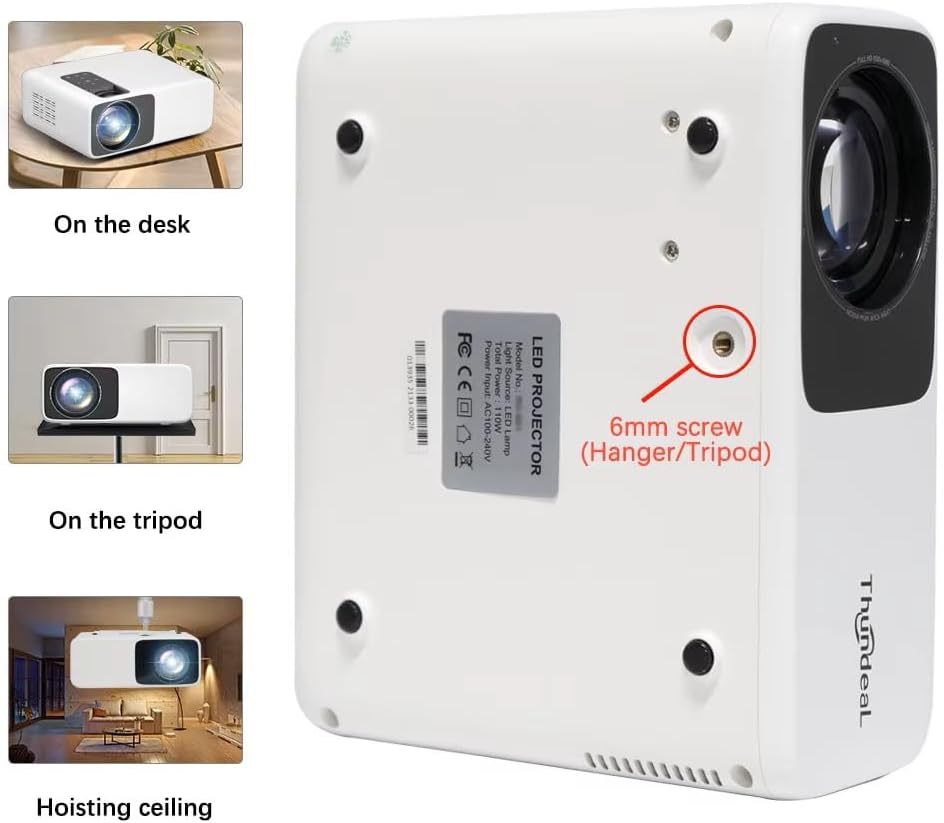
Image 4.1: Projector placement options and mounting point.
Pou pi bon viewing, ensure the projector is positioned perpendicular to the screen or wall. Adjust the projection distance (1.6 to 6.5 meters) to achieve your desired screen size (49 to 300 inches). A distance of 3-5 meters for a 93-150 inch screen is recommended for eye comfort.
4.2. Koneksyon pouvwa
- Konekte kòd kouran an nan pò antre kouran pwojektè a.
- Branche lòt bout kòd kouran an nan yon priz elektrik estanda.
- Peze bouton pouvwa a sou pwojektè a oswa sou kontwòl remote la pou limen li.
5. Operasyon Enstriksyon
5.1. Multi-Media Connections
The TD93 Pro projector offers various ports for connecting external devices:
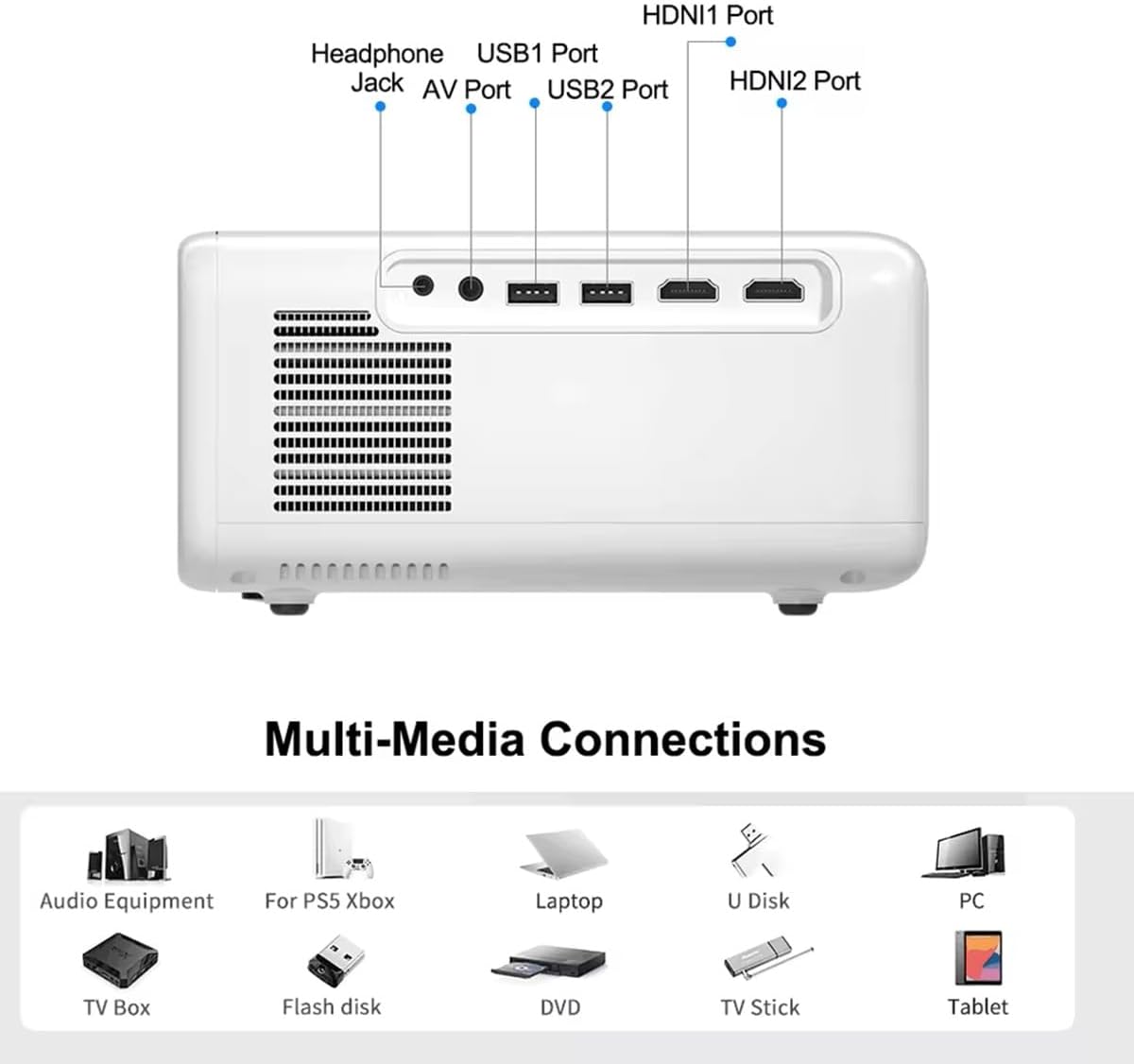
Image 5.1: Available multimedia connection ports.
- HDMI Ports (HDMI1, HDMI2): Connect devices such as TV boxes, gaming consoles (PS5, Xbox), laptops, or Blu-ray players.
- USB Ports (USB1, USB2): Connect USB flash drives for direct media playback (photos, videos, office documents).
- Pò AV: Konekte ansyen aparèy yo avèk kab AV ki vini ak yo a.
- Jack kas ekoutè (3.5mm): Konekte kas ekoutè oswa oratè ekstèn yo.
To switch input sources, use the "Source" button on the remote control or the projector's control panel and select the desired input (HDMI1, HDMI2, AV, USB).
5.2. Wireless Koneksyon
5.2.1. WiFi Connection (2.4G/5G)
The projector supports dual-band WiFi for internet access and network features:
- Navigate to the "Settings" menu on the projector's Android interface.
- Select "Network & Internet" and then "Wi-Fi".
- Aktive Wi-Fi a epi chwazi rezo ou vle a nan lis la.
- Antre modpas la si yo mande w epi konekte.
5.2.2. Bluetooth Koneksyon
Connect Bluetooth-compatible audio devices like speakers or headphones:
- Go to "Settings" > "Connected devices" > "Bluetooth".
- Limen Bluetooth.
- Mete aparèy Bluetooth ou a nan mòd appariement.
- Chwazi aparèy ou an nan lis aparèy ki disponib pou konekte.
5.3. Screen Mirroring (Airplay/WiFi-Display)
Wirelessly display content from your Android or iOS phone:

Image 5.2: Screen mirroring from iOS and Android devices.
- Ensure both your projector and mobile device are connected to the same Wi-Fi network.
- On the projector's main interface, select the "Screen Mirroring" or "Airplay/WiFi-Display" application.
- For iOS devices: Open Control Center, tap "Screen Mirroring" or "AirPlay Mirroring", and select the projector from the list.
- For Android devices: Open the notification panel, find "Cast", "Smart View", "Wireless Display", or similar function, and select the projector.
5.4. Ajisteman Imaj
5.4.1. Keystone Correction (6D)
The projector features 6D keystone correction to adjust image shape:
- Kle Vètikal: Adjust +/- 60 degrees vertically using the remote control.
- 4-Point Corner Keystone: Adjust each of the four corners independently by +/- 60 degrees for side projection or irregular surfaces. This allows for precise rectangular image alignment.
Access keystone settings via the projector's menu or dedicated buttons on the remote.
5.4.2. Fonksyon Zoom
Adjust the display size from 50% to 100% proportionally without moving the projector. This feature is useful for fine-tuning the image size to fit your screen or wall.
Access the zoom function through the projector's menu settings.
5.5. Android OS and App Usage
The integrated Android 9.0 OS allows you to download and install applications directly from the Play Store. Ensure the projector is connected to Wi-Fi to access online services and apps.
- Jwe magazen: Access the Google Play Store to download streaming apps, games, and utilities.
- Media lèktur: Use pre-installed media players or download alternatives (e.g., VLC player for AC3 audio support).
6. Antretyen
6.1. Dust Removal
The projector is equipped with a built-in dust net for easy cleaning. Regularly clean the dust net to maintain optimal performance and prevent overheating. Press to pop out the dust net for cleaning.
6.2. Sistèm refwadisman
The advanced cooling system is designed to dissipate heat efficiently and extend the lamp's lifespan. Ensure proper ventilation around the projector and avoid blocking air vents during operation.
6.3. Lamp Tout lavi
Dirije lamp has an estimated lifespan of 50,000 hours. No lamp replacement is typically required during the product's operational life under normal usage conditions.
NAN. Depanaj
7.1. No Image Displayed
- Tcheke si pwojektè a limen.
- Verifye sous antre a byen chwazi (pa egzanp, HDMI1, USB).
- Asire ke tout câbles yo byen konekte.
- Ajiste fokus ak koreksyon trapèz.
7.2. Pa gen Son
- Tcheke nivo volim nan sou pwojektè a ak aparèy sous ki konekte a.
- Ensure external speakers or headphones are properly connected and powered on if used.
- If using an external source, verify its audio output settings.
- For AC3 audio, ensure you are using a compatible player like VLC.
7.3. Connectivity Issues (WiFi/Bluetooth)
- Ensure WiFi is enabled and you are connected to the correct network.
- Rekòmanse pwojektè a ak routeur/aparèy Bluetooth ou a.
- For screen mirroring, confirm both devices are on the same Wi-Fi network.
7.4. Image is Blurry or Distorted
- Ajiste bag konsantre sou lantiy pwojektè a.
- Use the keystone correction features to correct any trapezoidal distortion.
- Asire w sifas pwojeksyon an plat e lis.
8. Garanti ak sipò
Pou enfòmasyon sou garanti a ak sipò teknik, tanpri gade dokiman yo te bay lè w te achte a oswa kontakte machann ou an. Kenbe resi acha w la kòm prèv acha.


